


Hi everyone,
I feel like I have been stuck in the world of Pure Data for most the past three days. *head spinning*
I have managed to get values from all four MPR121s flowing into Pd (again with the help of Chris from the Bela platform team). Unfortunately, the results aren't as great as I was expecting so I might have to change part of how the pads work.
Changing the C code
I started off looking at the example for the MPR121 (which doesn't use Pd) and looked for anything that said "0x5a" as this is the default I2C address for the boards.
I found this in the setup part of the code:
  if(!mpr121.begin(1, 0x5A)) {
  rt_printf("Error initialising MPR121\n");
  return false;
  }
So I looked for where the mpr121 object had been setup and found this:
I2C_MPR121 mpr121; // Object to handle MPR121 sensing
I created 4 different objects like this:
I2C_MPR121 cap; // Object to handle MPR121 sensing
I2C_MPR121 cap1; // Object to handle MPR121 sensing
I2C_MPR121 cap2; // Object to handle MPR121 sensing
I2C_MPR121 cap3; // Object to handle MPR121 sensing
And modified the if statement, creating one for each of the I2C addresses used by the MPR121s (I had previously soldered the address pins on the boards to change them):
  if(!cap.begin(1, 0x5A)) {
  rt_printf("Error initialising MPR121\n");
  return false;
  }

  if(!cap1.begin(1, 0x5B)) {
  rt_printf("Error initialising MPR121\n");
  return false;
  }

  if(!cap2.begin(1, 0x5C)) {
  rt_printf("Error initialising MPR121\n");
  return false;
  }

  if(!cap3.begin(1, 0x5D)) {
  rt_printf("Error initialising MPR121\n");
  return false;
  }
I then copied all of these back to my custom render.cpp file and added some more scheduled messages to get all of this data into Pd:
void readMPR121()
{
  for(int i = 0; i < NUM_TOUCH_PINS; i++) {
  sensorValue[i] = -(cap.filteredData(i) - cap.baselineData(i));
  sensorValue[i] -= threshold;
  if(sensorValue[i] < 0)
  sensorValue[i] = 0;
        hv_vscheduleMessageForReceiver(gHeavyContext, "sensorValues", 0, "fff", (float)0, (float)i, (float)sensorValue[i]);
  }

  for(int i = 0; i < NUM_TOUCH_PINS; i++) {
  sensorValue1[i] = -(cap1.filteredData(i) - cap1.baselineData(i));
  sensorValue1[i] -= threshold;
  if(sensorValue1[i] < 0)
  sensorValue1[i] = 0;
        hv_vscheduleMessageForReceiver(gHeavyContext, "sensorValues", 0, "fff", (float)1, (float)i, (float)sensorValue1[i]);
  }

  for(int i = 0; i < NUM_TOUCH_PINS; i++) {
  sensorValue2[i] = -(cap2.filteredData(i) - cap2.baselineData(i));
  sensorValue2[i] -= threshold;
  if(sensorValue2[i] < 0)
  sensorValue2[i] = 0;
        hv_vscheduleMessageForReceiver(gHeavyContext, "sensorValues", 0, "fff", (float)2, (float)i, (float)sensorValue2[i]);
  }

  for(int i = 0; i < NUM_TOUCH_PINS; i++) {
  sensorValue3[i] = -(cap3.filteredData(i) - cap3.baselineData(i));
  sensorValue3[i] -= threshold;
  if(sensorValue3[i] < 0)
  sensorValue3[i] = 0;
        hv_vscheduleMessageForReceiver(gHeavyContext, "sensorValues", 0, "fff", (float)3, (float)i, (float)sensorValue3[i]);
Back in Pure Data
In order to organise the data streams, I created an abstraction to use for the different pads. The creation arguments specify the midi note and ADC input.
This is what the main patch looks like:

And this is is what the pad abstraction looks like:
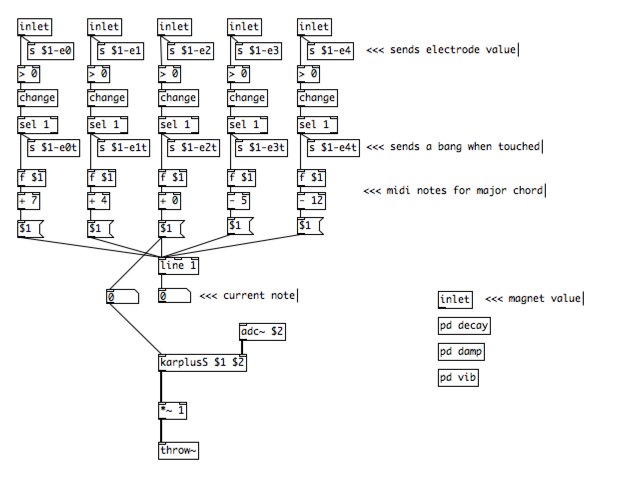
As you can see, I have set it up so that when each electrode is touched, a different midi note goes into the karplusS abstraction. However, I have bypassed this for the time being. The reason is that the trigger from touching an electrode has more latency than the one from the piezo transducer. This results in a weird effect, similar to a hammer-on on guitar which I don't really like. This was somewhat perceivable when there was only one MPR121 board but with all four boards it seems to have gotten worse.
I am not doing anything with the sixth inlet at the moment. I will explain more about this in a future post but these will be used to transpose all of the notes to change the key of the scale.
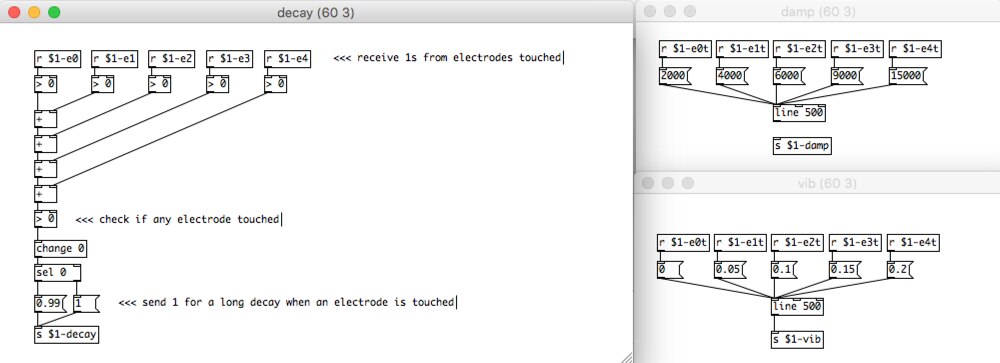
The subpatches on the lower right-hand corner receive the bangs from touched electrodes for different effects. This is what they look like (pd damp is bypassed).
Demo
This is a test using three pads. For some reason, I am getting a Segmentation fault when I use more than three so I will have to look into that.
Bela on Kickstarter
Lastly, great news for the Bela platform as it is now over 500% funded on Kickstarter. They have announced two stretch goals which are also brilliant news, especially the Multiplexer Capelet as it will enable use of up to 64 analog inputs!
-

DAB
-
Cancel
-
Vote Up
0
Vote Down
-
-
Sign in to reply
-
More
-
Cancel
Comment-

DAB
-
Cancel
-
Vote Up
0
Vote Down
-
-
Sign in to reply
-
More
-
Cancel
Children