BEGIN:VCALENDAR
VERSION:2.0
METHOD:PUBLISH
BEGIN:VEVENT
ORGANIZER:MAILTO:
DTSTART:20180607T143000Z
DTEND:20180607T153000Z
LOCATION:webex
SUMMARY:Powered by Raspberry Pi  - Industrial Uses for the Raspberry Pi with Eben Upton
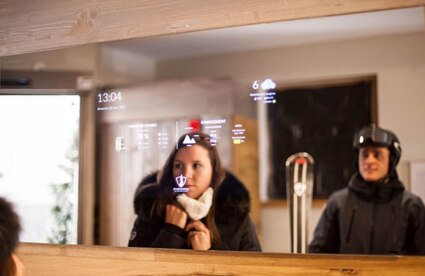
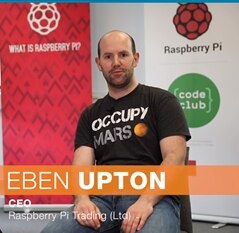
DESCRIPTION;ENCODING=QUOTED-PRINTABLE:contentimage_96722.png-465x142.png?sv=2016-05-31&amp;sr=b&amp;sig=eKBfEmHlw%2F8DiB7aEI%2BtbmG%2F0rLuUB8QR6wiBmFX3vE%3D&amp;se=2026-11-27T23%3A59%3A59Z&amp;sp=r&amp;_=KK3s5ObsTJIQTzxHhBRlUA== {tabbedtable} Tab Label Tab Content About Eben Upton, CEO of Raspberry Pi Trading, explains how the Raspberry Pi has developed into a viable product for use in an industrial context. Eben will detail the technical and commercial benefits of using a Raspberry Pi as a embedded product into end solutions. A ‘Powered by Raspberry Pi’ success story - ’Anna’ the Smart Mirror 1Q== AirNodes IoT Design House will share their experience of designing ’Anna’ the Smart Mirror installed in prestigious hotels in France like the K2 Palace, Courchevel and Hotel Pashmina, Val Thorens. Presenter contentimage_96724.png-239x233.png?sv=2016-05-31&amp;sr=b&amp;sig=4TY4s8PXPle2lbF2M8Fwv98Uv29l84KKIAQXemYmQAA%3D&amp;se=2026-11-27T23%3A59%3A59Z&amp;sp=r&amp;_=RQPhBn4+frQrgtd4cXyKJw== Eben Upton is a founder and former trustee of the Raspberry Pi Foundation, and now CEO of Raspberry Pi Trading Ltd. He is also a technical director and ASIC architect for Broadcom. Webinar Recording Click Here to View The Webinar Recording Accessing the Webinar Webex has an official ‘supported system requirements’ available here: https://www.webex.co.uk/support/support-system-requirements.html Linux: No webcam transmit support (only view) No video file sharing support For Browser based, only Firefox is supported Mac: No USB headset support No Animations/transition support for presentations There are Android and iOS clients: https://play.google.com/store/apps/details?id=com.cisco.webex.meetings&amp;hl=en_GB https://itunes.apple.com/gb/app/cisco-webex-meetings/id298844386?mt=8 It should be possible to also ‘dial in’ using the computer as opposed to a phone line. You will need to download and install a plugin for this: http://fh1.westuc.com/downloads/rpvoip.exe for windows http://fh1.westuc.com/downloads/rpvoip_mac.pkg for mac
X-ALT-DESC;FMTTYPE=text/html:<html><body><p style="margin:0;"><span><a href="https://community.element14.com/resized-image/__size/465x142/__key/telligent-evolution-extensions-calendar-calendarfiles/00-00-00-00-75/contentimage_5F00_96722.png"><a href="https://community-storage.element14.com/communityserver-components-secureimagefileviewer/telligent/evolution/extensions/calendar/calendarfiles/00/00/00/00/75/contentimage_96722.png-465x142.png?sv=2016-05-31&amp;sr=b&amp;sig=eKBfEmHlw%2F8DiB7aEI%2BtbmG%2F0rLuUB8QR6wiBmFX3vE%3D&amp;se=2026-11-27T23%3A59%3A59Z&amp;sp=r&amp;_=KK3s5ObsTJIQTzxHhBRlUA==">contentimage_96722.png-465x142.png?sv=2016-05-31&amp;sr=b&amp;sig=eKBfEmHlw%2F8DiB7aEI%2BtbmG%2F0rLuUB8QR6wiBmFX3vE%3D&amp;se=2026-11-27T23%3A59%3A59Z&amp;sp=r&amp;_=KK3s5ObsTJIQTzxHhBRlUA==</a></a></span></p><p style="margin:0;padding:0px;">&nbsp;</p><p style="margin:0;padding:0px;">&nbsp;</p><table border="1" class="jiveBorder" style="border:1px solid #000000;width:100%;"><thead><tr><th style="border:1px solid black;border:1px solid #000000;padding:2px;color:#ffffff;background-color:#6690bc;text-align:center;" valign="middle"><strong>{tabbedtable} Tab Label</strong></th><th style="border:1px solid black;border:1px solid #000000;padding:2px;color:#ffffff;background-color:#6690bc;text-align:center;" valign="middle"><strong>Tab Content</strong></th></tr></thead><tbody><tr><td style="border:1px solid black;border:1px solid #000000;padding:2px;">About</td><td style="border:1px solid black;border:1px solid #000000;padding:2px;"><p style="margin:0;">Eben Upton, CEO of Raspberry Pi Trading, explains how the Raspberry Pi has developed into a viable product for use in an industrial context. Eben will detail the technical and commercial benefits of using a Raspberry Pi as a embedded product into end solutions.</p><p style="margin:0;padding:0px;">&nbsp;</p><p style="margin:0;"><strong>A ‘Powered by Raspberry Pi’ success story -&nbsp; ’Anna’ the Smart Mirror</strong></p><p style="margin:0;"><strong><span><a href="https://community.element14.com/resized-image/__size/425x276/__key/telligent-evolution-extensions-calendar-calendarfiles/00-00-00-00-75/contentimage_5F00_96723.png"><a href="https://community-storage.element14.com/communityserver-components-secureimagefileviewer/telligent/evolution/extensions/calendar/calendarfiles/00/00/00/00/75/contentimage_96723.png-425x276.png?sv=2016-05-31&amp;sr=b&amp;sig=C6KNMxDtByxAnbY6wJcDwX7zjYyOELSIv0lZYUZsMPk%3D&amp;se=2026-11-27T23%3A59%3A59Z&amp;sp=r&amp;_=JmK8jZg+AZdMc0Im0iP/1Q==">1Q==</a></a></span></strong></p><p style="margin:0;">AirNodes IoT Design House will share their experience of designing ’Anna’ the Smart Mirror installed in prestigious hotels in France like the K2 Palace, Courchevel and Hotel Pashmina, Val Thorens.</p></td></tr><tr><td style="border:1px solid black;border:1px solid #000000;padding:2px;">Presenter</td><td style="border:1px solid black;border:1px solid #000000;padding:2px;"><p style="margin:0;"><strong><span><a href="https://community.element14.com/resized-image/__size/239x233/__key/telligent-evolution-extensions-calendar-calendarfiles/00-00-00-00-75/contentimage_5F00_96724.png"><a href="https://community-storage.element14.com/communityserver-components-secureimagefileviewer/telligent/evolution/extensions/calendar/calendarfiles/00/00/00/00/75/contentimage_96724.png-239x233.png?sv=2016-05-31&amp;sr=b&amp;sig=4TY4s8PXPle2lbF2M8Fwv98Uv29l84KKIAQXemYmQAA%3D&amp;se=2026-11-27T23%3A59%3A59Z&amp;sp=r&amp;_=RQPhBn4+frQrgtd4cXyKJw==">contentimage_96724.png-239x233.png?sv=2016-05-31&amp;sr=b&amp;sig=4TY4s8PXPle2lbF2M8Fwv98Uv29l84KKIAQXemYmQAA%3D&amp;se=2026-11-27T23%3A59%3A59Z&amp;sp=r&amp;_=RQPhBn4+frQrgtd4cXyKJw==</a></a></span></strong></p><p style="margin:0;">Eben Upton is a founder and former trustee of the Raspberry Pi Foundation, and now CEO of Raspberry Pi Trading Ltd. He is also a technical director and ASIC architect for Broadcom.</p></td></tr><tr><td style="border:1px solid black;border:1px solid #000000;padding:2px;">Webinar Recording</td><td style="border:1px solid black;border:1px solid #000000;padding:2px;"><p style="margin:0;"><a class="jive-link-wiki-small" href="https://community.element14.com/learn/events/w/documents/3674/webinar-recording-powered-by-raspberry-pi---industrial-uses-for-the-raspberry-pi-with-eben-upton">Click Here to View The Webinar Recording</a></p></td></tr></tbody><tbody><tr><td style="border:1px solid black;border:1px solid #000000;padding:2px;">Accessing the Webinar</td><td style="border:1px solid black;border:1px solid #000000;padding:2px;"><ul><li><span style="font-size:11.0pt;font-family:&#39;Calibri&#39;,sans-serif;">Webex has an official ‘supported system requirements’ available here:</span><ul style="list-style-type:circle;"><li><span style="font-size:11.0pt;font-family:&#39;Calibri&#39;,sans-serif;"><a class="jive-link-external-small" href="https://www.webex.co.uk/support/support-system-requirements.html" rel="nofollow ugc noopener" target="_blank">https://www.webex.co.uk/support/support-system-requirements.html</a></span></li><li><span style="font-size:11.0pt;font-family:&#39;Calibri&#39;,sans-serif;">Linux:</span><ul style="list-style-type:disc;"><li><span style="font-size:11.0pt;font-family:&#39;Calibri&#39;,sans-serif;">No webcam transmit support (only view)</span></li><li><span style="font-size:11.0pt;font-family:&#39;Calibri&#39;,sans-serif;">No video file sharing support</span></li><li><span style="font-size:11.0pt;font-family:&#39;Calibri&#39;,sans-serif;">For Browser based, only Firefox is supported</span></li></ul></li><li><span style="font-size:11.0pt;font-family:&#39;Calibri&#39;,sans-serif;">Mac:</span><ul><li><span style="font-size:11.0pt;font-family:&#39;Calibri&#39;,sans-serif;">No USB headset support</span></li><li><span style="font-size:11.0pt;font-family:&#39;Calibri&#39;,sans-serif;">No Animations/transition support for presentations</span></li></ul></li></ul></li></ul><ul><li><span style="font-size:11.0pt;font-family:&#39;Calibri&#39;,sans-serif;">There are Android and iOS clients:</span><ul style="list-style-type:circle;"><li><span style="font-size:11.0pt;font-family:&#39;Calibri&#39;,sans-serif;"><a class="jive-link-external-small" href="https://play.google.com/store/apps/details?id=com.cisco.webex.meetings&amp;hl=en_GB" rel="nofollow ugc noopener" target="_blank">https://play.google.com/store/apps/details?id=com.cisco.webex.meetings&amp;hl=en_GB</a></span></li><li><span style="font-size:11.0pt;font-family:&#39;Calibri&#39;,sans-serif;"><a class="jive-link-external-small" href="https://itunes.apple.com/gb/app/cisco-webex-meetings/id298844386?mt=8" rel="nofollow ugc noopener" target="_blank">https://itunes.apple.com/gb/app/cisco-webex-meetings/id298844386?mt=8</a></span></li></ul></li><li><span style="font-size:11.0pt;font-family:&#39;Calibri&#39;,sans-serif;">It should be possible to also ‘dial in’ using the computer as opposed to a phone line. You will need to download and install a plugin for this:</span><ul><li><span style="font-size:11.0pt;font-family:&#39;Calibri&#39;,sans-serif;"><a class="jive-link-external-small" href="http://fh1.westuc.com/downloads/rpvoip.exe" rel="nofollow ugc noopener" target="_blank">http://fh1.westuc.com/downloads/rpvoip.exe</a> for windows</span></li><li><span style="font-size:11.0pt;font-family:&#39;Calibri&#39;,sans-serif;"><a class="jive-link-external-small" href="http://fh1.westuc.com/downloads/rpvoip_mac.pkg" rel="nofollow ugc noopener" target="_blank">http://fh1.westuc.com/downloads/rpvoip_mac.pkg</a> for mac</span></li></ul></li></ul></td></tr></tbody></table><script>window.top.e14.func.queueScripts.add(function() { window.top.e14.func.e14DynaloadTabbedTables.init(); });</script></body></html>
CLASS:PUBLIC
END:VEVENT
END:VCALENDAR