element14 Community
element14 Community
    Register Log In
  • Site
  • Search
  • Log In Register
  • Community Hub
    Community Hub
    • What's New on element14
    • Feedback and Support
    • Benefits of Membership
    • Personal Blogs
    • Members Area
    • Achievement Levels
  • Learn
    Learn
    • Ask an Expert
    • eBooks
    • element14 presents
    • Learning Center
    • Tech Spotlight
    • STEM Academy
    • Webinars, Training and Events
    • Learning Groups
  • Technologies
    Technologies
    • 3D Printing
    • FPGA
    • Industrial Automation
    • Internet of Things
    • Power & Energy
    • Sensors
    • Technology Groups
  • Challenges & Projects
    Challenges & Projects
    • Design Challenges
    • element14 presents Projects
    • Project14
    • Arduino Projects
    • Raspberry Pi Projects
    • Project Groups
  • Products
    Products
    • Arduino
    • Avnet & Tria Boards Community
    • Dev Tools
    • Manufacturers
    • Multicomp Pro
    • Product Groups
    • Raspberry Pi
    • RoadTests & Reviews
  • About Us
  • Store
    Store
    • Visit Your Store
    • Choose another store...
      • Europe
      •  Austria (German)
      •  Belgium (Dutch, French)
      •  Bulgaria (Bulgarian)
      •  Czech Republic (Czech)
      •  Denmark (Danish)
      •  Estonia (Estonian)
      •  Finland (Finnish)
      •  France (French)
      •  Germany (German)
      •  Hungary (Hungarian)
      •  Ireland
      •  Israel
      •  Italy (Italian)
      •  Latvia (Latvian)
      •  
      •  Lithuania (Lithuanian)
      •  Netherlands (Dutch)
      •  Norway (Norwegian)
      •  Poland (Polish)
      •  Portugal (Portuguese)
      •  Romania (Romanian)
      •  Russia (Russian)
      •  Slovakia (Slovak)
      •  Slovenia (Slovenian)
      •  Spain (Spanish)
      •  Sweden (Swedish)
      •  Switzerland(German, French)
      •  Turkey (Turkish)
      •  United Kingdom
      • Asia Pacific
      •  Australia
      •  China
      •  Hong Kong
      •  India
      • Japan
      •  Korea (Korean)
      •  Malaysia
      •  New Zealand
      •  Philippines
      •  Singapore
      •  Taiwan
      •  Thailand (Thai)
      • Vietnam
      • Americas
      •  Brazil (Portuguese)
      •  Canada
      •  Mexico (Spanish)
      •  United States
      Can't find the country/region you're looking for? Visit our export site or find a local distributor.
  • Translate
  • Profile
  • Settings
Forget Me Not Design Challenge
  • Challenges & Projects
  • Design Challenges
  • Forget Me Not Design Challenge
  • More
  • Cancel
Forget Me Not Design Challenge
Blog Don't forget the windows 08 - it's moving!
  • Blog
  • Forum
  • Documents
  • Files
  • Events
  • Mentions
  • Sub-Groups
  • Tags
  • More
  • Cancel
  • New
  • Share
  • More
  • Cancel
Group Actions
  • Group RSS
  • More
  • Cancel
Engagement
  • Author Author: hlipka
  • Date Created: 14 Oct 2014 9:31 PM Date Created
  • Views 1360 views
  • Likes 0 likes
  • Comments 7 comments
  • forget_me_not
  • more_intelligent_home
Related
Recommended

Don't forget the windows 08 - it's moving!

hlipka
hlipka
14 Oct 2014

I was rather slow in getting my Farnell order together, so the parts arrived end of last week. Since I had no time over the weekend, I got a deeper look at them only on sunday evening. Most important part are the three additional STM310 contact sensors I needed for all the windows to be monitored.

Some more sensors and stuff

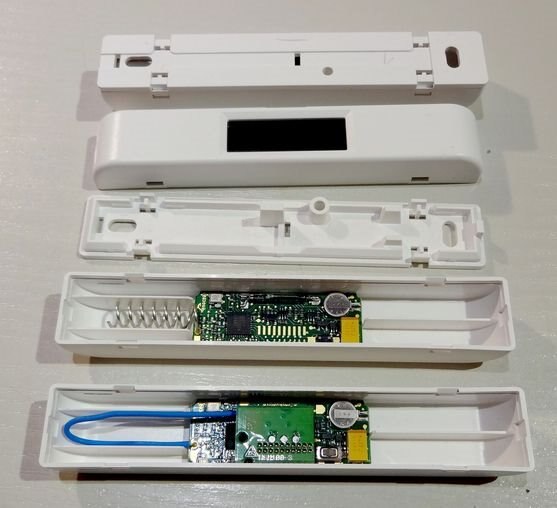
EnOcean was so kind to send me enclosures for all of them (and one for the STM330, and one HSM100 sensor), so the problem of mounting them is now solved. And it looks much better, which increases the wife-acceptance-factor image

image

From top to bottom:

  • a case with the bottom lid closed (so its ready to be mounted)
  • a case from the top side, with just the solar cell visible
  • a lid - the stud in the middle holds the PCB in place, and the small hole beneath id allows to press the button (on the STM330 at least)
  • the STM310 contact sensor in the case - there is extra room for the antenna
  • the STM330 temperature and humidity sensor in the case - here the lid will not fit without modification

I should have asked EnOcean whether they also have the corresponding magnet enclosures, since they also don't seem to be available standalone. Btw: there are a many companies out there the provide sensors witn EnOcean technology, so there are also different kinds out there (e.g. door handles which signal their current state).

Working with OpenHAB rules

Having now multiple contact sensors, I could go ahead and create a OpenHAB rule system that provides an overall state for all windows.

First, I added a new item:

String WindowState "State [%s]"

Then this item must be added to the sitemap:

Frame label="Window State"
{
    Text item=WindowState
}

And the last step was creating a rule that gets triggered when any of the window contacts changes state:

import org.openhab.core.library.types.*
import org.openhab.model.script.actions.*

rule "Windows"
when
    Item sensor_CONTACT1 changed or
    Item sensor_CONTACT2 changed or
    Item sensor_CONTACT3 changed or
    Item sensor_CONTACT4 changed
then
    if ((sensor_CONTACT1.state==OPEN) || (sensor_CONTACT2.state==OPEN) || (sensor_CONTACT3.state==OPEN) || (sensor_CONTACT4.state==OPEN))
    {
        postUpdate(WindowState,"open")
    }
    else
    {
        postUpdate(WindowState,"closed")
    }
end

Unfortunately the rules can be triggered by items only (or be time- or system-event-based). So it looks like its not possible to create a rule that gets triggered by an update to a group (or one of the items in a group). That means whenever a new sensor is added, not only the list of items but also the rule must be updated. No nice...

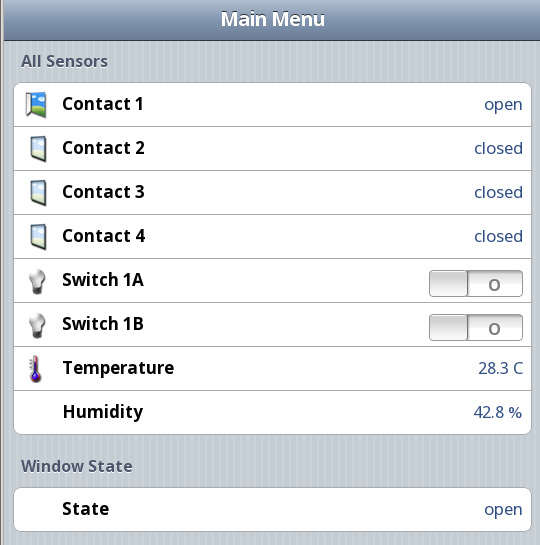
Having this rule in place, and waiting for OpenHAB to reload all changes, the main window ends up in (with all but one contact closed):
image

Optimizing that rule

The language underneath that rules is really powerful - its based on the Eclipse xtend framework which in turn is based on Java. So the condition from above could be written as:

if (Windows.members.filter(w | w.state == OPEN).size > 0)

which reads much cleaner.

And after taking a closer look at the examples, Groups are handles as items indeed. So the condition now looks also much simpler:

when
    Item Windows changed
then

with 'Windows' being the group where exactly all the window contact sensors are in. Neat!

I also verified that the summary item 'WindowState' can also be listened to with the REST API, so my Android application can utilize that one.

One thing I noticed while doing the experiments: the sensor state was not always transmitted right away, but seemed to got lost. So probably I will reconfigure the sensors to do more that one retransmit when their state changes.

  • Sign in to reply

Top Comments

  • michaelwylie
    michaelwylie over 11 years ago +1
    There were enclosures for them? Doh!
  • fvan
    fvan over 11 years ago in reply to michaelwylie

    Didn't know either.


    They look nice though, perhaps a bit too bulky.

    • Cancel
    • Vote Up 0 Vote Down
    • Sign in to reply
    • More
    • Cancel
  • michaelwylie
    michaelwylie over 11 years ago

    There were enclosures for them? Doh!

    • Cancel
    • Vote Up +1 Vote Down
    • Sign in to reply
    • More
    • Cancel
<
element14 Community

element14 is the first online community specifically for engineers. Connect with your peers and get expert answers to your questions.

  • Members
  • Learn
  • Technologies
  • Challenges & Projects
  • Products
  • Store
  • About Us
  • Feedback & Support
  • FAQs
  • Terms of Use
  • Privacy Policy
  • Legal and Copyright Notices
  • Sitemap
  • Cookies

An Avnet Company © 2026 Premier Farnell Limited. All Rights Reserved.

Premier Farnell Ltd, registered in England and Wales (no 00876412), registered office: Farnell House, Forge Lane, Leeds LS12 2NE.

ICP 备案号 10220084.

Follow element14

  • X
  • Facebook
  • linkedin
  • YouTube