


Security monitoring has two dimensions that are rarely combined in a single embedded system: physical intrusion detection and network event awareness. NetSentinel was built for the element14 Smart Security and Surveillance Challenge to address both simultaneously — a distributed embedded SOC (Security Operations Center) node that detects movement in a datacenter environment, captures photographic evidence, performs an automated pan sweep, and delivers real-time visual alerts to an operator at their desk, all while also displaying network-level alerts from syslog sources across the infrastructure.
This is not a single-device security camera. It is a multi-node distributed system running on enterprise-grade network infrastructure.
The Two Nodes — Two Roles
NetSentinel is built around two MAX32630FTHR Feather boards, each with a completely different role and physical location.
MAX Node 1 lives on the operator's desk. It drives a CharlieWing LED matrix that serves as a physical alert panel. When something happens — either a motion detection event in the field or a network change event captured via syslog from FortiGates, MikroTik routers, or switches — the operator sees an immediate visual alert on the display. No screen required, no application to check. The alert comes to the operator physically.
MAX Node 2 lives in the field, mounted on a turret enclosure printed on a Voxelab Aquila X2. When the Raspberry Pi sends it a trigger over UDP, it drives a NEMA 17 stepper motor through an Adafruit DC+Stepper FeatherWing (P2927D) to perform a 180-degree surveillance sweep of the area where motion was detected. An ESP32-CAM module captures photographic evidence in parallel the moment the PIR fires, before the sweep even begins.
The Brain — Raspberry Pi in the DMZ
The Raspberry Pi is the central processing node. It sits in the DMZ of the network topology and has two inputs and two outputs.
On the input side it receives syslog from network infrastructure — FortiGate firewalls, MikroTik routers, and switches — and it receives motion detection events from the ESP32-CAM and PIR sensor in the field. On the output side it forwards processed alerts to MAX Node 1 for visual display, and it sends UDP trigger packets to MAX Node 2 to initiate the pan sweep.
The full event flow looks like this:
FIELD (Datacenter / Turret):
[PIR sensor] ──► motion detected
[ESP32-CAM] ──► photo captured ──► RPi
[MAX Node 2] ◄── UDP trigger ◄── RPi ──► NEMA 17 sweep

BRAIN (DMZ):
[Raspberry Pi 192.168.2.200]
    ◄── syslog from FortiGate 90D, FortiGate 40F,
        MikroTik RB3011, switches
    ◄── motion events from ESP32-CAM / PIR
    ──► alert packets to MAX Node 1
    ──► sweep trigger to MAX Node 2

OPERATOR DESK:
[MAX Node 1 + CharlieWing]
    ◄── physical intrusion alerts
    ◄── network change alerts (syslog)
    ──► visual LED display to operator
Network Architecture
NetSentinel was deployed on a dual-firewall DMZ architecture originally designed for an MSc Cybersecurity lab at Universidad Galileo. This gave the project a realistic enterprise network context rather than a flat home lab.
The topology uses a FortiGate 90D as the exterior firewall, a MikroTik RB3011 as the central routing node, and a FortiGate 40F as the interior firewall protecting the LAN where the MAX nodes reside.
Internet
    |
[FortiGate 90D] — 192.168.10.1/30
    |
[MikroTik RB3011]
    |— ether4: 192.168.2.1/24  ← DMZ
    |       |
    |   [Raspberry Pi — NetSentinel Core]
    |   192.168.2.200
    |
    |— ether2: 192.168.20.1/30
    |
[FortiGate 40F]
    |— LAN: 192.168.4.0/24
            |
        [MAX Node 1 — Operator Alert Panel]
        [MAX Node 2 — Field Turret Controller]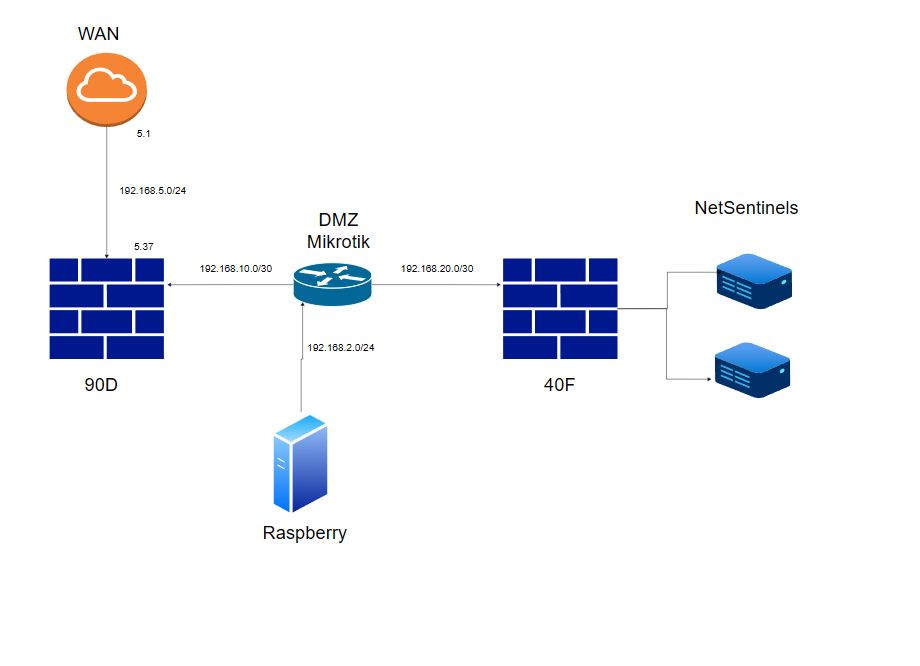
OSPF Area 0 runs across all three routing devices, providing full dynamic reachability without static routes. The Raspberry Pi in the DMZ can receive syslog and events from all segments but cannot initiate connections toward the LAN — a clean security boundary that reflects real DMZ design principles.
The FortiGates and MikroTik forward syslog to the Raspberry Pi at 192.168.2.200. The Pi processes those logs and determines which events warrant a visual alert on the operator panel.
Hardware Summary
The complete bill of materials for NetSentinel includes the Raspberry Pi 4 as the central node, two MAX32630FTHR boards for the alert panel and turret controller, a Particle Ethernet FeatherWing for wired connectivity on each MAX board, an Adafruit CharlieWing LED matrix for the operator display, an Adafruit DC+Stepper FeatherWing P2927D for stepper motor control, a NEMA 17 stepper motor (17HS19-2004S1, 200 steps/rev, 2A/phase) for the pan mechanism, an ESP32-CAM for photographic evidence capture, a PIR sensor as the primary motion trigger, and a Voxelab Aquila X2 3D printer for the custom turret enclosure.
What Comes Next
The following blogs will cover each subsystem in detail: the 3D printed turret enclosure, the network configuration and firewall policies, the PIR and ESP32-CAM detection pipeline, the stepper motor pan mechanism, and the full system integration.
NetSentinel demonstrates that embedded security systems do not have to be isolated gadgets — with the right network architecture they become nodes in a real security infrastructure.
