


My PiIot Design Challenge project is an (airplane) hangar control system, "Hangar Central". One of the components will be a remotely scheduled and operated engine block heater, which I intend to power using a relay whose low-voltage control circuit is driven by one of the Raspberry Pi GPIO 3.3V on/off pins. I haven't built the remote heater yet as I am still experimenting with various components. On my test bench I have a Raspberry Pi that has jumpers from pin 6 (ground) and pin 11 (set to output 3.3V when "on") connected to a resistor/LED pair. If you're reading this then you have most certainly seen (ad nauseam) a program to turn an LED on and off. For the sake of development, the LED represents a heater and when it is on, the heater is running.
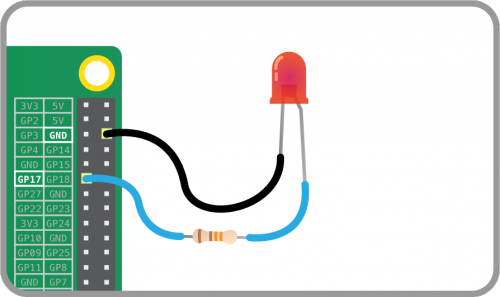
I decided to use the gpiozero library (http://gpiozero.readthedocs.io/en/v1.2.0) because the API is very readable and intuitive. The gpiozero API provides a class called "LED" which allows us to focus on treating individual GPIO pins as lights that we can turn on and off rather than circuits to bring high or low. Let's get a quick script going using gpiozero:
# Use the gpiozero library to control the GPIO pins
from gpiozero import LED

# Allow us to sleep
import time

# Use a descriptive variable name and assign it to a GPIO pin
# GPIO 17 is physical pin #11
heater = LED(17)

# To start preheating an engine (in this case, turn on the LED)
heater.on()

# Wait long enough for us to see the light
time.sleep(5)

# To turn off an engine heater
heater.off()
Running this program on the RPi will turn on and off the LED. Pretty basic and incredibly easy -- Precisely the reason that the Raspberry Pi has found such great success.
While waiting for the Challenge Kit to arrive, I have started messing around with some of the issues I foresee and the concepts surrounding physical computing. I travel quite a bit for both work and personal reasons. When traveling for work, I have no time for playing around. When I am not at work, I am usually taking my two sons to music lessons, soccer practices, or karate classes. I often find myself with anywhere from 30 minutes to 2 hours of downtime. During these times, I have been learning Python and how to interact with the RPi. As small and portable as the Raspberry Pi is, it's still not convenient to carry around. I needed a way to develop for the Pi without developing on the Pi.
Right now, I am sitting in a parking lot with my laptop on and no Raspberry Pi in sight. I want to do some coding for my RPi, so I am going to rig up enough of an environment to let me do so. Enter the concept of "stubbing". Basically, we're going to provide enough of a model to represent the GPIO pins on the Raspberry Pi so that we can write the major portions of a program and then test the physical functionality when the Raspberry Pi is available. I understand that some of you may consider a stub module far too obvious to write about, but hopefully others will find benefit in the discussion or, at the very least, a refresher (reminder) that not every problem needs to be solved before starting.
Above, I provided a quick example of the gpiozero LED class. Now I want duplicate the (programming) interface so that we can program "offline". Use your favorite editor to create a Python script called "gpio_stub.py":
# Create our own LED class
class LED(object):

 # Initialize our version of an LED and use variables to duplicate what
  # would happen in hardware
 def __init__(self, pin, active_high=True, initial_value=False):
    self.pin = pin
    self.value = initial_value
    self.active_high = active_high

  # "Turn on" the LED by recording a True value
  def on(self):
    self.value = True

  # "Turn off" the LED by recording False
  def off(self):
    self.value = False

  # Is the light on or off?
  @property
  def is_lit(self):
    return self.value
We now have the basics of an interface for programming the GPIO just like we do with the gpiozero library. To have your own program function both on the RPi as well as your development machine, place the following snippet wherever you would import the gpiozero module -- Most likely at the top of your Python program:
# If we're not running on a Raspberry, use a GPIO stub so we can still get some coding done
from platform import processor
if processor() == 'x86_64':
  from lib.gpio_stub import LED
else:
  from gpiozero import LED
The above snippet checks the processor type in an attempt to identify what kind of machine we are on. I realize that there may be other processor types being returned, for example working on a Mac, etc. Simply find out what processor type your machine is reporting and use that for the test condition. I did not want to test operating system types as that was (even more) ambiguous than identifying a processor. Again, the goal is to identify our current development environment and not necessarily a robust solution to be used in production.
I hope that this article gives you some ideas about how you can do some RPi tinkering while you're on the road. In addition, if you're either waiting for something to be written or come available, write a little placeholder ("stub") module to implement the missing pieces.
Enjoy,
Rick