element14 Community
element14 Community
    Register Log In
  • Site
  • Search
  • Log In Register
  • Community Hub
    Community Hub
    • What's New on element14
    • Feedback and Support
    • Benefits of Membership
    • Personal Blogs
    • Members Area
    • Achievement Levels
  • Learn
    Learn
    • Ask an Expert
    • eBooks
    • element14 presents
    • Learning Center
    • Tech Spotlight
    • STEM Academy
    • Webinars, Training and Events
    • Learning Groups
  • Technologies
    Technologies
    • 3D Printing
    • FPGA
    • Industrial Automation
    • Internet of Things
    • Power & Energy
    • Sensors
    • Technology Groups
  • Challenges & Projects
    Challenges & Projects
    • Design Challenges
    • element14 presents Projects
    • Project14
    • Arduino Projects
    • Raspberry Pi Projects
    • Project Groups
  • Products
    Products
    • Arduino
    • Avnet & Tria Boards Community
    • Dev Tools
    • Manufacturers
    • Multicomp Pro
    • Product Groups
    • Raspberry Pi
    • RoadTests & Reviews
  • About Us
    About the element14 Community
  • Store
    Store
    • Visit Your Store
    • Choose another store...
      • Europe
      •  Austria (German)
      •  Belgium (Dutch, French)
      •  Bulgaria (Bulgarian)
      •  Czech Republic (Czech)
      •  Denmark (Danish)
      •  Estonia (Estonian)
      •  Finland (Finnish)
      •  France (French)
      •  Germany (German)
      •  Hungary (Hungarian)
      •  Ireland
      •  Israel
      •  Italy (Italian)
      •  Latvia (Latvian)
      •  
      •  Lithuania (Lithuanian)
      •  Netherlands (Dutch)
      •  Norway (Norwegian)
      •  Poland (Polish)
      •  Portugal (Portuguese)
      •  Romania (Romanian)
      •  Russia (Russian)
      •  Slovakia (Slovak)
      •  Slovenia (Slovenian)
      •  Spain (Spanish)
      •  Sweden (Swedish)
      •  Switzerland(German, French)
      •  Turkey (Turkish)
      •  United Kingdom
      • Asia Pacific
      •  Australia
      •  China
      •  Hong Kong
      •  India
      •  Japan
      •  Korea (Korean)
      •  Malaysia
      •  New Zealand
      •  Philippines
      •  Singapore
      •  Taiwan
      •  Thailand (Thai)
      •  Vietnam
      • Americas
      •  Brazil (Portuguese)
      •  Canada
      •  Mexico (Spanish)
      •  United States
      Can't find the country/region you're looking for? Visit our export site or find a local distributor.
  • Translate
  • Profile
  • Settings
Arduino
  • Products
  • More
Arduino
Blog DHT22 temperature and Humidity Sensor with Arduino Uno and Ethernet Card (ENC or WizNet) (Instant weather Station)
  • Blog
  • Forum
  • Documents
  • Quiz
  • Events
  • Polls
  • Files
  • Members
  • Mentions
  • Sub-Groups
  • Tags
  • More
  • Cancel
  • New
Join Arduino to participate - click to join for free!
  • Share
  • More
  • Cancel
Group Actions
  • Group RSS
  • More
  • Cancel
Engagement
  • Author Author: Robert Peter Oakes
  • Date Created: 6 Apr 2014 5:50 AM Date Created
  • Views 4968 views
  • Likes 3 likes
  • Comments 18 comments
  • dht22
  • 5100
  • arduino
  • wiznet
  • enc28j60
Related
Recommended

DHT22 temperature and Humidity Sensor with Arduino Uno and Ethernet Card (ENC or WizNet) (Instant weather Station)

Robert Peter Oakes
Robert Peter Oakes
6 Apr 2014

This is a quick post to show how easy it is to connect a DHT22 temp and Humidity sensor to an Arduino and have it output its reading on a web page that can easily be accessible from anywhere on the internet

With a little more work you can pretty up the display and add other features. This is just to demonstrate a proof of concept to you


The library is directly from the Arduino Playground, what I am demonstrating here is how to combine a few libraries to create something useful, a little more than a blinky sketch. I have found through experience that there is a lot of good educational material on the internet to do just a single function but not too much that actually is useful beyond the educational aspect. What I am going to do in the coming weeks is to build upon this sample prototype in this post and create a full blown useful home thermostat or something similar.


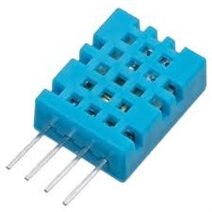
this is the sensor :-
image

you can also get the cheaper and less accurate DHT11 but will need to change the code ever so slightly, IE, change this "int chk = DHT.read22(DHT22_PIN)" to "int chk = DHT.read11(DHT11_PIN)" and other places with similar references to DHT22image


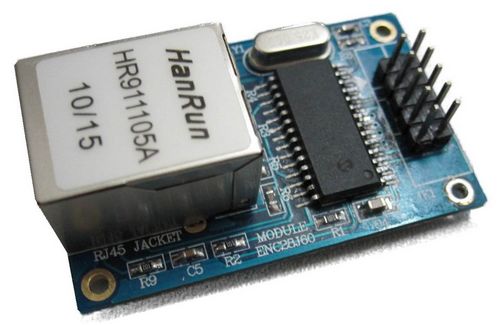
and the ENC Card looks like this

image

or you can use a Wiznet based Shield

image

Parts are available from eBay, AdaFruit, Sparkfun and other suppliers

Please provide feedback as to any features you would like to see in this as we progress and I will try to include some.


Oh and for those not following along closely, the Arduino is acting as the web server in this case, you don't need a separate server


Thanks


Peter


Code for the proof of concept

#include <SPI.h>
#include <Wire.h>
#include <Ethernet.h>
//#include <UIPEthernet.h>
#include <dht.h>
#include <stdio.h>
dht DHT;
#define DHT22_PIN 2
float combined_temp_C;
float combined_temp_F;  //create a new variable
byte TempHi;              // Variable hold data high byte
byte TempLo;              // Variable hold data low byte
boolean P_N;              // Bit flag for Positive and Negative
boolean P_N112;
boolean P_N212;
unsigned int Decimal;     // Variable hold decimal value
char * strTempC = NULL;
 char * strTempF = NULL;
byte mac[] = { 0x90, 0xA2, 0xDA, 0x00, 0x4E, 0x10 };  // MAC address 84.85.88.16.0.36
byte ip[]  = { 192, 168, 1, 203 };                     // ip-address, please change to fit your network
byte mydns[] = { 192, 168, 1, 1 };            
byte gateway[] = { 192, 168, 1, 1 };             
byte subnet[] = { 255,255,255,0 }; 
EthernetServer server(80);
static char output[300] = "";
void setup() {
 Serial.begin(9600);
 //ethernet
   Ethernet.begin(mac, ip);
   server.begin();
   Serial.print("server is at ");
   Serial.println(Ethernet.localIP());
}
char headerHTML[] = "HTTP/1.1 200 OK\r\n"
          "Content-Type: text/html\r\n"
          "Connection: close\r\n"
          "Refresh: 5\r\n"
          "\r\n"
          "<!DOCTYPE HTML>"
          "<Title>RBBS Server</Title>"
          "<html>";
          
 char footerHTML[] = "</html>" ;
 
 char * TimeElapsed() { // Was Home Page
  long t = millis() / 1000;
  word h = t / 3600;
  byte m = (t / 60) % 60;
  byte s = t % 60;
  sprintf(output, "<h1>%d%d:%d%d:%d%d</h1>" , h/10, h%10, m/10, m%10, s/10, s%10);
  return output;
}
 void sendTempToNetwork(EthernetClient myClient)
 {
      // now humidity / temp sensor
    int chk = DHT.read22(DHT22_PIN);
    myClient.print("Humidity=");
    myClient.print(DHT.humidity,0);
    myClient.print("%");
    myClient.print("<BR/>");
    myClient.print("Temperature=");
    myClient.print(DHT.temperature, 0);
    myClient.write(" ");
    myClient.print("C");
    myClient.print("<BR/>");
    myClient.print("Dewpoint=");
    myClient.print(dewPoint(DHT.temperature,DHT.humidity), 0);
    myClient.write(" ");
    myClient.print("C");
    myClient.print("<BR/><BR/>");
 }
 void sendAnalogToNetwork(EthernetClient myClient)
 {
    // output the value of each analog input pin for good measure
    for (int analogChannel = 0; analogChannel < 6; analogChannel++) {
      int sensorReading = analogRead(analogChannel);
      myClient.print("analog input ");
      myClient.print(analogChannel);
      myClient.print(" is ");
      myClient.print(sensorReading);
      myClient.println("<br />");       
    }
 }
/*******************************************************************************
 * Main Loop
 *******************************************************************************/
void loop() 
{
// listen for incoming clients
  EthernetClient client = server.available();
  if (client) {
    Serial.println("new client");
    // an http request ends with a blank line
    boolean currentLineIsBlank = true;
    while (client.connected()) {
      if (client.available()) {
        char c = client.read();
        Serial.write(c);
        // if you've gotten to the end of the line (received a newline
        // character) and the line is blank, the http request has ended,
        // so you can send a reply
        if (c == '\n' && currentLineIsBlank) {
          // send a standard http response header
          client.print(headerHTML);
          // now send the stuff we want
          client.print(TimeElapsed()); // your old code here
          // do some more stuff
          sendTempToNetwork(client);
          sendAnalogToNetwork(client);
           // were done sending so now send the footer to close the page
          client.println(footerHTML);
          break;
        }
        if (c == '\n') {
          // you're starting a new line
          currentLineIsBlank = true;
        } 
        else if (c != '\r') {
          // you've gotten a character on the current line
          currentLineIsBlank = false;
        }
      }
    }
    // give the web browser time to receive the data
    delay(1);
    // close the connection:
    client.stop();
    Serial.println("client disconnected");
  }
 delay(2000);
}
void Cal_Temp()
{
  if (TempHi&0x80)     // If bit7 of the TempHi is HIGH then the temperature is negative
    P_N = 0;
  else       // Else the temperature is positive
  P_N = 1;
  TempHi = TempHi & 0x7F;   // Remove sign
  TempLo = TempLo & 0xF0;   // Filter out last nibble
  TempLo = TempLo >>4; // Shift right 4 times
  Decimal = TempLo;
  Decimal = Decimal * 625;  // Each bit = 0.0625 degree C
  combined_temp_C= TempHi + TempLo*.0625;
  combined_temp_F = combined_temp_C*1.8+32;
   sprintf(strTempC, "%f", combined_temp_C);
   sprintf(strTempF, "%f", combined_temp_F);
}
////Celsius to Kelvin conversion
//double Kelvin(double celsius)
//{
//        return celsius + 273.15;
//}
// dewPoint function NOAA
// reference: http://wahiduddin.net/calc/density_algorithms.htm 
double dewPoint(double celsius, double humidity)
{
        double A0= 373.15/(273.15 + celsius);
        double SUM = -7.90298 * (A0-1);
        SUM += 5.02808 * log10(A0);
        SUM += -1.3816e-7 * (pow(10, (11.344*(1-1/A0)))-1) ;
        SUM += 8.1328e-3 * (pow(10,(-3.49149*(A0-1)))-1) ;
        SUM += log10(1013.246);
        double VP = pow(10, SUM-3) * humidity;
        double T = log(VP/0.61078);   // temp var
        return (241.88 * T) / (17.558-T);
}
// delta max = 0.6544 wrt dewPoint()
// 5x faster than dewPoint()
// reference: http://en.wikipedia.org/wiki/Dew_point
double dewPointFast(double celsius, double humidity)
{
        double a = 17.271;
        double b = 237.7;
        double temp = (a * celsius) / (b + celsius) + log(humidity/100);
        double Td = (b * temp) / (a - temp);
        return Td;
}


The DHT22 Library can be found here


http://arduino.cc/playground/Main/DHTLib


This is a sample of the code and also the resulting output on a web browser to show it works

You don't have permission to edit metadata of this video.
Edit media
x
image
Upload Preview
image

Attachments:
DCT22_test.ino.zip
  • Sign in to reply

Top Comments

  • gadget.iom
    gadget.iom over 10 years ago in reply to Former Member +1
    In answer to your first question: DHT: Celsius to Fahrenheit Conversion
  • gadget.iom
    gadget.iom over 10 years ago in reply to Former Member +1
    And your second question: Adafruit DHT - Two sensors
  • Robert Peter Oakes
    Robert Peter Oakes over 11 years ago in reply to Former Member

    well that would account for it, I did not have an SD card in my testing, I am please you cracked it, I will make a point of sighting my libraries in future too to prevent contusion


    Thanks


    Peter

    • Cancel
    • Vote Up 0 Vote Down
    • Sign in to reply
    • More
    • Cancel
  • Former Member
    Former Member over 11 years ago in reply to Robert Peter Oakes

    I think I discovered the issue on the Arduino Doc's site  (Arduino - WebServer)...  This whole time I had a MicroSD card in the slot.  I never crossed my mind to remove it.


    Warning

    This example doesn't require an SD card. If an SD card is inserted but not used, it is possbile for the sketch to hang, because pin 4 is used as SS (active low) of the SD and when not used it is configured as INPUT by default. Two possible solutions:

    • remove the SD card;
    • add these lines of code in the setup()


    pinMode(4, OUTPUT);

    digitalWrite(4, HIGH);


    I've run the existing code and we have had more than a hour of error free web pages.

    • Cancel
    • Vote Up 0 Vote Down
    • Sign in to reply
    • More
    • Cancel
  • Former Member
    Former Member over 11 years ago in reply to Robert Peter Oakes

    I naively was thinking there was only one library per device and that is what everyone is using.  Your DHT code had me stumped for a while, until I looked back at some of my other DHT22 sketches and use them as a reference point.  At that time I still was confused as to why your code would not work for me.  Now that I know you where using a different library makes everything make sense.  I'm going to make a point from now on to let people up front know in my discussions where my code is being sourced from.  I'm still at the borrowing and adaptation stage of beginner programming. It is going to be a while before I'm writing my own original code.


    All my present issues (I believe) are caused by the way the Arduino Ethernet Shield Rev.3 handles requests and servers up responses.  It was not even something I was thinking would be an issue when I started this little project.

    • Cancel
    • Vote Up 0 Vote Down
    • Sign in to reply
    • More
    • Cancel
  • Robert Peter Oakes
    Robert Peter Oakes over 11 years ago in reply to Former Member

    I did have a quick scan and the main difference is in the DHT library, the one I used can automatically switch between the DHT22 and DHT11, the one you have you need to declare it when you call the constructor, this will account for the errors you encountered with reading the sensor

    • Cancel
    • Vote Up 0 Vote Down
    • Sign in to reply
    • More
    • Cancel
  • Former Member
    Former Member over 11 years ago

    I look forward to your comments.

    • Cancel
    • Vote Up 0 Vote Down
    • Sign in to reply
    • More
    • Cancel
<>
element14 Community

element14 is the first online community specifically for engineers. Connect with your peers and get expert answers to your questions.

  • Members
  • Learn
  • Technologies
  • Challenges & Projects
  • Products
  • Store
  • About Us
  • Feedback & Support
  • FAQs
  • Terms of Use
  • Privacy Policy
  • Legal and Copyright Notices
  • Sitemap
  • Cookies

An Avnet Company © 2026 Premier Farnell Limited. All Rights Reserved.

Premier Farnell Ltd, registered in England and Wales (no 00876412), registered office: Farnell House, Forge Lane, Leeds LS12 2NE.

ICP 备案号 10220084.

Follow element14

  • X
  • Facebook
  • linkedin
  • YouTube