element14 Community
element14 Community
    Register Log In
  • Site
  • Search
  • Log In Register
  • Community Hub
    Community Hub
    • What's New on element14
    • Feedback and Support
    • Benefits of Membership
    • Personal Blogs
    • Members Area
    • Achievement Levels
  • Learn
    Learn
    • Ask an Expert
    • eBooks
    • element14 presents
    • Learning Center
    • Tech Spotlight
    • STEM Academy
    • Webinars, Training and Events
    • Learning Groups
  • Technologies
    Technologies
    • 3D Printing
    • FPGA
    • Industrial Automation
    • Internet of Things
    • Power & Energy
    • Sensors
    • Technology Groups
  • Challenges & Projects
    Challenges & Projects
    • Design Challenges
    • element14 presents Projects
    • Project14
    • Arduino Projects
    • Raspberry Pi Projects
    • Project Groups
  • Products
    Products
    • Arduino
    • Avnet & Tria Boards Community
    • Dev Tools
    • Manufacturers
    • Multicomp Pro
    • Product Groups
    • Raspberry Pi
    • RoadTests & Reviews
  • About Us
  • Store
    Store
    • Visit Your Store
    • Choose another store...
      • Europe
      •  Austria (German)
      •  Belgium (Dutch, French)
      •  Bulgaria (Bulgarian)
      •  Czech Republic (Czech)
      •  Denmark (Danish)
      •  Estonia (Estonian)
      •  Finland (Finnish)
      •  France (French)
      •  Germany (German)
      •  Hungary (Hungarian)
      •  Ireland
      •  Israel
      •  Italy (Italian)
      •  Latvia (Latvian)
      •  
      •  Lithuania (Lithuanian)
      •  Netherlands (Dutch)
      •  Norway (Norwegian)
      •  Poland (Polish)
      •  Portugal (Portuguese)
      •  Romania (Romanian)
      •  Russia (Russian)
      •  Slovakia (Slovak)
      •  Slovenia (Slovenian)
      •  Spain (Spanish)
      •  Sweden (Swedish)
      •  Switzerland(German, French)
      •  Turkey (Turkish)
      •  United Kingdom
      • Asia Pacific
      •  Australia
      •  China
      •  Hong Kong
      •  India
      • Japan
      •  Korea (Korean)
      •  Malaysia
      •  New Zealand
      •  Philippines
      •  Singapore
      •  Taiwan
      •  Thailand (Thai)
      • Vietnam
      • Americas
      •  Brazil (Portuguese)
      •  Canada
      •  Mexico (Spanish)
      •  United States
      Can't find the country/region you're looking for? Visit our export site or find a local distributor.
  • Translate
  • Profile
  • Settings
Arduino
  • Products
  • More
Arduino
Blog RGB LED Shield diagrams for documentation purposes
  • Blog
  • Forum
  • Documents
  • Quiz
  • Events
  • Polls
  • Files
  • Members
  • Mentions
  • Sub-Groups
  • Tags
  • More
  • Cancel
  • New
Join Arduino to participate - click to join for free!
  • Share
  • More
  • Cancel
Group Actions
  • Group RSS
  • More
  • Cancel
Engagement
  • Author Author: shabaz
  • Date Created: 17 Dec 2014 3:36 PM Date Created
  • Views 4330 views
  • Likes 7 likes
  • Comments 22 comments
  • infineon
  • iot_holiday_lights
  • yun
  • light_emitting_diode
  • diode
  • holiday
  • iot_holidaylights
  • light
  • light-emitting-diode
  • emitting
  • led
  • rgb
  • iot-holiday-lights
  • arduino-yun
  • lights
  • infineon_led
  • iot
  • arduino_shield
  • shield
  • arduino_yun
  • arduino
  • arduino-shield
Related
Recommended

RGB LED Shield diagrams for documentation purposes

shabaz
shabaz
17 Dec 2014

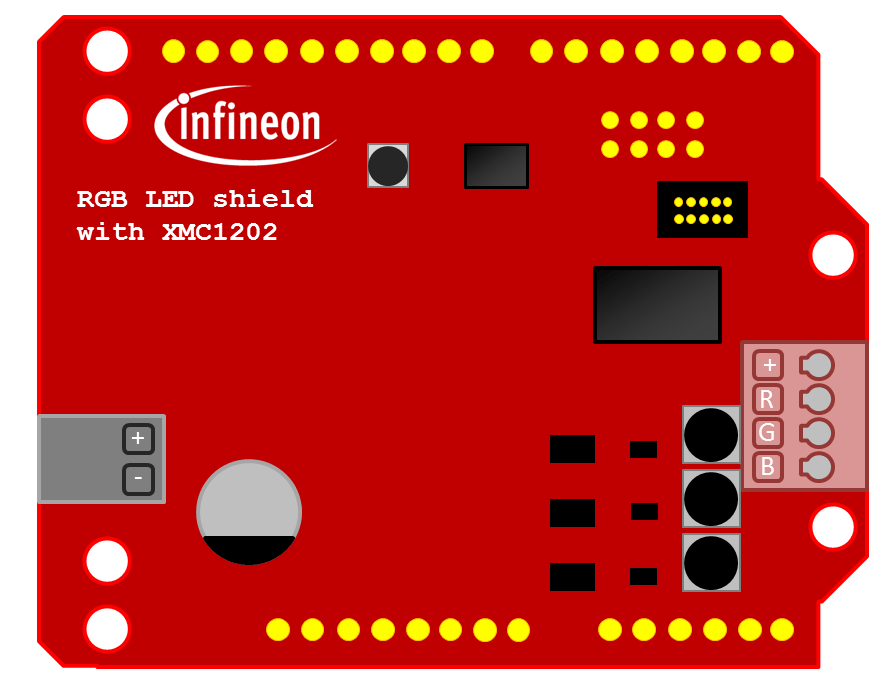
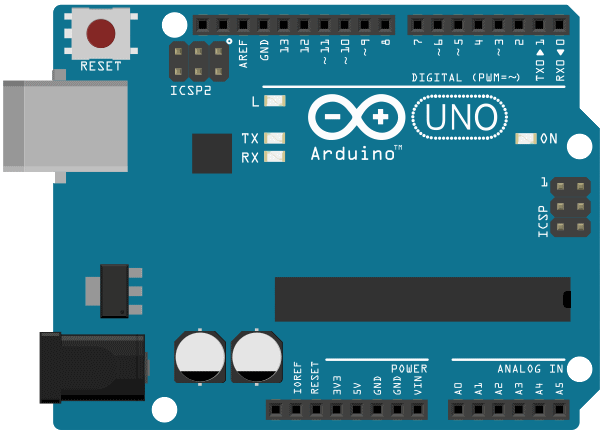
For those creating projects with the RGB LED ShieldRGB LED Shield, hopefully these images can come in handy.
 

image

image

They are attached to the bottom of this post in two versions - white background and transparent background.

I can't take credit for the Arduino Uno diagram, I found that on the Internet (not sure of the original source, it was in many places - and just edited it slightly).

Attachments:
image
image
image
image
rgb-shield-vector-emf.zip
rgb-shield-vector-svg-inkscape.zip
  • Sign in to reply

Top Comments

  • shabaz
    shabaz over 10 years ago in reply to RParkerE +4
    Hi Parker, Can you try the program called RGBLED_2_SAFE.ino ? I tried that, with LEDs connected to the red channel only, and they worked, see the post here: RGB LED Shield from Infineon - Getting Started…
  • Workshopshed
    Workshopshed over 10 years ago in reply to lokkytron +3
    Yes that file did not seem to have anything to hookup to. But shabaz 's Inkscape file worked once I deleted the big white rectangle from it.
  • Robert Peter Oakes
    Robert Peter Oakes over 10 years ago +3
    I do not beleive there is a minimum current limit for the Infineon board, it is simply the set constant current in the demo sketch, the board is actually programable for almost any current up to the MAX…
  • RParkerE
    RParkerE over 10 years ago

    Hello,


    So I am currently working with the shield, but have run into some trouble. I am trying to power a single red LED using the red LED channel from the board. I am using a 9 volt battery as the power source for the shield. I have tried running the example codes provided by infineon. However, those are not working to power the LED, neither will my manipulated code that is only supposed to drive only the red LED channel. You can find the manipulated code here. I am not sure what is wrong, almost positive it is a case of user error, but any guidance would be helpful!


    Thank You!

    • Cancel
    • Vote Up 0 Vote Down
    • Sign in to reply
    • More
    • Cancel
  • Workshopshed
    Workshopshed over 10 years ago

    A quick tutorial on setting up this part in Fritzing

    http://www.element14.com/community/people/Workshopshed/blog/2015/03/27/creating-a-part-for-fritzing

    • Cancel
    • Vote Up +1 Vote Down
    • Sign in to reply
    • More
    • Cancel
  • shabaz
    shabaz over 10 years ago in reply to Workshopshed

    Oh wow - this parts editor looks interesting. Looking forward to seeing the final result!

    • Cancel
    • Vote Up +1 Vote Down
    • Sign in to reply
    • More
    • Cancel
  • shabaz
    shabaz over 10 years ago in reply to Workshopshed

    It's disappointing that Fritzing part creation is tightly linked to Inkscape layers ; (

    As much as I love Inkscape, it's a shame there is no method of importing an SVG or PNG into some Fritzing part creator and then just click where circuit/component nodes are needed.

    I think even Visio allows that - you can have a graphic image, and click where you want to define nodes for attaching lines/connections for example, and then save it as a Visio component (from memory - been ages since I used Visio).

    • Cancel
    • Vote Up 0 Vote Down
    • Sign in to reply
    • More
    • Cancel
  • Workshopshed
    Workshopshed over 10 years ago in reply to lokkytron

    Yes that file did not seem to have anything to hookup to. But shabaz's Inkscape file worked once I deleted the big white rectangle from it.

    image

    • Cancel
    • Vote Up +3 Vote Down
    • Sign in to reply
    • More
    • Cancel
<>
element14 Community

element14 is the first online community specifically for engineers. Connect with your peers and get expert answers to your questions.

  • Members
  • Learn
  • Technologies
  • Challenges & Projects
  • Products
  • Store
  • About Us
  • Feedback & Support
  • FAQs
  • Terms of Use
  • Privacy Policy
  • Legal and Copyright Notices
  • Sitemap
  • Cookies

An Avnet Company © 2026 Premier Farnell Limited. All Rights Reserved.

Premier Farnell Ltd, registered in England and Wales (no 00876412), registered office: Farnell House, Forge Lane, Leeds LS12 2NE.

ICP 备案号 10220084.

Follow element14

  • X
  • Facebook
  • linkedin
  • YouTube