element14 Community
element14 Community
    Register Log In
  • Site
  • Search
  • Log In Register
  • Community Hub
    Community Hub
    • What's New on element14
    • Feedback and Support
    • Benefits of Membership
    • Personal Blogs
    • Members Area
    • Achievement Levels
  • Learn
    Learn
    • Ask an Expert
    • eBooks
    • element14 presents
    • Learning Center
    • Tech Spotlight
    • STEM Academy
    • Webinars, Training and Events
    • Learning Groups
  • Technologies
    Technologies
    • 3D Printing
    • FPGA
    • Industrial Automation
    • Internet of Things
    • Power & Energy
    • Sensors
    • Technology Groups
  • Challenges & Projects
    Challenges & Projects
    • Design Challenges
    • element14 presents Projects
    • Project14
    • Arduino Projects
    • Raspberry Pi Projects
    • Project Groups
  • Products
    Products
    • Arduino
    • Avnet & Tria Boards Community
    • Dev Tools
    • Manufacturers
    • Multicomp Pro
    • Product Groups
    • Raspberry Pi
    • RoadTests & Reviews
  • About Us
  • Store
    Store
    • Visit Your Store
    • Choose another store...
      • Europe
      •  Austria (German)
      •  Belgium (Dutch, French)
      •  Bulgaria (Bulgarian)
      •  Czech Republic (Czech)
      •  Denmark (Danish)
      •  Estonia (Estonian)
      •  Finland (Finnish)
      •  France (French)
      •  Germany (German)
      •  Hungary (Hungarian)
      •  Ireland
      •  Israel
      •  Italy (Italian)
      •  Latvia (Latvian)
      •  
      •  Lithuania (Lithuanian)
      •  Netherlands (Dutch)
      •  Norway (Norwegian)
      •  Poland (Polish)
      •  Portugal (Portuguese)
      •  Romania (Romanian)
      •  Russia (Russian)
      •  Slovakia (Slovak)
      •  Slovenia (Slovenian)
      •  Spain (Spanish)
      •  Sweden (Swedish)
      •  Switzerland(German, French)
      •  Turkey (Turkish)
      •  United Kingdom
      • Asia Pacific
      •  Australia
      •  China
      •  Hong Kong
      •  India
      • Japan
      •  Korea (Korean)
      •  Malaysia
      •  New Zealand
      •  Philippines
      •  Singapore
      •  Taiwan
      •  Thailand (Thai)
      • Vietnam
      • Americas
      •  Brazil (Portuguese)
      •  Canada
      •  Mexico (Spanish)
      •  United States
      Can't find the country/region you're looking for? Visit our export site or find a local distributor.
  • Translate
  • Profile
  • Settings
Altium CircuitStudio
  • Products
  • Manufacturers
  • Altium CircuitStudio
  • More
  • Cancel
Altium CircuitStudio
Documents Altium CircuitStudio v1.4 Release
  • Blog
  • Forum
  • Documents
  • Events
  • Polls
  • Members
  • Mentions
  • Sub-Groups
  • Tags
  • More
  • Cancel
  • New
Join Altium CircuitStudio to participate - click to join for free!
Actions
  • Share
  • More
  • Cancel
Engagement
  • Author Author: jwatson
  • Date Created: 22 Mar 2017 1:39 PM Date Created
  • Last Updated Last Updated: 6 Oct 2021 9:03 PM
  • Views 3189 views
  • Likes 2 likes
  • Comments 18 comments
Related
Recommended

Altium CircuitStudio v1.4 Release

Hi everyone!


Hotfix 1.4.1 released July 2017 - Read about it here.


CS v1.4 is the easiest professional PCB design tool to use, with the 1.4 release now making it easier than ever to transition your historical EagleTm data into a modern tool, with the peace of mind that you will have continued access to your design files today, tomorrow, and into the future.  In summary, enhancements include:       


• addition of classes to PCB and Schematic editors

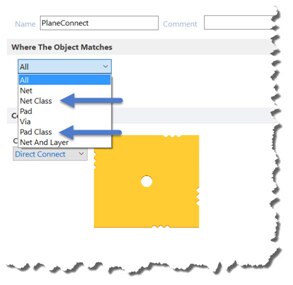
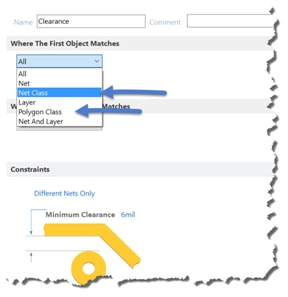
• improved design rules in PCB to allow the use of Net, Component, Pad, and Polygon classes in rule definitions                                   

• more than 20 enhancements made specifically to make it easier to switch from Eagle to CircuitStudio, including


  Try for Free


Register to Watch Introductory WebinarsLive Dates (recordings posted on links later)

CircuitStudio New Version 1.4: What's New and Overview  (EU Session)

Apr 11, 2017 1:00-2:00 PM GMT (Europe/Dublin)

CircuitStudio New Version 1.4: What's New and Overview (US/NAM Session)

Apr 11, 2017 9:00-10:00 PM GMT (Europe/Dublin)


Of particular note in this release, is the addition of Classes. 


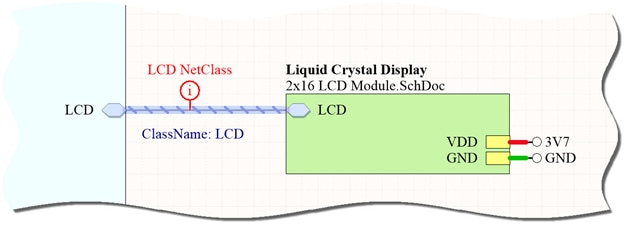
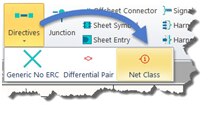
Within the Schematic editor, Net Classes can be generated using the new Net Class directive and Component Classes are automatically generated for each Schematic Sheet within the hierarchy. 
image

image

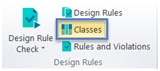
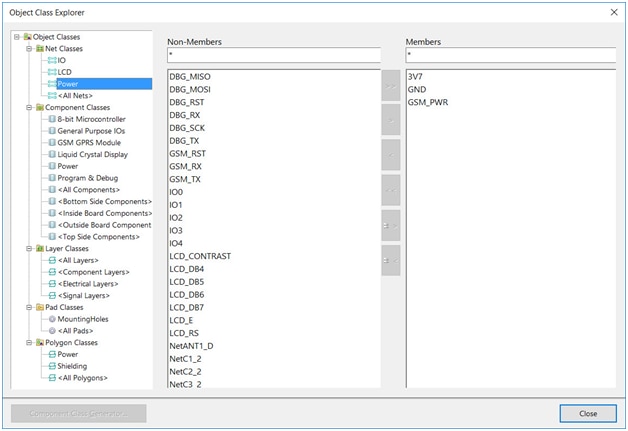
Within the PCB editor a new Classes dialog is available on the Home tab in the Design Rules section, and this can be used to create Pad, Polygon, Component, Layer, and Net Classes.
image

image

Design rules in PCB have been improved to allow the use of Net, Component, Pad, and Polygon classes in rule definitions.
 

imageimage

In addition to the above, the transition from EagleTm to CircuitStudio is now easier and better than ever, with more than 20 enhancements made specifically to ease this migration, including the ability to directly open EagleTm  design files, and the ability to add EagleTm  libraries directly to the Libraries panel. Make sure to check out What’s New and the Release Notes.


If you are already a CircuitStudio user, these improvements will help to increase your efficiency and allow better control over your design flow. If you are considering CircuitStudio now is the perfect time to make the move as we are currently running a special promotion for EagleTm users, so come check it out and take advantage of this amazing offer while it lasts! http://www.altium.com/eagle-switch/circuitstudio/#page1


Updating To CircuitStudio
1.4

1. Select View >> Start to open the Home page


2. Select Licenses from the My Account pull-down menu and sign in if
not already.


3. Select Extensions and Updates from the My Account pull-down menu.


4. From the Extensions & Updates page, click the Updates tab.


5. Click the CircuitStudio 1.4.0 (Build 84) update link to start the
update process.


6. Restart CircuitStudio (restart notification window will pop up)

Alternatively, do a fresh install with http://www.circuitstudio.com/download

 

image

The update is also available to download and install via the Update System in CircuitStudio.


Release Notes

#244    EAGLE Importer - Improved text alignment.
#340    EAGLE Importer - Improved display of net labels on schematic wires.
#346    EAGLE Importer - Improved NetClasses support.
#348    EAGLE Importer - Improved the import of pad objects.
#355    EAGLE Importer - Improved mounting hole support in footprints.
#357    EAGLE Importer - Improved tRestrict and bRestrict layer support.
#369    EAGLE Importer - DRC track width is now supported correctly.
#370    EAGLE Importer - Improved support for solder mask rules.
#371    EAGLE Importer - Improved support for paste mask rules.
#373    EAGLE Importer - Improved support for polygon clearance.
#388    EAGLE Importer - Added support for opening EAGLE files instead of importing.
#390    EAGLE Importer - Added support to import Eagle libraries directly to library panel.
#399    EAGLE Importer - PCB silkscreen layers now import correctly.
#400    EAGLE Importer - Added support for hierarchical schematics to Eagle Importer.
#408    EAGLE Importer - Added support for an unconnected wire to Eagle Importer.
#413    EAGLE Importer - Via tenting settings are imported correctly.
#414    EAGLE Importer - Test pads now import onto the correct layer.
#415    EAGLE Importer - SPIN property on text now imports correctly.
#432    EAGLE Importer - Added parameters for symbol, gate, device and deviceset names.
#444    EAGLE Importer - Added support for multi-line text outputs for PCB.
#459    EAGLE Importer - Improved Hole to Hole clearance rule support.
#461    EAGLE Importer - Improved Minimum Annual Ring support.
#494    EAGLE Importer - Improved text positioning issues on overlay layers.
#497    EAGLE Importer - Polygons are now included in polygon classes.
#268    Added process to cancel subscription and notify customer if their subscription renewal cannot be completed after 3 processing attempts.
#307    Fixed an issue where the STEP output crashes for a Teensy 3.2 ARM dev board.
#332    Added Single Layer Mode toggle options.
#338    Fixed a bug where creating primitives from board shape doesn't include cutouts if "route tool online" is selected.
#359    Fixed a bug that would not allow changing the default primitives using the TAB key.
#360    Fixed a login issue with using an existing account created for a trial version with a new account.
#365    Added "Bring to Front" and "Send to Back" commands for polygons.
#402    Fixed a crash in PCB while interactively routing and using recursive via placement.
#422    Fixed a bug where pad Top-Middle-Bottom padstack X-Size and Y-Size are not saved for Middle and Bottom.
#424    Added NetClass support to HoleSize rule.
#428    Fixed import from schematic (ECO), so that PCB footprints are created in the correct place.
#453    Fixed a bug that caused a footprint to not be found in IntLib libraries that have been created with footprints that weren't linked with the "Library Path".
#455    Fixed a bug where the component name was missing from the Browse Libraries Footprint View.
#467    Added Page Setup options to Generate outputs files.
#471    Fixed a bug that caused the annotation menu to be empty if a document was deleted from a project.
#479  Added ability to download personal ALF files from a browser.
#480    Fixed some issues and made improvements to the Account Sign In window.
#481    Added login/logout items to the My Account drop down menu.


Questions?

Contact software@element14.com or add a comment to this blog post.


Please note: Altium claims no trademark or other rights in the EAGLE mark.

  • altium
  • altium circuitstudio 1.4 webinar
  • altium circuitstudio webinar
  • circuitstudio 1.4
  • webinar
  • circuitstudio
  • altium circuitstudio 1.4
  • altium circuitstudio
  • altium webinar
  • Share
  • History
  • More
  • Cancel
  • Sign in to reply
  • jamesharrimanaltium
    jamesharrimanaltium over 8 years ago

    Hi everyone,


    Please see below for an issue known to exist in this release of CircuitStudio, and the various work arounds that may be used prior to a fix being made available.


    Known Issue in CircuitStudio 1.4: Selected object location is incorrectly offset during rotation, by an amount related to the Current Origin setting.


    When moving selected objects (M shortcut key) and pressing Space Bar to rotate them, the object moves a long way from the current location. Objects such as a Component or String could be moved a long way from the PCB board shape.


    This issue doesn't occur if the Current Origin is set to the same location as the Absolute Origin, but this is rarely the case. That would offer one work around but it sacrifices the Current Origin feature, so the following work arounds are more suitable.


    Work Arounds:

    The best work around is to use a command to rotate selections, rather than pressing the Space Bar:


    1. Use an alternative method, rather than Space Bar:

    - Select the object(s)

    - Tools > Move > Rotate Selection, type 90, press Enter

    - Left click on the point to rotate around


    2. If a component has already been moved right out of the work space and can't be selected with the mouse, correct as follows:

    - Remove the component from the schematic

    - Update the PCB document

    - Paste the component back in the schematic with a new designator

    - Update the PCB document.


    3. If rotating a single object, deselect the object prior to dragging it with the mouse. Press the space bar and the location isn't affected.


    4. If rotating selected objects using Space Bar and the location is offset, zoom out, press M and click to move the selected objects back to the board.


    5. This issue does not occur if the Current Origin is set to the same location as the Absolute Origin.

    To set this, choose Home > Origin > Set, press Ctrl+Home and Enter

    This last work around isn't recommended, since you lose the advantage of the more convenient Current Origin.


    Best regards,


    James Harriman

    Altium

    • Cancel
    • Vote Up 0 Vote Down
    • Sign in to reply
    • More
    • Cancel
  • jamesharrimanaltium
    jamesharrimanaltium over 8 years ago

    Hi everyone,


    Elaborating on the above, alternatively, do a fresh install of CircuitStudio, downloaded from http://www.circuitstudio.com/download

    Run CircuitStudioSetup1.4.exe and choose either:


    __New Installation

    or

    __Update existing version.


    The New Installation option allows a completely fresh install to be installed, and you may even retain the previous installation. Unlike updating, the fresh install will require you to setup the license after installation. Sign in, Reactivate. If using the same license as the other installation of CircuitStudio, only run one product at a time.


    When the DESTINATION FOLDERS screen appears, change both paths, e.g. add some letters to the end.

    For example, these paths:

    C:\Program Files (x86)\Altium\CS

    C:\Users\Public\Documents\Altium\CS


    could be changed to:

    C:\Program Files (x86)\Altium\CS14

    C:\Users\Public\Documents\Altium\CS14


    In this example, a new program shortcut will be created and named "CircuitStudio (in CS14)", so that you may launch the correct version of the product.


    The Update existing version will display a list of previous version(s) installed on your system. Select the version to update, and it will be overwritten by the new version of CircuitStudio, into the existing folders.


    Updating Within CircuitStudio

    Similar to above, but without requiring any download, run the old version of CircuitStudio, e.g. version 1.3, then follow the procedure below. This will overwrite the existing version with the new version 1.4 of CircuitStudio.


    1. Select View >> Start to open the Home page


    2. Select Licenses from the My Account pull-down menu and sign in if not already.


    3. Select Extensions and Updates from the My Account pull-down menu.


    4. From the Extensions & Updates page, click the Updates tab


    5. Click the CircuitStudio 1.4.0 (Build 84) update link to start the update process.


    6. Restart CircuitStudio (restart notification window will pop up)


    Best regards,


    James Harriman

    Altium

    • Cancel
    • Vote Up 0 Vote Down
    • Sign in to reply
    • More
    • Cancel
  • migration.user
    migration.user over 8 years ago in reply to justinstevens

    Hi justinstevens

    Could you please explain, what regional settings and system language do you use on your Windows7?

    • Cancel
    • Vote Up 0 Vote Down
    • Sign in to reply
    • More
    • Cancel
  • justinstevens
    justinstevens over 8 years ago in reply to migration.user

    I reinstalled 1.4 from scratch... and now I'm back to the EOIeException   Again, I've tried rebooting, and even disabling every running service on my computer that isn't from Microsoft.

    • Cancel
    • Vote Up 0 Vote Down
    • Sign in to reply
    • More
    • Cancel
  • justinstevens
    justinstevens over 8 years ago in reply to migration.user

    Thanks... holding in ctrl didn't make a difference.  I also tried completely uninstalling and reinstalling 1.3, but now I get a different exception:

    Exception EEncodingError in module DXP.EXE at 0002AD37. Invalid code page.

    I am using Win 7, BTW.


    DXP Startup Commenced At 12:22:37 PM on 3/24/2017

    -------------------------------------------------------

    T+: 0          0          Name thread for debugging

    T+: 0          0          Acquiring startup mutex

    T+: 0          0          Cleanup AD temp files

    T+: 0          0          Application.Initialize

    T+: 15         15         Before security initialize

    T+: 0          15         Before CreateClient


    DXP Startup Commenced At 3:08:57 PM on 3/24/2017

    -------------------------------------------------------

    T+: 0          0          Name thread for debugging

    T+: 0          0          Acquiring startup mutex

    T+: 0          0          Cleanup AD temp files

    T+: 0          0          Application.Initialize

    T+: 15         15         Before security initialize

    T+: 0          15         Before CreateClient

    • Cancel
    • Vote Up 0 Vote Down
    • Sign in to reply
    • More
    • Cancel
  • migration.user
    migration.user over 8 years ago in reply to justinstevens

    Hi justinstevens.


    Can I ask you to try start circuitstudio with pressed Ctrl key.

    Also please send me log files from the following path:

    c:\Users\{your user name}\AppData\Local\Altium\CircuitStudio {XXXX}


    Thanks,

    Vlad

    • Cancel
    • Vote Up 0 Vote Down
    • Sign in to reply
    • More
    • Cancel
  • justinstevens
    justinstevens over 8 years ago

    After installing the update I get:

    Exception EOIeException in module DXP.EXE at 00D0D32E. Invalid code page.

    Tried rebooting and still the same.  The update seemed to install successfully, no errors.

    • Cancel
    • Vote Up 0 Vote Down
    • Sign in to reply
    • More
    • Cancel
  • satyaeee247
    satyaeee247 over 8 years ago

    HI Jane,


    I can't update my Circuit Studio.


    Is it released in UK yet?


    Thanks

    Satya

    • Cancel
    • Vote Up 0 Vote Down
    • Sign in to reply
    • More
    • Cancel
<
element14 Community

element14 is the first online community specifically for engineers. Connect with your peers and get expert answers to your questions.

  • Members
  • Learn
  • Technologies
  • Challenges & Projects
  • Products
  • Store
  • About Us
  • Feedback & Support
  • FAQs
  • Terms of Use
  • Privacy Policy
  • Legal and Copyright Notices
  • Sitemap
  • Cookies

An Avnet Company © 2026 Premier Farnell Limited. All Rights Reserved.

Premier Farnell Ltd, registered in England and Wales (no 00876412), registered office: Farnell House, Forge Lane, Leeds LS12 2NE.

ICP 备案号 10220084.

Follow element14

  • X
  • Facebook
  • linkedin
  • YouTube