XBMC Bundle for Raspberry Pi

View table of contents ...  

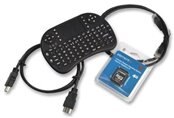
The XBMC bundle for Raspberry Pi is simple out-of-the-box solution that turns your Raspberry Pi into a powerful media centre for the home or office.image  It contains all the hardware and software you need, but note it does not contain the Raspberry Pi minicomputer.  If you don’t already have a Raspberry Pi, the Raspberry Pi Starter Kit is a perfect complement.
Included in the XBMC bundle is an SD card that already has the necessary software installed on it.  The software is Raspbmc, an open source Linux distribution created by Sam Nazarko that brings XBMC to your Raspberry Pi.  To help you get up and running quickly a straightforward user guide is included and there is also a video tutorial that can be found at URL.
To control your Raspberry Pi in XBMC mode the bundle includes an ultra Mini Keyboard and Integrated Mouse Pad that wirelessly connects to the Raspberry Pi. For the connection to the Internet and your TV or monitor, we’ve included an HDMI cable and Ethernet cable. After you have set it up the first time, you can either use the Ethernet cable or WiPi; a wireless USB dongle designed to work seamlessly with your Raspberry Pi.
Features
Software
-   SD card, pre-installed with the  Raspbmc software that brings XBMC to your Raspberry Pi
User Guide and Introductory Video
-   straightforward instructions and introductory video to set up your Raspberry Pi and begin using XBMC.
Ultra Mini Keyboard and Integrated Mouse Pad
-   Wireless remote control for XBMC running on your Raspberry Pi
HDMI Cable
-   To connect the Raspberry Pi to your monitor or television
Ethernet Cable
-   To connect your Raspberry Pi to the Internet
Unboxing Video
Terms & Conditions
  • Testers will be selected on the basis of quality of applications: we expect a full and complete description of why you want to test this particular product.
  • Testers are required to produce a full, comprehensive and well thought out review within 2 months of receipt of the product.
  • Failure to provide this review within the above timescale will result in the enrolee being excluded from future Road Tests.
RoadTest Reviews
Comments
Anonymous
  • I too am very interested in testing this product. Been a fan of XBMC for a long time and would love to be part of this.


    Sammy.

  • Hi Shane,


    Do you mean the Level number next to your profile picture?


    If so, it's explained here: http://www.element14.com/community/docs/DOC-53274?ICID=members-topbnr


    Regards,

    Alan

  • umm I know this makes me sound like a noob but what do the lvls mean?

  • I'd love to enroll in this but i already made a standalone, one plug to the wall XBMC TV.


    15" Coby television with every connector known to man in the back holds the end of a 3 plug power strip (i didn't have a 2 plug). TV always plugged in.

    USB charger on an inline switch so i can turn it on after the tv has started into hdmi mode. Has 2.1A rating so i don't lose juice running bluetooth and wireless 720p streaming.

    Infrared reciever and remote programmed to control the RaspBMC like a TV, otherwise i can use a logitech k400 KB/Trackpad to navigate menus or switch over to Raspian.

    Pi mounts on the back of the TV via VESA mounts and is not at all visible except for the little IR reciever sugru'd to the top.


    I'll prob add some better speakers and run them from the analog output rather than over HDMI into the crummy 2W speakers in most small screens. I also want to be able to mount the camera so i can treat it as a webcam, atleast until i find something more robust than a ribbon cable for it. Also gonna get a longer GPIO ribbon cable so i don't have to take it off of the screen to play with breadboards and various projects.


    It really is a small tv you can put anywhere (near an outlet) on my property and get great wireless connection, 720 (max TV allows) .mkvs almost look better than on my big windows 7 desktop. 1 remote if you don't mind powering the tv on and off manually (you have to do that to the pi anyway). I know this is all just bragging, but hopefully someone sees it and remembers it for the next test I apply for!

  • Anyone know where to get the mouse/keyboard combo separately? image

  • This should be very interesting road test, so many possibilities...

  • i have rasplex runnig on my pi at the moment that is good but cant use the mouse only the keyboard

    could this be any better

  • Home control and safety check tru a smart TV.

  • i hope i get this one i have so many ideas for it

  • I remember reading that it's not reccomended to power the Pi via USB from other devices. Their outputs might not provide enough amperage at a consistent rate. Especially if you're using a wifi dongle and/or other add-ons that require power.


    Also: thank you for the link to Yatse. That looks so much better than the official app! Can't wait to get home and try it out!

  • Ohhh... Just noticed that you can voice control with a cellphone app on raspberry pi XBMC too, I'll have to have that!

  • Hmmm, sign me up.  I've been interested in repurposing my sons Pi and do the XBMC but still skeptical in the power versus output lag.  Heh...but about the time I grab his I'll end up getting a hey I was using that and have to purchase another!

  • I'd be interested in testing this;


    I've been considering moving to a set-top XBMC box for a couple of months now.


    I'm known for my tinkering abilities; currently I'm sourcing parts to build my own 1 watt ILDA/DMX RGB laser projector for my DJ system.


    I've been running XBCM on 3 systems at my house for over a year now, one even has voice control!


    I moved to a Clear Wireless hotspot with unlimited data plan ($45 bucks a month instead of comcast's $130 that I was paying for internet and Cable TV)


    So now when I take my laptop and hotspot, I can watch TV anywhere I go!


    Currently I'm running one system on an Intel based multimedia Tower running windows 7 SP1, then there's my lenovo laptop running windows 7 SP1, and I also have an old industrial intel Pentium 4 box with windows Xp SP3That resides behind my TV.


    I'd be happy to purchase the raspberry PI off of this site if I was considered. I've already seen the raspberryPI video on youtube testing the xbmc version you mention. Looks pretty easy to install.


    StarTiger~~

  • I'd love to be a tester! I did an Instructables.com last year where I put my Raspberry Pi inside a keyboard

    . http://www.instructables.com/id/Turn-a-keyboard-into-a-Raspberry-Pi-case-for-aroun/

    As you can see I'm rather fond of the Raspberry Pi and would love to provide feedback if I was selected.


    Thanks!

    Jonathan

  • Hi Mr. Moses,


    The Pi is $35 and worth every cent, the money you save on the TV bill alone pays for this. I know myself that money can be tight quite often, I just want to let you know it is worth saving for. The bundle is an excellent add-on to the XBMC Pi but not necessarily required. I encourage you to apply for the roadtest, if you get chosen for the roadtest and can't afford to buy a Raspberry Pi, I will get one sent to you. You will love the ability of this computer and it's something nobody should miss out on.


    Dale W.

  • I would love to enroll for this. But sadly i do not have a Raspberry pi to test it with. image

  • Definitely interesting.


    My main media pc is xbmc running on fedora 19, and I have two Western Digital TV Live devices on other TV's.  It seems to work well, except it's frustrating that it doesn't mark shows as watched on xbmc when I watch them on the WDTV Lives.

    It would be interesting to try and share the library database with xbmc running on the RPi.


    A couple other possiblities:

    Powering the RPi using the TV's USB port

    A Vesa mount for the RPi.  I didn't see any listed on E14.  Did I miss it?  Is that something you could carry going forward?


    One thing I already found, I like the Yatse Android Remote Control App for XBMC much better than the Official XBMC App:

    https://play.google.com/store/apps/details?id=org.leetzone.android.yatsewidgetfree

  • Would love to see this Road Test transform into some pracitcal implementations / creations of media centers... and a show and tell of the final product!

  • Hi Gerrit,

    I have the privilege of running both in my home. I had the Apple TV2 with XBMC in my home for a lot longer than Raspberry XBMC and have to say that side by side the final outcome is pretty much identical. The Apple does run faster, but for the price, the Rasperry Pi is not much different. The background can be changed to look identical to the Apple and you get everything that the Apple gets. The Apple TV3 is out and can`t be modded as of yet for the XBMC which has made the Apple TV2 very valuable to have. Here the Apple TV2 sells for around $300+ now, with the arrival of the Raspberry Pi XBMC bundle it makes it pretty easy to set up and run. There is some resources to add to the XBMC so you can receive the top quality programs, but that info should be left for the reviewers. When I created my first XBMC on Rasperry Pi I just bought the package they are selling in pieces over the Net. I created my own SD card as well, this isn`t hard to do either if you do a bit of research (which again will be left for the reviewers). I hope I will be chosen as a reviewer as I will go into great detail on how to make the whole package the best media player you`ll ever have.


    Hope this helped, any questions please PM me,


    Dale W

  • great! just curious how this will compare to Apple TV.