RoadTest: Review the Arduino Plug and Make Kit
Author: obones
Creation date:
Evaluation Type: Development Boards & Tools
Did you receive all parts the manufacturer stated would be included in the package?: True
What other parts do you consider comparable to this product?: Arduino Starter Kit Multi-Language, Arduino Sensor Kit - Bundle
What were the biggest problems encountered?: Machine generated translation for non English speakers
Detailed Review:
First of all, I would like to thank Arduino and Element14 for selecting my application to roadtest the Arduino Plug and Make kit. It is a great opportunity for me to experiment various sensors in the Arduino ecosystem and showcase it to my 11- and 14-years old kids.
Here is a video showing the kit package and its contents:
As you can see, this kit comes in quite a big box (16.5 * 16.5 * 11.5 = 3131 cm3) but most of it is empty. This is nice as a big box “Christmas present” but I have a hard time figuring out what’s the added value in storage space.
As I first opened the package like a book, I saw that there was nothing on the left part, despite drawings of the various modulino modules. This led me to believe the package was missing some key components and I was almost about to send a follow up message about it.
But then I turned to the right part and ok, everything was on that side but quite a few Modulino modules slipped off their plastic bags which does not feel “clean” for this kind of package aimed at beginners. I’m also surprised by the kind of plastic bag used, usually antistatic ones are more opaque than this with a silvery glare.
Inside the package you will find the following elements:
Arduino UNO R4 WiFi
The R4 is provided with a plastic “holder” to avoid its underside components touching the base, which is nice. However, out of the box, it’s not placed properly in its holder which once again does not feel clean. Maybe it’s to allow easy access to two “hidden” screw holes?
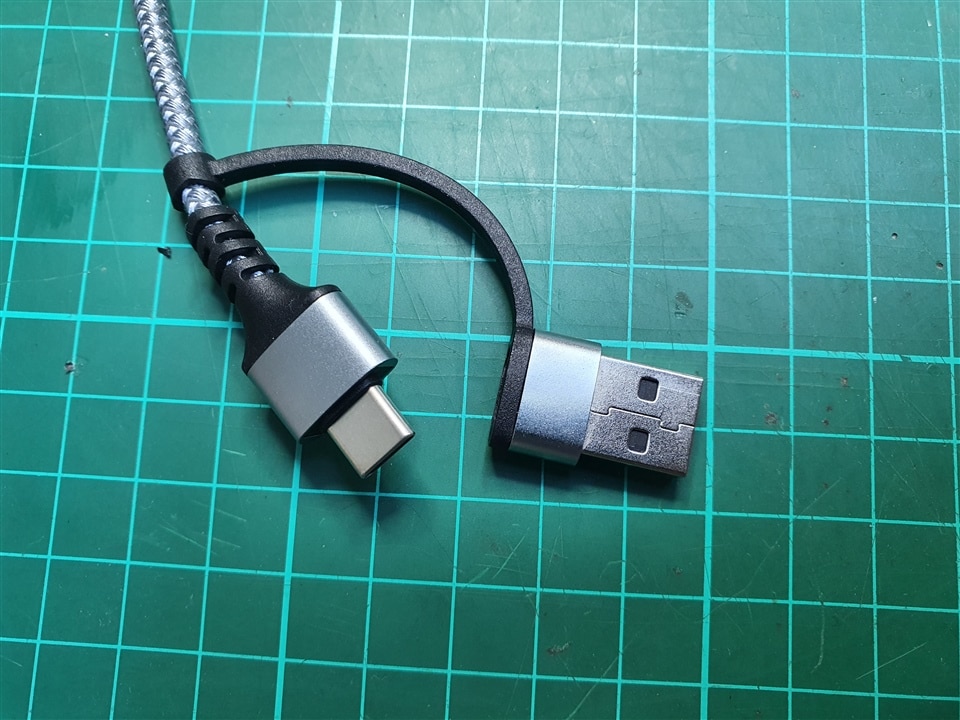
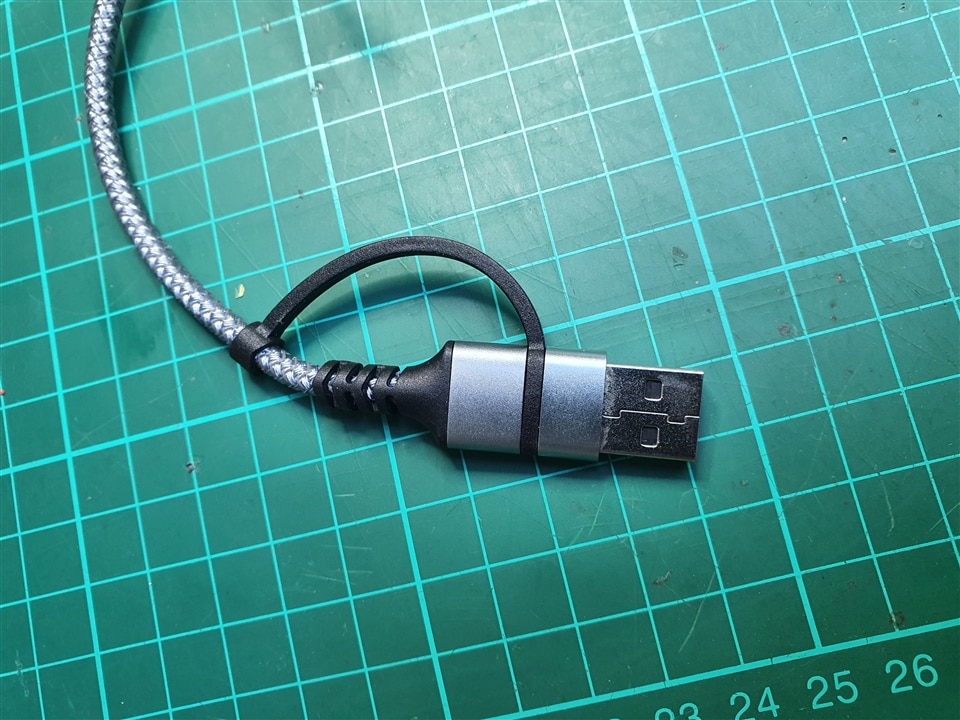
USB C to USB A/C cable
This cable is there to connect the R4 to the host computer. As it is braided, it should be more durable than the standard ones. Also, it quite cleverly contains an embedded A to C adapter on one end, catering for both computers that only have USB-C or more ancient USB-A plugs.
Modulino Distance
Based on the STMicro VL53L4CD or VL53L4ED TOF sensor, this gives very precise measurements up to 120 centimeters. It’s quite hard to see which one is installed on the modulino board but the library code manages the difference transparently for the end user.
https://www.st.com/en/imaging-and-photonics-solutions/vl53l4ed.html
Modulino Movement:
Based on the STMicro LSM6DO 6 axis IMU (inertial measurement unit), it gives fairly accurate acceleration and rotation measurements.
https://www.st.com/en/mems-and-sensors/lsm6dso.html
Modulino Thermo
Based on the Renesas HS300x temperature and humidity sensor
https://www.mouser.fr/new/renesas/idt-hs300-series-sensors/
Modulino Pixels
Eight RGB LEDS controlled via a STM32C011F6 microcontroller.
Looking at the datasheet for this part makes me think it’s quite an overkill of computation power for a simple I2C to switches bridge. That being said, it goes with the “almost all STMicro” approach and ensures there is a certain degree of consistency.
Modulino Knob
A knob that has 28 positions plus the ability to be pressed. Also controlled by a STM32C011F6 microcontroller.
Modulino Buzzer
A MEMS buzzer controlled by a STM32C011F6 microcontroller providing 8-bit style sound generation.
Modulino Buttons
Three buttons and three associated LEDs to allow users to provide input to a sketch. Also controlled by a STM32C011F6 microcontroller.
Qwiic cables
Those seven cables are the ones used to connect the modules to the R4 and between themselves in a daisy chain architecture.
All Quick connectors are orientated the same on all boards which avoids trying to find the right side to connect to. But the provided cables have opposite orientation connectors on their ends meaning the Modulinos will want to turn around at each connection in the daisy chain. Sure, the screws are here to help but when quickly testing, it’s getting in the way of all but the temperature module as can be seen on this picture where the pixels are face down for the knob to be usable.
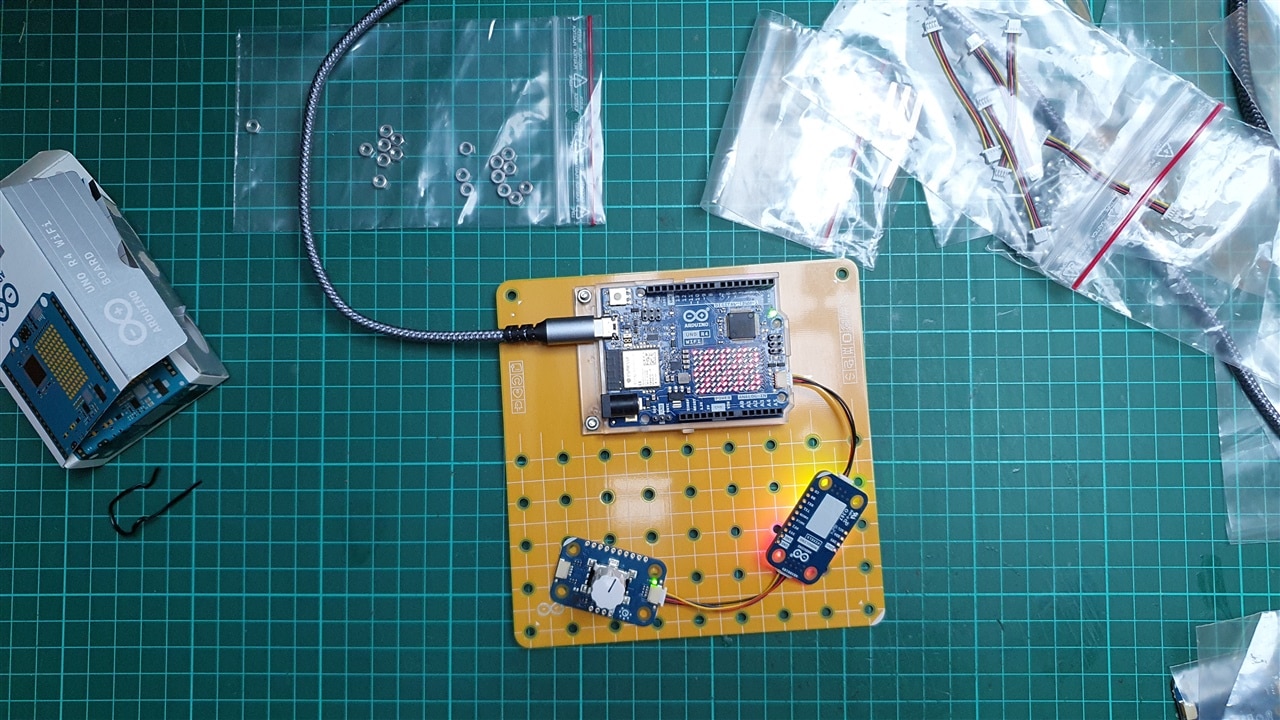
Twisting the cables and constraining them in place for a few weeks allows to give them a more sensible shape. Applying a little bit of heat at the center also allows to achieve the same result, in much less time, but beware of not completely melting the insulation.
Modulino Base
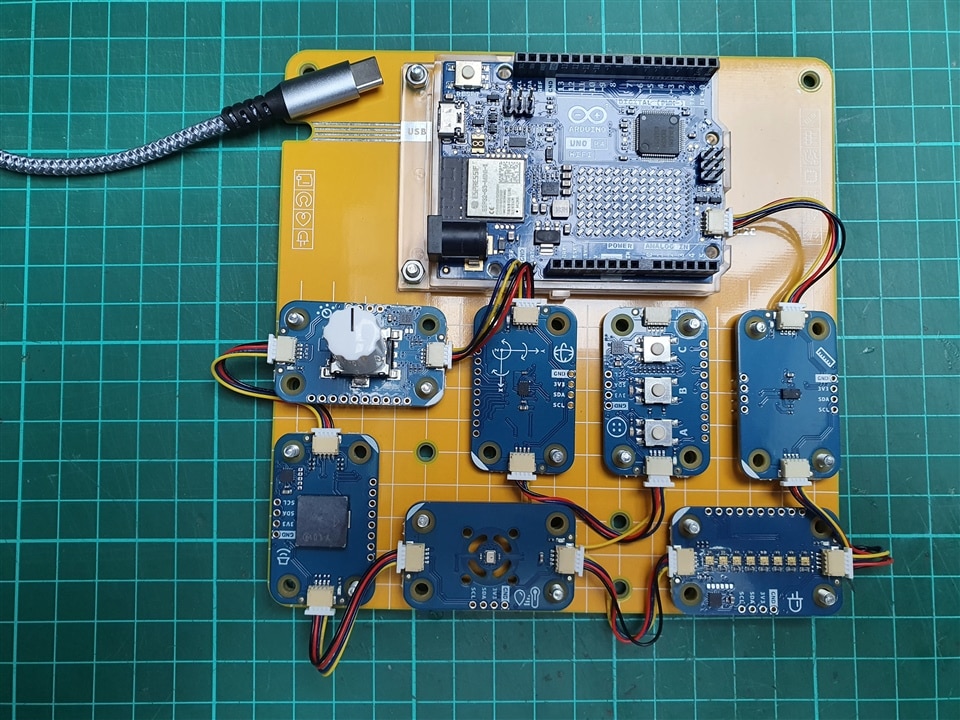
A large PCB plate without any traces but lots of holes that match the size of modulinos. Note that if you want to fit everything on the plate, you must be quite creative with placement, here is a possible solution:
Spacers, nuts and screws
There are also 4 spacers, 20 nuts and 24 screws to be used as a means to maintain the R4 and modulinos on the base board. The number of these seems a bit off at first but I believe the extra 4 screws are meant to be mated with spacers even if there aren’t many explanations about that.
Using screws is fine when doing a “final project” version and you don’t want anything to come loose, but for a beginner friendly approach, I believe a “click” approach would be easier. Something friction based, like toy bricks would be awesome, even more if it was compatible with the main brand in this domain.
To help get started with the kit, Arduino conveniently provides online courses here: https://courses.arduino.cc/plugandmake/fr/
Being a native French speaker, I appreciate that they are available in French. Sadly, they are clearly machine translated and not reviewed by a native speaker. It does the job though, at the cost of some strange “child-like” language and weird inconsistencies non-English speakers have come to get used to even if it makes us smile or cringe a little.
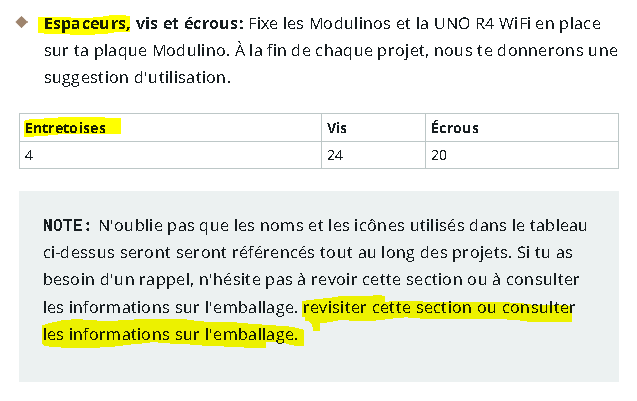
All those courses are done using Arduino Cloud with preconfigured cloud templates which are really easy to use and quite cleverly hide the fact that it’s actually compiling C++ code behind your back on the Arduino Cloud. The free plan with only two things and 25 compilations is barely enough for a demonstration, and clearly not enough when exploring with ideas.
The Arduino cloud templates for the Plug and Make kit all require Wi-Fi access and each time a new template is loaded, the network SSID and its associated password are required. This is troublesome enough when it’s printed on the back of the ISP router, but it’s even more problematic if you want your kid to work through them by themselves.
Indeed, I would not want to give the Wi-Fi password to freely use so as to avoid they pair other devices, let alone “leak” it to friends when they are over.
The same would be true in a class context, unless the teacher has enough accounts for all children and with the right plan to be able to import all templates beforehand which seems quite unlikely.
On top of that, having “cloud only” examples gives a false feeling that the device MUST be connected to a Wi-Fi network to function properly which is somewhat limiting in my view. Sure, it’s a discovery kit, but it would be nice to have it prominently indicated that you can create offline projects.
Creating animations for the R4 LED matrix could be quite tiresome, I have quite a lot of memories doing pixel art on a sheet of paper with 5x5 grid and coding it myself to an hex value. But luckily, there is a LED Matrix editor here: https://ledmatrix-editor.arduino.cc/
The getting started template showcases various possibilities by combining two or more modulinos, here are two examples:
A simple shooter game with gyroscope and buttons
Distance measurement and report with the TOF sensor and the LED bar
On top of this “show it all” project here are the other available more advanced courses:
The “eco watch” project (an others) highlights code that does this: if (variable == true)
This is a confusing code and should never be taught to beginners but rather the fact that variable is already a Boolean should be emphasized for the user to learn good practices from the get go. And it’s not even consistent as the “Game controller” project only does this once with if (a == true), but never explains why it works mater on with if (b).
I know it may sound futile to argue over code quality, but because this kit and its associated examples are targeted at beginners, I believe code quality should be part of the lessons learned from it.
Being an electronics tinkerer means that my kids have long been asking about what’s all those tiny things spread out on my desk. Lately we started working together on small projects, mostly soldering premade kits like a Christmas tree or a fidget spinner with LEDs.
Having access to the Arduino Plug and Make kit was the perfect opportunity to show them a more advanced version of electronics, something that they can program with some guidance at first, with the objective of being autonomous on that subject. And because they both are at the high school / junior high level, they have already been creating programs on their computers.
My 11 years old was the first to work with it and found it very impressive that it could sense orientation to create an interactive game on the led matrix. He loves pixel art and seeing the result on it was a nice thing for him.
What was an issue almost immediately are the Quick connectors. To him, they are too small, too firm to connect and disconnect, he was afraid of breaking them when trying various combinations. When asked about classroom usage, he said the connectors would only survive for an hour before being broken by repeated usage.
He did not use the Arduino cloud at all by himself because being not translated at all, using browser translation made it hard to get consistent results and understanding what’s happening.
While he admitted not knowing immediately what he could be using it for, I’m quite sure this will stay in a corner of his brain as he already talked about creating an alarm fitted to his door to ward off intruders (aka parents) from his bedroom.
My 14 years old was next and she immediately recognized the Uno format with a “hey, I’m using this at school for the robot project!”.
She felt right at home with the card and connectors even saying that while kids the age of her brother would surely destroy them, kids in her class are already working with tiny cables and things go smoothly.
She too said that having an English only Arduino Cloud is very annoying, and even if she did not detect the oddities in automatic translation as much as I did, she said that this was an obstacle when following the provided courses.
She was most impressed with the TOF device precision, saying that she would love to use it for the school robot because the ultrasonic one they use is slow and lacks precision. Avoiding walls being one of the main goals, this would make her life easier.
Using the C++ language felt quite foreign to her, up to the point where she lost interest in all the details when she would have much preferred using what she is already used to, which is mBlock: https://mblock.cc/
Others are also interested in using such a graphical approach to the point of asking for Uno R4 support: https://forum.makeblock.com/t/solved-does-arduino-uno-r4-wi-fi-work-with-mblock/23353
But at the time of writing this, no one came through with a solution.
Another potential solution would be to use Visuino: https://www.visuino.com/
While the R4 is supported out of the box, none of the Modulinos are, which makes it hard to create a startup project. I contacted the editors and they would be quite willing to add support for this, should they be provided with the hardware.
Having used the Arduino Plug and Make kit for the better of two months, I can say that it’s a very nice set of devices for a beginner to enter the wonderful world of programmable electronics. At a price point of nearly 100€, it makes for a not so affordable present but if you consider all the sensors available, it’s not unexpected to reach that price level.
The packaging feels too big for what’s inside. Maybe it gives a feeling of “value for money” but to me it’s more a waste of space when putting it back in its box until the next project.
The accompanying courses material is really interesting with different projects leveraging all the available sensors, even if the limits of free Arduino cloud subscription make for a more challenging experience.
As the source code is released publicly, one can review it to discover more details about the used components: https://github.com/arduino-libraries/Modulino/blob/main/src/Modulino.h
For instance, there is code to support for a Modulino using a LPS22HB barometer sensor from STMicro. It does not appear to be offered online, but support for it is there.
There is also a trace of a Modulino Light module, but this one is even more hidden as the supporting class is empty.
Targeted at humans 14 and older, its not so surprising that younger kids feel a bit lost faced with such a lot of possibilities in the kit. But to make it even easier to get onboard, special care should be given to translations in the supported language, connectors ease of use (more banana-style for instance) and support for tools used in the classroom such as mBlock. Maybe the Arduino company could devote a few days of work to adding R4 and modulino device support.
One way to make it easier to include in kids project could be to do away with screws and make the attachment method compatible with brick-based systems. Or simply publish the CAD files for the Modulino boards so that one could use them to create 3D printable adapters.
As a final word, and despite the remarks above, I find this kit to be of a very good quality for the money, especially for beginners who will get a very smooth learning curve when compared to other available options.
I hope you have enjoyed reading this review as much as I enjoyed working with the Arduino Plug and Make kit, do not hesitate to ask questions in the comments section if you need more details.


