element14 Community
element14 Community
    Register Log In
  • Site
  • Search
  • Log In Register
  • Community Hub
    Community Hub
    • What's New on element14
    • Feedback and Support
    • Benefits of Membership
    • Personal Blogs
    • Members Area
    • Achievement Levels
  • Learn
    Learn
    • Ask an Expert
    • eBooks
    • element14 presents
    • Learning Center
    • Tech Spotlight
    • STEM Academy
    • Webinars, Training and Events
    • Learning Groups
  • Technologies
    Technologies
    • 3D Printing
    • FPGA
    • Industrial Automation
    • Internet of Things
    • Power & Energy
    • Sensors
    • Technology Groups
  • Challenges & Projects
    Challenges & Projects
    • Design Challenges
    • element14 presents Projects
    • Project14
    • Arduino Projects
    • Raspberry Pi Projects
    • Project Groups
  • Products
    Products
    • Arduino
    • Avnet & Tria Boards Community
    • Dev Tools
    • Manufacturers
    • Multicomp Pro
    • Product Groups
    • Raspberry Pi
    • RoadTests & Reviews
  • About Us
  • Store
    Store
    • Visit Your Store
    • Choose another store...
      • Europe
      •  Austria (German)
      •  Belgium (Dutch, French)
      •  Bulgaria (Bulgarian)
      •  Czech Republic (Czech)
      •  Denmark (Danish)
      •  Estonia (Estonian)
      •  Finland (Finnish)
      •  France (French)
      •  Germany (German)
      •  Hungary (Hungarian)
      •  Ireland
      •  Israel
      •  Italy (Italian)
      •  Latvia (Latvian)
      •  
      •  Lithuania (Lithuanian)
      •  Netherlands (Dutch)
      •  Norway (Norwegian)
      •  Poland (Polish)
      •  Portugal (Portuguese)
      •  Romania (Romanian)
      •  Russia (Russian)
      •  Slovakia (Slovak)
      •  Slovenia (Slovenian)
      •  Spain (Spanish)
      •  Sweden (Swedish)
      •  Switzerland(German, French)
      •  Turkey (Turkish)
      •  United Kingdom
      • Asia Pacific
      •  Australia
      •  China
      •  Hong Kong
      •  India
      • Japan
      •  Korea (Korean)
      •  Malaysia
      •  New Zealand
      •  Philippines
      •  Singapore
      •  Taiwan
      •  Thailand (Thai)
      • Vietnam
      • Americas
      •  Brazil (Portuguese)
      •  Canada
      •  Mexico (Spanish)
      •  United States
      Can't find the country/region you're looking for? Visit our export site or find a local distributor.
  • Translate
  • Profile
  • Settings
Community Hub
Community Hub
Member's Forum USB 3.x Type-C Switch (KVM type) - Design Review
  • Blog
  • Forum
  • Documents
  • Quiz
  • Events
  • Leaderboard
  • Polls
  • Files
  • Members
  • Mentions
  • Sub-Groups
  • Tags
  • More
  • Cancel
  • New
Join Community Hub to participate - click to join for free!
Actions
  • Share
  • More
  • Cancel
Forum Thread Details
  • Replies 6 replies
  • Subscribers 565 subscribers
  • Views 890 views
  • Users 0 members are here
  • usb3
Related

USB 3.x Type-C Switch (KVM type) - Design Review

Attila Tőkés
Attila Tőkés over 4 years ago

Hi,


I'm designing an open-source USB 3.x Type-C (KVM) Switch, and I'm looking for some feedback on the design I came up with.


The USB 3.x Type-C (KVM) Switch will be the modern version of a traditional KVM Switch, meant to work with modern USB Type-C capable monitors like the Dell P2720DC.


These monitors can use a single USB Type-C cable to carry a high resolution video signal, USB data signals and are also capable of charging connected devices using USB Power Delivery.


Usually there is just a single USB Type-C input available, and as I have multiple devices I started looking for USB Type-C switches. It turned out there are not too many options available, and all are like super expensive ($100+). So, I decided to try to design one.


The device will have the following features:

  • two USB 3.x Type-C Input ports
  • one USB 3.x Type-C Output port
  • switching of all four USB 3.x SuperSpeed differential pairs
  • switching of the USB 2.x HighSpeed differential pair
  • switching of the Configuration (CC) and Sideband use (SBU) channels
  • USB Power Delivery pass-through up to the full power range 20V @ 5A
  • reasonable cost


In terms of design, I think we should have the following sections:

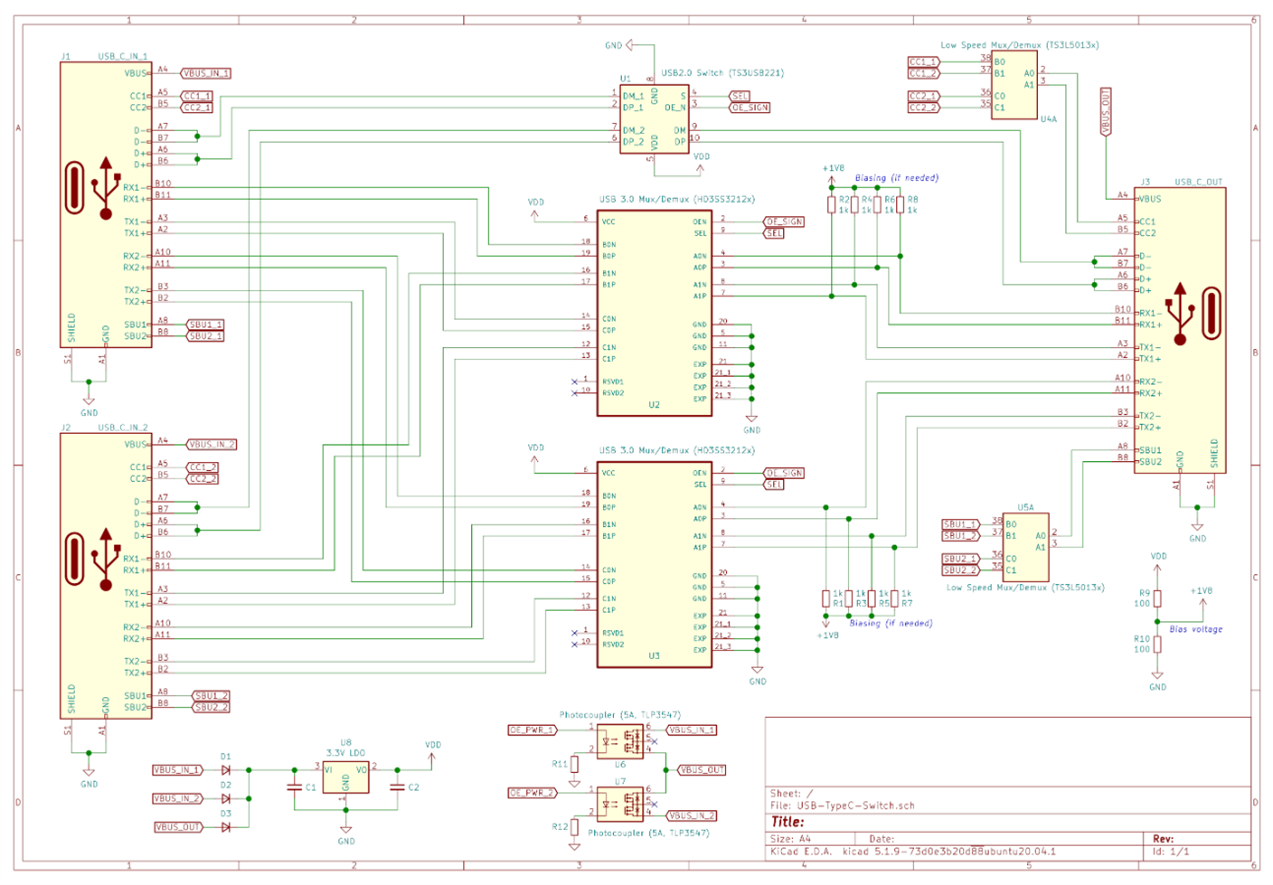
  • USB 3.x SuperSpeed differential pair switching
    • with high bandwidth (5-10 GHz) analog multiplexers / de-multiplexers designed for differential signals
    • best candidates are Texas Instruments HD3SS3212, or ON Semi FUSB340TMX
    • biasing on the differential lines may be needed


  • USB 2.x HighSpeed differential switching
    • can be done using IC-s designed for USB 2.0 switching
    • there are lot of options, ex. Texas Instruments TS3USB221 - I will probably choose one based on price and availability

  • switching of auxiliary Configuration (CC) and Sideband use (SBU) signals
    • these are supposed to be low speed and voltage signals
    • can be switched with any analog multiplexers / de-multiplexers, ex. Texas Instruments TS3A44159


  • switching of the VBus power signal
    • this is trickier as with USB Power Delivery the voltage can go up to 20V @ 5A, and the power can be provided either by the input or output port
    • can be done using high power photocouplers, like the Toshiba TLP3547
    • the disadvantage is that this high power photocouplers are super expensive - probably it can be done easier and I'm just over-complicating it (?)

  • 3.3V power supply
    • combine the VBus signal of the three USB Type-C connectors with diodes
    • use a LDO regulator to generate the 3.3V power rail


  • Microcontroller and I/O
    • something Arduino compatible, maybe an SMT32
    • not yet included in the schematics
    • control by a button, and feedback by one or more LED-s


Here is the first version of the schematic I came up with:
image

The PCB probably will be a 4-layer one. I also thought to try (just for fun) a 2-layer PCB with a shielding provided by an aluminium casing.


So, I wanted to ask what do you think about this design?


Do you see anything terrible wrong with it? What are the parts of the design that can be improved?


Thanks,

Attila

  • Sign in to reply
  • Cancel

Top Replies

  • wolfgangfriedrich
    wolfgangfriedrich over 4 years ago +1
    Hello Attila Attila Tőkés , Running the SBU signals through a low-speed switch might cause some signal integrity issues, as there are applications that use the SBU for high speed USB. Not necessarily in…
  • Attila Tőkés
    Attila Tőkés over 4 years ago in reply to wolfgangfriedrich +1
    Good addition wolfgangfriedrich . I can definitely use an USB 2.0 High Speed switch for SBU signals. Thanks!
Parents
  • shabaz
    shabaz over 4 years ago

    Hi Attila,


    I have not worked with USB type C, however one limiting factor I've found with Dell monitors, is that the amount of power delivery is limited. So, if you have a PC that requires a lot more power, you could find that the PC runs in a more limited way. It might be good to be able to optionally disable the power delivery, since not all monitors or PCs will allow it to be disabled from being supplied, or used.

    • Cancel
    • Vote Up 0 Vote Down
    • Sign in to reply
    • Cancel
  • Attila Tőkés
    Attila Tőkés over 4 years ago in reply to shabaz

    Hi shabarinath,


    The Dell P2720DC I use is capable to deliver up to 65W. You can run on most of mid-range laptops on this, and even higher power ones if not running compute intensive tasks continuously. If more power is needed at a certain time, the battery capacity can be used to deliver the needed power. For continuous compute intensive tasks an appropriate power adapter may be needed, as with running from USB Type-C + battery will end up draining the battery capacity after a certain time.


    For example I use the Dell P2720DC monitor with a Latitude 7400 laptop, which also comes with a 65W power adapter. It is very convenient as I have display, keyboard, mouse and power connected with just a single USB Type-C cable. The 65W provided by the USB Type-C is enough to keep the battery full 99% of the time. Even when running compute intensive tasks, on this compact laptops usually the thermals end being the limiting factor.


    Cheers,

    Attila

    • Cancel
    • Vote Up 0 Vote Down
    • Sign in to reply
    • Cancel
  • shabaz
    shabaz over 4 years ago in reply to Attila Tőkés

    Hi Attila,


    Sure, but some laptops require 100W or upward, especially those with a separate GPU (probably most gaming laptops? just guessing). Not all will allow separate supply if the USB C is supplying power, and as you say, then the battery will need to kick in each time the drain exceeds 65W.

    By the way, keeping the battery at 99% isn't healthy, but that's another story.. some laptops have a setting in their BIOS to configure for a lower setting, more suited for when deploying external displays with laptops, i.e. when people are not traveling much with their laptops, like now I guess : (

    I'm not a target user for this KVM board, I'm just suggesting that some flexibility may be needed otherwise it could end up catering for just one use-case.

    • Cancel
    • Vote Up 0 Vote Down
    • Sign in to reply
    • Cancel
Reply
  • shabaz
    shabaz over 4 years ago in reply to Attila Tőkés

    Hi Attila,


    Sure, but some laptops require 100W or upward, especially those with a separate GPU (probably most gaming laptops? just guessing). Not all will allow separate supply if the USB C is supplying power, and as you say, then the battery will need to kick in each time the drain exceeds 65W.

    By the way, keeping the battery at 99% isn't healthy, but that's another story.. some laptops have a setting in their BIOS to configure for a lower setting, more suited for when deploying external displays with laptops, i.e. when people are not traveling much with their laptops, like now I guess : (

    I'm not a target user for this KVM board, I'm just suggesting that some flexibility may be needed otherwise it could end up catering for just one use-case.

    • Cancel
    • Vote Up 0 Vote Down
    • Sign in to reply
    • Cancel
Children
  • Attila Tőkés
    Attila Tőkés over 4 years ago in reply to shabaz

    Yeah, gaming laptop can have some crazy power requirements and adapters. I'm not suggesting powering those from USB Type-C. image


    Also, this USB 3.x Type-C Switch will not require in any means to use USB Power Delivery. Is up to the negotiation between the input and output device, if Power Delivery is used or not.


    But as the switch will be more like a passive switch, it kind of needs to support pass-through of USB Power Delivery. Otherwise, if an input device and an output device ends up negotiating Power Delivery at the maximum 100W (20V @ 5A), and the switch may just end-up blowing up image, if it is not designed to handle this kind of voltage and amperage.

    • Cancel
    • Vote Up 0 Vote Down
    • Sign in to reply
    • Cancel
element14 Community

element14 is the first online community specifically for engineers. Connect with your peers and get expert answers to your questions.

  • Members
  • Learn
  • Technologies
  • Challenges & Projects
  • Products
  • Store
  • About Us
  • Feedback & Support
  • FAQs
  • Terms of Use
  • Privacy Policy
  • Legal and Copyright Notices
  • Sitemap
  • Cookies

An Avnet Company © 2025 Premier Farnell Limited. All Rights Reserved.

Premier Farnell Ltd, registered in England and Wales (no 00876412), registered office: Farnell House, Forge Lane, Leeds LS12 2NE.

ICP 备案号 10220084.

Follow element14

  • X
  • Facebook
  • linkedin
  • YouTube