element14 Community
element14 Community
    Register Log In
  • Site
  • Search
  • Log In Register
  • Community Hub
    Community Hub
    • What's New on element14
    • Feedback and Support
    • Benefits of Membership
    • Personal Blogs
    • Members Area
    • Achievement Levels
  • Learn
    Learn
    • Ask an Expert
    • eBooks
    • element14 presents
    • Learning Center
    • Tech Spotlight
    • STEM Academy
    • Webinars, Training and Events
    • Learning Groups
  • Technologies
    Technologies
    • 3D Printing
    • FPGA
    • Industrial Automation
    • Internet of Things
    • Power & Energy
    • Sensors
    • Technology Groups
  • Challenges & Projects
    Challenges & Projects
    • Design Challenges
    • element14 presents Projects
    • Project14
    • Arduino Projects
    • Raspberry Pi Projects
    • Project Groups
  • Products
    Products
    • Arduino
    • Avnet & Tria Boards Community
    • Dev Tools
    • Manufacturers
    • Multicomp Pro
    • Product Groups
    • Raspberry Pi
    • RoadTests & Reviews
  • About Us
  • Store
    Store
    • Visit Your Store
    • Choose another store...
      • Europe
      •  Austria (German)
      •  Belgium (Dutch, French)
      •  Bulgaria (Bulgarian)
      •  Czech Republic (Czech)
      •  Denmark (Danish)
      •  Estonia (Estonian)
      •  Finland (Finnish)
      •  France (French)
      •  Germany (German)
      •  Hungary (Hungarian)
      •  Ireland
      •  Israel
      •  Italy (Italian)
      •  Latvia (Latvian)
      •  
      •  Lithuania (Lithuanian)
      •  Netherlands (Dutch)
      •  Norway (Norwegian)
      •  Poland (Polish)
      •  Portugal (Portuguese)
      •  Romania (Romanian)
      •  Russia (Russian)
      •  Slovakia (Slovak)
      •  Slovenia (Slovenian)
      •  Spain (Spanish)
      •  Sweden (Swedish)
      •  Switzerland(German, French)
      •  Turkey (Turkish)
      •  United Kingdom
      • Asia Pacific
      •  Australia
      •  China
      •  Hong Kong
      •  India
      • Japan
      •  Korea (Korean)
      •  Malaysia
      •  New Zealand
      •  Philippines
      •  Singapore
      •  Taiwan
      •  Thailand (Thai)
      • Vietnam
      • Americas
      •  Brazil (Portuguese)
      •  Canada
      •  Mexico (Spanish)
      •  United States
      Can't find the country/region you're looking for? Visit our export site or find a local distributor.
  • Translate
  • Profile
  • Settings
1 Meter of Pi
  • Challenges & Projects
  • Design Challenges
  • 1 Meter of Pi
  • More
  • Cancel
1 Meter of Pi
Blog Blog 4 for 1 Meter of Pi
  • Blog
  • Forum
  • Documents
  • Polls
  • Files
  • Events
  • Mentions
  • Sub-Groups
  • Tags
  • More
  • Cancel
  • New
  • Share
  • More
  • Cancel
Group Actions
  • Group RSS
  • More
  • Cancel
Engagement
  • Author Author: hugohu
  • Date Created: 1 Dec 2020 3:34 AM Date Created
  • Views 589 views
  • Likes 3 likes
  • Comments 2 comments
Related
Recommended

Blog 4 for 1 Meter of Pi

hugohu
hugohu
1 Dec 2020

Ok! My procrastination has lead to me not doing anything.


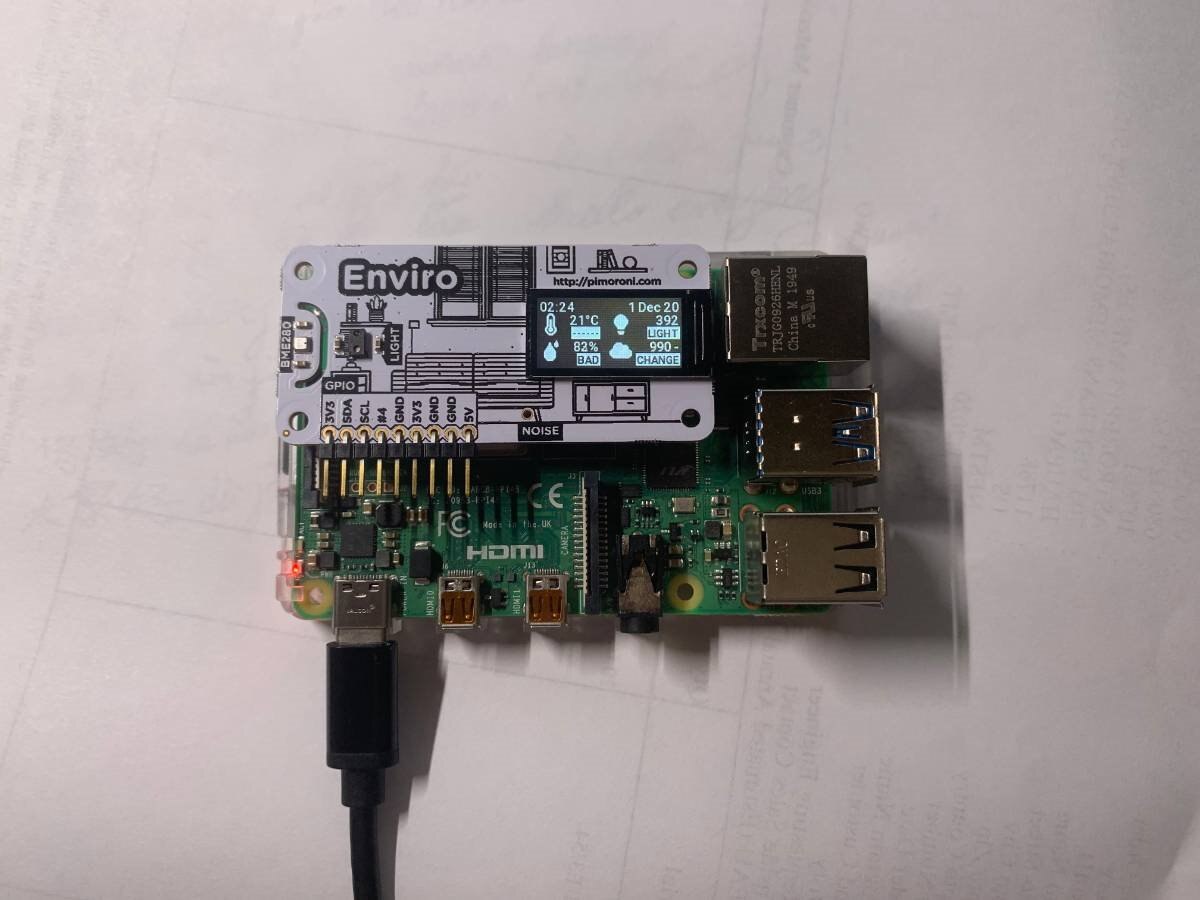
Well, I managed to get the Enviro hat to work. This blog will document my progress.


Initially:


I didn't have a HDMI monitor free, I had a Raspberry PI Foundation 7" touchscreen, but didn't really use it. I just used it to check the IP address and unplugged.


This is using SSH. SSH by default is disabled on the Pi. You must go to pi configuration and set it to on, and then reboot.


Here is how to connect to the Pi via SSH on a Mac(I'm using a Mac so this is how I do it, not sure for other OS but I suspect Linux is similar)

ssh pi@10.0.1.62


Note: after the @, it's your pi's IP. The example was the IP my Pi had.


It will ask you for a password for the pi @ (IP). By default the password is "raspberry".


I'm no python expert, I'm using the pre-made examples which I find to be suitable for my case.


First, in the terminal, type:


git clone https://github.com/pimoroni/enviroplus-python
cd enviroplus-python
sudo ./install.sh


For people not familiar with terminal executions, git clone is to "clone" or basically download a repository from GitHub. The link is the location of the repository which includes all necessary libraries, examples, and configuration settings.


"CD" means "change directory". This means that you'll change your current directory to the one after, which is enviroplus-python.


Lastly, it's installing some script files.


Now, type in this:


cd examples
ls


We are switching our directory to examples, which is inside enviroplus-python.


"Ls" is to "look" inside this directory to see what is inside.


There are a few examples. To run them,


python (filename)


Some may require python version 3. Instead, type


python3 (filename)


I'm using the "weather-and-light.py" example. This is a premed one that shows quite a lot of sensor data, together on the 0.96 display.


The command:


python3 weather-and-light.py


I used python3- this file requires python 3.


I honestly did this before and it didn't work. If it doesn't work for you, tag me in the comments and I'll be happy to troubleshoot with you. I can even install a fresh copy of raspbian on another pi 4 to try and find your issue, and to troubleshoot.


Now, here's the working example!
 

image


Additionally, here is a video I made.


You don't have permission to edit metadata of this video.
Edit media
x
image
Upload Preview
image


Hmm, is the video loading?


Note: I'm not using the raspberry pi provided as part of the hardware. I already have 2 opened Pi 4GBs(so this satisfies the 2Gb requirement of contest), and I hope this doesn't disqualify me. (Contest Pi is unopened since I don't need it opened at this moment.)

  • Sign in to reply

Top Comments

  • ajcc
    ajcc over 5 years ago +1
    That's a great start!
  • hugohu
    hugohu over 5 years ago in reply to ajcc +1
    Thank you! Sorry, I forgot to ping you last night.
Parents
  • ajcc
    ajcc over 5 years ago

    That's a great start!

    • Cancel
    • Vote Up +1 Vote Down
    • Sign in to reply
    • More
    • Cancel
Comment
  • ajcc
    ajcc over 5 years ago

    That's a great start!

    • Cancel
    • Vote Up +1 Vote Down
    • Sign in to reply
    • More
    • Cancel
Children
  • hugohu
    hugohu over 5 years ago in reply to ajcc

    Thank you! Sorry, I forgot to ping you last night.

    • Cancel
    • Vote Up +1 Vote Down
    • Sign in to reply
    • More
    • Cancel
element14 Community

element14 is the first online community specifically for engineers. Connect with your peers and get expert answers to your questions.

  • Members
  • Learn
  • Technologies
  • Challenges & Projects
  • Products
  • Store
  • About Us
  • Feedback & Support
  • FAQs
  • Terms of Use
  • Privacy Policy
  • Legal and Copyright Notices
  • Sitemap
  • Cookies

An Avnet Company © 2025 Premier Farnell Limited. All Rights Reserved.

Premier Farnell Ltd, registered in England and Wales (no 00876412), registered office: Farnell House, Forge Lane, Leeds LS12 2NE.

ICP 备案号 10220084.

Follow element14

  • X
  • Facebook
  • linkedin
  • YouTube