


Hi all ! Hope everyone is safe and sound !
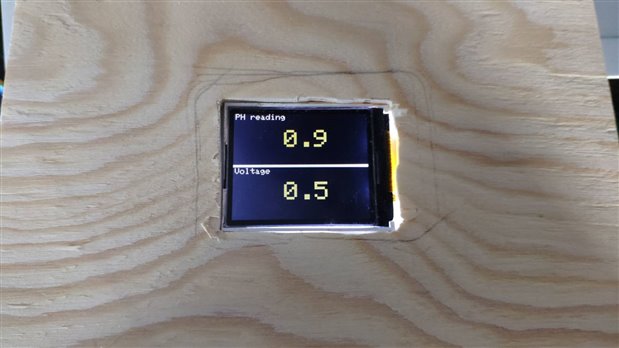
This post is just to share the contraption I made to read the PH level of the water. Because the PH sensor cannot stay in water for long - like the TDS sensor - I've build a small contraption to read the PH level and display it in a TFT screen I had laying around.
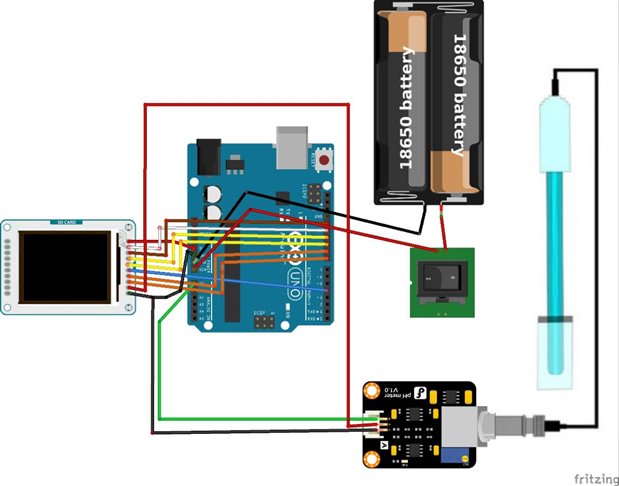
Here's the schematics of the build:
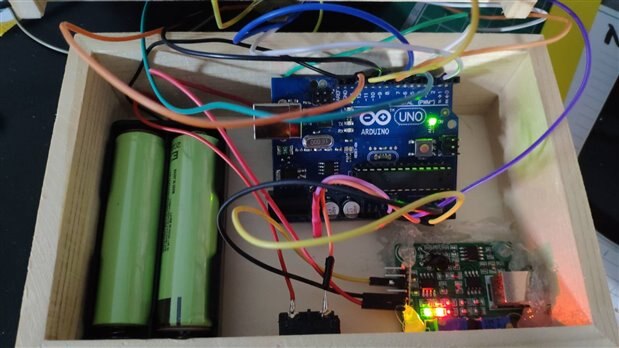
The build is nothing fancy - a small wooden box with holes to the power button



Code
To be able to use the PH sensor, it had to be calibrated. Using a PH 7.0 solution just for these purpose, I was able to calibrate it .
Note: The following code is not mine. I've taken it from https://scidle.com/how-to-use-a-ph-sensor-with-arduino/ . It works very well. In the second listing, I've just altered the code to be used with the TFT screen.
Here's the code used for calibration.
/*
 # This sample code is used to test the pH meter V1.0.
 # Editor : YouYou
 # Ver    : 1.0
 # Product: analog pH meter
 # SKU    : SEN0161
*/
#define SensorPin A0            //pH meter Analog output to Arduino Analog Input 0
#define Offset -1.18            //deviation compensate
#define LED 13
#define samplingInterval 20
#define printInterval 800
#define ArrayLenth  40    //times of collection
int pHArray[ArrayLenth];   //Store the average value of the sensor feedback
int pHArrayIndex=0;
void setup(void) {
    pinMode(LED,OUTPUT);
    Serial.begin(9600);
    Serial.println("pH meter experiment!");    //Test the serial monitor
}

void loop(void) {
    static unsigned long samplingTime = millis();
    static unsigned long printTime = millis();
    static float pHValue,voltage;
    if(millis()-samplingTime > samplingInterval) {
        pHArray[pHArrayIndex++]=analogRead(SensorPin);
        if(pHArrayIndex==ArrayLenth)pHArrayIndex=0;
            voltage = avergearray(pHArray, ArrayLenth)*5.0/1024;
        pHValue = 3.5*voltage+Offset;
        samplingTime=millis();
    }
    if(millis() - printTime > printInterval) {  //Every 800 milliseconds, print a numerical, convert the state of the LED indicator
        Serial.print("Voltage:");
        Serial.print(voltage,2);
        Serial.print("    pH value: ");
        Serial.println(pHValue,2);
        digitalWrite(LED,digitalRead(LED)^1);
        printTime=millis();
    }
}

double avergearray(int* arr, int number) {
    int i;
    int max,min;
    double avg;
    long amount=0;
    if (number<=0) {
        Serial.println("Error number for the array to avraging!/n");
        return 0;
    }
    if (number<5) {   //less than 5, calculated directly statistics
        for(i=0;i<number;i++) {
            amount+=arr[i];
        }
        avg = amount/number;
        return avg;
    } else {
        if (arr[0]<arr[1]) {
            min = arr[0];max=arr[1];
        }
        else {
            min=arr[1];max=arr[0];
        }
        for(i=2;i<number;i++) {
            if (arr[i]<min) {
                amount+=min;        //arr<min
                min=arr[i];
            } else {
                if (arr[i]>max) {
                    amount+=max;    //arr>max
                    max=arr[i];
                } else {
                    amount+=arr[i]; //min<=arr<=max
                }
            }//if
        }//for
        avg = (double)amount/(number-2);
    } //if
    return avg;
}
Basically what the codes does is takes 40 samples in a question of milliseconds and shows the average value.
Now here's the code adapted for the LCD and with the offset necessary after calibration.
/*
 # Measure PH level
 # Editor : Feiticeir0
 # Ver    : 1.0
 # Product: analog pH meter

*/
#include <SPI.h>
#include <TFT.h>

//TFT PINS
#define cs 10
#define dc 9
#define reset 8

TFT tftScreen = TFT (cs, dc, reset);

#define SensorPin A0            //pH meter Analog output to Arduino Analog Input 0
#define Offset -1.18            //deviation compensate
#define LED 13
#define samplingInterval 20
#define printInterval 800
#define ArrayLenth  40    //times of collection

int pHArray[ArrayLenth];   //Store the average value of the sensor feedback
int pHArrayIndex=0;

char vprint[4];
char pprint[4];

void setup(void) {
    pinMode(LED,OUTPUT);
    Serial.begin(9600);

    /* dont have more 5v outputs.. TEMP */
    pinMode (7, OUTPUT);
    digitalWrite(7,HIGH);
    tftScreen.begin();
    tftScreen.background(0,0,0); // clear the screen

    tftScreen.setTextSize(1);
    //line split voltage and PH
    tftScreen.stroke(255,255,255);
    //tftScreen.line(0,64,160,64);
    tftScreen.fill(255,255,255);
    tftScreen.rect(0,63,160,3);
    tftScreen.text("PH reading ",2,0);
    tftScreen.text("Voltage ",2,67);
    tftScreen.setTextSize(3);
}
void loop(void) {
    static unsigned long samplingTime = millis();
    static unsigned long printTime = millis();
    static float pHValue,voltage;
    if (millis() - samplingTime > samplingInterval) {
        pHArray[pHArrayIndex++]=analogRead(SensorPin);
        if (pHArrayIndex==ArrayLenth)
            pHArrayIndex = 0;
        voltage = avergearray(pHArray, ArrayLenth)*5.0/1024;
        pHValue = 3.5*voltage+Offset;
        samplingTime=millis();
    }
    if (millis() - printTime > printInterval) {   //Every 800 milliseconds, print a numerical, convert the state of the LED indicator
        String volts = String(voltage);
        String ph = String(pHValue);
        volts.toCharArray(vprint,4);
        ph.toCharArray(pprint,4);
        tftScreen.stroke(255,255,0);
        tftScreen.text(vprint, 60,84);
        tftScreen.text(pprint, 60,20);
        delay(500);
        //set to black to erase
        tftScreen.stroke(0,0,0);
        tftScreen.text(vprint, 60, 84);
        tftScreen.text(pprint, 60,20);
        //digitalWrite(LED,digitalRead(LED)^1);
        printTime = millis();
    }
}


double avergearray(int* arr, int number){
    int i;
    int max,min;
    double avg;
    long amount=0;
    if (number<=0) {
        Serial.println("Error number for the array to avraging!/n");
        return 0;
    }
    if (number<5) {   //less than 5, calculated directly statistics
        for(i=0;i<number;i++) {
            amount+=arr[i];
        }
    avg = amount/number;
    return avg;
    } else {
        if(arr[0]<arr[1]) {
            min = arr[0];max=arr[1];
        }
        else {
            min=arr[1];max=arr[0];
        }
        for(i=2;i<number;i++) {
            if(arr[i]<min) {
                amount+=min;        //arr<min
                min=arr[i];
            } else {
                if (arr[i]>max) {
                    amount+=max;    //arr>max
                    max=arr[i];
                } else {
                    amount+=arr[i]; //min<=arr<=max
                }
            } //if
        } //for
        avg = (double)amount/(number-2);
    }//if
    return avg;
}
With this, I'm able to use the sensor anytime !
Happy coding.
Top Comments