element14 Community
element14 Community
    Register Log In
  • Site
  • Search
  • Log In Register
  • Community Hub
    Community Hub
    • What's New on element14
    • Feedback and Support
    • Benefits of Membership
    • Personal Blogs
    • Members Area
    • Achievement Levels
  • Learn
    Learn
    • Ask an Expert
    • eBooks
    • element14 presents
    • Learning Center
    • Tech Spotlight
    • STEM Academy
    • Webinars, Training and Events
    • Learning Groups
  • Technologies
    Technologies
    • 3D Printing
    • FPGA
    • Industrial Automation
    • Internet of Things
    • Power & Energy
    • Sensors
    • Technology Groups
  • Challenges & Projects
    Challenges & Projects
    • Design Challenges
    • element14 presents Projects
    • Project14
    • Arduino Projects
    • Raspberry Pi Projects
    • Project Groups
  • Products
    Products
    • Arduino
    • Avnet & Tria Boards Community
    • Dev Tools
    • Manufacturers
    • Multicomp Pro
    • Product Groups
    • Raspberry Pi
    • RoadTests & Reviews
  • About Us
  • Store
    Store
    • Visit Your Store
    • Choose another store...
      • Europe
      •  Austria (German)
      •  Belgium (Dutch, French)
      •  Bulgaria (Bulgarian)
      •  Czech Republic (Czech)
      •  Denmark (Danish)
      •  Estonia (Estonian)
      •  Finland (Finnish)
      •  France (French)
      •  Germany (German)
      •  Hungary (Hungarian)
      •  Ireland
      •  Israel
      •  Italy (Italian)
      •  Latvia (Latvian)
      •  
      •  Lithuania (Lithuanian)
      •  Netherlands (Dutch)
      •  Norway (Norwegian)
      •  Poland (Polish)
      •  Portugal (Portuguese)
      •  Romania (Romanian)
      •  Russia (Russian)
      •  Slovakia (Slovak)
      •  Slovenia (Slovenian)
      •  Spain (Spanish)
      •  Sweden (Swedish)
      •  Switzerland(German, French)
      •  Turkey (Turkish)
      •  United Kingdom
      • Asia Pacific
      •  Australia
      •  China
      •  Hong Kong
      •  India
      •  Korea (Korean)
      •  Malaysia
      •  New Zealand
      •  Philippines
      •  Singapore
      •  Taiwan
      •  Thailand (Thai)
      • Americas
      •  Brazil (Portuguese)
      •  Canada
      •  Mexico (Spanish)
      •  United States
      Can't find the country/region you're looking for? Visit our export site or find a local distributor.
  • Translate
  • Profile
  • Settings
1 Meter of Pi
  • Challenges & Projects
  • Design Challenges
  • 1 Meter of Pi
  • More
  • Cancel
1 Meter of Pi
Blog The Saviour - #3 Getting Started with The Kit
  • Blog
  • Forum
  • Documents
  • Polls
  • Files
  • Events
  • Mentions
  • Sub-Groups
  • Tags
  • More
  • Cancel
  • New
  • Share
  • More
  • Cancel
Group Actions
  • Group RSS
  • More
  • Cancel
Engagement
  • Author Author: ajayvishaal
  • Date Created: 30 Dec 2020 7:29 PM Date Created
  • Views 309 views
  • Likes 3 likes
  • Comments 0 comments
Related
Recommended

The Saviour - #3 Getting Started with The Kit

ajayvishaal
ajayvishaal
30 Dec 2020

    We've already taken a look into the contents of the challenger kit. Now lets get started with the components of the kit.

image

Getting Started with Raspberry Pi 4:

        Before getting started we need some hardware and software components, they are:

     Hardware:

  •           Raspberry Pi 4
  •           Micro SD card
  •           Monitor and an HDMI cable
  •           USB keyboard and mouse
  •           Power supply

     Software:

  •           Raspberry Pi OS written in SD card

                    Just insert the SD card with OS into the Raspberry Pi SD card slot and power on the Pi the Pi will automatically boot the OS and now you can use the Pi. This is a basic setup guide. However we'll be using a Headless setup for setting up the raspberry pi, Since the board will be placed in our robot, We need VNC or SSH setup. That will be discussed later. Now we have completed booting our Pi.


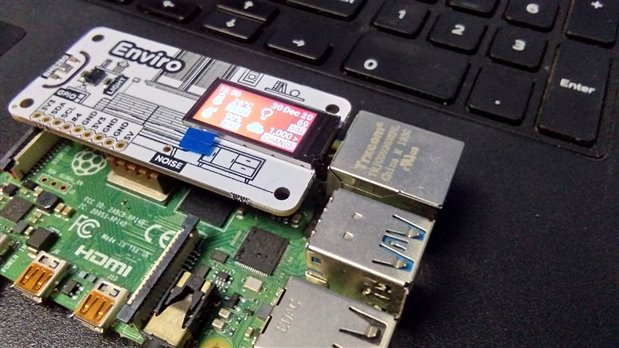
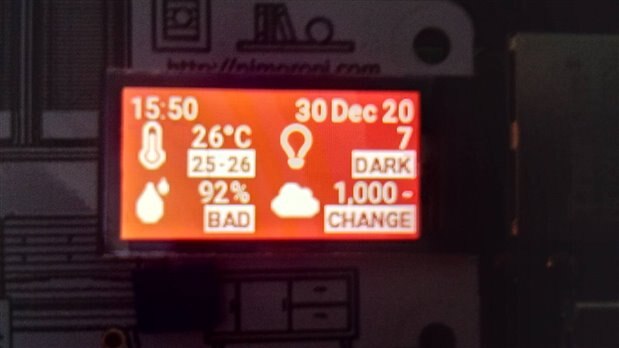
Getting Started with Pimoroni Enviro Hat:

          To get started with the Enviro hat first open the terminal by entering

Ctrl + Alt + T

Now the terminal opens up. Clone the Enviro hat examples repository into the Pi using the Command,

git clone https://github.com/pimoroni/enviroplus-python.git

Now enter into the examples directory and run any of the example.

cd enviroplus-python/examples/

python <example>.py


{gallery}Enviro Hat

image

image

image

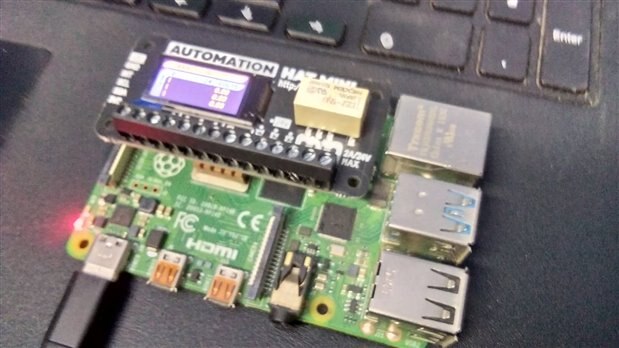
Getting Started With Pimoron Automation Hat Mini:


          To get started with the Automation Hat Mini first open the terminal by entering

Ctrl + Alt + T

Now the terminal opens up. Clone the Automation Hat Mini examples repository into the Pi using the Command,

git clone https://github.com/pimoroni/automation-hat.git

Now enter into the examples directory and run the example by using the command,

cd automation-hat/examples/hat-mini/

python <example>.py


{gallery}Automation Hat Mini

image

image

image

          Hope you all enjoyed my blog. In the next blog I'll be sharing about the hardware components required to build The Saviour.

  • Sign in to reply
element14 Community

element14 is the first online community specifically for engineers. Connect with your peers and get expert answers to your questions.

  • Members
  • Learn
  • Technologies
  • Challenges & Projects
  • Products
  • Store
  • About Us
  • Feedback & Support
  • FAQs
  • Terms of Use
  • Privacy Policy
  • Legal and Copyright Notices
  • Sitemap
  • Cookies

An Avnet Company © 2025 Premier Farnell Limited. All Rights Reserved.

Premier Farnell Ltd, registered in England and Wales (no 00876412), registered office: Farnell House, Forge Lane, Leeds LS12 2NE.

ICP 备案号 10220084.

Follow element14

  • X
  • Facebook
  • linkedin
  • YouTube