element14 Community
element14 Community
    Register Log In
  • Site
  • Search
  • Log In Register
  • Community Hub
    Community Hub
    • What's New on element14
    • Feedback and Support
    • Benefits of Membership
    • Personal Blogs
    • Members Area
    • Achievement Levels
  • Learn
    Learn
    • Ask an Expert
    • eBooks
    • element14 presents
    • Learning Center
    • Tech Spotlight
    • STEM Academy
    • Webinars, Training and Events
    • Learning Groups
  • Technologies
    Technologies
    • 3D Printing
    • FPGA
    • Industrial Automation
    • Internet of Things
    • Power & Energy
    • Sensors
    • Technology Groups
  • Challenges & Projects
    Challenges & Projects
    • Design Challenges
    • element14 presents Projects
    • Project14
    • Arduino Projects
    • Raspberry Pi Projects
    • Project Groups
  • Products
    Products
    • Arduino
    • Avnet & Tria Boards Community
    • Dev Tools
    • Manufacturers
    • Multicomp Pro
    • Product Groups
    • Raspberry Pi
    • RoadTests & Reviews
  • About Us
    About the element14 Community
  • Store
    Store
    • Visit Your Store
    • Choose another store...
      • Europe
      •  Austria (German)
      •  Belgium (Dutch, French)
      •  Bulgaria (Bulgarian)
      •  Czech Republic (Czech)
      •  Denmark (Danish)
      •  Estonia (Estonian)
      •  Finland (Finnish)
      •  France (French)
      •  Germany (German)
      •  Hungary (Hungarian)
      •  Ireland
      •  Israel
      •  Italy (Italian)
      •  Latvia (Latvian)
      •  
      •  Lithuania (Lithuanian)
      •  Netherlands (Dutch)
      •  Norway (Norwegian)
      •  Poland (Polish)
      •  Portugal (Portuguese)
      •  Romania (Romanian)
      •  Russia (Russian)
      •  Slovakia (Slovak)
      •  Slovenia (Slovenian)
      •  Spain (Spanish)
      •  Sweden (Swedish)
      •  Switzerland(German, French)
      •  Turkey (Turkish)
      •  United Kingdom
      • Asia Pacific
      •  Australia
      •  China
      •  Hong Kong
      •  India
      •  Japan
      •  Korea (Korean)
      •  Malaysia
      •  New Zealand
      •  Philippines
      •  Singapore
      •  Taiwan
      •  Thailand (Thai)
      •  Vietnam
      • Americas
      •  Brazil (Portuguese)
      •  Canada
      •  Mexico (Spanish)
      •  United States
      Can't find the country/region you're looking for? Visit our export site or find a local distributor.
  • Translate
  • Profile
  • Settings
Bluetooth Unleashed Design Challenge
  • Challenges & Projects
  • Design Challenges
  • Bluetooth Unleashed Design Challenge
  • More
  • Cancel
Bluetooth Unleashed Design Challenge
Blog Smart Doorbell System - Part 10 - Complete Project Video
  • Blog
  • Forum
  • Documents
  • Polls
  • Files
  • Events
  • Mentions
  • Sub-Groups
  • Tags
  • More
  • Cancel
  • New
  • Share
  • More
  • Cancel
Group Actions
  • Group RSS
  • More
  • Cancel
Engagement
  • Author Author: shabaz
  • Date Created: 20 Jul 2018 10:58 PM Date Created
  • Views 7214 views
  • Likes 17 likes
  • Comments 28 comments
  • bluetooth
  • cc2640r2
  • ti launchpad
  • bluetooth le
  • bluetooth_unleashed
  • winners
  • bt_smart_doorbell
  • design_challenges
  • bluetooth 5.0
  • raspberry_pi
  • rpi 3b+
  • bbb
  • texas_instruments
  • cc2640r2f
  • rpi 3b
  • bluetooth_le
Related
Recommended

Smart Doorbell System - Part 10 - Complete Project Video

shabaz
shabaz
20 Jul 2018

For all the parts to this project, click here! Smart Doorbell System


Introduction

The Smart Doorbell System is a Bluetooth Low Energy (BLE) project to build a better doorbell! However, it could also have other uses - to open and close gates, to act as an emergency attendant button or to control or monitor all sorts of things. It can also be connected up to a Pi or BeagleBone, for extending reach and capabilities even further. For example, the Pi could log and timestamp activity, or activate a camera, or tunnel the information to another Pi or BeagleBone, and then pass the information onward over BLE to the far end, providing all the benefits of BLE combined with the compute horsepower and cloud connecting capability of the Pi.


All software and schematics and PCB files and bill-of-materials (BoM) are available.


For more information, click on the link above to explore all the blog posts, or (easier) watch the twenty-minute video below.


You don't have permission to edit metadata of this video.
Edit media
x
image
Upload Preview
image


What Was Built?

Two modules were constructed; the bell push module, and the chime module. The can communicate directly to each other, or they can connect to a Linux system for extra features such as tunnelling alerts over the Internet, or for logging events or taking photos of who is at the door. With some effort the same system could be used for patient care, or for alerting people in a warehouse / shop floor.

image


The Bell Push Module runs from an AA sized battery and should run for four years (I intend to make code changes to improve that further - currently it consumes 45uA but around 20uA should be feasible). It uses a Texas Instruments chip, the CC2640R2FCC2640R2F. When connecting to the wireless Chime Module, it consumes around 12-13mA average, briefly until the communication is complete. More accurate tests still need to be done, but these values were promising.

image


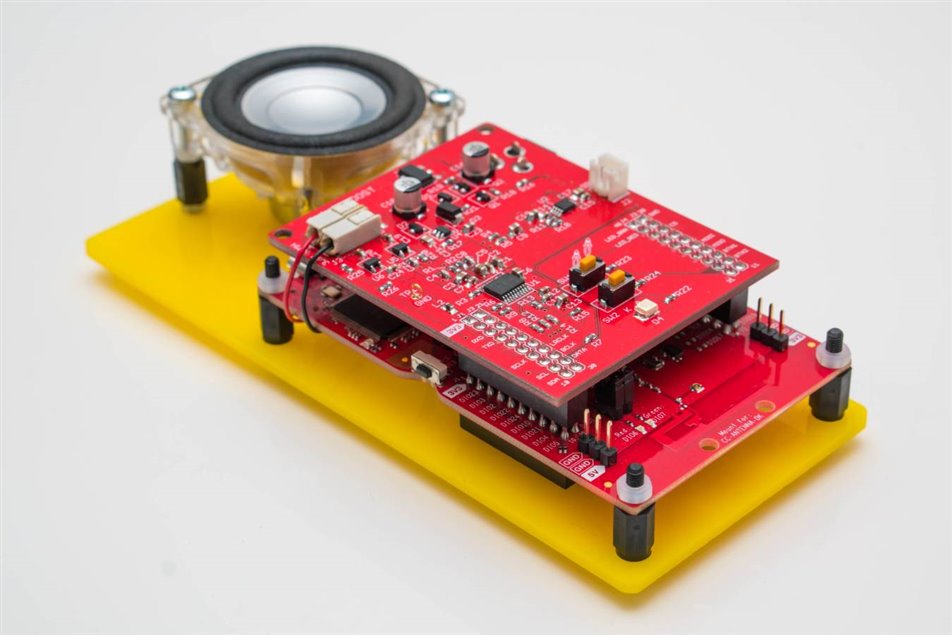
The Chime Module was constructed from a custom PCB plugged on top of a ready-made Texas Instruments microcontroller board called the CC2640R2 LaunchPadCC2640R2 LaunchPad. The custom PCB contains digital audio capability and dual supply capability (external DC, or the attached rechargeable battery which gets charged up automatically). The Chime Module can be used plugged-in to the DC supply, or it can be detached and taken outdoors (e.g. into the garden). When used on battery power, the current consumption is about 8mA, which allows for several days of outdoor use with the 600mA battery that was used. The battery will charge itself so there should be no maintenance required.
image


Next Steps

Although the system functions, the code is very proof-of-concept and I'd like to take the time to improve it and add more features. I've already tested communications with the Pi (so that the Bell Push module connects to the Pi, and another Pi connects to the Chime Module) and the code functions nicely (see blog post 9 for the source code). So, with little effort, it should be possible to use this system over any distance.

Thanks for following the project!

  • Sign in to reply

Top Comments

  • mcb1
    mcb1 over 7 years ago +5
    Well done. It's a lot of work, and I'm betting your're glad it over. A simple suggestion is to look at wireless charging. I used something very similar in the Beyond_the_phone challenge Wireless Challenge…
  • shabaz
    shabaz over 7 years ago in reply to Problemchild +4
    I think we need to develop an app, let's call it ChimeOS say, that allows users to configure on their Pi the doorbell strategy for the home, and let it accept the commands from the bell push, and then…
  • Problemchild
    Problemchild over 7 years ago in reply to mcb1 +3
    Hey Mark wouldn't the wireless charging require the charge pad to be behind the button unit which would becool but you would need to make sure the distance between the unit and the bell was very small…
  • aspork42
    aspork42 over 7 years ago

    What would you estimate the BOM cost for 10 units? I was thinking of using the pushbutton type setup as a home security monitoring device - i.e. window sensor. Instead of a pushbutton, it would be a reed switch & magnet and look for any transition to report. I would need to build up about 20 units; and would possibly use a single sensor and dual sensor unit (for two windows right next to each other). I've seen other units that cost like $40 each, so that is pretty cost prohibitive. If these are in the area of $10/unit it becomes much more feasible.

    • Cancel
    • Vote Up +2 Vote Down
    • Sign in to reply
    • More
    • Cancel
  • aspork42
    aspork42 over 7 years ago

    Hey - Congrats on winning! Very well done!

    • Cancel
    • Vote Up +2 Vote Down
    • Sign in to reply
    • More
    • Cancel
  • aspork42
    aspork42 over 7 years ago in reply to shabaz

    You would need some way to indicate "which" bell push modules should be in range as well; since your system is expandable with multiple push modules.

    • Cancel
    • Vote Up +2 Vote Down
    • Sign in to reply
    • More
    • Cancel
  • shabaz
    shabaz over 7 years ago in reply to aspork42

    Hi James,


    Thanks!

    It's interesting what you say about the notification when you're out of range. I wonder if your system uses Bluetooth too. If the chime unit is out of range, the caller gets an indication, because the LED continues to flash until the chime unit is back in range. That bit of functionality was just inherent in the reliable mode of operation with the Central/Peripheral modes of topology, but like your system, I'd want the alert on the Chime module. Since the bell push module is asleep at all times except when it is pressed, it is hard to implement the out-of-range feature, but I think it could be possible by forcing the bell push to wake up every (say) minute using it's clock. This would preserve battery life, but also let it run a range check that could be coded up to let the Chime module be aware if it sees a transmission in that minute or not. Definitely a very useful feature to implement!

    6 months is pretty good for a first battery project : )  Some commercial products can't manage that.. I have a ham radio that chews batteries even if I don't use it : ( And three-phase saw a similar issue with a product too: Fluke PRV240FS Proving Unit Battery Consumption

    • Cancel
    • Vote Up +2 Vote Down
    • Sign in to reply
    • More
    • Cancel
  • aspork42
    aspork42 over 7 years ago

    Really nice looking final product!

    My baby monitor has the "child" unit as always requiring DC power, but the "parent" unit uses a tiny DC barrel jack and also 2x AA batteries. The parent can, say, slip outside to the back deck or over to the neighbor's house and carry the unit with them to keep an 'ear' on the child. The unit switches automatically over to the batteries when unplugged. So your unit uses a rechargeable battery and is better than mine!


    One other feature that it has though, is visual and audible (LED, and sound) indications if the parent unit is unable to establish communication with the child unit. So if we walk too far away, it will start beeping to indicate "out of range".


    I love you comment in the video "It should last about four years, which is OK" image (Paraphrasing, of course)

    My first battery powered project (very similar to this but with ESP8266 + Arduino ProMini) lasts only about 6 months, or ~180 button pushes... Need some more optimization!!!

    • Cancel
    • Vote Up +2 Vote Down
    • Sign in to reply
    • More
    • Cancel
<>
element14 Community

element14 is the first online community specifically for engineers. Connect with your peers and get expert answers to your questions.

  • Members
  • Learn
  • Technologies
  • Challenges & Projects
  • Products
  • Store
  • About Us
  • Feedback & Support
  • FAQs
  • Terms of Use
  • Privacy Policy
  • Legal and Copyright Notices
  • Sitemap
  • Cookies

An Avnet Company © 2026 Premier Farnell Limited. All Rights Reserved.

Premier Farnell Ltd, registered in England and Wales (no 00876412), registered office: Farnell House, Forge Lane, Leeds LS12 2NE.

ICP 备案号 10220084.

Follow element14

  • X
  • Facebook
  • linkedin
  • YouTube