


AWS Management
AWS provides several alternatives to manage their services: the AWS Management Console, the AWS Command Line Interface (CLI) and the SDK (available in C++, Go, Java, JavaScript, .NET, Node.js, PHP, Python and Ruby).
To show how these methods compare to each other I decided to list my S3 Buckets and objects stored in a Bucket using the console, the CLI and the Python SDK. The Amazon Simple Storage Service (S3) is an object storage service, and before performing the listing operations, I had to create a Bucket and upload some files to it.
Lets see how the different management interfaces compare to each other:
The AWS Management Console interface
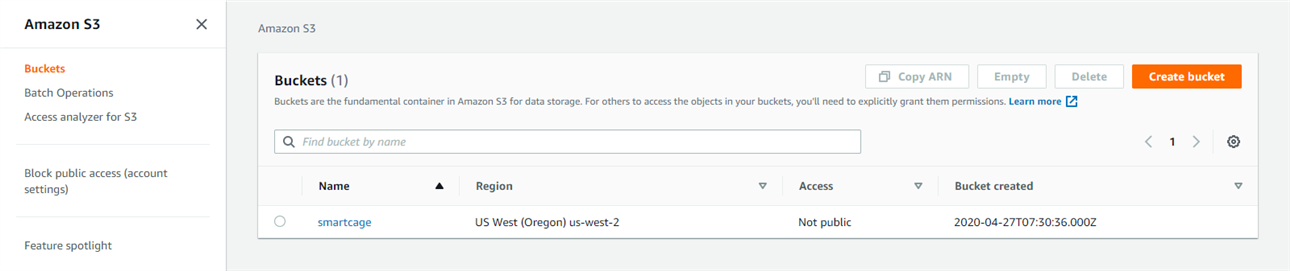
To check available Buckets, I selected the S3 service, and a list showed up:
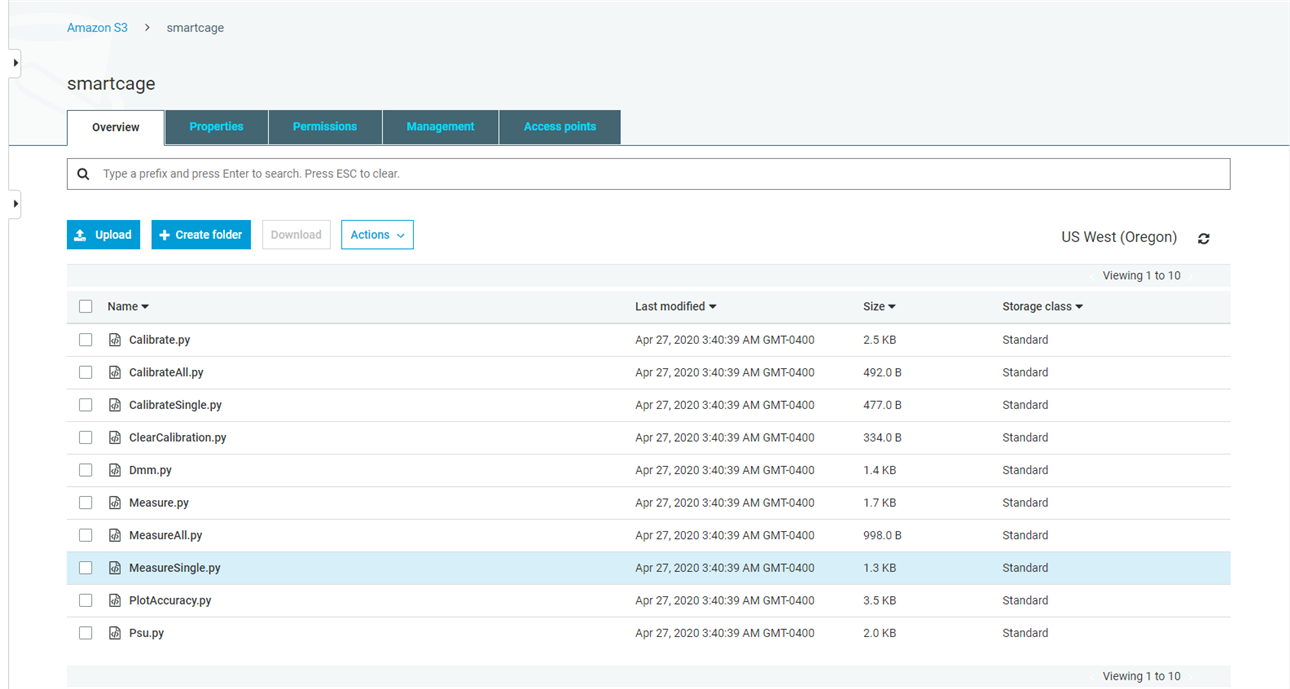
To check the "smartcage" Bucket, I clicked it and got its content:
The AWS Command Line Interface
Before using the CLI for the first time it I had to configured it, this required me to enter the AWS Access Key Id, the AWS Secret Access Key, the default region name and default output format. Then I listed the available Buckets using the following command:
aws s3 ls
Which outputted:
2020-04-27 03:30:38 smartcage
To list the content of the bucket I entered:
aws s3 ls s3://smartcage
Which outputted:
2020-04-27 03:40:39 2571 Calibrate.py
2020-04-27 03:40:39 492 CalibrateAll.py
2020-04-27 03:40:39 477 CalibrateSingle.py
2020-04-27 03:40:39 334 ClearCalibration.py
2020-04-27 03:40:39 1479 Dmm.py
2020-04-27 03:40:39 1717 Measure.py
2020-04-27 03:40:39 998 MeasureAll.py
2020-04-27 03:40:39 1310 MeasureSingle.py
2020-04-27 03:40:39 3626 PlotAccuracy.py
2020-04-27 03:40:39 2074 Psu.py
The Python SDK
The SDK interface is very similar to the CLI. The Python SDK library is called Boto 3, and can be installed with the PIP tool. To list all Buckets and then the contents of the "smartcage" Bucket in the same format as the previously shown CLI format, the following code was used:
import boto3
s3 = boto3.client('s3')
response = s3.list_buckets()
for bucket in response['Buckets']:
creationDate = bucket['CreationDate'].astimezone().strftime("%Y-%m-%d %H:%M:%S")
name = bucket['Name']
print('{:s} {:s}'.format(creationDate, name))
print('')
response = s3.list_objects_v2(Bucket = 'smartcage')
for content in response['Contents']:
lastModified = content['LastModified'].astimezone().strftime("%Y-%m-%d %H:%M:%S")
size = content['Size']
key = content['Key']
print('{:s} {:10d} {:s}'.format(lastModified, size, key))
Which outputted:
2020-04-27 03:30:38 smartcage
2020-04-27 03:40:39 2571 Calibrate.py
2020-04-27 03:40:39 492 CalibrateAll.py
2020-04-27 03:40:39 477 CalibrateSingle.py
2020-04-27 03:40:39 334 ClearCalibration.py
2020-04-27 03:40:39 1479 Dmm.py
2020-04-27 03:40:39 1717 Measure.py
2020-04-27 03:40:39 998 MeasureAll.py
2020-04-27 03:40:39 1310 MeasureSingle.py
2020-04-27 03:40:39 3626 PlotAccuracy.py
2020-04-27 03:40:39 2074 Psu.py
The Python SDK used the same configuration than the CLI, so it was not set through code.