element14 Community
element14 Community
    Register Log In
  • Site
  • Search
  • Log In Register
  • Community Hub
    Community Hub
    • What's New on element14
    • Feedback and Support
    • Benefits of Membership
    • Personal Blogs
    • Members Area
    • Achievement Levels
  • Learn
    Learn
    • Ask an Expert
    • eBooks
    • element14 presents
    • Learning Center
    • Tech Spotlight
    • STEM Academy
    • Webinars, Training and Events
    • Learning Groups
  • Technologies
    Technologies
    • 3D Printing
    • FPGA
    • Industrial Automation
    • Internet of Things
    • Power & Energy
    • Sensors
    • Technology Groups
  • Challenges & Projects
    Challenges & Projects
    • Design Challenges
    • element14 presents Projects
    • Project14
    • Arduino Projects
    • Raspberry Pi Projects
    • Project Groups
  • Products
    Products
    • Arduino
    • Avnet & Tria Boards Community
    • Dev Tools
    • Manufacturers
    • Multicomp Pro
    • Product Groups
    • Raspberry Pi
    • RoadTests & Reviews
  • About Us
  • Store
    Store
    • Visit Your Store
    • Choose another store...
      • Europe
      •  Austria (German)
      •  Belgium (Dutch, French)
      •  Bulgaria (Bulgarian)
      •  Czech Republic (Czech)
      •  Denmark (Danish)
      •  Estonia (Estonian)
      •  Finland (Finnish)
      •  France (French)
      •  Germany (German)
      •  Hungary (Hungarian)
      •  Ireland
      •  Israel
      •  Italy (Italian)
      •  Latvia (Latvian)
      •  
      •  Lithuania (Lithuanian)
      •  Netherlands (Dutch)
      •  Norway (Norwegian)
      •  Poland (Polish)
      •  Portugal (Portuguese)
      •  Romania (Romanian)
      •  Russia (Russian)
      •  Slovakia (Slovak)
      •  Slovenia (Slovenian)
      •  Spain (Spanish)
      •  Sweden (Swedish)
      •  Switzerland(German, French)
      •  Turkey (Turkish)
      •  United Kingdom
      • Asia Pacific
      •  Australia
      •  China
      •  Hong Kong
      •  India
      • Japan
      •  Korea (Korean)
      •  Malaysia
      •  New Zealand
      •  Philippines
      •  Singapore
      •  Taiwan
      •  Thailand (Thai)
      • Vietnam
      • Americas
      •  Brazil (Portuguese)
      •  Canada
      •  Mexico (Spanish)
      •  United States
      Can't find the country/region you're looking for? Visit our export site or find a local distributor.
  • Translate
  • Profile
  • Settings
Connected Cloud Challenge
  • Challenges & Projects
  • Design Challenges
  • Connected Cloud Challenge
  • More
  • Cancel
Connected Cloud Challenge
Blog Connected Cloud Challenge - IoT based Advertisement BillBoards/Hordings - #BlogPost-5
  • Blog
  • Forum
  • Documents
  • Polls
  • Files
  • Events
  • Mentions
  • Sub-Groups
  • Tags
  • More
  • Cancel
  • New
  • Share
  • More
  • Cancel
Group Actions
  • Group RSS
  • More
  • Cancel
Engagement
  • Author Author: sami9974
  • Date Created: 10 May 2020 11:56 AM Date Created
  • Views 336 views
  • Likes 3 likes
  • Comments 0 comments
  • connectedcloud
  • connected cloud
  • postgresql
  • psoc6
  • aws_iot
Related
Recommended

Connected Cloud Challenge - IoT based Advertisement BillBoards/Hordings - #BlogPost-5

sami9974
sami9974
10 May 2020

Getting started with PSoC Creator :

PSoC Creator 4.3, PSoC Programmer, and the kit design files which you can download from here. You may need to create an account on Cypress site first in order to download the file.

The installation of the prerequisite software should be quite straight forward so I am not going to describe it in detail. However, a couple of things need to pay attention:

1. After installing PSoC Creator 4.2, some components may be out-of-date, so you may need to run Cypress Update Manager multiple times to get all components updated as shown below.

image


Create Project:

We will not start the secure boot project from scratch. Instead, we will copy a template project from the installed PDL (Peripheral Driver Library), then we will modify the copied project so it can work for PSoCRegistered 6 WiFi-BT Pioneer Kit (CY8CKIT-062-WIFI-BT).
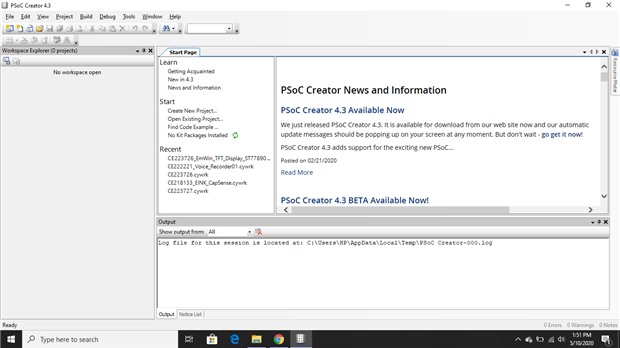
image

As a start, you will get this start page that has the latest news and information about software and versions available on the website.

Then click start page screen you able to see three sections Learn, Start and Restart from which you need click Start >> Find the code Example >> Click on that.

image

You need to select Device Family >> according to your board, In my case which is PSoC 62 (This numbers you can found on top of the development kit box).
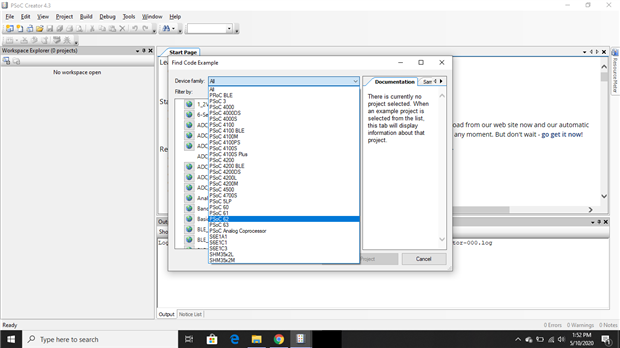
image

And choose example code from Filter by >> choose code and read its documentation from the right side window.
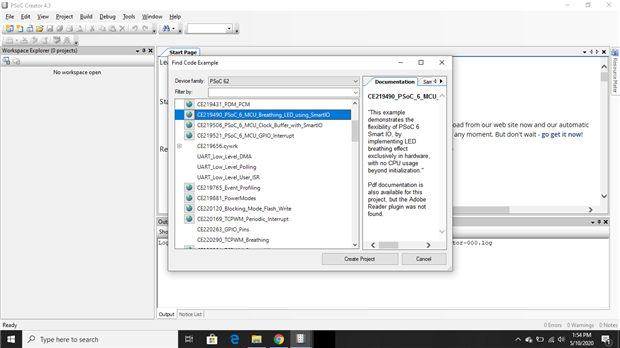
image

After choosing the project >> click on create a project, it will automatically download project resources from the Internet.

image

You need to click on Build >> Generate Application.
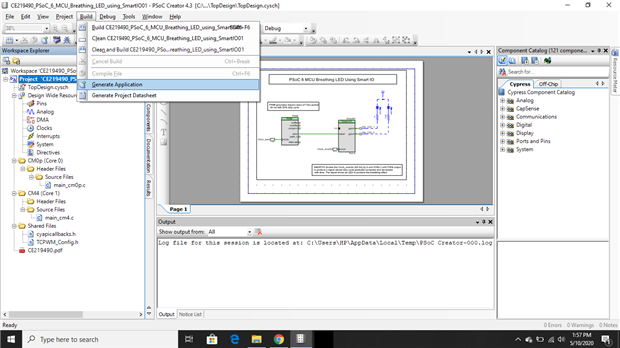
image

Then it will generate applications by its processes like RTL generation, Synthesis, Mapping, and analog Placement.
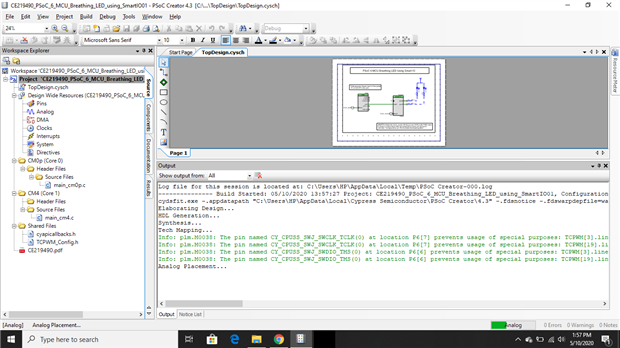

image

image

After a successful build for upload code into PSoC you need to connect PSoC first and then click on Debug >> Program click OK.
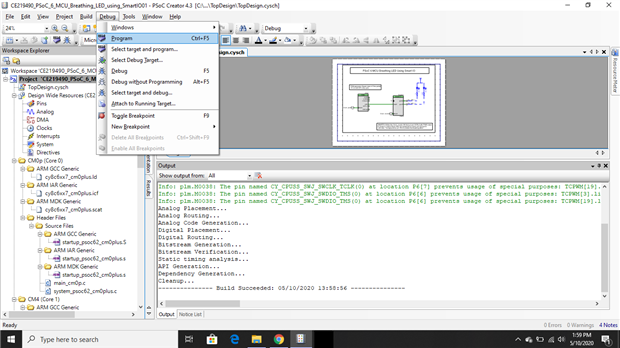
image

Choose your Board. Click OK/CONNECT

image

image

  • Sign in to reply
element14 Community

element14 is the first online community specifically for engineers. Connect with your peers and get expert answers to your questions.

  • Members
  • Learn
  • Technologies
  • Challenges & Projects
  • Products
  • Store
  • About Us
  • Feedback & Support
  • FAQs
  • Terms of Use
  • Privacy Policy
  • Legal and Copyright Notices
  • Sitemap
  • Cookies

An Avnet Company © 2025 Premier Farnell Limited. All Rights Reserved.

Premier Farnell Ltd, registered in England and Wales (no 00876412), registered office: Farnell House, Forge Lane, Leeds LS12 2NE.

ICP 备案号 10220084.

Follow element14

  • X
  • Facebook
  • linkedin
  • YouTube