element14 Community
element14 Community
    Register Log In
  • Site
  • Search
  • Log In Register
  • Community Hub
    Community Hub
    • What's New on element14
    • Feedback and Support
    • Benefits of Membership
    • Personal Blogs
    • Members Area
    • Achievement Levels
  • Learn
    Learn
    • Ask an Expert
    • eBooks
    • element14 presents
    • Learning Center
    • Tech Spotlight
    • STEM Academy
    • Webinars, Training and Events
    • Learning Groups
  • Technologies
    Technologies
    • 3D Printing
    • FPGA
    • Industrial Automation
    • Internet of Things
    • Power & Energy
    • Sensors
    • Technology Groups
  • Challenges & Projects
    Challenges & Projects
    • Design Challenges
    • element14 presents Projects
    • Project14
    • Arduino Projects
    • Raspberry Pi Projects
    • Project Groups
  • Products
    Products
    • Arduino
    • Avnet & Tria Boards Community
    • Dev Tools
    • Manufacturers
    • Multicomp Pro
    • Product Groups
    • Raspberry Pi
    • RoadTests & Reviews
  • About Us
  • Store
    Store
    • Visit Your Store
    • Choose another store...
      • Europe
      •  Austria (German)
      •  Belgium (Dutch, French)
      •  Bulgaria (Bulgarian)
      •  Czech Republic (Czech)
      •  Denmark (Danish)
      •  Estonia (Estonian)
      •  Finland (Finnish)
      •  France (French)
      •  Germany (German)
      •  Hungary (Hungarian)
      •  Ireland
      •  Israel
      •  Italy (Italian)
      •  Latvia (Latvian)
      •  
      •  Lithuania (Lithuanian)
      •  Netherlands (Dutch)
      •  Norway (Norwegian)
      •  Poland (Polish)
      •  Portugal (Portuguese)
      •  Romania (Romanian)
      •  Russia (Russian)
      •  Slovakia (Slovak)
      •  Slovenia (Slovenian)
      •  Spain (Spanish)
      •  Sweden (Swedish)
      •  Switzerland(German, French)
      •  Turkey (Turkish)
      •  United Kingdom
      • Asia Pacific
      •  Australia
      •  China
      •  Hong Kong
      •  India
      •  Korea (Korean)
      •  Malaysia
      •  New Zealand
      •  Philippines
      •  Singapore
      •  Taiwan
      •  Thailand (Thai)
      • Americas
      •  Brazil (Portuguese)
      •  Canada
      •  Mexico (Spanish)
      •  United States
      Can't find the country/region you're looking for? Visit our export site or find a local distributor.
  • Translate
  • Profile
  • Settings
Connected Cloud Challenge
  • Challenges & Projects
  • Design Challenges
  • Connected Cloud Challenge
  • More
  • Cancel
Connected Cloud Challenge
Blog Connected Cloud Challenge - Smart Backup Sump Pump #4
  • Blog
  • Forum
  • Documents
  • Polls
  • Files
  • Events
  • Mentions
  • Sub-Groups
  • Tags
  • More
  • Cancel
  • New
  • Share
  • More
  • Cancel
Group Actions
  • Group RSS
  • More
  • Cancel
Engagement
  • Author Author: cmelement14
  • Date Created: 3 May 2020 1:07 AM Date Created
  • Views 284 views
  • Likes 4 likes
  • Comments 0 comments
  • ble
  • wifi
  • connected cloud challenge
  • modustoolbox
  • aws
  • psoc6
  • iot
  • cypress
  • smart home
Related
Recommended

Connected Cloud Challenge - Smart Backup Sump Pump #4

cmelement14
cmelement14
3 May 2020

In this blog, I will set up AWS SNS services to notify me through text messages and emails when the kit sends MQTT messages.


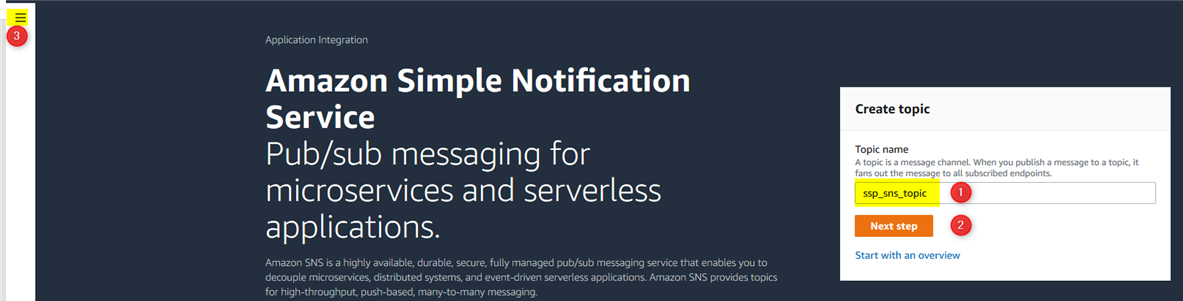
From AWS console home page, choose Amazon Simple Notification Service (SNS). If this is your first time using SNS, the following page will pop up. From here, you can create your first SNS topic.
image


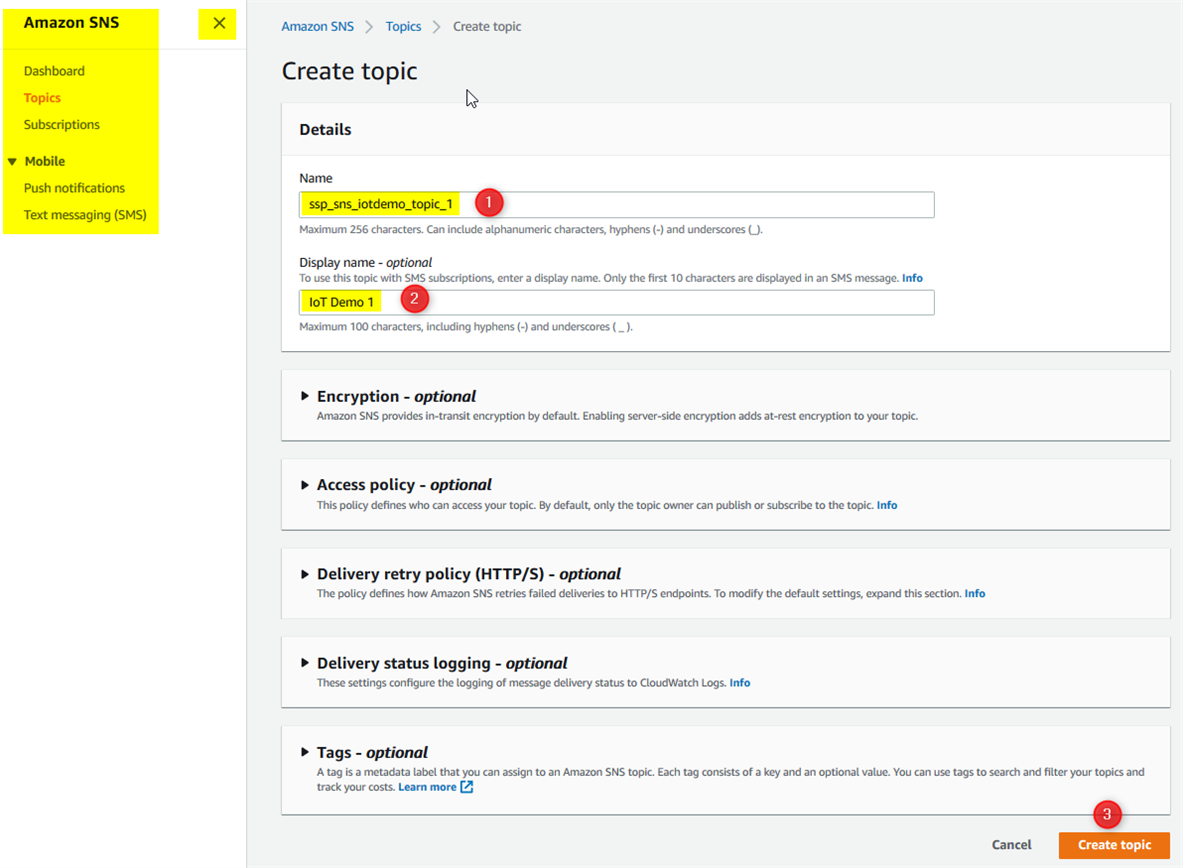
By default, the SNS navigation tab is collapsed, but you can expand it by clicking the navigation button (step 3 as shown in the above screenshot). The navigation tab is on the left hand side of the web page. You can set up SNS service using the following steps. First, as shown below, you need to create a SNS topic.
image


Next, you need to create SMS and email subscriptions to the SNS topic. Click either of the two highlighted two buttons below. Please remember the ARN string because you will need it for creating the rule triggering the SMS/email notification.
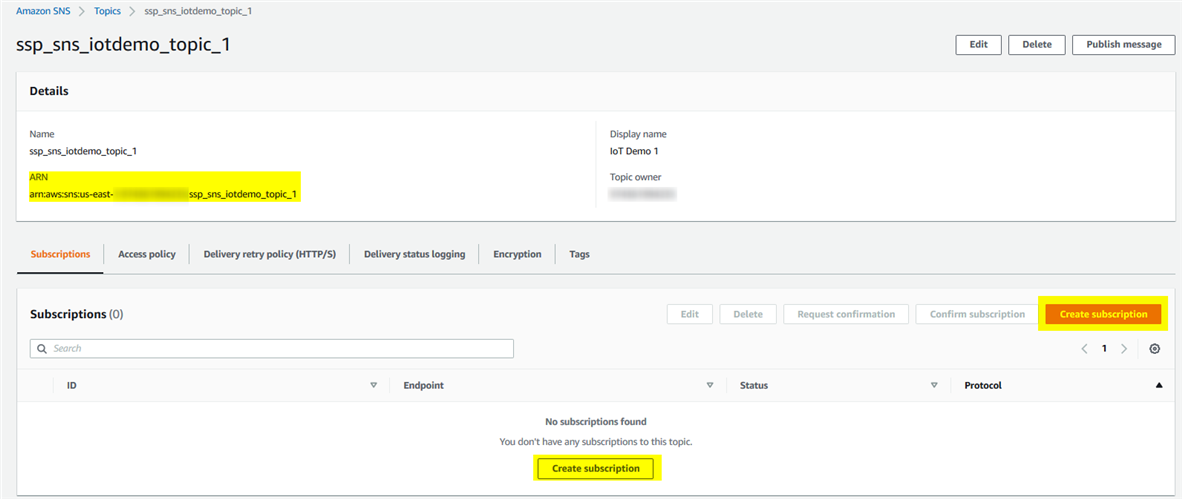
 

image


After click either Create subscription button, it will open a new page as shown below.


image


Next, you can create the email subscription similar to the creation of SMS subscription. These subscriptions may need confirmation, for instance, AWS send an email to the subscribed email address for your confirmation. Once you confirmed your subscription, you should see two items as shown below.

 

image


Next, to trigger SNS services, you need to set up a rule in AWS IoT where your IoT data is first received in AWS system. Go to the top bar on the web page, click on Services pull-down menu, choose IoT Core. As shown below, go to Act  -> Rules page, then click Create a rule button.
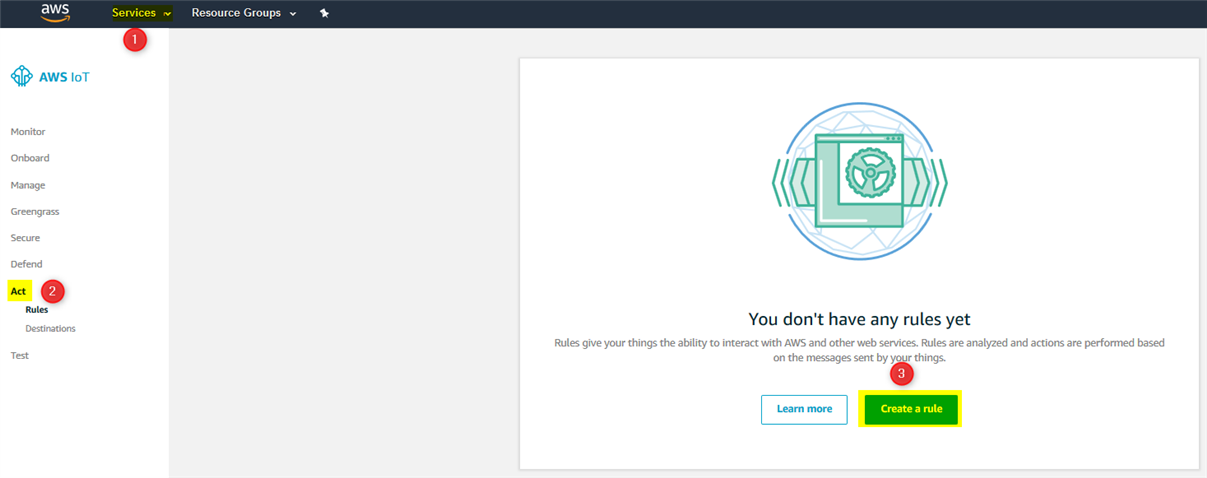
 

image


Following steps shown below to create your own rule. For your own application, you have to replace the query with your own IoT topic (replace 'iotdemo/topic/1'). Next, you need to link the rule to SNS topic we created above by clicking Add action button.
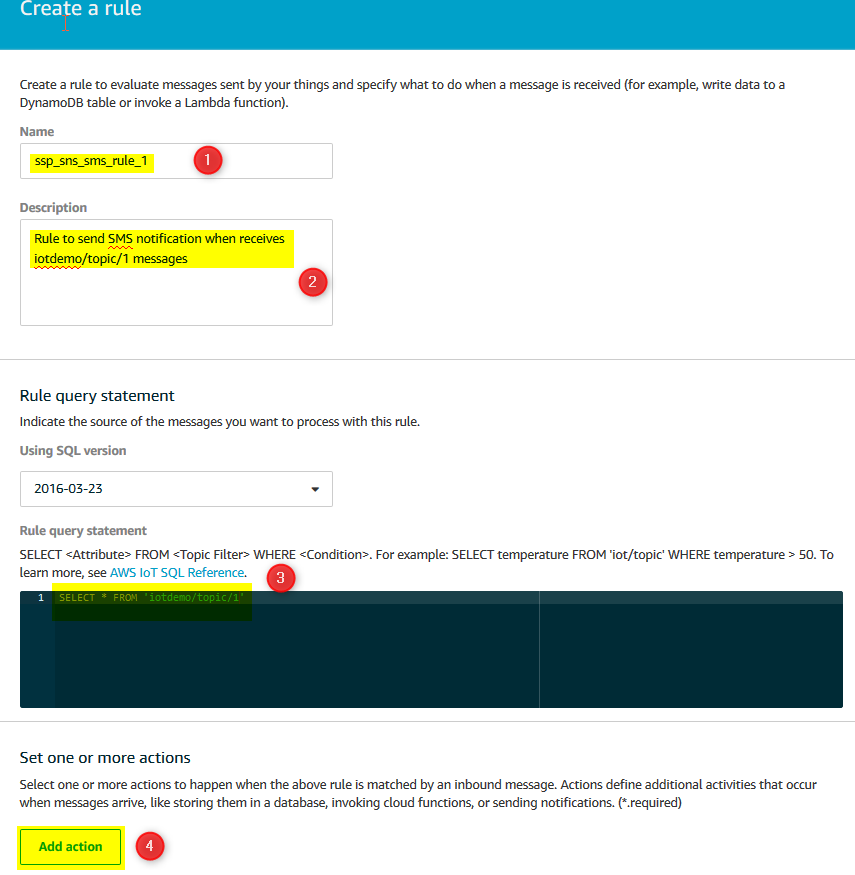
 

image


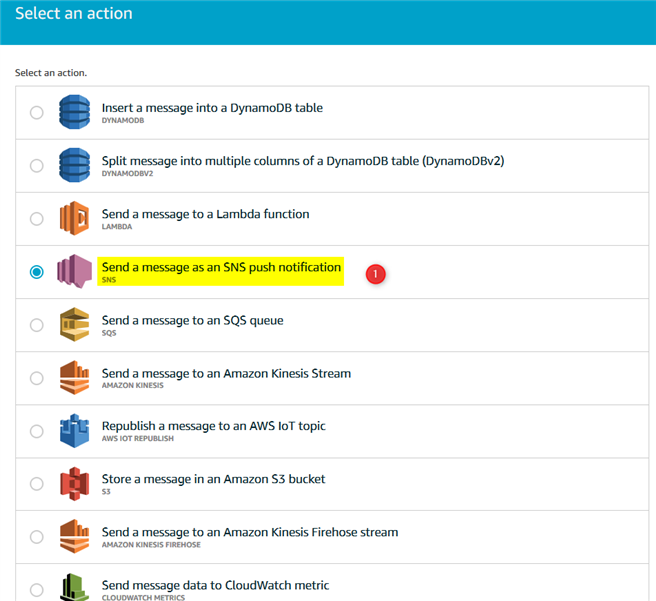
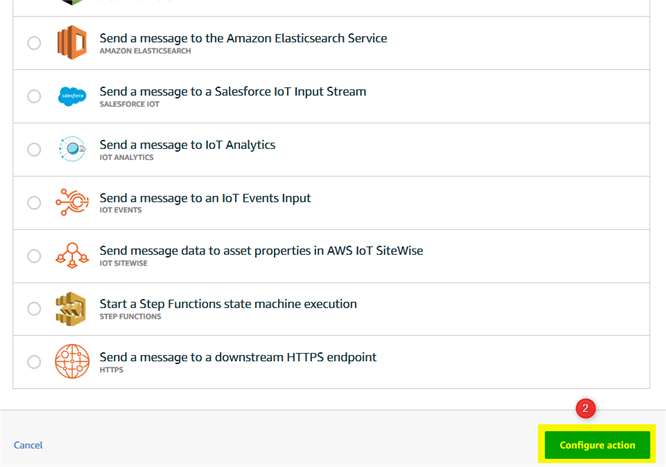
Select SNS as the action.


image

image


First, choose the SNS topic you created above. For IoT demo application, choose RAW as message format. For your own application, you may  use JSON format. If you don't have a role for this, the system will automatically creates MySNSRole role and just select it then click on Update to attach the policy.
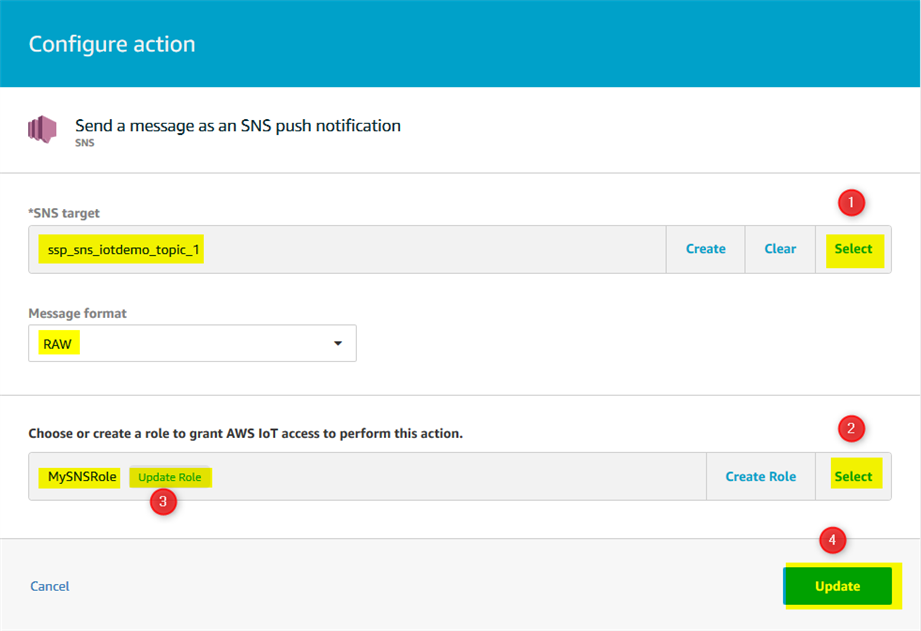
image


To finish the rule creation, click on Create rule button.


image


At this point, your SNS set up and link to IoT has completed. To do a quick test, you can use IoT's testing capability. Once you push the IoT topic linked to the SNS service, you should receive both SMS and email messages.
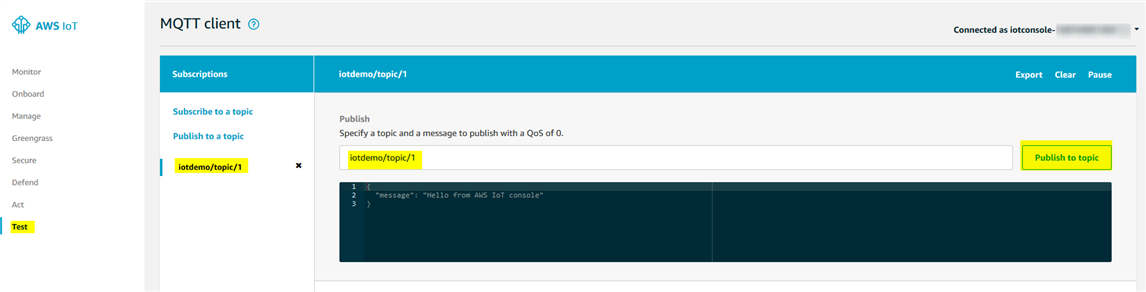
 

image

The following two phone screenshots show both SMS and email messages generated by the IoT demo application.
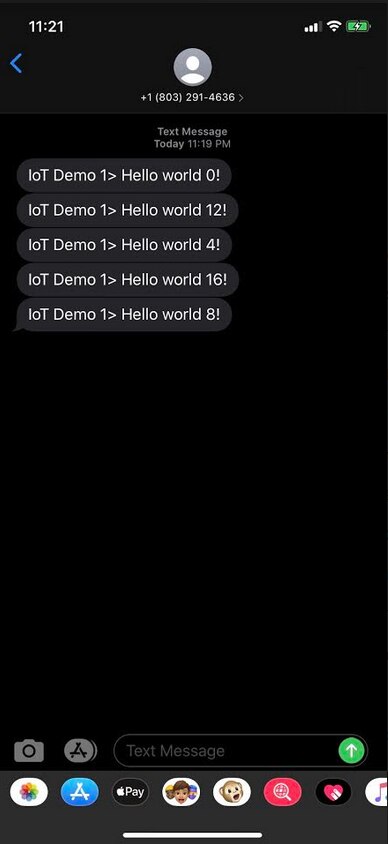
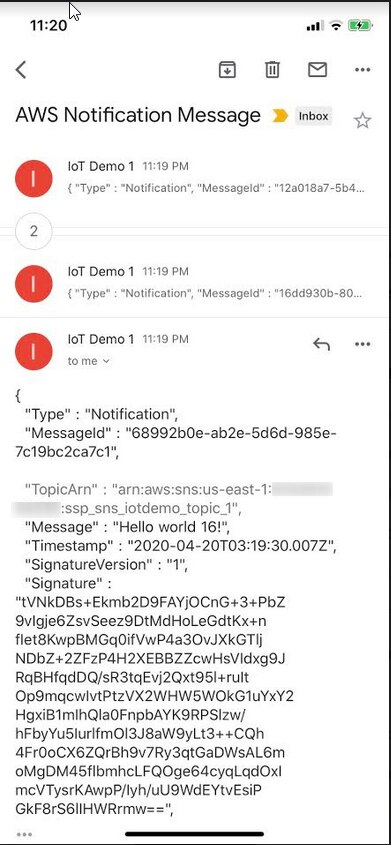
 

image

image

  • Sign in to reply
element14 Community

element14 is the first online community specifically for engineers. Connect with your peers and get expert answers to your questions.

  • Members
  • Learn
  • Technologies
  • Challenges & Projects
  • Products
  • Store
  • About Us
  • Feedback & Support
  • FAQs
  • Terms of Use
  • Privacy Policy
  • Legal and Copyright Notices
  • Sitemap
  • Cookies

An Avnet Company © 2025 Premier Farnell Limited. All Rights Reserved.

Premier Farnell Ltd, registered in England and Wales (no 00876412), registered office: Farnell House, Forge Lane, Leeds LS12 2NE.

ICP 备案号 10220084.

Follow element14

  • X
  • Facebook
  • linkedin
  • YouTube