


In our project, which require synchronise the state between two or more devices, one is located onsite for monitoring and control physical environment (the things), another is the remote devices may virtually such as APP or the homesites. (the Apps)
Because the Apps and the Things both with Internet connect, we can direct connect those two devices though Internet.However, in order to office line monitoring and synchronise, a server which served for middle channel between both device is good for update and reteived the data when either device is offline, such as we want to notify our user when have mail arrived, our "things" send the data to the middle server either the client is online or offline, when the client available on-line, the APP get data and sync the latest status. The middle server also helpful for security and prevent malicous. In our project, the AWS IOT cloud service for this purpose.
Cognito
In our App size, we use Cognito for managing our user login activities, our APP don't require storage the private and CA key inside, instead we use Cognito user pools for User authorise and use Cognito Identity Pool for APP authorise.
The brief step of work inside cognito is:
- Build new user pools - maiilbox
- Added App clients
- Create new user "ios_iot" under "Users and groups"
- Create App clients - iOS
- Under App client setting - select Enabled Identity Providers and Cognito User Pool
- Select "Federated Identities" and click "Create new identify Pool"
- Under Authentication providers, select Cognito, enter "User Pool ID" and "App client id" from the user pools we created before.
- Check the Unauthenticated role / Authenticate role name
- Enter AWS "IAM"
- Role, select the Authenticate role which corresponding the Federated Identitiies
- Attach policies -> AWSIoTDataAccess Ensure this listed on policy name (IAM policy)
- Select Unauthenticated identities, remove "Enable access to unauthenticated identities"
12. Go AWS IOT console, select Secure -> Policies
13. Add new policy cognito_policy, added the relative shadow resource on the document.
Follow the AWS SDK for iOS install process:
https://github.com/aws-amplify/aws-sdk-ios/blob/master/README.md
Recommending use Carthage Install method and add --no-use-binaries flag for use latest Xcode version, otherwise the lib may not comparability your Xcode
Implement the Cognito User Identify Login library, I am not use unauthenticated identities in this case, so user require login before access the IOT


For specify the AWS IOT platform, we should attached the IOT policy inside our APP, which is the name under IOT console -> Secure ->Policies. Please don't conflct the IAM policy, we have two policy here, one inside AWS IoT, anther under IAM, which two policies work together and need "Allow" the shadow traffic.
let policy = AWSIoTAttachPolicyRequest();
    policy?.target = clientid
    policy?.policyName = "cognito_policy"
 AWSIoT.default().attachPolicy(policy!).continueWith(block: { (task:AWSTask<AnyObject>) -> Any? in


        if (task.result != nil){
          return nil;
        }


       DispatchQueue.global(qos: .background).async {

                let dataManager = AWSIoTDataManager(forKey: "iot_dm")
                let error = dataManager.connectUsingWebSocket(withClientId: clientid,
                  cleanSession: true,
                  statusCallback: mqttEventCallback)


                if (error){
                      print ("datamanagement start connect error")
                    }
     }
So, we can use the "connectUsingWebSocket" to access our IOT, user login/logout control provided and management by AWS.
Shadow
The shadow is a JSON document individual for every "Things" to storage condition or small message, our APP design to use this shadow for exchange and synchronize data, so that we can retrieve the status and interactive between our APP and Device without additional storage platform such as implement DynamoDB, the APP can get our device data even the device offline, each Devices have a unique json shadow so that we can easy to implement multiple to multiple solution, which one APP control many Devices or one Devices can access by many APP. For example, we can sell thousand of mailbox and pair each to their user APP without setup a DB, just every mailbox with a json on the Cloud, make things simple.
In order to study how the AWS shadow working, our Pioneer Kit is pairing with the iOS APP though shadow cloud, to achieve those requirement:
1. Both side sync the status
2. Update the button and slider on either side
3. iOS is two button and a slider
4. Pioneer Kit status show on LCD display and use the Kit touch button and slider for interact
5. with Retry and offline capability, also prevent over-sending.
Although our devices and AWS cloud server between more that 10000 km, the performance is awesome, normally we can sync APP and Devices within two seconds.
How it work
The shadow use MQTT for exchange data, the TOPIC used for interactive the shadow, simply term is subscribe and publish on the by designate "TOPIC", all of subscriber will received the message when active.
I am not go though how this work, more detail under https://docs.aws.amazon.com/iot/latest/developerguide/device-shadow-data-flow.html
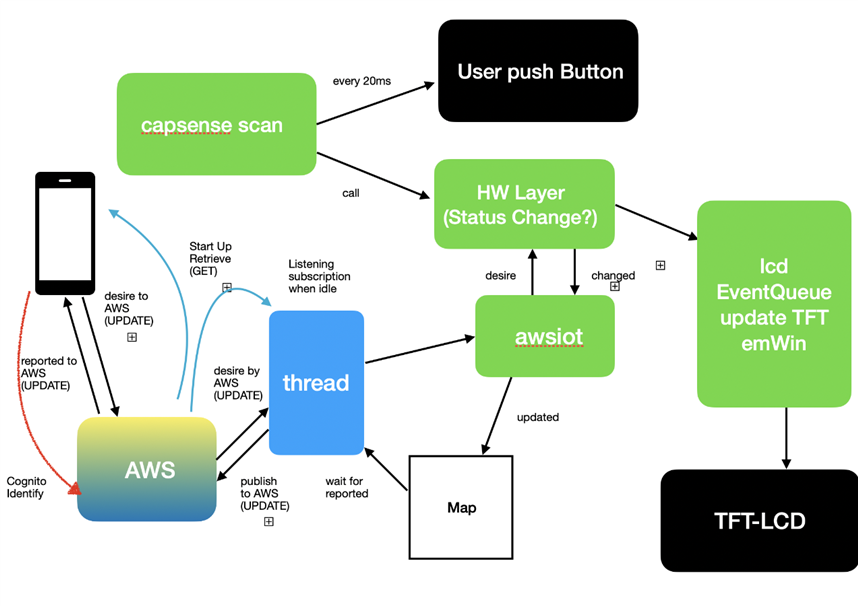
Our System
- APP / Device subscribe (listening) two TOPIC: $aws/things/myXXX/shadow/update/accepted / $aws/things/myXXX/shadow/get/accepted
- StartUP: APP / Device send $aws/things/myXXX/shadow/get to reserve the full condition of thing status
- APP/Device listen the $aws/things/myXXX/shadow/get/accepted, and modify the condition based on "reported" data
- The Pioneer Kits with higher priory of control more that APP, so Kits REPORT to shadow and App DESIRE the shadow.
- When the user touch the screen and change the condition of IOS button, APP send $aws/things/myXXX/shadow/update under json "desired", the IOS want device update the button.
- The device received APP "desired", if device accept, the device send $aws/things/myXXX/shadow/update under json "reported", which broadcasting master accept this requirement.
- The IOS received the message, stop resend "desired"
- When the device's kit buttons changed, the APP send $aws/things/myXXX/shadow/update under json "reported", which notify other devices need change their status.
The use of desired / reported is key for shadow, based on the purpose, the role can be change, such as the IOS can reported USER arrived near 1km and require the IOT things switch ON the light, in here, IOS reported to IOT device, the device must accept.
sample GET json is:
{"state":{"desired":{"slider_0":"67","button_1":"1","button_0":"1"},"reported":{"button_0":"1",
"button_1":"1","slider_0":"274"},"delta":{"slider_0":"67"}},"metadata":{"desired":{"slider_0":
{"timestamp":1586866608},"button_1":{"timestamp":1586865030},"button_0":{"timestamp":1586864872}},
"reported":{"button_0":{"timestamp":1586870402},"button_1":{"timestamp":1586870402},"slider_0":
{"timestamp":1586867144}}},"version":1568,"timestamp":1586871421}
sample UPDATE json is
{"state":{"desired":{"button_1":"0"}}}
Inside the code...
1. We implement internal checking on both side, so we just sending when difference observed, the AWS provide $aws/things/thingName/shadow/update/delta so the cloud can automative check the difference, in our application no apply the delta feature.
2. The default of Mbed library provided by Cypress only with 100 Packet size, it not long enough for shadow use, manual change aws_clients.h to #define AWS_MAX_PACKET_SIZE 1024
3. Carefully implement Mbed MQTT, to ensure the process run under single thread, so no publish and working on subscribe sometime.
4. Carefully verify the json string, the format should match of AWS requirement, otherwise will rejected by AWS IoT.
5. Carefully verify and checking of memory leakage, as the IOT device require long time running time with hard to reboot.
6. Improve battery performance by custom working, such as normally the json will generated by object based from a hierarchy of Map/Dictionary, in real production, we can create the prefix and suffix string and insert middle.
Our example with following structure:
Source Code
Will be provided later after stable verify.
Next
Currently, our research is enough to send notify to User App though AWS IOT cloud, which is send notify to user when mail have been detected, also we use AWS Cognito for user account control and security login.
Next step is work on Mailbox mail sensing....