


In the Last blog post(s) we used Yahoo Weather API under TEMBOO choreo to extract local weather information. The API returned data in XML form which we later parsed using Temboo Output filters and get needed information from the response. Now In this blog I'll show you three more powerful features of Temboo which is helping maker to integrate Digital/Analog input triggers and Actuators with their existing cloud APIs to build Internet Of Things based devices. Consider having a phone call when lights in room goes down a certain threshold now this can be achieved to hook a Light Sensor(LDR) reading continuous readings of ambient lights and monitoring the levels, if the level exceeds threshold it calls an API function which triggers phone, The digit pressed on your phone can be used to turn on the lights, hence this basic IoT device can be broken down into Input(LIGHT) cloud(PHONE CALL API SERVICE like NEXMO and TWILIO) and output say a light bulb. Keeping this approach in mind Temboo makes IoT easy to prototype as follows:
We already covered the cloud API part where weather data is coming from Yahoo API but in my project Enchanted Wardrobe I am looking to integrate the whole setup inside my wardrobe and want it to call the api and fetch information only when the wardrobe has been opened by me, this approach will have a lots of advantages like
--> Saving Energy and microcontroller free running cycles because I dont want it active all the time rather it is going to be used only few times in a day so why let it running for no reason?
--> It reduces the number of call to the server. Making unnecessary calls to APIs again and again in short interval of times overload them and they might block you from accessing them.
The design is therefore smart, consumes less power and work only when needed(WIN).
Integrating input Trigger:
I want my wardrobe to enchants me weather only when I open it, Therefore I need some kind of mechanism to sense opening and closing of the doors. There are fancy door sensors available in the market in glossy casing but to keep the cost low am going to use a Magnetic REED switch, infact the fancy one has same mechanism inside them so why dont use it barely. This works as a normal switch but with a difference of passing current through them in the presence of a magnet. Hence i can integrate the switch on door of wardrobe connect it to my YUN and have a magnet in periphery opposite to the door hence deactivating it when the door is opened, this way i can sense the trigger. How REED switches work?
The code is super simple, just use it with normal switch sketch inside arduino with pinMode(REED,INPUT_PULLUP); inside setup() and digitalRead(REED) inside loop before calling the api and using if else to check the opening of door.
A fancy way to do this is to tell this requirmentdirectly to temboo. In the page where we configured the API you can find the hyperlink which says is the choreo triggered by an input there you say yes and configured the pin for the api to get triggered as and select digital or analog triggered and suitable pin number with input. You can even hook up analog sensor using this approach.
However if you are using active low based triggered I've noticed that temboo generated code doesn't activated the pullup resistorby default so I recomend you doing that to avoid pin floating problems.
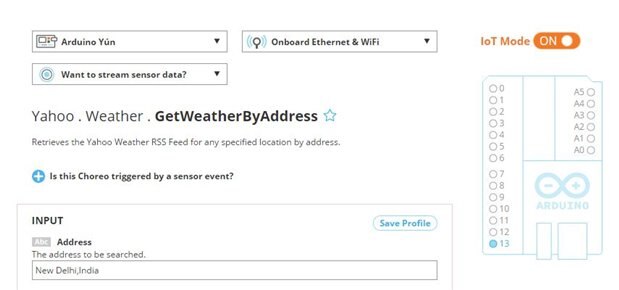
Actuating based on API responses
Similarly like triggering API based on input you can trigger an actuator like LED based on results obtained from API for ex: tuning on LED on pin13 if temperature of city >25'c or so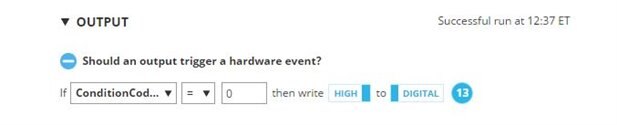
Thats how we can use powerfull feature of Temboo on Arduino Yun without even coding a single line. 
One more interesting feature that temboo offers is the ability to stream and store sensors reading to online cloud services like Google Big Query and Microsoft power BI, for this you can use WANT TO STREAM SENSOR DATA feature of temboo.