


In my last blog post I talk about fetching Weather Information of a desired location using Yahoo Weather API and TEMBOO services on Arduino Yun. The purpose of using Temboo like services in my Design challenge project is to make project as simple as possible and even simpler to replicate so we each can have our own Enchanted Wardrobe in homes  . Temboo makes it easy even for non-programmers to have a feel of IoT World and best part it comes pre-bundled with Arduino yun and other Arduino using Ethernet/Wifi/Gsm Shield and some more boards like TI-CC3200, Adafruit CC3000 wifi module and now even with Samsung Artik so you can probably make the same project with any one of them without actually modifying code, Temboo will handle that for you.
So progressing ahead, last time we were able to get Weather Information from Yahoo Weather API using Temboo's Choreo but as I mentioned the response from APIs are generally in some encoded form. Similarly Yahoo Weather API returns in XML(eXtensible Markup Language) or JSON(Java Script Object Notation) which are definitely not human readable but the needed information can be extracted by Parseing this response. For ex to Parse JSON in python we use JSON library similarly we've an ArduinoJsonParser or XML parser library for Arduino which we can use, but Temboo provides more flexibility while handling parseing from APIs it uses in its choreos and similar operation can be performed easily by using what Temboo calls : "OUTPUT FILTERS". Output filters makes easy to parse XML or JSON response from APIs and extract the required information from the returned response container. Here we'll use XML based output filter and you'll see that it is as easy to append just two extra lines in our previous code. So Lets Get Started
Before moving Ahead, we should be aware about what different things we can parse from the Yahoo weather API. The WEATHER API by Yahoo provides the following information:
>Temperature
>Pressure
>HIGH MARK of Temperature in a day
>LOW MARK of Temperature in a day
>Humidity
>Visibility
>Condition Text(Like Cold/ThunderStorm/Haze etc)
>Condition Code which can be resolved from API's documentation on Yahoo's Website
Moving Ahead on Parseing:
Step 1>> Complete steps till last blog post  .
.
step2>> Login to Temboo Output Filter webpage, it can also be found on left hand side lowermost tabs on Temboo's homepage.

step 3>> Select XML or JSON if you've requested yahoo to return data in JSON.
step4>> Select Get Values from XML tab.
step5>> In node field you can type data to be extracted say 'temperature' and in XML field add the response(XML) you got from API(in previous blog program).

step6>> Alternatively you can add following lines of code before GetWeatherByAddressChoreo.run(); function
GetWeatherByAddressChoreo.addOutputFilter("temperature", "/rss/channel/item/yweather:condition/@temp", "Response");
GetWeatherByAddressChoreo.addOutputFilter("code", "/rss/channel/item/yweather:condition/@code", "Response");
GetWeatherByAddressChoreo.addOutputFilter("text", "/rss/channel/item/yweather:condition/@text", "Response");
This resolves Temperature, Code and Text from XML in similar fashion you can extract say Humidity.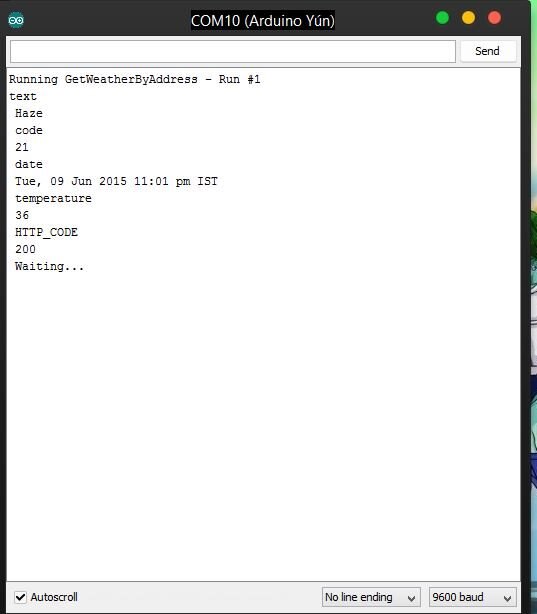
Will be adding a triggered sensor in the next one. Stay Tuned! 
Top Comments