


Intro
Experimenting with Single Pair Ethernet Design Challenge is a Molex sponsored contest involving conducting research of Single Pair Ethernet - one of newer physical layers of 802.3 Ethernet. This layer, which is utilizing single twisted conductor pair as a medium, further divides into two groups:
- short range (with a suffix of T1S)
- and long range (T1L) - and this one is a subject of current challenge
Short range version is currently specified only as 10BASE-T1S (10Mb/s), but long range can be 10/100/1000Mb/s (10BASE-T1L, 100BASE-T1L, 1000BASE-T1L).
Another mayor difference is the fact that T1L has point-to-point topology, where T1S can connect several devices using one cable run (similar to - for example - RS485).
Single Pair Ethernet can also be seen as a mean of unifying the communication protocols across the installation - by means of simple media conversion, the same protocol stack can be used in places where traditionally protocol conversion was needed (for example - serial to Ethernet bridge utilizing protocols capable for - for example - address translation).
Design kit
Design kit consist of two parts - a set of Molex connectors and cables and some additional components: Analog Devices evaluation boards, Raspberry Pi SBC and a sensor module:
Unboxing and initial tests
Components were delivered neatly packaged in the big cardboard box, allowing us to take closer look at their features.
IEC63171-6 IP20 patchcords (1m and 5m) and sockets
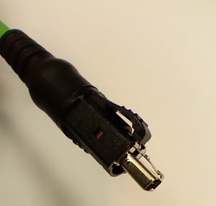
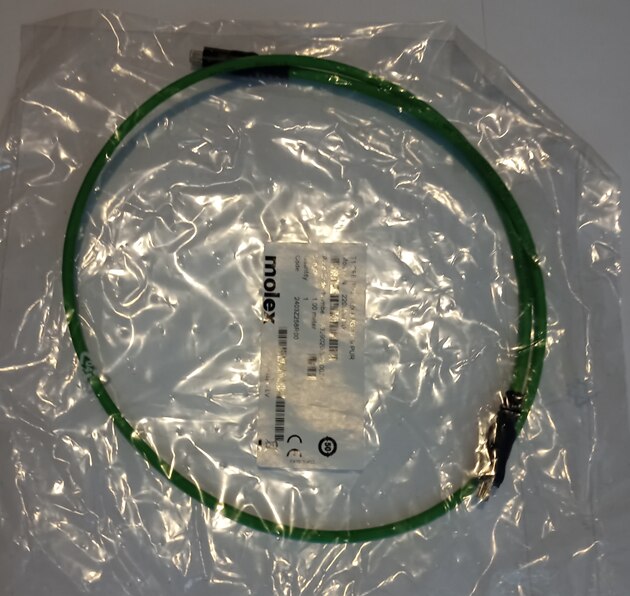
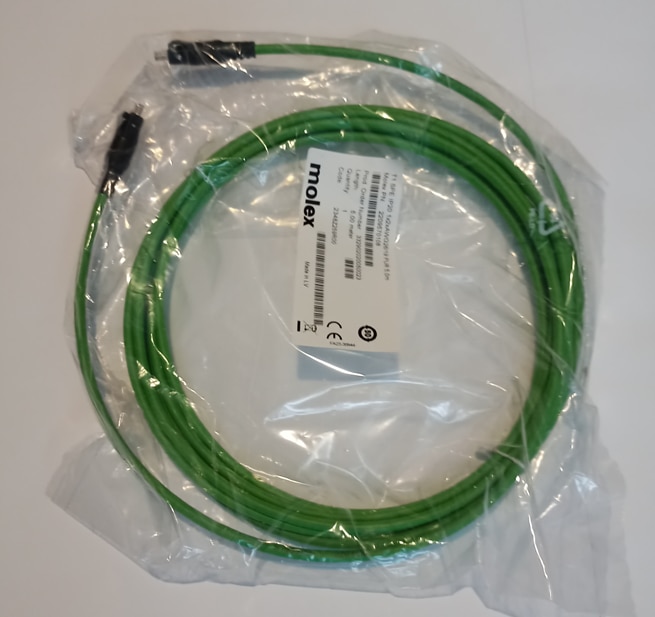
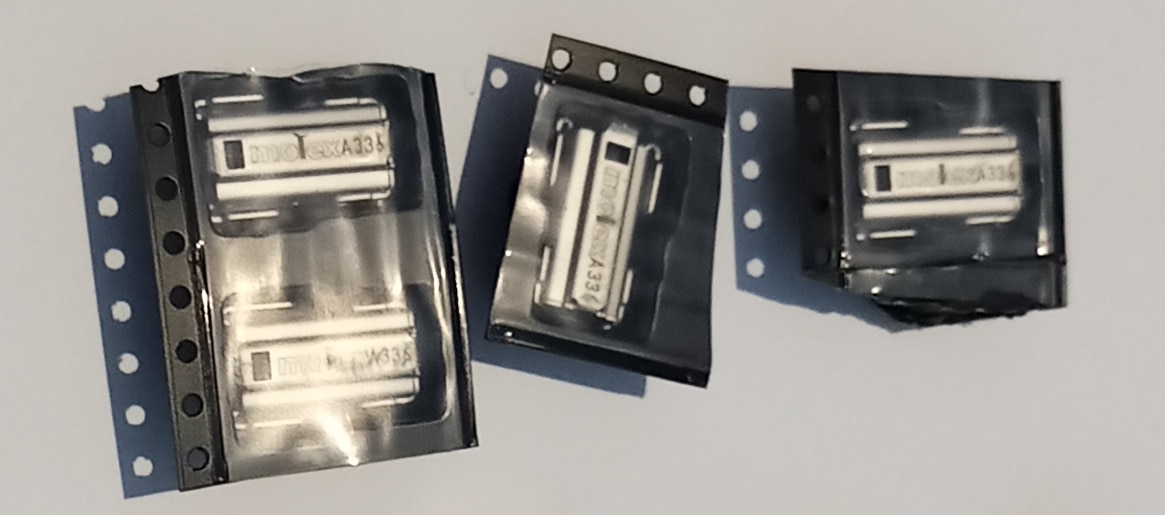
Those patchcords, built with stranded, shielded AWG26 twisted pair cable have detailed part specification printed on the cable insulation and their connectors sport metal latches for increased reliability in the presence of vibrations. Along with the cables, four shielded, right angle, PCB mounted sockets were delivered.
| {gallery}ip20 cables |
|---|

|
|
|
|
|
|
IEC63171-6 IP65/67 patchcord and sockets
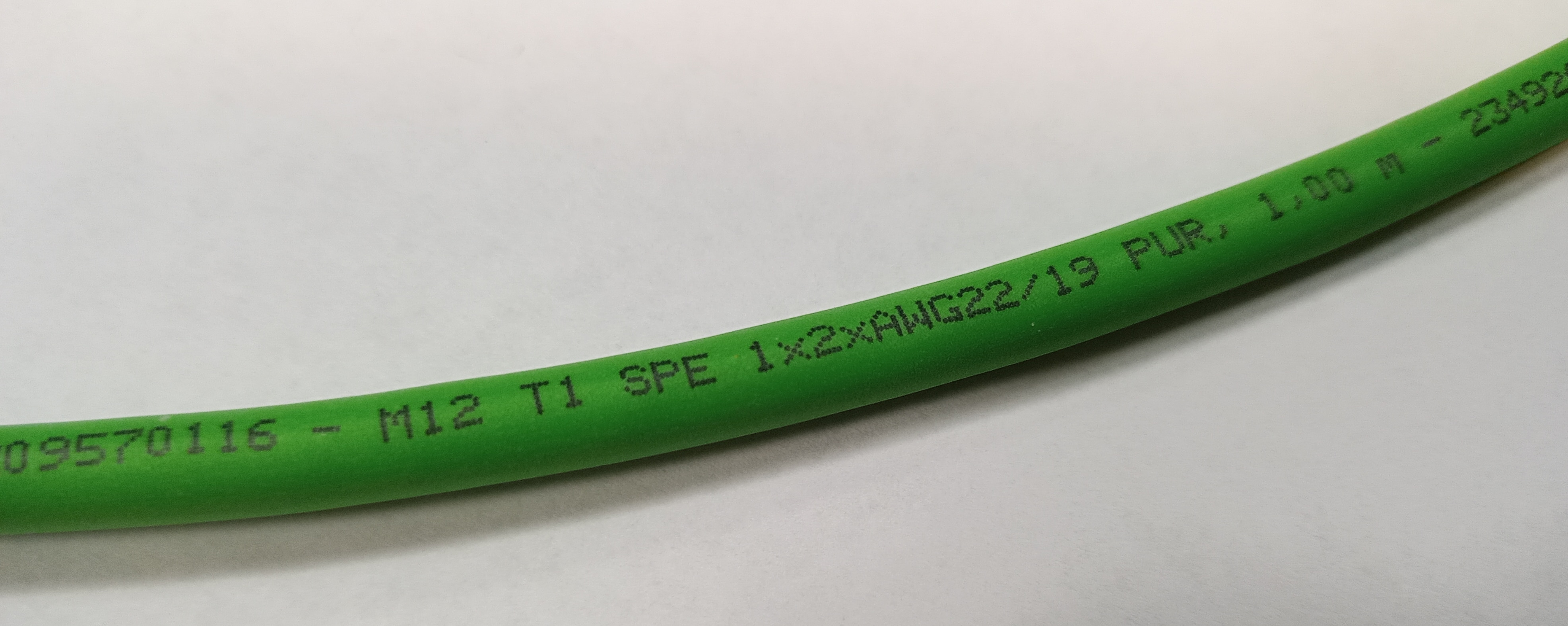
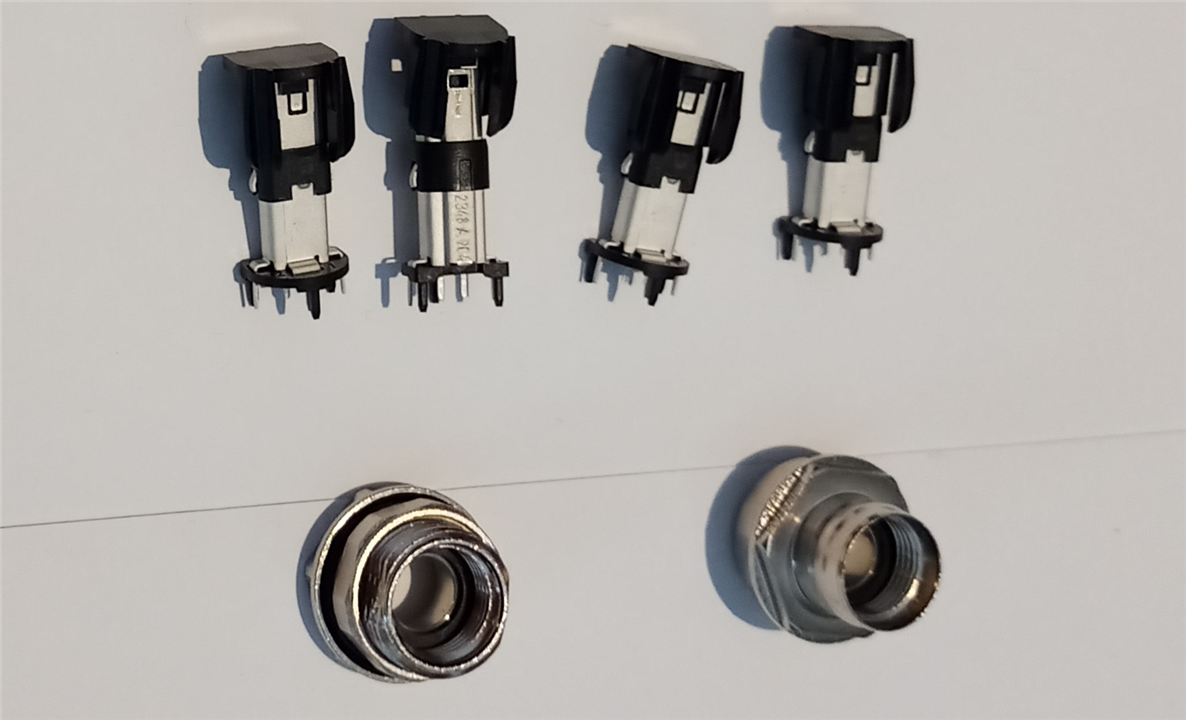
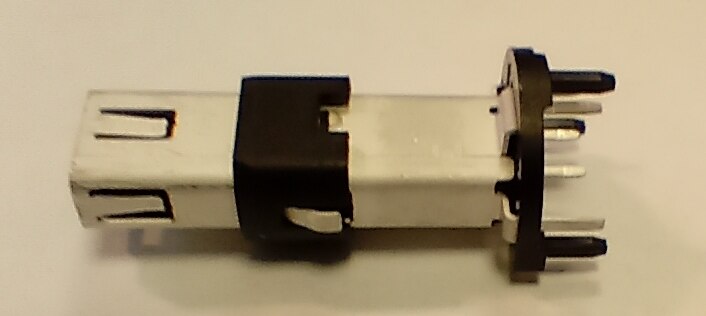
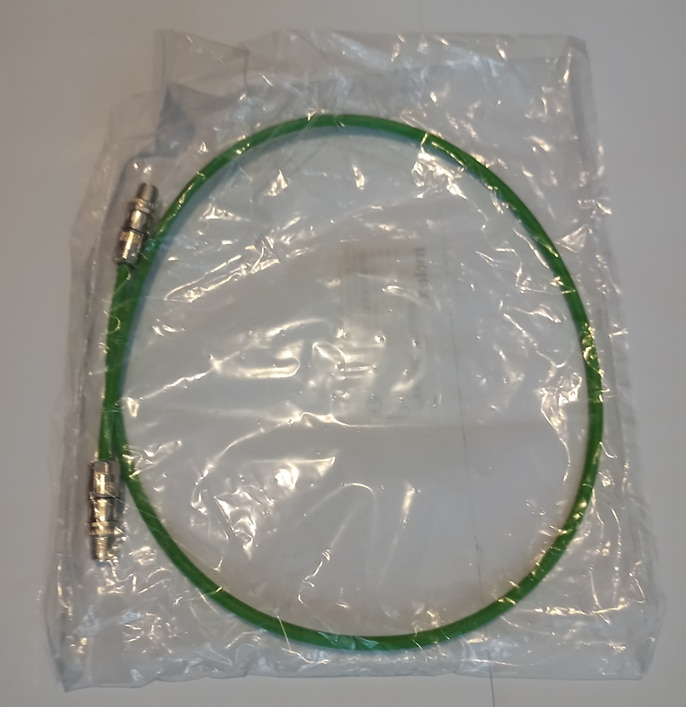
For more demanding environments, 1m of IP65/67 patchcord was also included, along with four matching PCB sockets - this time straight, and two enclosure mounts - one screwed from the inside and one from the outside. Patchord itself is constructed using thicker wire - this time AWG22 shielded twisted pair.
| {gallery}ip67 cable assemblies |
|---|
|
|
|

|
|
|
Provided PCB connector is IP67 rated only when connected, which can be verified using simple light test - one can see the light through the connector, indicating lack of internal sealings

and confirmed in the documentation

so - given that this connector is of M12 screwed type, several plastic M12 protector caps were also bought to protect the socket when unconnected

As an active part of the experimenting setup, several other components were provided:
three evaluation boards from Analog Devices:
EVAL-ADIN1100EBZ
This board, featured on the photo below, includes ADIN1100 PHY in media converter configuration, connected with ADIN1200 10BASE-T/100BASE-TX industrial grade PHY. There is also on-board MCU, allowing for on-line configuration and ADIN1100 register access using virtual COM on USB port.
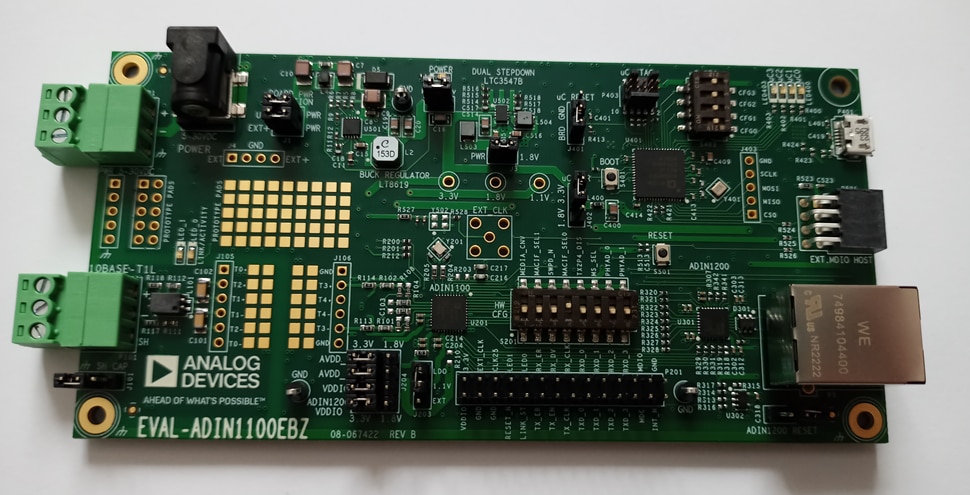

EVAL-ADIN1110EBZ
This board features more integrated 10BASE-T1L chip from Analog Devices: ADIN1110 MAC-PHY, connected with STM32 MCU using SPI bus. 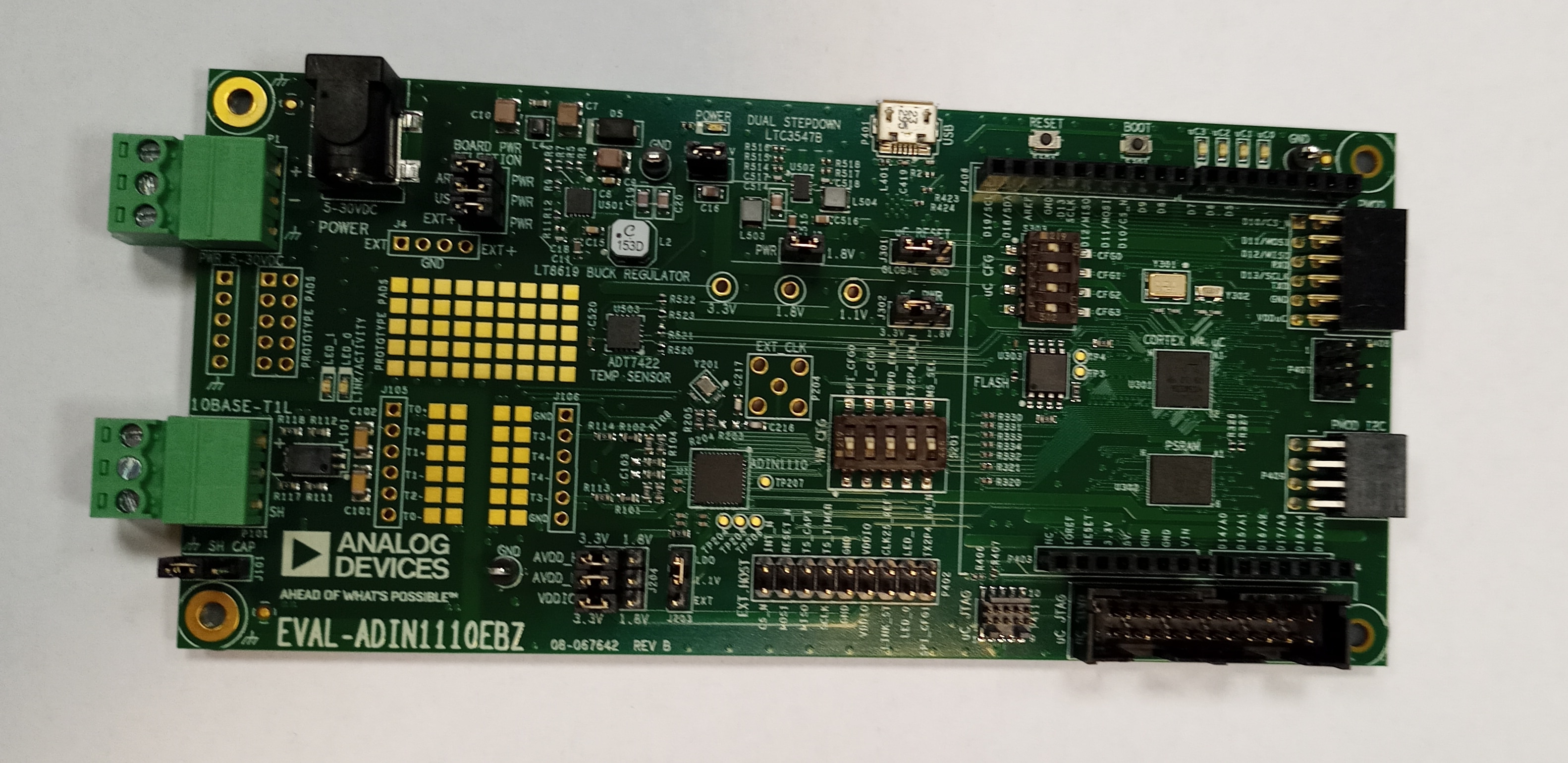

CN-0575
CN-0575 is another board with ADIN1110 MAC-PHY, this time in the form of Raspberry Pi shield and with additional Power over Data Line circuits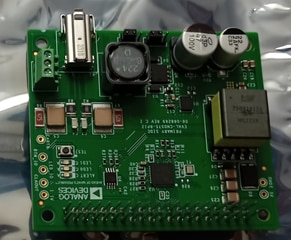
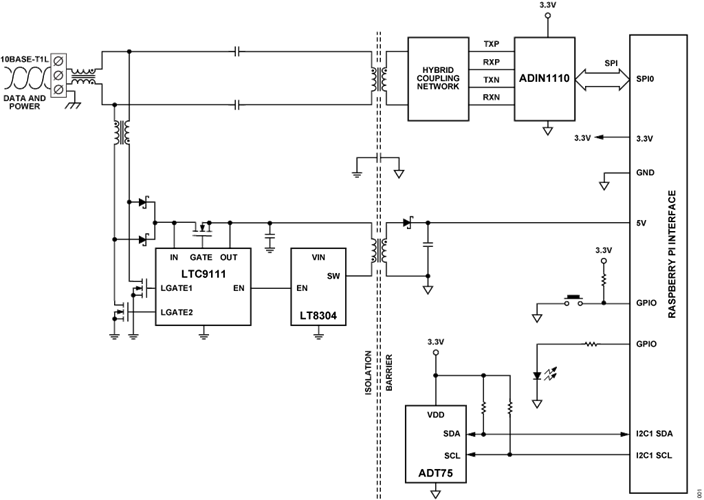
Two Raspberry Pi 4 SBC

First connectivity check
As I have accidently received two EVAL-ADIN1100EBZ boards instead of one and Element14 staff generously allowed me to keep the additional one, my first test will be to connect a laptop to the Internet using two EVAL-ADIN1100EBZ in media converter configurations. When the board is configured this way, two Ethernet PHYs (one for 10BASE-T1L and one for 10BASE-T) are connected back-to-back, which also proves that SPE is simply a variant of well-known Ethernet, when the same frames can be copied from one medium to another without modification. The converter can be powered using USB or external power supply with voltage in 5-32V range.

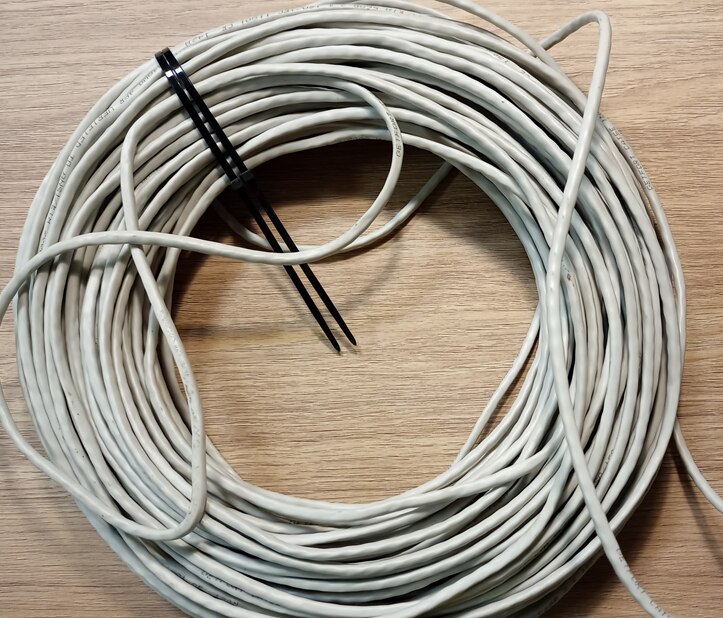
To test if communication can be carried on typical low-cost medium, I have prepared 48m of CAT5E CCE (copper clad aluminum - very inexpensive one) AWG 24 cable, from which one pair will be used for communication,
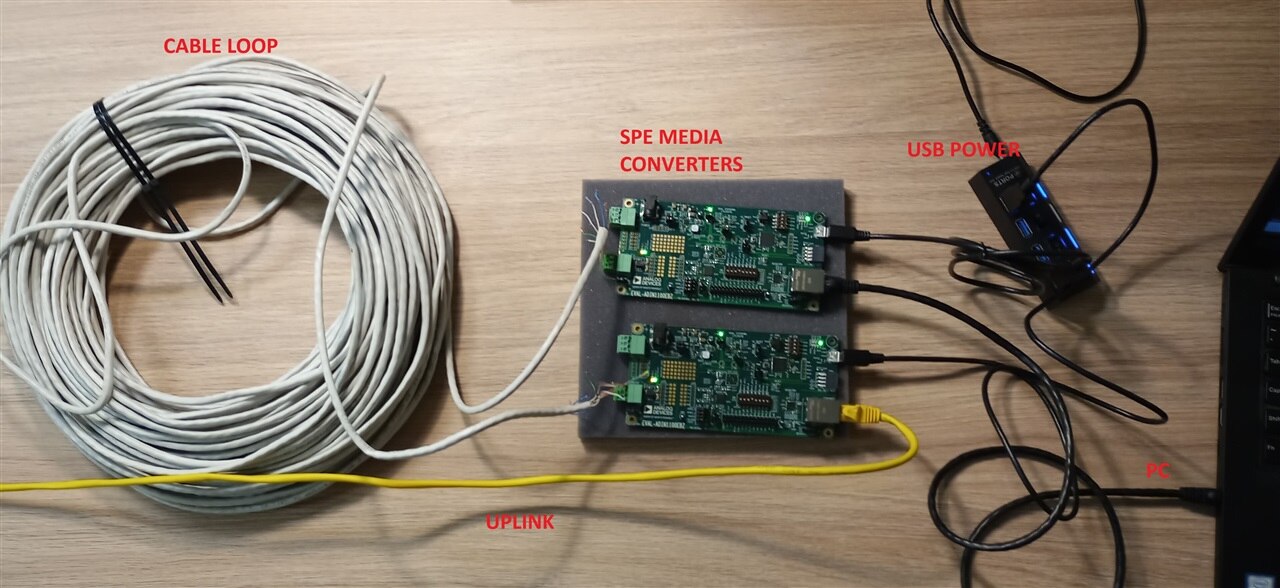
And the whole setup will look like below
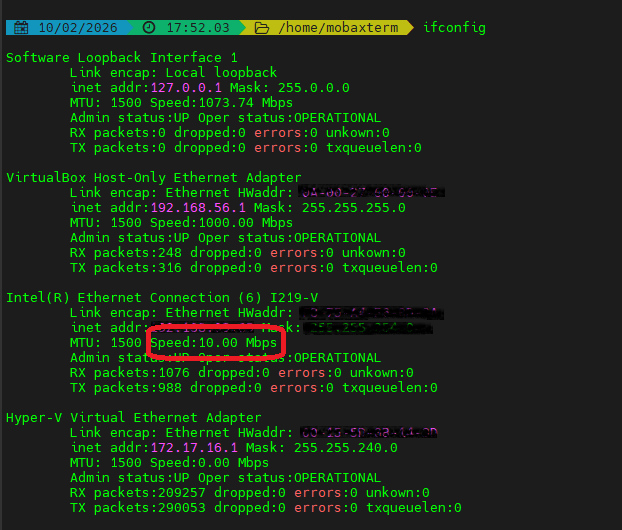
And?
Autonegotiation was successful and link speed of 10Mb/s correctly set
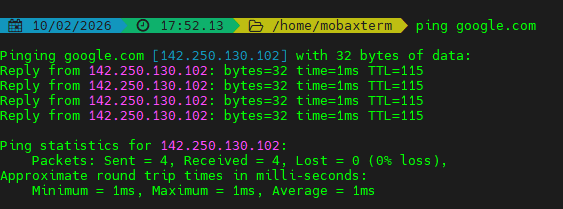
ICMP Echo (ping) test was successful
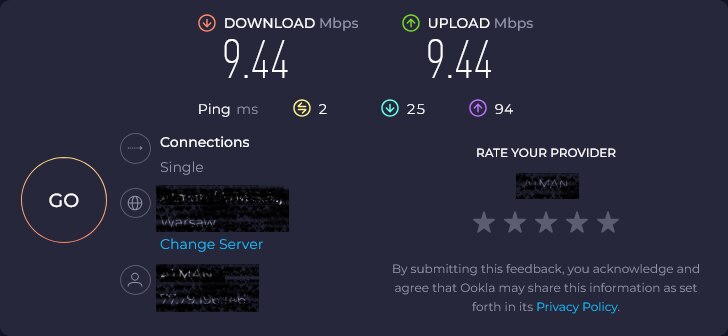
And bandwidth test (using bandwidth metering service from the Internet) was showing full bandwidth was available:
Long distance tests
Next test will involve the question: can longer link be used? Following the suggestion of wolfgangfriedrich I have connected in series all four pairs of 48m UTC cable from the last test, forming 192m cable with additional inter-pair crosstalk as a bonus.
This time, I have used two server-grade Intel 82576 1000Base-T adapters installed in Dell servers, connected using 192m of single pair cable with two EVAL-ADIN1100EBZ as media converters.

First test - ICMP echo was successful:
PING 172.19.0.11 (172.19.0.11) 56(84) bytes of data.
64 bytes from 172.19.0.11: icmp_seq=1 ttl=64 time=0.561 ms
64 bytes from 172.19.0.11: icmp_seq=2 ttl=64 time=0.523 ms
64 bytes from 172.19.0.11: icmp_seq=3 ttl=64 time=0.533 ms
64 bytes from 172.19.0.11: icmp_seq=4 ttl=64 time=0.523 ms
64 bytes from 172.19.0.11: icmp_seq=5 ttl=64 time=0.545 ms
64 bytes from 172.19.0.11: icmp_seq=6 ttl=64 time=0.539 ms
64 bytes from 172.19.0.11: icmp_seq=7 ttl=64 time=0.544 ms
64 bytes from 172.19.0.11: icmp_seq=8 ttl=64 time=0.554 ms
Then, iperf3 test indicated good performance and no data loss
client side
iperf3 -c 172.19.0.11 -b 10M
Connecting to host 172.19.0.11, port 5201
[ 5] local 172.19.0.10 port 35668 connected to 172.19.0.11 port 5201
[ ID] Interval Transfer Bitrate Retr Cwnd
[ 5] 0.00-1.00 sec 1.30 MBytes 10.9 Mbits/sec 0 50.9 KBytes
[ 5] 1.00-2.00 sec 1.12 MBytes 9.44 Mbits/sec 0 50.9 KBytes
[ 5] 2.00-3.00 sec 1.22 MBytes 10.3 Mbits/sec 0 50.9 KBytes
[ 5] 3.00-4.00 sec 1.12 MBytes 9.38 Mbits/sec 0 50.9 KBytes
[ 5] 4.00-5.00 sec 1.12 MBytes 9.38 Mbits/sec 0 50.9 KBytes
[ 5] 5.00-6.00 sec 1.12 MBytes 9.38 Mbits/sec 0 50.9 KBytes
[ 5] 6.00-7.00 sec 1.12 MBytes 9.38 Mbits/sec 0 50.9 KBytes
[ 5] 7.00-8.00 sec 1.12 MBytes 9.38 Mbits/sec 0 50.9 KBytes
[ 5] 8.00-9.00 sec 1.12 MBytes 9.38 Mbits/sec 0 50.9 KBytes
[ 5] 9.00-10.00 sec 1.12 MBytes 9.38 Mbits/sec 0 50.9 KBytes
- - - - - - - - - - - - - - - - - - - - - - - - -
[ ID] Interval Transfer Bitrate Retr
[ 5] 0.00-10.00 sec 11.5 MBytes 9.63 Mbits/sec 0 sender
[ 5] 0.00-10.08 sec 11.3 MBytes 9.37 Mbits/sec receiveriperf Done.
server side:
iperf3 -s
-----------------------------------------------------------
Server listening on 5201
-----------------------------------------------------------
Accepted connection from 172.19.0.10, port 35656
[ 5] local 172.19.0.11 port 5201 connected to 172.19.0.10 port 35668
[ ID] Interval Transfer Bitrate
[ 5] 0.00-1.00 sec 1.07 MBytes 9.01 Mbits/sec
[ 5] 1.00-2.00 sec 1.12 MBytes 9.42 Mbits/sec
[ 5] 2.00-3.00 sec 1.12 MBytes 9.41 Mbits/sec
[ 5] 3.00-4.00 sec 1.12 MBytes 9.42 Mbits/sec
[ 5] 4.00-5.00 sec 1.12 MBytes 9.42 Mbits/sec
[ 5] 5.00-6.00 sec 1.12 MBytes 9.42 Mbits/sec
[ 5] 6.00-7.00 sec 1.12 MBytes 9.42 Mbits/sec
[ 5] 7.00-8.00 sec 1.12 MBytes 9.41 Mbits/sec
[ 5] 8.00-9.00 sec 1.12 MBytes 9.42 Mbits/sec
[ 5] 9.00-10.00 sec 1.12 MBytes 9.42 Mbits/sec
[ 5] 10.00-10.08 sec 90.5 KBytes 9.32 Mbits/sec
- - - - - - - - - - - - - - - - - - - - - - - - -
[ ID] Interval Transfer Bitrate
[ 5] 0.00-10.08 sec 11.3 MBytes 9.37 Mbits/sec receiver
And iperf3 UDP
client
Connecting to host 172.19.0.11, port 5201
[ 5] local 172.19.0.10 port 42566 connected to 172.19.0.11 port 5201
[ ID] Interval Transfer Bitrate Total Datagrams
[ 5] 0.00-1.00 sec 1.19 MBytes 10.0 Mbits/sec 863
[ 5] 1.00-2.00 sec 1.19 MBytes 9.97 Mbits/sec 861
[ 5] 2.00-3.00 sec 1.14 MBytes 9.57 Mbits/sec 826
[ 5] 3.00-4.00 sec 1.14 MBytes 9.56 Mbits/sec 825
[ 5] 4.00-5.00 sec 1.14 MBytes 9.57 Mbits/sec 826
[ 5] 5.00-6.00 sec 1.14 MBytes 9.57 Mbits/sec 826
[ 5] 6.00-7.00 sec 1.14 MBytes 9.56 Mbits/sec 825
[ 5] 7.00-8.00 sec 1.14 MBytes 9.57 Mbits/sec 826
[ 5] 8.00-9.00 sec 1.14 MBytes 9.57 Mbits/sec 826
[ 5] 9.00-10.00 sec 1.14 MBytes 9.56 Mbits/sec 825
- - - - - - - - - - - - - - - - - - - - - - - - -
[ ID] Interval Transfer Bitrate Jitter Lost/Total Datagrams
[ 5] 0.00-10.00 sec 11.5 MBytes 9.65 Mbits/sec 0.000 ms 0/8329 (0%) sender
[ 5] 0.00-10.08 sec 11.4 MBytes 9.52 Mbits/sec 0.014 ms 0/8285 (0%) receiver
server
Accepted connection from 172.19.0.10, port 48540
[ 5] local 172.19.0.11 port 5201 connected to 172.19.0.10 port 42566
[ ID] Interval Transfer Bitrate Jitter Lost/Total Datagrams
[ 5] 0.00-1.00 sec 1.09 MBytes 9.13 Mbits/sec 0.299 ms 0/788 (0%)
[ 5] 1.00-2.00 sec 1.14 MBytes 9.57 Mbits/sec 0.307 ms 0/826 (0%)
[ 5] 2.00-3.00 sec 1.14 MBytes 9.57 Mbits/sec 0.021 ms 0/826 (0%)
[ 5] 3.00-4.00 sec 1.14 MBytes 9.56 Mbits/sec 0.019 ms 0/825 (0%)
[ 5] 4.00-5.00 sec 1.14 MBytes 9.57 Mbits/sec 0.024 ms 0/826 (0%)
[ 5] 5.00-6.00 sec 1.14 MBytes 9.56 Mbits/sec 0.024 ms 0/825 (0%)
[ 5] 6.00-7.00 sec 1.14 MBytes 9.57 Mbits/sec 0.018 ms 0/826 (0%)
[ 5] 7.00-8.00 sec 1.14 MBytes 9.57 Mbits/sec 0.019 ms 0/826 (0%)
[ 5] 8.00-9.00 sec 1.14 MBytes 9.56 Mbits/sec 0.015 ms 0/825 (0%)
[ 5] 9.00-10.00 sec 1.14 MBytes 9.57 Mbits/sec 0.022 ms 0/826 (0%)
[ 5] 10.00-10.08 sec 93.3 KBytes 9.64 Mbits/sec 0.014 ms 0/66 (0%)
- - - - - - - - - - - - - - - - - - - - - - - - -
[ ID] Interval Transfer Bitrate Jitter Lost/Total Datagrams
[ 5] 0.00-10.08 sec 11.4 MBytes 9.52 Mbits/sec 0.014 ms 0/8285 (0%) receiver
this observation was also verified using error counters of interfaces:
inet 172.19.0.11 netmask 255.255.0.0 broadcast 172.19.255.255
inet6 fe80::225:90ff:fe3a:1730 prefixlen 64 scopeid 0x20<link>
ether 00:25:90:3a:17:30 txqueuelen 1000 (Ethernet)
RX packets 4010912 bytes 5725615220 (5.3 GiB)
RX errors 0 dropped 0 overruns 0 frame 0
TX packets 1865313 bytes 565506418 (539.3 MiB)
TX errors 0 dropped 0 overruns 0 carrier 0 collisions 0
device memory 0xc15a0000-c15bffffinet 172.19.0.10 netmask 255.255.0.0 broadcast 172.19.255.255
inet6 fe80::225:90ff:fe39:8fb0 prefixlen 64 scopeid 0x20<link>
ether 00:25:90:39:8f:b0 txqueuelen 1000 (Ethernet)
RX packets 1865234 bytes 565502452 (539.3 MiB)
RX errors 0 dropped 0 overruns 0 frame 0
TX packets 4011112 bytes 5725623976 (5.3 GiB)
TX errors 0 dropped 0 overruns 0 carrier 0 collisions 0
device memory 0xc15a0000-c15bffff
no errors after transferring 5GB and 500MB back (after bulk file transfer test).
Then, Netpipe bandwidth test was conducted for different frame sizes, giving plots as below:

Again - very good, no packet loss symptoms - observed slight drop of transfer near 1kB frame size was identified before as a behavior of the Intel network card used.
Reverse polarity test
As Analog Devices evaluation cards are using screwed terminal blocks to connect the SPE cable, I have seen an opinion that it can be lead to installation errors in form of swapped conductors. Although IEEE 802.3-2022 states:
146.3.4.4 PCS Receive automatic polarity detection
An automatic polarity detection and correction shall be implemented on the receive side of both master and
slave PHY.
we can test it ourselves. After reversing pair conductors, PING still goes through:
64 bytes from 172.19.0.11: icmp_seq=1 ttl=64 time=0.543 ms
64 bytes from 172.19.0.11: icmp_seq=2 ttl=64 time=0.551 ms
64 bytes from 172.19.0.11: icmp_seq=3 ttl=64 time=0.570 ms
64 bytes from 172.19.0.11: icmp_seq=4 ttl=64 time=0.522 ms
Iperf3 performance is unaffected:
client:
Connecting to host 172.19.0.11, port 5201
[ 5] local 172.19.0.10 port 38580 connected to 172.19.0.11 port 5201
[ ID] Interval Transfer Bitrate Total Datagrams
[ 5] 0.00-1.00 sec 1.19 MBytes 10.0 Mbits/sec 863
[ 5] 1.00-2.00 sec 1.19 MBytes 9.97 Mbits/sec 861
[ 5] 2.00-3.00 sec 1.14 MBytes 9.57 Mbits/sec 826
[ 5] 3.00-4.00 sec 1.14 MBytes 9.56 Mbits/sec 825
[ 5] 4.00-5.00 sec 1.14 MBytes 9.57 Mbits/sec 826
[ 5] 5.00-6.00 sec 1.14 MBytes 9.57 Mbits/sec 826
[ 5] 6.00-7.00 sec 1.14 MBytes 9.56 Mbits/sec 825
[ 5] 7.00-8.00 sec 1.14 MBytes 9.57 Mbits/sec 826
[ 5] 8.00-9.00 sec 1.14 MBytes 9.57 Mbits/sec 826
[ 5] 9.00-10.00 sec 1.14 MBytes 9.56 Mbits/sec 825
- - - - - - - - - - - - - - - - - - - - - - - - -
[ ID] Interval Transfer Bitrate Jitter Lost/Total Datagrams
[ 5] 0.00-10.00 sec 11.5 MBytes 9.65 Mbits/sec 0.000 ms 0/8329 (0%) sender
[ 5] 0.00-10.08 sec 11.4 MBytes 9.52 Mbits/sec 0.022 ms 0/8284 (0%) receiver
server:
Accepted connection from 172.19.0.10, port 39240
[ 5] local 172.19.0.11 port 5201 connected to 172.19.0.10 port 38580
[ ID] Interval Transfer Bitrate Jitter Lost/Total Datagrams
[ 5] 0.00-1.00 sec 1.09 MBytes 9.13 Mbits/sec 0.303 ms 0/788 (0%)
[ 5] 1.00-2.00 sec 1.14 MBytes 9.57 Mbits/sec 0.306 ms 0/826 (0%)
[ 5] 2.00-3.00 sec 1.14 MBytes 9.57 Mbits/sec 0.028 ms 0/826 (0%)
[ 5] 3.00-4.00 sec 1.14 MBytes 9.56 Mbits/sec 0.019 ms 0/825 (0%)
[ 5] 4.00-5.00 sec 1.14 MBytes 9.57 Mbits/sec 0.010 ms 0/826 (0%)
[ 5] 5.00-6.00 sec 1.14 MBytes 9.57 Mbits/sec 0.020 ms 0/826 (0%)
[ 5] 6.00-7.00 sec 1.14 MBytes 9.56 Mbits/sec 0.021 ms 0/825 (0%)
[ 5] 7.00-8.00 sec 1.14 MBytes 9.57 Mbits/sec 0.020 ms 0/826 (0%)
[ 5] 8.00-9.00 sec 1.14 MBytes 9.57 Mbits/sec 0.020 ms 0/826 (0%)
[ 5] 9.00-10.00 sec 1.14 MBytes 9.56 Mbits/sec 0.014 ms 0/825 (0%)
[ 5] 10.00-10.08 sec 91.9 KBytes 9.50 Mbits/sec 0.022 ms 0/65 (0%)
- - - - - - - - - - - - - - - - - - - - - - - - -
[ ID] Interval Transfer Bitrate Jitter Lost/Total Datagrams
[ 5] 0.00-10.08 sec 11.4 MBytes 9.52 Mbits/sec 0.022 ms 0/8284 (0%) receiver
And Netpipe graph is as below (comparing direct and reversed connection) - no observable difference

ADIN1110 tests
As we have discovered previously, ADIN1110 differs from ADIN1100 PHYs we have used so far that it includes complete Ethernet adapter (both PHY and MAC functions). In this Challenge, we were provided with evaluation boards for both ADIN1100 and ADIN1110.
Our next test would be connecting ADIN1110 evaluation board (that has on-board MCU and can serve a web page) with Raspberry PI - but instead of using CN-0575 shield (yet), another interface will be used: USB 10BASE-T1L adapter that is included in AD-SWIOT1L-SL : AD-T1LUSB2.0, that is basically USB Ethernet adapter with included ADIN1100 PHY. It's block diagram is below:

Our test setup consists of
- Raspberry PI
- 10BASE-T1L USB adapter
- short run of MODBUS cable (included in AD-SWIOT1L-SL evaluation platform), later replaced with 48 meters of CAT5E UTP
- USB powered ADIN1110 evaluation board in a default configuration
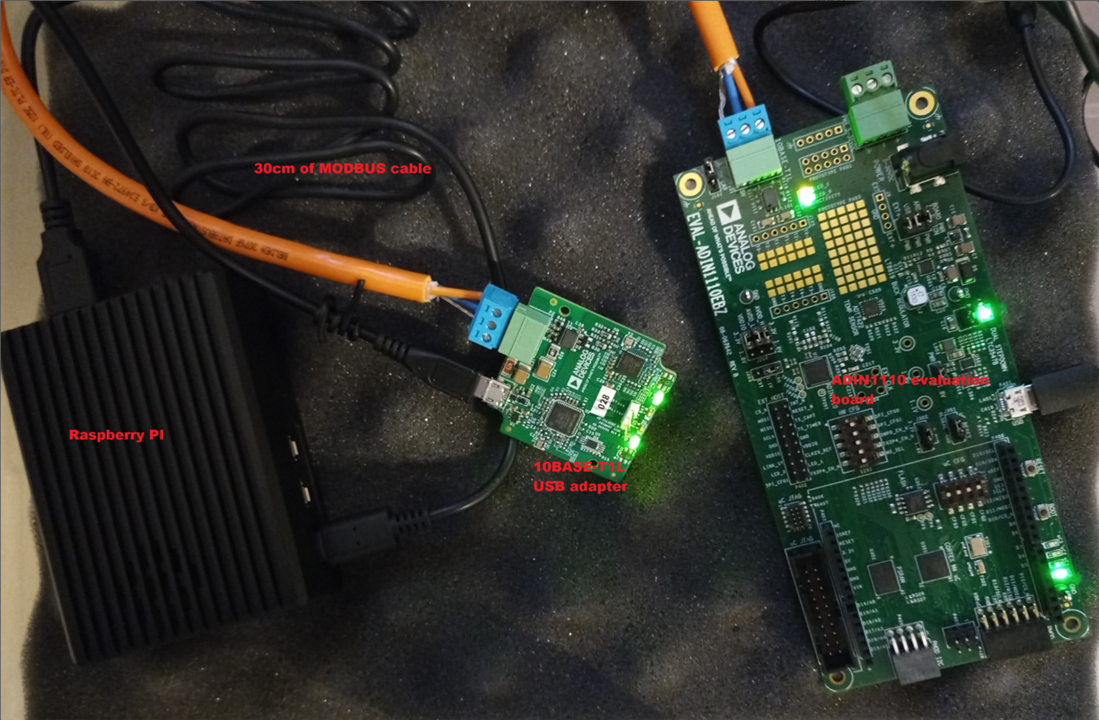
and is (after configuring DHCP server on Raspberry PI, because default configuration of ADIN1110 evaluation board uses dynamic address) working, serving page as below:
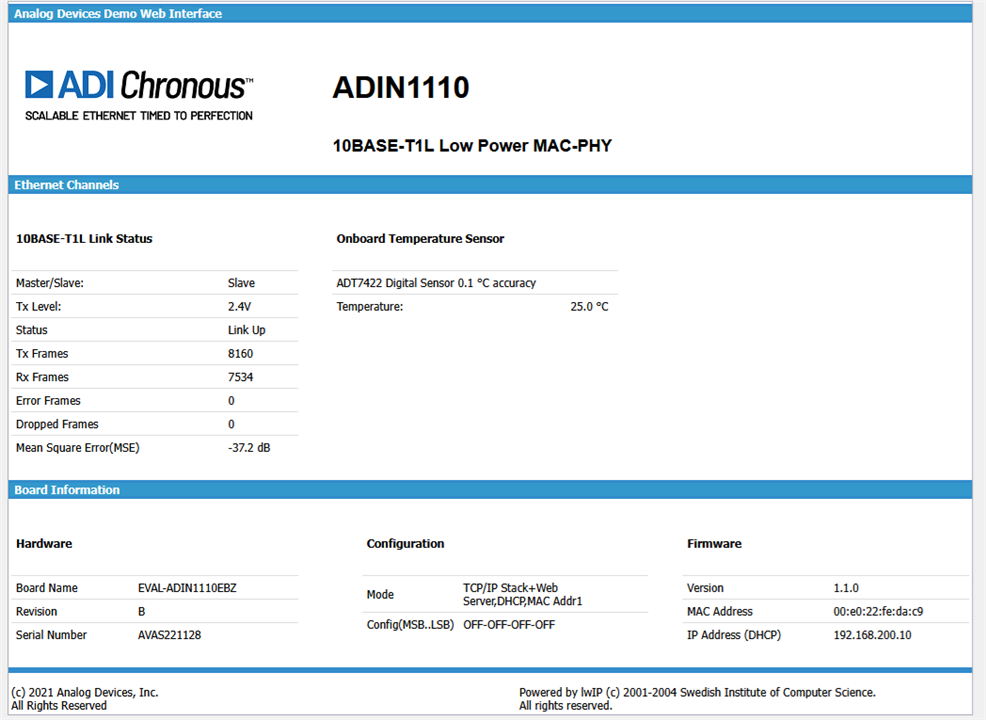
From this page, some interesting data can be gathered:
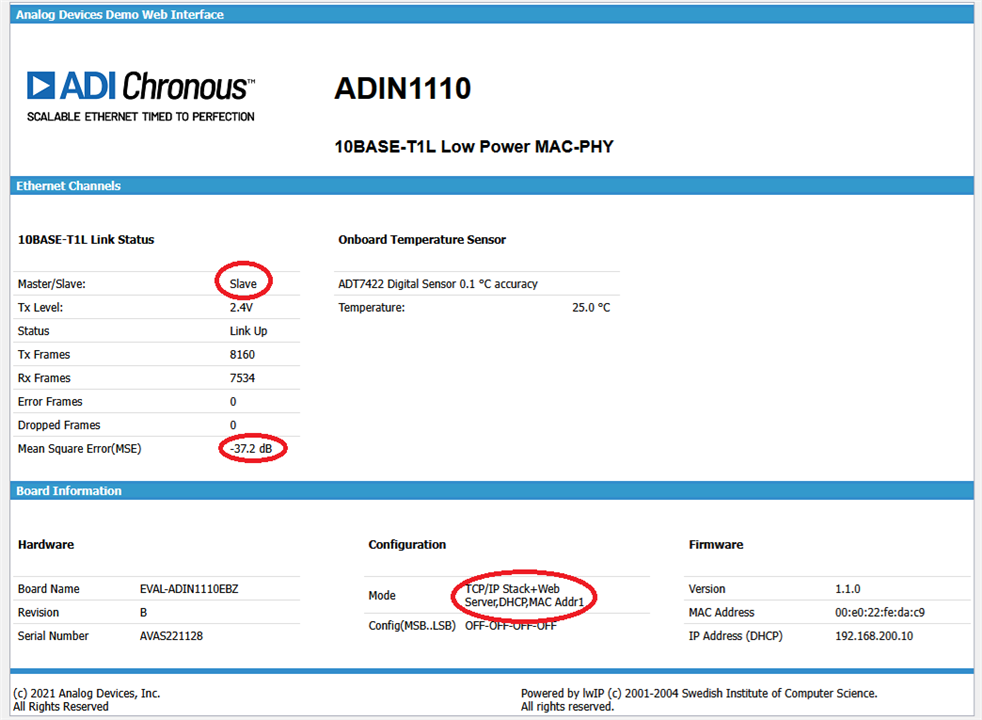
As we can see, it has autonegotiated as slave/follower (which is consistent with default jumper setting of "prefer follower"), some quality metric is displayed and DHCP configuration is also present.
Then, 48 meters of UTP CAT5E cable was connected instead of MODBUS cable

with no observable degradation - even MSE metric stays at -37.2dB

Unfortunately, on Raspberry PI side ever increasing counter of receive errors was observed:

The frame loss is not affecting ICMP, but TCP segments sent from ADIN1110 get lost and are being retransmitted:

As this behavior is not present when using ADIN1100 media converters and is independent to the cable length (happens both on 30cm and on 192m cable) it could be some firmware or USB adapter issue.
Technology evaluation and project directions
As we have tested, 10BASE-T1 technology can be utilized on typical Ethernet cables (at least in low noise/lab environment) and is immune to reverse polarization. So - what can be benefits of using good quality cables and connectors?
First - noise suppression. Molex cables and connectors are shielded which could be needed in the presence of higher noise levels. In fact, even in lab/office environment, mains noise (second image) has similar amplitude to the signal transmitted (first image):


and given imperfections of common-mode filtering components, it could have negative impact on the communication if high enough.
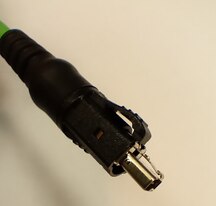
Second - temporary/detachable connections. In such a situation connectors that can be quickly dis/connected while being vibration resistant are a must. Below we can see metal latch of Molex IP20 connector, which secures it in place and is more damage-resistant that a plastic one we are familiar from RJ-45 plugs.
Third - water and dust protection. IP rating specifies protection level against dust (first digit) and water ingress (second digit).
- IP6x describe equipment that is "dust-tight", which means that even limited amounts of dust are prevented from entering,
- IPx5 inform that equipment is protected against "water jets" - water projected in low-pressure jets from any direction will not have harmful effects (but limited ingress may happen),
- IPx7 specifies that equipment is protected against temporary immersion in water (up to 1m for 30min),
Molex offers connectors and cables with IP rating of 65 or even 67.
And the last one - power over data line. As we know from "traditional" Ethernet, possibility to power equipment using only data line could simplify installations of low-power, remote components - like WiFi Access Points or cameras. 10BASE-T1 standard allows for powering equipment using data line, but the cables should meet higher standards than for data-only. In this situation also good quality cables are important.
Waterproof enclosure and connectors
To demonstrate the usage of SPE Molex connectors in more demanding environment, we will try to build water-resistant, line powered IP camera. To do this, we will need appropriate enclosure. I have selected Kradex Z74 I have used as an additional one in E14 Extreme Environment Challenges. It is slightly larger than a Raspberry Pi 4 SBC, so there is a room for additional components

but has mounting points only very near the walls - this fact will be important later
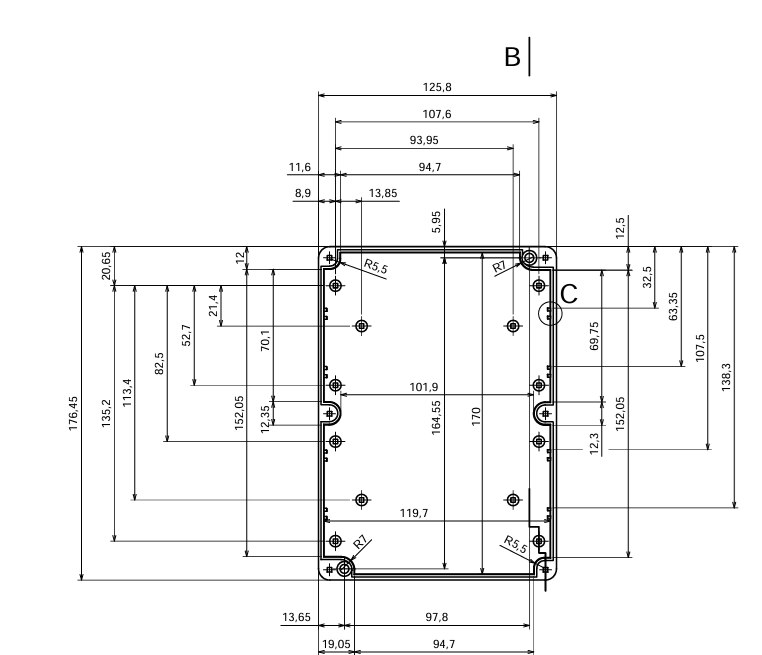
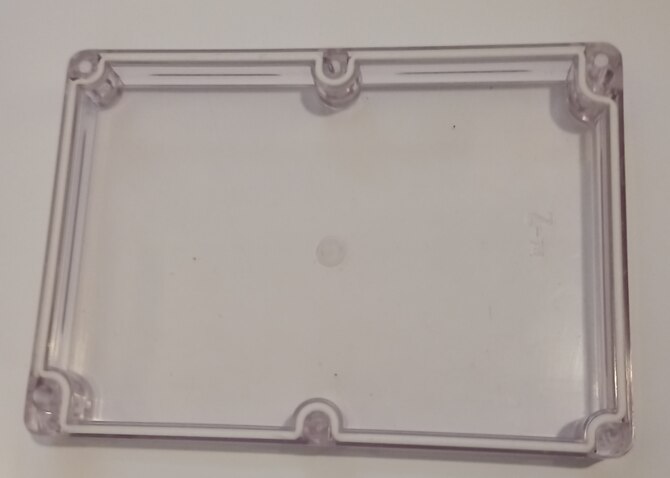
Enclosure itself - rated for IP65 (so it is protected from dust ingress and from water jets from any direction, but not for water immersion), has foam-roll gasket between the main part and the lid that should be trimmed and self-installed from the provided length
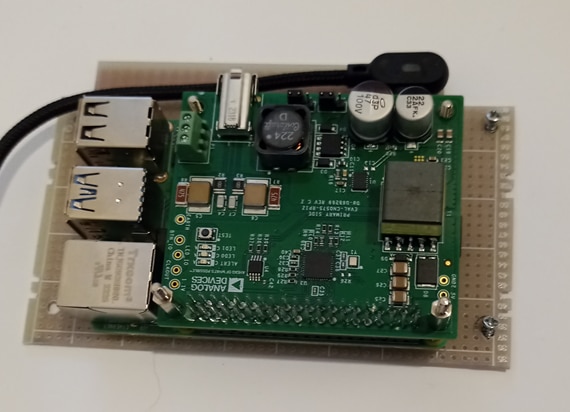
Raspberry Pi itself was screwed into section of PCB cut-out to the shape of enclosure floor, boards connected using 2.5mm spacers and screws - RPI has mounting holes of 2.7mm diameter, so more common 3mm spacers cannot be used.
Then, first immersion test was performed: with empty enclosure filled with paper towel to quickly identify water ingress

No excessive bubbling was observer and no water identifiable on the paper towel - success! This enclosure survived short-term water immersion despite being IP65 only.
Next goal - install SPE connector. First dilemma - where? Traditionally, it should be installed on one of the walls but there is one problem: connector is PCB mounted and should be slided into a mount screwed to the enclosure wall. So, either PCB should be vertically moved into a mount, then fastened, or a mount should be installed onto a connector. As we see below, connector protrudes out of enclosure, creating mechanical challenge
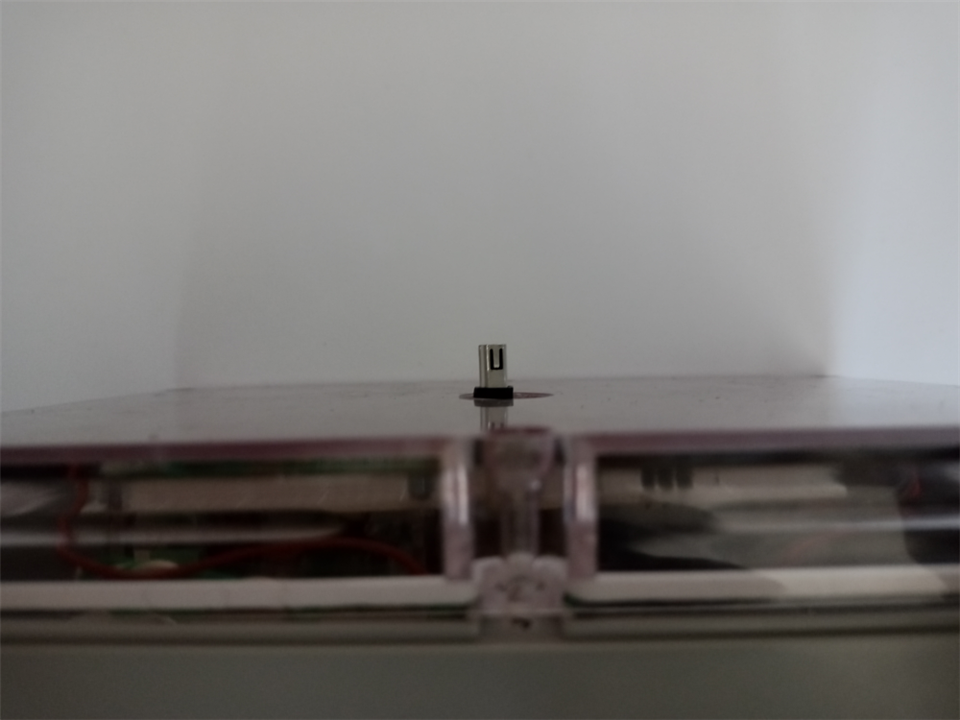
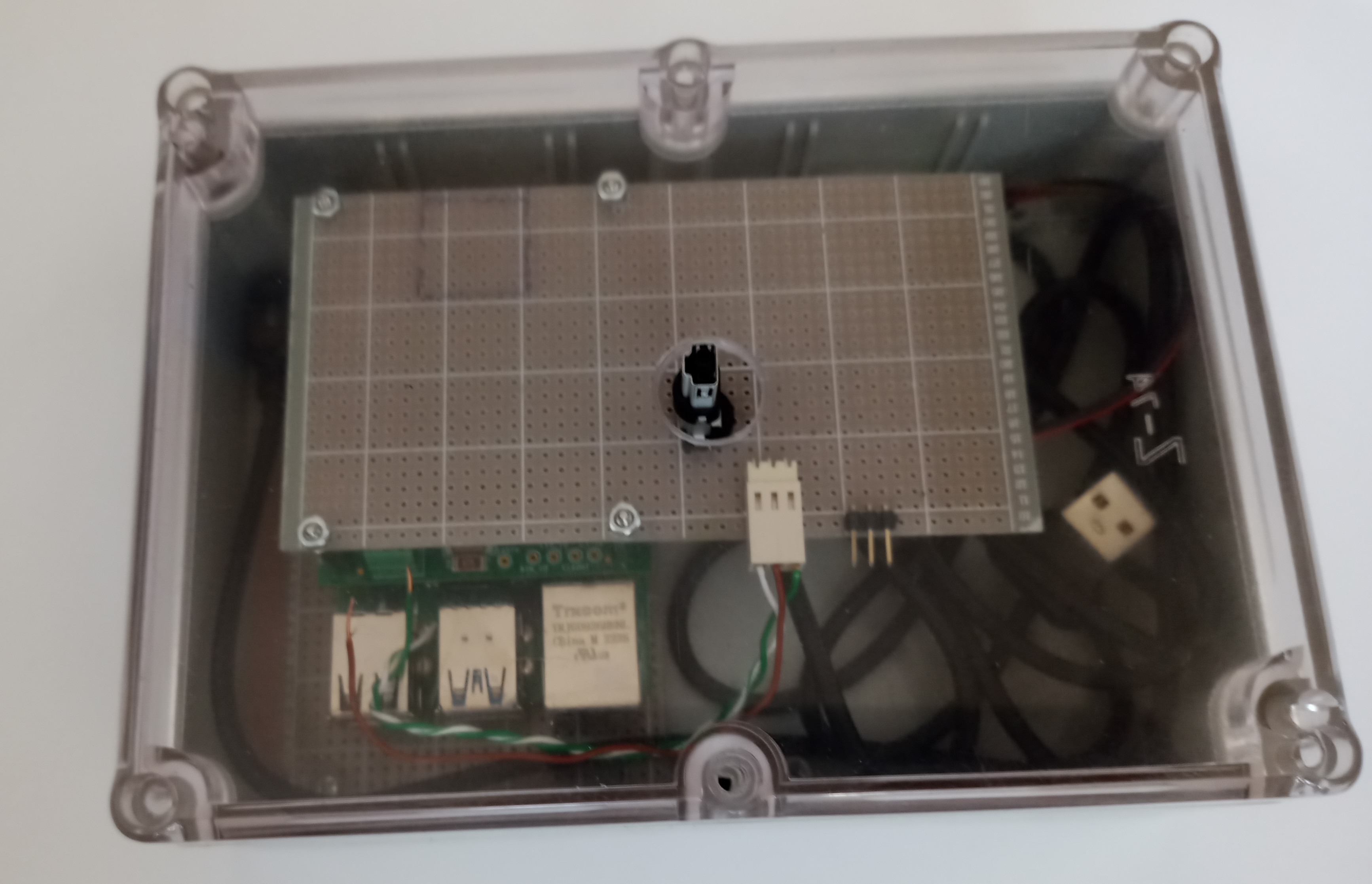
And - as my enclosure doesn't provide easy way of moving PCB vertically (board profiled in such a way that it can be mounted using mounting points in the corners cannot be moved vertically) I have decided to mount it into the lid - this way, the lid can be positioned on the connector.
| {gallery}connector mount |
|---|

|
|
Next test - is it still waterproof, is the connector really IP67 only when connected and if we can use connector cap to protect it when not connected
Test setup is as before: enclosure with paper towel inserted (to quickly identify water ingress), this time with the connector socket installed (we can see inner gasket that is protecting the connection with plug installed)

as we can see, water can enter through the connector, leaving enclosure after test in the state like below:
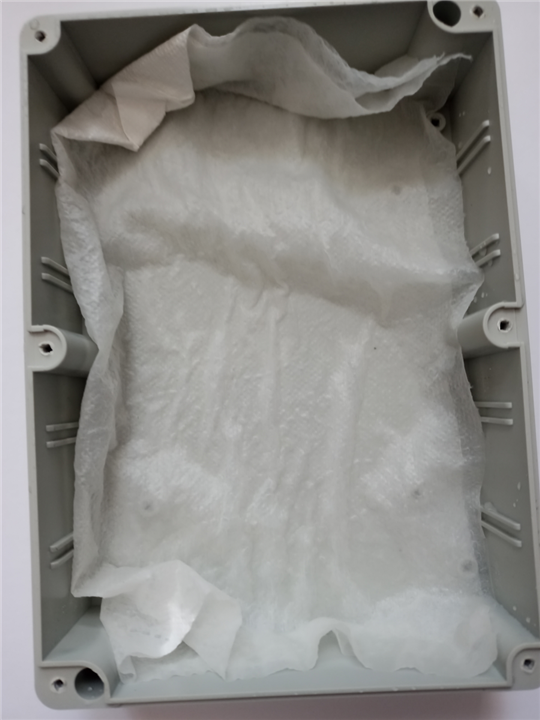
What can we do about this? Fortunately our Molex M12 connector mounts are of threaded variety, so they have inner thread and a gasket so we can use standard M12 threaded connector caps. Connector filled with such a cap is shown on the photo below:

This time test result is quite different
with no observable water ingress at the end

Connector adapters
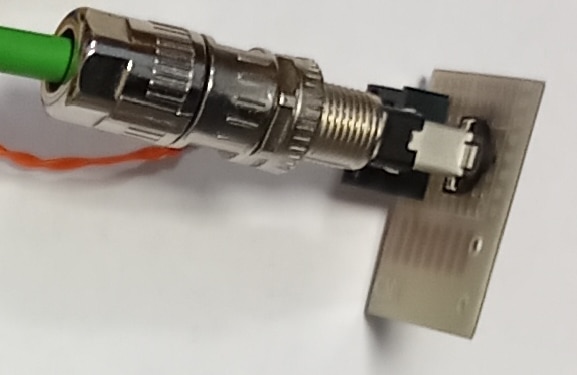
To allow easy interfacing with ADI evaluation boards (that usually terminate Single Pair Ethernet using terminal blocks), two adapters were prepared:
- one for IP20 PCB connector
- and another one for IP67 PCB connector

RPI with CN-0575
To provide our camera with 10BASE-T1L interface, we will install CN-0575 shield, that not only includes SPI connected ADIN1110 MAC-PHY, but a complete Power over Data Line Powered Device (PD) circuit with galvanic isolation.
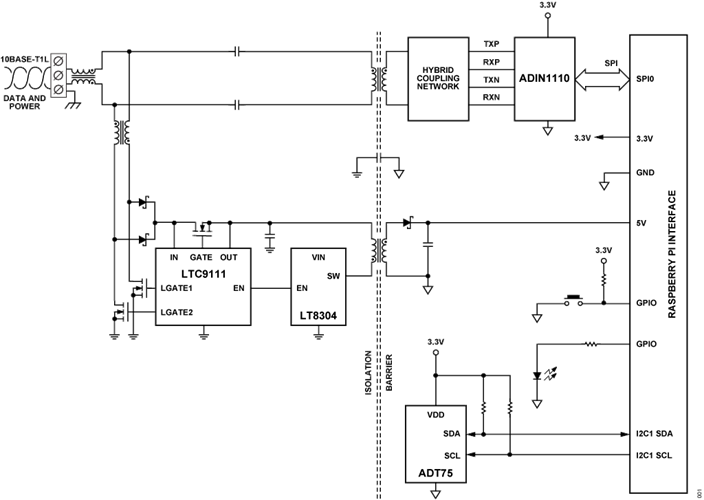
There is a small problem configuring it through - although ADIN1110 driver is included in the mainline kernel, Raspberry Pi OS (previously known as Raspbian) is not building it - even as loadable module. Additionally, Raspberry Pi OS lacks an overlay file (a form of configuration file for hardware components for CN-0575.
Those two obstacles can be solved - driver can be built "by hand" and overlay file can be downloaded, but there is another approach: ADI offers Kuiper Linux - Raspberry Pi OS clone with support included for various ADI development boards - CN-0575 included.
After flashing it into SD card (in the standard way), enabling
dtoverlay=rpi-cn0575
in the config.txt and rebooting, additional Ethernet interface (usually eth1) appears that can be configured using typical methods.
Camera interface
To provide main function of the device (and consume somewhat more power to show off power over the data line capabilities), a camera and RGB LED ring were installed on the upper PCB.

Camera was connected in the usual way with dedicated cable to the dedicated port of Raspberry Pi SBC, and WS2812B LED ring was also connected in the typical way - to the GPIO18 of the SBC.
Then, libraries were installed:
#pip3 install rpi_ws281x
#pip3 install adafruit-circuitpython-neopixel
And modified example was run. Modification involved leaving only solid color set and including sleep in the loop to prevent it from spinning too fast:
colorWipe(strip, Color(255, 255, 255)) #white
time.sleep(10)
Resulting in the ring of white light
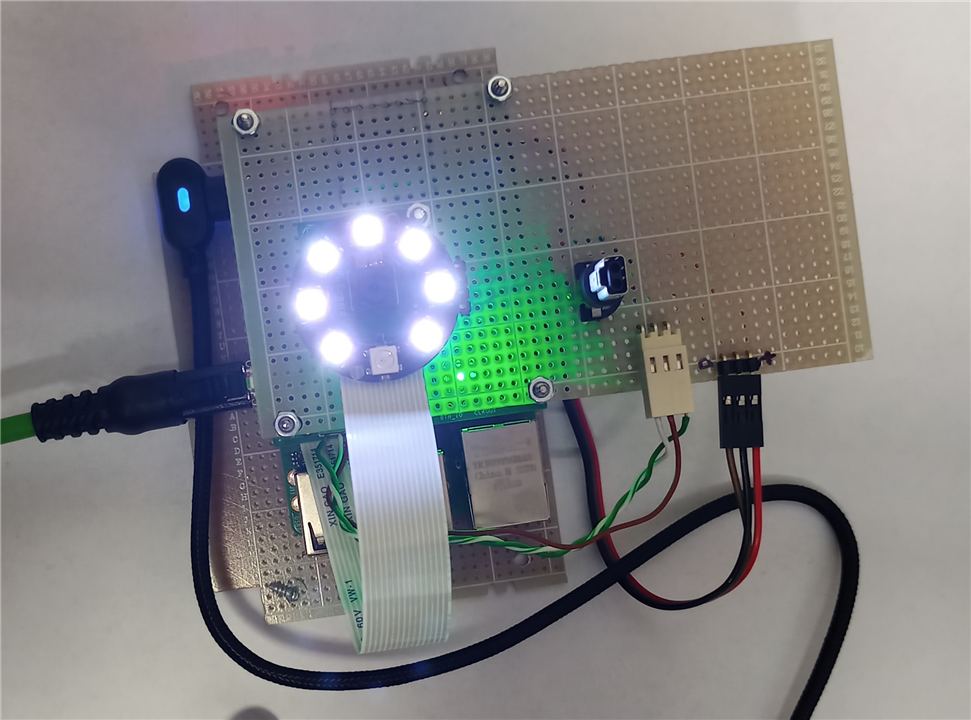
with device consuming about 600mA.

CN-0575 performance test
For CN-0575 performance test, setup was modified by including (in addition to 48m of UTP) Molex IP20 connector adapter and Molex IP20 1m cable
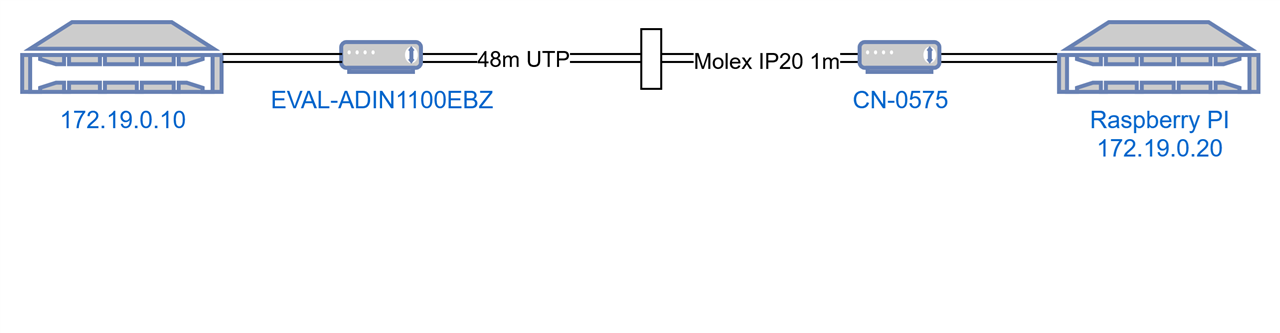
Raspberry Pi is USB powered in this setup.
Iperf3 test results are somewhat surprising - there is some packet loss observable when using datagram (UDP) mode
iperf3 -c 172.19.0.20 -u -b 10M
Connecting to host 172.19.0.20, port 5201
[ 5] local 172.19.0.10 port 57318 connected to 172.19.0.20 port 5201
[ ID] Interval Transfer Bitrate Total Datagrams
[ 5] 0.00-1.00 sec 1.19 MBytes 10.0 Mbits/sec 863
[ 5] 1.00-2.00 sec 1.19 MBytes 9.97 Mbits/sec 861
[ 5] 2.00-3.00 sec 1.14 MBytes 9.57 Mbits/sec 826
[ 5] 3.00-4.00 sec 1.14 MBytes 9.56 Mbits/sec 825
[ 5] 4.00-5.00 sec 1.14 MBytes 9.57 Mbits/sec 826
[ 5] 5.00-6.00 sec 1.14 MBytes 9.56 Mbits/sec 825
[ 5] 6.00-7.00 sec 1.14 MBytes 9.57 Mbits/sec 826
[ 5] 7.00-8.00 sec 1.14 MBytes 9.57 Mbits/sec 826
[ 5] 8.00-9.00 sec 1.14 MBytes 9.56 Mbits/sec 825
[ 5] 9.00-10.00 sec 1.14 MBytes 9.57 Mbits/sec 826
- - - - - - - - - - - - - - - - - - - - - - - - -
[ ID] Interval Transfer Bitrate Jitter Lost/Total Datagrams
[ 5] 0.00-10.00 sec 11.5 MBytes 9.65 Mbits/sec 0.000 ms 0/8329 (0%) sender
[ 5] 0.00-10.09 sec 11.1 MBytes 9.21 Mbits/sec 0.191 ms 263/8284 (3.2%) receiver
Which can be further explored using Netpipe graph
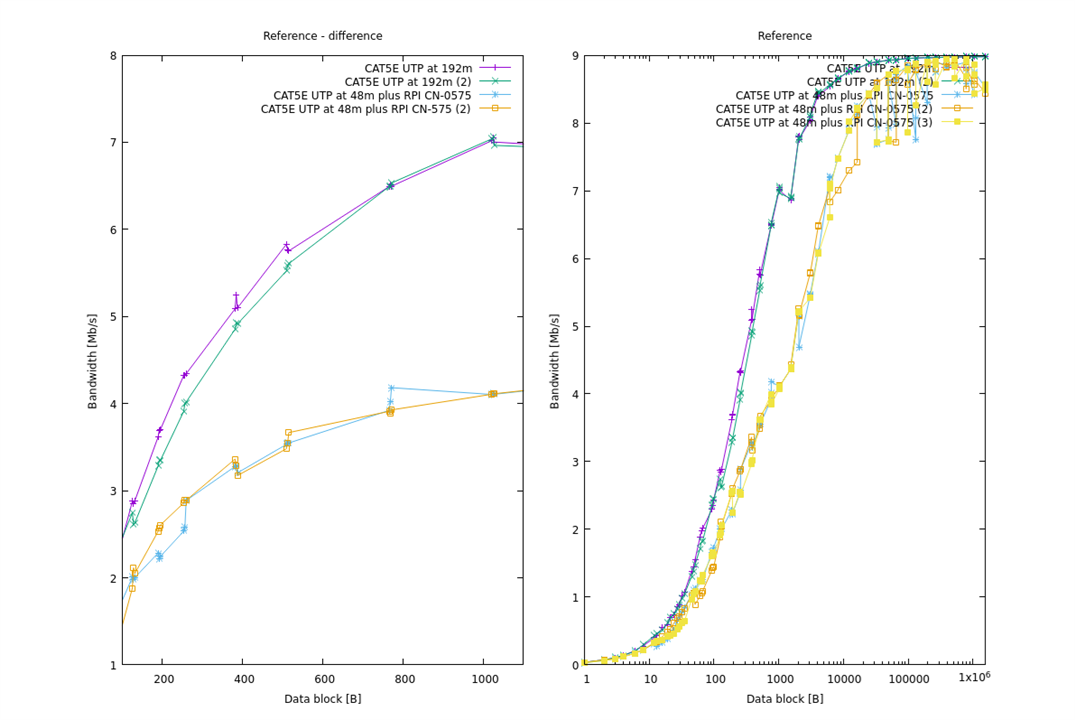
Not only performance for small block sizes is significantly lower than when using media converters (which can be attributed to the limited transactional performance of SPI interface) but there are throughput dips observed for largest block sizes, which can be connected with packet loss and subsequent TCP restransmission.
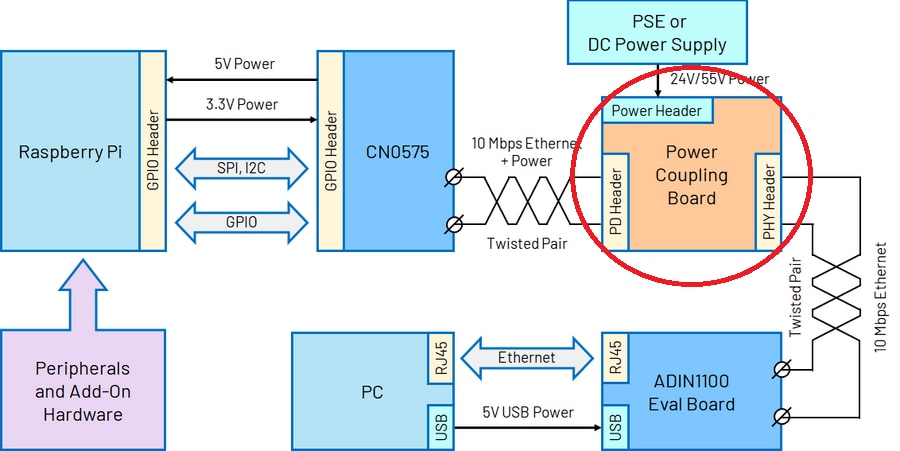
In the search of mysterious power coupler
Documentation available is really scarce when one wants to know how exactly power should be delivered to the PoDL link. For example, until the recent times, ADI documentation usually limited itself to simply mention such a device, without information how to get/build it (in recent times there is also a comment that power coupling board are in development).
TDK - manufacturer of the inductor families dedicated for PoDL applications (and PoDL daughter boards for ADI evaluation kits), includes a slide like below in their product presentation:
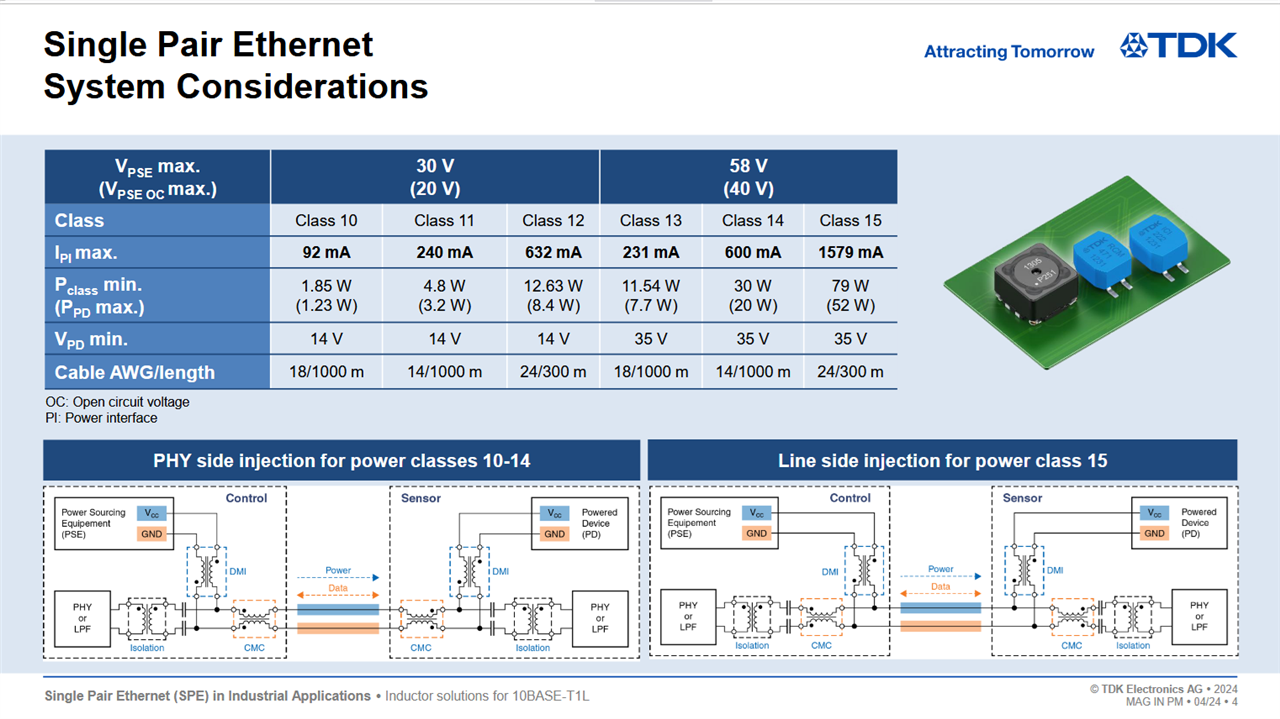
So - could it be such a simple schematics? Differential mode choke for PS HF isolation, common mode choke on the line and isolation transformer in the PHY direction?
Better - considering that for high power delivery power supply can be connected after CMC and both CN575

and EVAL-ADIN1100EBZ

include both (at least capacitive) isolation and CNC, could power injector be reduced to something like below?
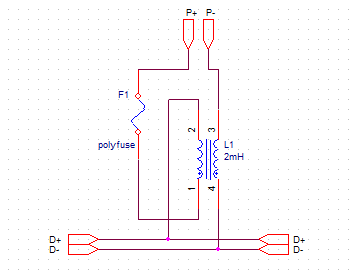
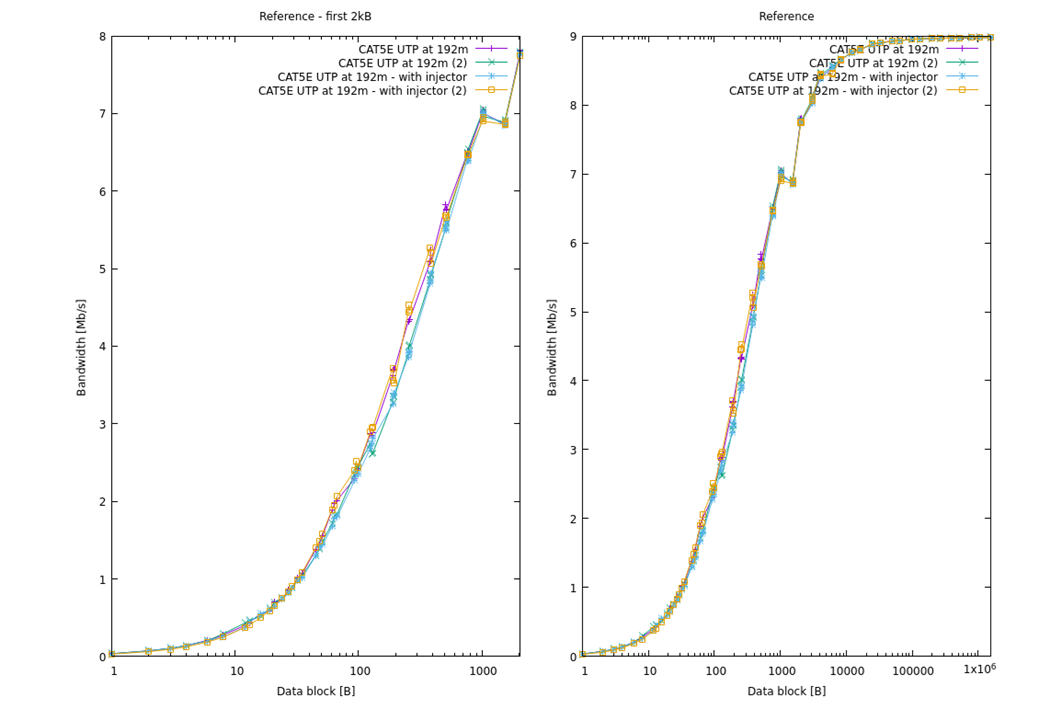
Let's see - as chokes are needed to separate high frequency signal on the data line from output capacitors of the power supply (which would filter it otherwise) , connecting the coupler with power input shorted by - for example - 1uF capacitor between two EVAL-ADIN1100 boards and doing transfer test would give us an answer about possible interference.
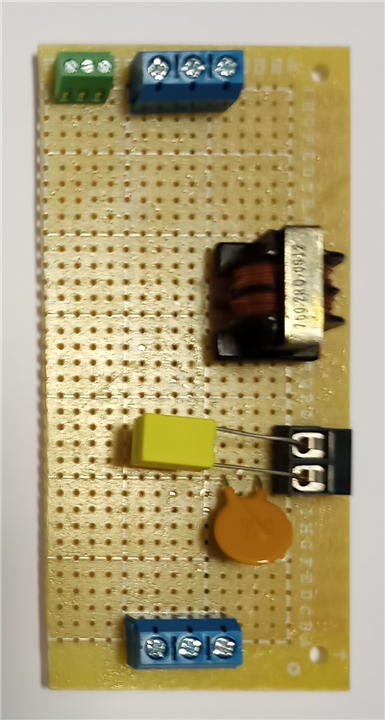
As can be seen on the results graph below, no observable difference to the reference signal - good!
Next thing - will the network adapter survive DC voltage on the line?
According to the IEEE 802.3-2022
146.8.5 MDI DC power voltage tolerance
The DTE shall withstand without damage the application of any voltages between 0 V dc and 60 V dc with the source current limited to 2000 mA, applied across BI_DA+ and BI_DA–, in either polarity, under all operating conditions, for an indefinite period of time. This requirement ensures that all devices tolerate DC powering voltages, such as those in Clause 104, even if the device does not require power.
so this issue is also resolved.
LTC9111 PD
But what will happen if one end is equipped with managed power delivery circuit, like LTC9111 PD that could try to negotiate power delivery parameters?
LTC9111 datasheet specifies state machine as below - so there is a path to power up without negotiation with Power Sourcing Equipment, but with impossible condition: classification occurs on low voltage and limited current (communication is established using one wire protocol when either end pulls down the line) and the graph states that a power-up sequence can continue without negotiation when voltage is low enough

Fortunately - normative reference specifies this condition in the opposite way (VPD > Vsig_disable) so I have decided to find out the truth
LTC9111 proof of concept
To test if LTC9111 can be powered in the unmanaged way, I have decided to build the simplest application of this chip possible.
SPOILER: there is a paragraph in the LTC9111 datasheet that states what will happen in this case:
The LTC9111 is designed primarily for connection to an 802.3cg complaint, classifying PSE. When a PD is powered directly by an auxiliary power supply, the state will advance to the MDI_POWER2 state and enable the application, provided the supply voltage exceeds VON for the configured class. Note that the LTC9111 does not implement current limit or circuit breaker functionality.
but I didn't find it until after the test and even ADI technical support didn't cite it when asked about possible error is state machine graph, so I consider it well hidden.
So let's start - LTC9111 datasheet specifies typical schematics as below:
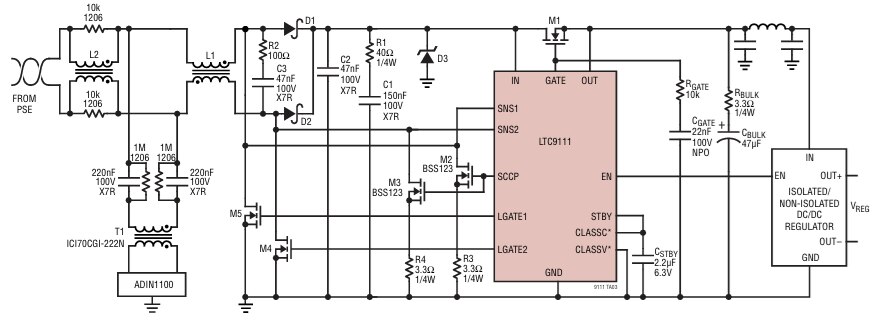
and usual startup sequence involves PSE-PD discovery process, allowing for proper PD classification and management.
During the discovery, PSE raises line voltage (with current limit enforced) to about 5V, then initiates communication.
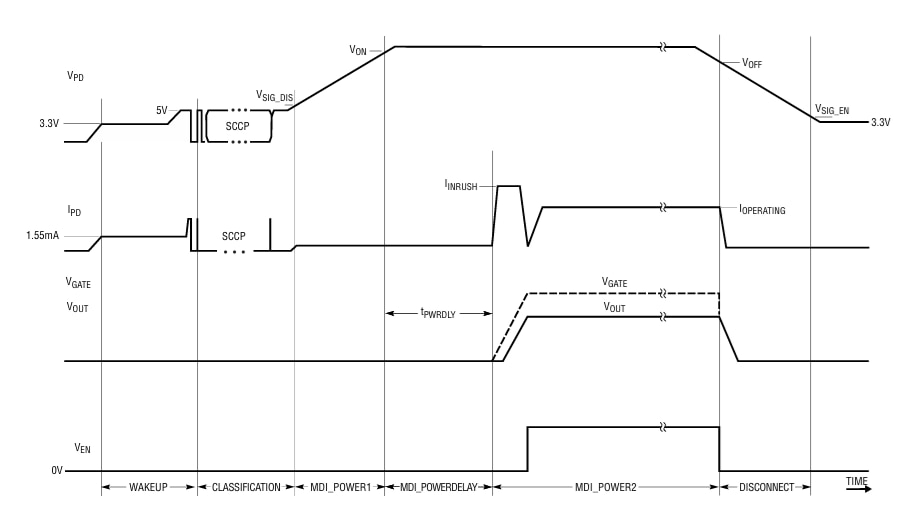
When voltage is about 5V, classification can begin. It is done using one-wire SCCP protocol, which involves pulling down the power line at the transmitter side for predefined time.
LTC9111 is powered using Cstby capacitor during power down pulses and is using M2/M3 MOSFET pair to pull down power line by it's own (as the system is designed to be polarity-agnostic, symmetric design is used).
Communication is started by the PSE which sends reset pulse and PD answers with presence pulse. Then, PD transmits it's power class and, when accepted, PSE raises line voltage to the negotiated value. Then, PD opens M1 MOSFET and raises ENABLE signal, starting providing power to the load.
When voltage on the line drops, ENABLE signal is lowered and M1 closed.
So - good information - PD waits for PSE pulse, so it will not short our unmanaged power supply trying to communicate.
Six power classes are defined (and can be configured using two three-state pins of LTC9111), three for supply voltage up to 30V and three for voltage up to 58V
| Class | max power [W] | PD voltage [V] |
| 10 | 1.23 | 14-30 |
| 11 | 3.2 | 14-30 |
| 12 | 8.4 | 14-30 |
| 13 | 7.7 | 35-58 |
| 14 | 20 | 35-58 |
| 15 | 52 | 35-58 |
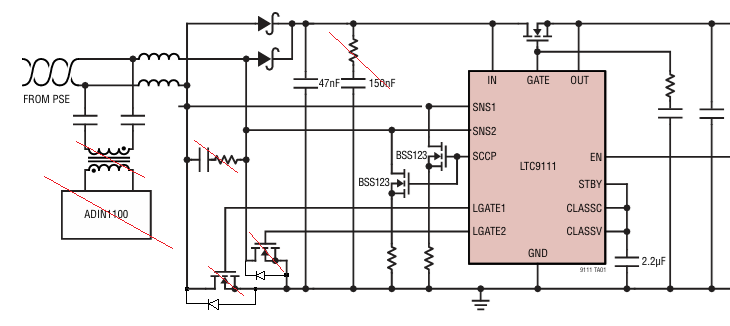
As the solution is expected to work over long data lines, which may involve significant voltage drop - and, as we have previously discovered and confirmed in the requirements - signal polarity needs to be corrected if needed, low-loss rectifier is built using D1 and D2 Schottky diodes and M4 and M5 MOSFETs (from which one is activated when voltage polarity is sensed using SNS1 and SNS2 inputs to further reduce voltage drop). Before M4/M5 activation, current flows through their reverse parasitic diodes, effectively forming traditional Graetz bridge.
This solution is very advanced, but for the basic usage can be simplified: M4/M5 can be replaced with another set of Schottky diodes and some snubbing circuits can be (at least initially) omitted, leading to the circuit like below:
Complete proof of concept looks like below:
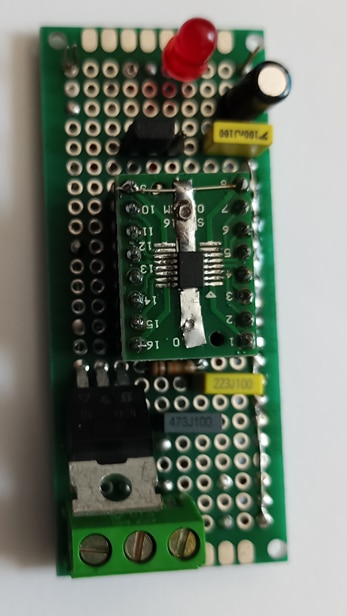
and the test setup (involving two prizes I have got from E14: MP710079 power supply and 72-7730A multimeter ) looks like below
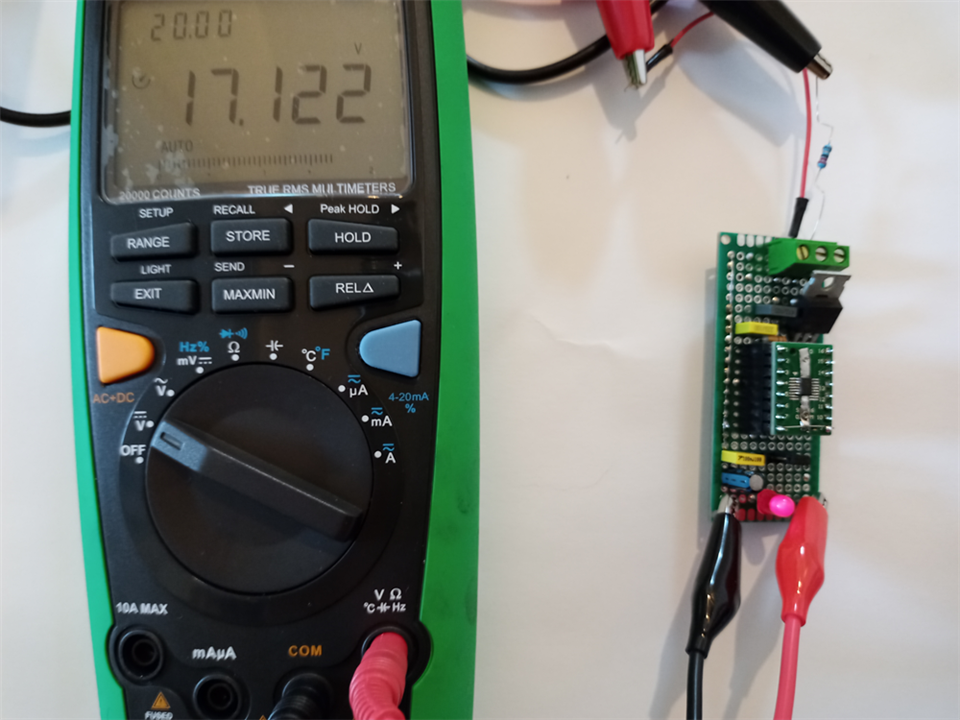
And? LTC9111 turns on without classification at 17.4V and turn off when input voltage drops below 12V.
| {gallery}LTC9111 measurements |
|---|

|

|

|

|
So we are all set for the final test
PoDL powered Raspnerry PI
Final test looks like below and is working happily filming the ceiling - using 24V power supply connected through passive power injector between Raspberry Pi with CN-0575 shield and EVAL-ADIN1100EBZ, with Molex IP67 connectors, 1m of Molex IP67 cable and 48m of UTP at the EVAL-ADIN1100EBZ side.

What is more interesting - performance is better than when using external power supply for Raspberry PI - packet loss is gone (maybe power supply used was underpowered - and as SPI clock is directly derived from CPU clock, maybe some throttling was happening?)
$ iperf3 -c 172.19.0.20 -u -b 10MConnecting to host 172.19.0.20, port 5201
[ 5] local 172.19.0.10 port 48954 connected to 172.19.0.20 port 5201
[ ID] Interval Transfer Bitrate Total Datagrams
[ 5] 0.00-1.00 sec 1.19 MBytes 10.0 Mbits/sec 863
[ 5] 1.00-2.00 sec 1.19 MBytes 9.97 Mbits/sec 861
[ 5] 2.00-3.00 sec 1.14 MBytes 9.57 Mbits/sec 826
[ 5] 3.00-4.00 sec 1.14 MBytes 9.56 Mbits/sec 825
[ 5] 4.00-5.00 sec 1.14 MBytes 9.57 Mbits/sec 826
[ 5] 5.00-6.00 sec 1.14 MBytes 9.56 Mbits/sec 825
[ 5] 6.00-7.00 sec 1.14 MBytes 9.57 Mbits/sec 826
[ 5] 7.00-8.00 sec 1.14 MBytes 9.56 Mbits/sec 825
[ 5] 8.00-9.00 sec 1.14 MBytes 9.57 Mbits/sec 826
[ 5] 9.00-10.00 sec 1.14 MBytes 9.56 Mbits/sec 825
- - - - - - - - - - - - - - - - - - - - - - - - -
[ ID] Interval Transfer Bitrate Jitter Lost/Total Datagrams
[ 5] 0.00-10.00 sec 11.5 MBytes 9.65 Mbits/sec 0.000 ms 0/8328 (0%) sender
[ 5] 0.00-10.13 sec 11.5 MBytes 9.52 Mbits/sec 0.020 ms 0/8328 (0%) receiveriperf Done.

Summary
Just as in "traditional" Ethernet there is managed Power over Ethernet (PoE) with advanced (and expensive) switches but many devices can be powered using passive PoE (with power delivered unconditionally on - for example - two unused pairs of 100BASE-TX cable), we have proved that for Single Pair Ethernet we can also use unmanaged power delivery.
That approach can be inexpensive and more accessible for simple devices but at the cost of some safety: managed setup can refuse to provide power to unconnected or shorted outputs, while unmanaged can rely on (poly)fuses or protections built in power supply to deal with short-circuits..

