


Software Development
Overview:
The ask here is to develop firmware that communicates with the sensors over I2C, collects the data, feeds it into the edge AI model, and provides a classification of the state of the turbine rotor. The classification results, along with temperature and wind speed data, are sent over LoRAWAN to the gateway node. The software stack used for this project is mentioned below:
- Platform IO
- Arduino MKRWAN Library
- Arduino Low Power Library
- LoRa Library
- Arduino-ADXL355 Library
- SparkFun_Air_Velocity_Sensor Library
- Edge Impulse
Note: The first simple example of communicating between two LoRa boards doesn't work out of the box and you would first need to run this example code on both of your MKR1300 boards in order to successfully communicate.
Data Logging Code:
The code was developed to verify the communication to various sensors in the initial stage. The code is mainly used to collect the accelerometer data and send it over to UART. The edge-impulse-data-forwarder then picks up the same data to send it further to the cloud, saving it in a time-stamped JSON file. After initial testing, the accelerometer sensitivity was set to 8g to avoid clipping or saturation of rotor data at peaks, and the sampling frequency was also set to 400Hz. With the switch of defined macros, you can test our different sensors: #define AIRFLOW 1
#define ACC 2
#define AIR_ACC 3
#define ACC_INTERRUPT 4
#define ACC_DATALOG 5
#define TEMP 6
#define SENSOR_SELECT ACC_INTERRUPT
/*************************** Air Flow Code **********************/
#if (SENSOR_SELECT == AIRFLOW)
#include <Arduino.h>
#include <Wire.h>
#include <SparkFun_FS3000_Arduino_Library.h>
FS3000 fs;
void setup()
{
Serial.begin(115200);
Serial.println("Example 1 - Reading values from the FS3000");
Wire.begin();
if (fs.begin() == false) //Begin communication over I2C
{
Serial.println("The sensor did not respond. Please check wiring.");
while(1); //Freeze
}
Serial.println("Sensor is connected properly.");
}
void loop()
{
Serial.print("FS3000 Readings \tRaw: ");
Serial.print(fs.readRaw()); // note, this returns an int from 0-3686
Serial.print("\tm/s: ");
Serial.print(fs.readMetersPerSecond()); // note, this returns a float from 0-7.23
Serial.print("\tmph: ");
Serial.println(fs.readMilesPerHour()); // note, this returns a float from 0-16.17
delay(1000); // note, repsone time on the sensor is 125ms
}
#endif
/***********************************************************/
/*************************** Accelerometer Code **********************/
#if (SENSOR_SELECT == ACC)
#include "ADXL355.h"
#include "Wire.h"
#include "ArduinoLowPower.h"
ADXL355 accl;
#define INT1_Pin 7u
const uint8_t ACTVITY_EN = 0x24;
const uint8_t ACTVITY_TH_H = 0x25;
const uint8_t ACTVITY_TH_L = 0x26;
volatile bool int_detect = false;
void motor_activity(void)
{
int_detect = true;
}
void setup()
{
Serial.begin(115200);
Serial.println("Accelerometer running");
Wire.begin();
accl.start();
}
void loop()
{
long data_xyz[3] = {0};
accl.getRawAxes(&data_xyz[0],&data_xyz[1],&data_xyz[2]);
Serial.print(" Accel X: ");
Serial.print(data_xyz[0]);
Serial.print(" Accel Y: ");
Serial.print(data_xyz[1]);
Serial.print(" Accel z: ");
Serial.print(data_xyz[2]);
Serial.println("");
}
#endif
/*************************** Accelerometer + AirFlow I2C Code **********************/
#if (SENSOR_SELECT == AIR_ACC)
#include "ADXL355.h"
#include <Wire.h>
#include <SparkFun_FS3000_Arduino_Library.h>
ADXL355 accl;
FS3000 fs;
void setup()
{
Serial.begin(115200);
Wire.begin();
accl.start();
fs.begin();
}
void loop()
{
long data_xyz[3] = {0};
accl.getRawAxes(&data_xyz[0],&data_xyz[1],&data_xyz[2]);
Serial.println("");
Serial.print("Accel X: ");
Serial.print(data_xyz[0]);
Serial.print(" Accel Y: ");
Serial.print(data_xyz[1]);
Serial.print(" Accel z: ");
Serial.print(data_xyz[2]);
Serial.println("");
Serial.print("FS3000 Readings \tRaw: ");
Serial.print(fs.readRaw()); // note, this returns an int from 0-3686
Serial.print("\tm/s: ");
Serial.print(fs.readMetersPerSecond()); // note, this returns a float from 0-7.23
Serial.print("\tmph: ");
Serial.println(fs.readMilesPerHour()); // note, this returns a float from 0-16.17
delay(200);
}
#endif
/*************************** Accelerometer Interrupt Code **********************/
#if (SENSOR_SELECT == ACC_INTERRUPT)
#include "ADXL355.h"
#include "Wire.h"
#include "ArduinoLowPower.h"
ADXL355 accl;
#define INT1_Pin 7u
const uint8_t ACTVITY_EN = 0x24;
const uint8_t ACTVITY_TH_H = 0x25;
const uint8_t ACTVITY_TH_L = 0x26;
volatile bool int_detect = false;
void motor_activity(void)
{
int_detect = true;
}
void setup()
{
Serial.begin(115200);
Serial.println("Accelerometer running");
Wire.begin();
accl.start();
/* The trick here is quite simple. The
* value Thres_H = 0xFF and Thres_L = 0x01 seems to be working fine
* Currently it is set interrupt from the ACCEL is set in active high mode
* */
accl.write8(ACTVITY_EN, 0x01);
accl.write8(ACTVITY_TH_H, 0x23); //FB
accl.write8(ACTVITY_TH_L, 0x28); //6E 4e20 = 20000
accl.write8(0x2A, 0x08);
accl.write8(0x2C, 0x83);
//accl.write8(0x2d, 0x01);
pinMode(LED_BUILTIN, OUTPUT);
pinMode(INT1_Pin, INPUT_PULLUP);
attachInterrupt(digitalPinToInterrupt(INT1_Pin), motor_activity, FALLING);
//LowPower.attachInterruptWakeup(INT1_Pin, motor_activity, FALLING);
}
void loop()
{
uint8_t reg;
// reg = accl.read8(ACTVITY_EN);
// Serial.println("");
// Serial.print("Activity EN: ");
// Serial.print(reg);
// reg = accl.read8(ACTVITY_TH_H);
// Serial.print(" Activity High: ");
// Serial.print(reg);
// reg = accl.read8(ACTVITY_TH_L);
// Serial.print(" Activity Low: ");
// Serial.print(reg);
// reg = accl.read8(0x27);
// Serial.print(" Activity Count: ");
// Serial.print(reg);
// reg = accl.read8(0x2A);
// Serial.print(" Interrupt 2A: ");
// Serial.print(reg);
// reg = accl.read8(0x2C);
// Serial.print(" Interrupt Pol 2C: ");
// Serial.print(reg);
reg = accl.read8(0x04);
Serial.print(" Status: ");
Serial.print(reg);
Serial.println("Normal Working");
digitalWrite(LED_BUILTIN, HIGH);
if(int_detect == true)
{
//accl.write8(0x2d, 0x00);
Serial.println("Interrupt Detected");
reg = accl.read8(0x04);
Serial.println(reg);
long data_xyz[3] = {0};
accl.getRawAxes(&data_xyz[0],&data_xyz[1],&data_xyz[2]);
Serial.print(" Accel X: ");
Serial.print(data_xyz[0]);
Serial.print(" Accel Y: ");
Serial.print(data_xyz[1]);
Serial.print(" Accel z: ");
Serial.print(data_xyz[2]);
Serial.println("");
digitalWrite(LED_BUILTIN, LOW);
delay(1000);
int_detect = false;
//LowPower.sleep(10000);
}
}
#endif
/*************************** Accelerometer Code **********************/
#if (SENSOR_SELECT == ACC_DATALOG)
#include "ADXL355.h"
#include "Wire.h"
#include "ArduinoLowPower.h"
#define FREQUENCY_HZ 500
#define INTERVAL_MS (1000 / (FREQUENCY_HZ + 1))
static unsigned long last_interval_ms = 0;
ADXL355 accl;
void setup()
{
Serial.begin(230400);
Serial.println("Accelerometer running");
Wire.begin();
accl.start();
accl.write8(0x2C, 0x83); //required 8g because the danger was hittinh high acc whih was beinb cliffed off
}
void loop()
{
// Default Settings ODR = 4KSPS
long data_xyz[3] = {0};
char s_buff[50];
float datag_xyz[3] = {0};
if (millis() > last_interval_ms + INTERVAL_MS) {
last_interval_ms = millis();
accl.getRawAxes(&data_xyz[0],&data_xyz[1],&data_xyz[2]);
Serial.print(data_xyz[0]);
Serial.print(",");
Serial.print(data_xyz[1]);
Serial.print(",");
Serial.println(data_xyz[2]);
datag_xyz[0] = data_xyz[0] * (0.0000156);
datag_xyz[1] = data_xyz[1] * (0.0000156);
datag_xyz[2] = data_xyz[2] * (0.0000156);
//sprintf(s_buff,"%f,%f,%f",datag_xyz[0],datag_xyz[1],datag_xyz[2]);
//sprintf(s_buff,"%ld,%ld,%ld",data_xyz[0],data_xyz[1],data_xyz[2]);
//Serial.println(s_buff);
//Serial.print(" Accel X: ");
// Serial.print(datag_xyz[0]);
// Serial.print(",");
// Serial.print(datag_xyz[1]);
// Serial.print(",");
// Serial.println(datag_xyz[2]);
}
}
#endif
/*************************** temperature Sensor Code **********************/
#if (SENSOR_SELECT == TEMP)
#include <Arduino.h>
#include <OneWire.h>
#include <DallasTemperature.h>
// Data wire is plugged into port 2 on the Arduino
#define ONE_WIRE_BUS 6
// Setup a oneWire instance to communicate with any OneWire devices (not just Maxim/Dallas temperature ICs)
OneWire oneWire(ONE_WIRE_BUS);
// Pass our oneWire reference to Dallas Temperature.
DallasTemperature sensors(&oneWire);
// arrays to hold device address
DeviceAddress insideThermometer;
// function to print a device address
void printAddress(DeviceAddress deviceAddress)
{
for (uint8_t i = 0; i < 8; i++)
{
if (deviceAddress[i] < 16) Serial.print("0");
Serial.print(deviceAddress[i], HEX);
}
}
/*
* Setup function. Here we do the basics
*/
void setup(void)
{
// start serial port
Serial.begin(230400);
Serial.println("Dallas Temperature IC Control Library Demo");
// locate devices on the bus
Serial.print("Locating devices...");
sensors.begin();
Serial.print("Found ");
Serial.print(sensors.getDeviceCount(), DEC);
Serial.println(" devices.");
// report parasite power requirements
Serial.print("Parasite power is: ");
if (sensors.isParasitePowerMode()) Serial.println("ON");
else Serial.println("OFF");
// Assign address manually. The addresses below will beed to be changed
// to valid device addresses on your bus. Device address can be retrieved
// by using either oneWire.search(deviceAddress) or individually via
// sensors.getAddress(deviceAddress, index)
// Note that you will need to use your specific address here
//insideThermometer = { 0x28, 0x1D, 0x39, 0x31, 0x2, 0x0, 0x0, 0xF0 };
// Method 1:
// Search for devices on the bus and assign based on an index. Ideally,
// you would do this to initially discover addresses on the bus and then
// use those addresses and manually assign them (see above) once you know
// the devices on your bus (and assuming they don't change).
if (!sensors.getAddress(insideThermometer, 0)) Serial.println("Unable to find address for Device 0");
// method 2: search()
// search() looks for the next device. Returns 1 if a new address has been
// returned. A zero might mean that the bus is shorted, there are no devices,
// or you have already retrieved all of them. It might be a good idea to
// check the CRC to make sure you didn't get garbage. The order is
// deterministic. You will always get the same devices in the same order
//
// Must be called before search()
//oneWire.reset_search();
// assigns the first address found to insideThermometer
//if (!oneWire.search(insideThermometer)) Serial.println("Unable to find address for insideThermometer");
// show the addresses we found on the bus
Serial.print("Device 0 Address: ");
printAddress(insideThermometer);
Serial.println();
// set the resolution to 9 bit (Each Dallas/Maxim device is capable of several different resolutions)
sensors.setResolution(insideThermometer, 9);
Serial.print("Device 0 Resolution: ");
Serial.print(sensors.getResolution(insideThermometer), DEC);
Serial.println();
}
// function to print the temperature for a device
void printTemperature(DeviceAddress deviceAddress)
{
// method 1 - slower
//Serial.print("Temp C: ");
//Serial.print(sensors.getTempC(deviceAddress));
//Serial.print(" Temp F: ");
//Serial.print(sensors.getTempF(deviceAddress)); // Makes a second call to getTempC and then converts to Fahrenheit
// method 2 - faster
float tempC = sensors.getTempC(deviceAddress);
if(tempC == DEVICE_DISCONNECTED_C)
{
Serial.println("Error: Could not read temperature data");
return;
}
Serial.print("Temp C: ");
Serial.print(tempC);
Serial.print(" Temp F: ");
Serial.println(DallasTemperature::toFahrenheit(tempC)); // Converts tempC to Fahrenheit
}
/*
* Main function. It will request the tempC from the sensors and display on Serial.
*/
void loop(void)
{
// call sensors.requestTemperatures() to issue a global temperature
// request to all devices on the bus
Serial.print("Requesting temperatures...");
sensors.requestTemperatures(); // Send the command to get temperatures
Serial.println("DONE");
// It responds almost immediately. Let's print out the data
printTemperature(insideThermometer); // Use a simple function to print out the data
}
#endif
Edge Impulse:
As mentioned previously, the edge-impulse data forwarder makes it a hassle-free process to collect data for model training. This feature opens up an opportunity to collect data from any device. For this, you would first need to create a project in edge impulse because the edge-impulse data forwarder would prompt the user to select the project for which data is being collected.
Once the data is collected, you can view them in graphical form and decide on whether to proceed with the data or not: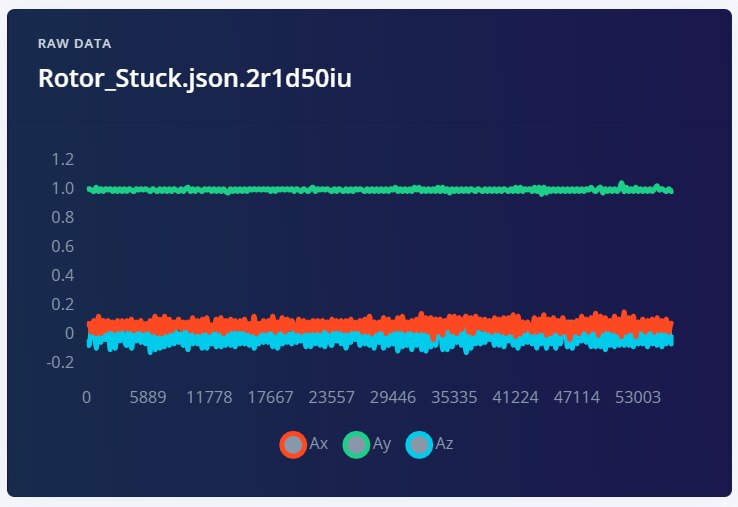
The rest of the process involves finding suitable preprocessing algorithms to filter the accelerometer data and the neural network architecture for classification. You find more information on edge impulse's website.
The project is publicly hosted on the edge impulse server and here is the link to it. Here is the model pipeline that works best for this project: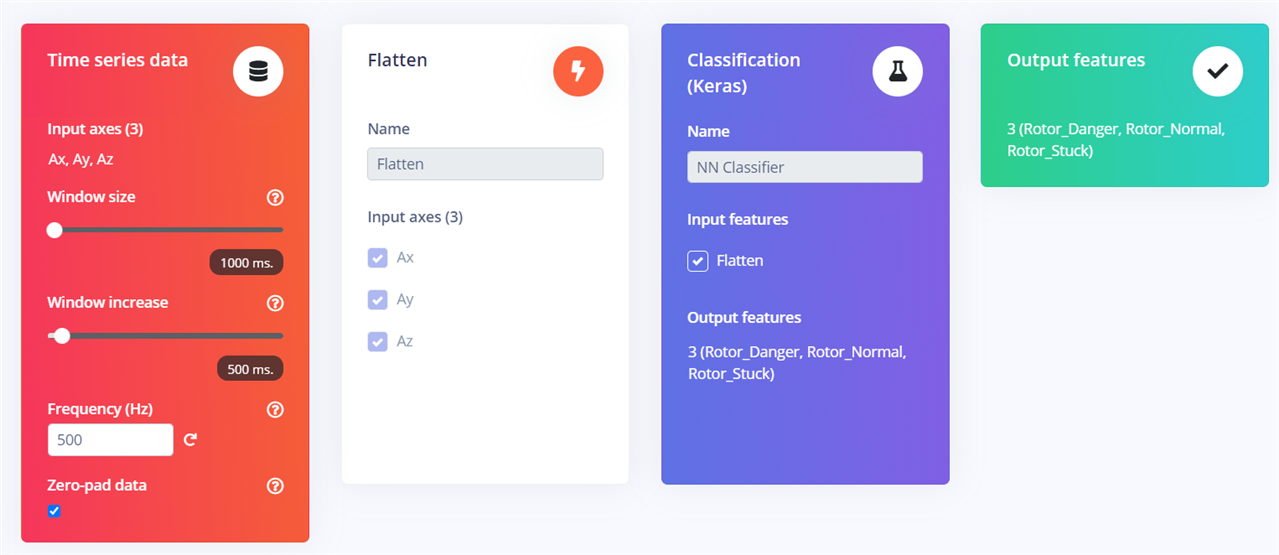
The next step is to train the model and tweak parameters to optimize the model performance. Once this is done, the model can be downloaded as a C/C++ source SDK or as an Arduino library. To integrate the library into your existing platform IDE project, all you need to do is place the library.zip in the 'libs/' folder in your project directory and the same in your platform.ini file. You would also need to pass in additional macros to avoid build errors specifically for MKR1300 due it slow DSP operations. With these changes, your project .ini file should look something like this:[env:mkrwan1300]
platform = atmelsam
board = mkrwan1300
framework = arduino
upload_port = COM3
build_flags = -Wall -O3
-Wl,-u_printf_float
-D__STATIC_FORCEINLINE='__STATIC_INLINE'
lib_deps =
arduino-libraries/MKRWAN@^1.1.0
sandeepmistry/LoRa@^0.8.0
sparkfun/SparkFun_FS3000_Arduino_Library @ ^1.0.0
https://github.com/arduino-libraries/ArduinoLowPower.git
./lib/ei-wind_turbine_monitoring-arduino-1.0.3.zip
Final Firmware:
The final code uses activity interrupt from the ADXl355 to wake the Arduino MKR device when a rotor activity is detected. The MCU, on waking up, collects samples of acceleration and then runs the collected data through the edge impulse model and sends the classification results to the gateway node. If no activity is detected, the device puts itself into deep sleep again to reduce power consumption. The gateway collects the data and formats the data packet and displays it onto the LCD, and turns on the buzzer if an anomaly is detected. Code for both the sensor node and gateway node are mentioned below:
Sensor Node:/**
* Wind Turbine Sensor Node Code
*
* Author: Pratyush Mallick
* Date: February 15, 2022
*
* The MIT License (MIT)
*
* Permission is hereby granted, free of charge, to any person obtaining a copy
* of this software and associated documentation files (the "Software"), to deal
* in the Software without restriction, including without limitation the rights
* to use, copy, modify, merge, publish, distribute, sublicense, and/or sell
* copies of the Software, and to permit persons to whom the Software is
* furnished to do so, subject to the following conditions:
*
* The above copyright notice and this permission notice shall be included in
* all copies or substantial portions of the Software.
*
* THE SOFTWARE IS PROVIDED "AS IS", WITHOUT WARRANTY OF ANY KIND, EXPRESS OR
* IMPLIED, INCLUDING BUT NOT LIMITED TO THE WARRANTIES OF MERCHANTABILITY,
* FITNESS FOR A PARTICULAR PURPOSE AND NONINFRINGEMENT. IN NO EVENT SHALL THE
* AUTHORS OR COPYRIGHT HOLDERS BE LIABLE FOR ANY CLAIM, DAMAGES OR OTHER
* LIABILITY, WHETHER IN AN ACTION OF CONTRACT, TORT OR OTHERWISE, ARISING FROM,
* OUT OF OR IN CONNECTION WITH THE SOFTWARE OR THE USE OR OTHER DEALINGS IN THE
* SOFTWARE.
*/
#include <Arduino.h>
#include <Wire.h>
#include <SPI.h>
#include <LoRa.h>
#include <SparkFun_FS3000_Arduino_Library.h>
#include "ADXL355.h"
#include "ArduinoLowPower.h"
/* Work Around for SAMD21 MCUs */
#define __STATIC_FORCEINLINE __attribute__((always_inline)) static inline
#define __SSAT(ARG1, ARG2) \
__extension__ \
({ \
int32_t __RES, __ARG1 = (ARG1); \
__ASM volatile ("ssat %0, %1, %2" : "=r" (__RES) : "I" (ARG2), "r" (__ARG1) : "cc" ); \
__RES; \
})
#include "Wind_Turbine_Monitoring_inferencing.h"
#define INT1_Pin 7u
#define raw_to_G 0.0000156
ADXL355 accl;
const uint8_t ACC_ACTVITY_EN = 0x24;
const uint8_t ACC_ACTVITY_TH_H = 0x25;
const uint8_t ACC_ACTVITY_TH_L = 0x26;
const uint8_t ACC_INT_MAP = 0x2A;
/* Acivitty Detection */
volatile bool act_detect = false;
/* Wind Speed object instance */
FS3000 fs;
/* Set this to true to see e.g. features generated from the raw signal */
static bool debug_nn = false;
/* Allocate a buffer here for the values we'll read from the IMU */
float buffer[EI_CLASSIFIER_DSP_INPUT_FRAME_SIZE] = { 0 };
/**
* @brief Printf function uses vsnprintf and output using Arduino Serial
*
* @param[in] format Variable argument list
*/
void ei_printf(const char *format, ...) {
static char print_buf[1024] = { 0 };
va_list args;
va_start(args, format);
int r = vsnprintf(print_buf, sizeof(print_buf), format, args);
va_end(args);
if (r > 0) {
Serial.write(print_buf);
}
}
void motor_activity(void)
{
act_detect = true;
}
void getAcceleration()
{
long data_xyz[3] = {0};
for (int i = 0; i < EI_CLASSIFIER_DSP_INPUT_FRAME_SIZE; i += 3) {
accl.getRawAxes(&data_xyz[0],&data_xyz[1],&data_xyz[2]);
buffer[i+0] = data_xyz[0] * 0.0000156;
buffer[i+1] = data_xyz[1] * 0.0000156;
buffer[i+2] = data_xyz[2] * 0.0000156;
delay(EI_CLASSIFIER_INTERVAL_MS);
}
}
void setup()
{
Serial.begin(230400);
Wire.begin();
accl.start();
fs.begin();
if (!LoRa.begin(868E6)) {
Serial.println("Starting LoRa failed!");
while(1);
}
/* Enable activity detection on X-Axis */
accl.write8(ACC_ACTVITY_EN, 0x01);
/* The threshold raw value: 0x2328 = 9000
* Can be change according to sensor placement*/
accl.write8(ACC_ACTVITY_TH_H, 0x23);
accl.write8(ACC_ACTVITY_TH_L, 0x28);
accl.write8(ACC_INT_MAP, 0x08);
/* Setting the AXDL355 range to 8g,
* to avoid clipping of data
* */
accl.write8(0x2C, 0x83);
pinMode(LED_BUILTIN, OUTPUT);
pinMode(INT1_Pin, INPUT_PULLUP);
//attachInterrupt(digitalPinToInterrupt(INT1_Pin), motor_activity, FALLING);
LowPower.attachInterruptWakeup(digitalPinToInterrupt(INT1_Pin), motor_activity, FALLING);
/* Initialize Edge Impulse classifier */
run_classifier_init();
}
void loop()
{
EI_IMPULSE_ERROR r;
ei_impulse_result_t result = { 0 };
char turbine_state[15] = {""};
float wind_speed = 0;
double temp = 0;
char lora_transmit[50];
if (act_detect) {
// Default Settings ODR = 4KSPS
getAcceleration();
// Do classification (i.e. the inference part)
// Turn the raw buffer in a signal which we can the classify
signal_t signal;
int err = numpy::signal_from_buffer(buffer, EI_CLASSIFIER_DSP_INPUT_FRAME_SIZE, &signal);
if (err != 0) {
ei_printf("Failed to create signal from buffer (%d)\n", err);
return;
}
// Turn the raw buffer in a signal which we can the classify
r = run_classifier(&signal, &result, debug_nn);
if (r != EI_IMPULSE_OK) {
ei_printf("ERR: Failed to run classifier (%d)\n", r);
return;
}
for (size_t ix = 0; ix < EI_CLASSIFIER_LABEL_COUNT; ix++) {
if(result.classification[ix].value > 0.80) {
strcpy(turbine_state, result.classification[ix].label);
break;
}
else
{
strcpy(turbine_state, result.classification[ix].label);
}
}
wind_speed = fs.readMetersPerSecond();
temp = accl.getTemperatureC();
sprintf(lora_transmit ,"%s,%0.2f,%0.2f", turbine_state, wind_speed,temp);
Serial.println(lora_transmit);
LoRa.beginPacket();
LoRa.print(lora_transmit);
LoRa.endPacket();
/* Reset interrupt acitivity */
act_detect = false;
accl.read8(0x04);
}
/* Triggers an infinite sleep (the device will be woken up only by the registered wakeup sources) */
LowPower.deepSleep();
}
Gateway Node:/**
* Wind Turbine Gateway Node Code
*
* Author: Pratyush Mallick
* Date: February 15, 2022
*
* The MIT License (MIT)
*
* Permission is hereby granted, free of charge, to any person obtaining a copy
* of this software and associated documentation files (the "Software"), to deal
* in the Software without restriction, including without limitation the rights
* to use, copy, modify, merge, publish, distribute, sublicense, and/or sell
* copies of the Software, and to permit persons to whom the Software is
* furnished to do so, subject to the following conditions:
*
* The above copyright notice and this permission notice shall be included in
* all copies or substantial portions of the Software.
*
* THE SOFTWARE IS PROVIDED "AS IS", WITHOUT WARRANTY OF ANY KIND, EXPRESS OR
* IMPLIED, INCLUDING BUT NOT LIMITED TO THE WARRANTIES OF MERCHANTABILITY,
* FITNESS FOR A PARTICULAR PURPOSE AND NONINFRINGEMENT. IN NO EVENT SHALL THE
* AUTHORS OR COPYRIGHT HOLDERS BE LIABLE FOR ANY CLAIM, DAMAGES OR OTHER
* LIABILITY, WHETHER IN AN ACTION OF CONTRACT, TORT OR OTHERWISE, ARISING FROM,
* OUT OF OR IN CONNECTION WITH THE SOFTWARE OR THE USE OR OTHER DEALINGS IN THE
* SOFTWARE.
*/
#include<Arduino.h>
#include <Wire.h>
#include <SPI.h>
#include <LoRa.h>
#include "rgb_lcd.h"
rgb_lcd lcd;
const uint8_t buzz = 9;
void setup() {
Serial.begin(230400);
//while (!Serial);
pinMode(OUTPUT, buzz);
digitalWrite(buzz, HIGH);
delay(1000);
digitalWrite(buzz, LOW);
delay(1000);
Serial.println("LoRa Receiver");
if (!LoRa.begin(868E6)) {
Serial.println("Starting LoRa failed!");
while (1);
}
// set up the LCD's number of columns and rows:
lcd.begin(16, 2);
lcd.setRGB(255, 255, 255);
// Print a message to the LCD.
lcd.print("Intialization Done!");
}
void loop() {
// try to parse packet
int packetSize = LoRa.parsePacket();
char *packet_buff = (char *)malloc(packetSize*sizeof(char));
char turbine_state[15];
uint8_t buff_index = 0;
uint8_t split_index[2] = {0};
uint8_t split_count = 0;
char wind_ch[10];
float temp = 0;
float wind_speed = 0;
if (packetSize) {
// received a packet
Serial.print("Received packet: ");
// read packet
while (LoRa.available()) {
packet_buff[buff_index] = (char)LoRa.read();
if(packet_buff[buff_index] == ',') {
split_index[split_count++] = buff_index;
}
buff_index++;
}
memcpy(turbine_state,packet_buff,(split_index[0])*sizeof(char));
turbine_state[split_index[0]] = '\0';
memcpy(wind_ch,&packet_buff[split_index[0]+1],(split_index[1] - split_index[0])*sizeof(char));
//wind_speed = atof(&packet_buff[split_index[0]+1]);
wind_speed = atof(wind_ch);
temp = atof(&packet_buff[split_index[1]+1]);
Serial.print("Turbine State: ");
Serial.print(turbine_state);
Serial.print(" Wind Speed: ");
Serial.print(wind_speed);
Serial.print(" Temperature: ");
Serial.print(temp);
// print RSSI of packet
Serial.print(" RSSI: ");
Serial.println(LoRa.packetRssi());
lcd.setCursor(0, 0);
if(!strcmp(turbine_state,"Rotor_Stuck")) {
lcd.setRGB(255,140,0);
digitalWrite(buzz, LOW);
}
else if(!strcmp(turbine_state,"Rotor_Normal")) {
lcd.setRGB(0, 255, 0);
digitalWrite(buzz, HIGH);
}
else if(!strcmp(turbine_state,"Rotor_Danger")) {
lcd.setRGB(255, 0, 0);
digitalWrite(buzz, LOW);
}
lcd.clear();
lcd.print(turbine_state);
lcd.setCursor(0, 1);
lcd.print("M/s:");
lcd.print(wind_speed, 3);
lcd.print(" T:");
lcd.print(temp,1);
}
free(packet_buff);
}