element14 Community
element14 Community
    Register Log In
  • Site
  • Search
  • Log In Register
  • Community Hub
    Community Hub
    • What's New on element14
    • Feedback and Support
    • Benefits of Membership
    • Personal Blogs
    • Members Area
    • Achievement Levels
  • Learn
    Learn
    • Ask an Expert
    • eBooks
    • element14 presents
    • Learning Center
    • Tech Spotlight
    • STEM Academy
    • Webinars, Training and Events
    • Learning Groups
  • Technologies
    Technologies
    • 3D Printing
    • FPGA
    • Industrial Automation
    • Internet of Things
    • Power & Energy
    • Sensors
    • Technology Groups
  • Challenges & Projects
    Challenges & Projects
    • Design Challenges
    • element14 presents Projects
    • Project14
    • Arduino Projects
    • Raspberry Pi Projects
    • Project Groups
  • Products & Partners
    Products & Partners
    • Arduino
    • Avnet & Tria Boards Community
    • Dev Tools
    • Manufacturers
    • Multicomp Pro
    • Product Groups
    • Raspberry Pi
    • RoadTests & Reviews
  • About Us
    About the element14 Community
  • Store
    Store
    • Visit Your Store
    • Choose another store...
      • Europe
      •  Austria (German)
      •  Belgium (Dutch, French)
      •  Bulgaria (Bulgarian)
      •  Czech Republic (Czech)
      •  Denmark (Danish)
      •  Estonia (Estonian)
      •  Finland (Finnish)
      •  France (French)
      •  Germany (German)
      •  Hungary (Hungarian)
      •  Ireland
      •  Israel
      •  Italy (Italian)
      •  Latvia (Latvian)
      •  
      •  Lithuania (Lithuanian)
      •  Netherlands (Dutch)
      •  Norway (Norwegian)
      •  Poland (Polish)
      •  Portugal (Portuguese)
      •  Romania (Romanian)
      •  Russia (Russian)
      •  Slovakia (Slovak)
      •  Slovenia (Slovenian)
      •  Spain (Spanish)
      •  Sweden (Swedish)
      •  Switzerland(German, French)
      •  Turkey (Turkish)
      •  United Kingdom
      • Asia Pacific
      •  Australia
      •  China
      •  Hong Kong
      •  India
      •  Japan
      •  Korea (Korean)
      •  Malaysia
      •  New Zealand
      •  Philippines
      •  Singapore
      •  Taiwan
      •  Thailand (Thai)
      •  Vietnam
      • Americas
      •  Brazil (Portuguese)
      •  Canada
      •  Mexico (Spanish)
      •  United States
      Can't find the country/region you're looking for? Visit our export site or find a local distributor.
  • Translate
  • Profile
  • Settings
My Project Is Trash
  • Challenges & Projects
  • Design Challenges
  • My Project Is Trash
  • More
  • Cancel
My Project Is Trash
Forum Clarification Needed: Forum Thread Updates, Project Blog, and Publication Process
  • News
  • Forum
  • Projects
  • DC
  • Leaderboard
  • Files
  • Members
  • More
  • Cancel
  • New
Join My Project Is Trash to participate - click to join for free!
Actions
  • Share
  • More
  • Cancel
Forum Thread Details
  • Replies 4 replies
  • Subscribers 3 subscribers
  • Views 94 views
  • Users 0 members are here
  • challenge-rules
  • my-project-is-trash
  • forum-updates
  • design-challenge
  • new-participant
Related

Clarification Needed: Forum Thread Updates, Project Blog, and Publication Process

javagoza
javagoza 2 days ago

Hi everyone,

Although I'm a veteran participant in these design challenges, it's been about two years since my last participation, and I must admit I'm feeling a bit lost.

Could someone clarify a few things for me?

  • Where exactly should I publish the 5 Forum Thread Updates and the 1 Project Blog?
  • Are the corresponding links already active and available for participants?
  • Can I create drafts for those posts or schedule them for future publication?
  • Once a post is published, can it still be edited? For example, I'd like to keep an updated index in all previous posts or add navigation links between the forum updates and the project blog.
  • When are we allowed to start publishing content?
  • Is there any limit on the number of forum updates or blog posts we can publish during the challenge?

Thanks in advance for your help. I'm looking forward to getting started and making sure I follow the process correctly.

  • Sign in to reply
  • Cancel

Top Replies

  • arvindsa
    arvindsa 2 days ago +1
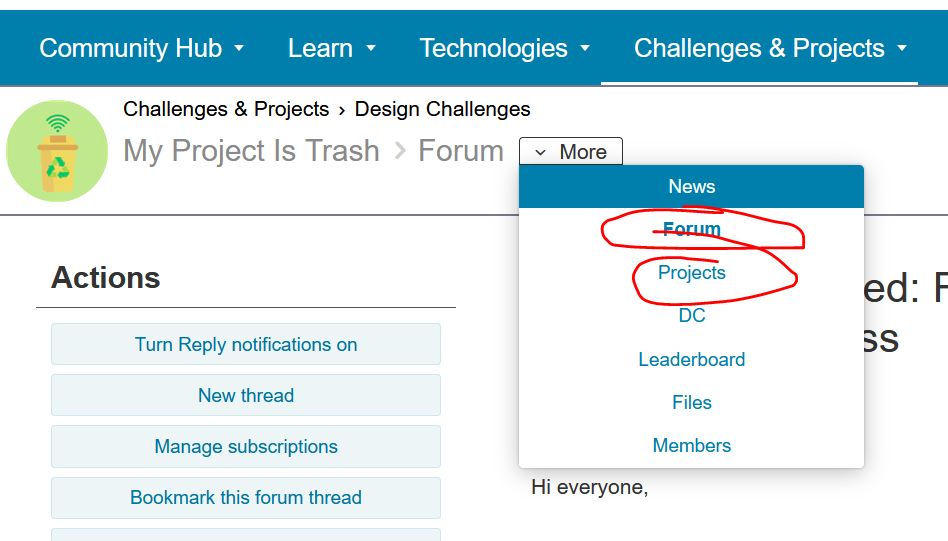
    For Forum post, Go to Forum page and then click new on Top RIght Corner, For Project Blog go to "Projects" page and Click new (check pics attached) New Button in Forum is always available, but for project…
Parents
  • arvindsa
    arvindsa 2 days ago

    image

    • For Forum post, Go to Forum page and then click new on Top RIght Corner, For Project Blog go to "Projects" page and Click new (check pics attached)
    • New Button in Forum is always available, but for project blog its made available in the last one week, If you dont see it, talk to admin
    • I never tried it, I write it in my Typora and so I can't answer this
    • Technically it can be edited yes.
    • Anytime, if you want to add after Deadline, do mention it with a disclaimer
    • No limit to Forum post but Blog post should be one per project.
    • Cancel
    • Vote Up +1 Vote Down
    • Sign in to reply
    • Cancel
  • javagoza
    javagoza 2 days ago in reply to arvindsa

    Thank you very much for your detailed response. I will need to adjust my habits and the way I prepare my posts. I tend to work quite slowly because I like to spend time refining the final post before publishing it. For me, one week feels a bit short, as I usually take around two weeks to prepare a final post. I also haven't found an effective way to copy and paste content within the Element14 editor.

    On a related note, could you share more details about your workflow with Typora? How do you transfer content from Typora to the Element14 editor, especially when the post contains multimedia elements such as images, videos, or audio files? Do you copy and paste everything directly, or do you follow a different process?

    • Cancel
    • Vote Up 0 Vote Down
    • Sign in to reply
    • Cancel
  • obones
    obones 1 day ago in reply to javagoza

    I do it with Word because that's what I'm used to, but it's essentially this:

    1. Type notes as I go along
    2. Create the forum post(s)/blog/review from notes
    3. In Word, use the Copy to clipboard function
    4. Paste into the E14 editor

    The only thing is about multimedia elements which I leave as markers in the Word document, something like <20261106_101010.jpg> or <url.to.video>

    Once pasted, I use the tools from E14 editor to replace the markers by the expected content.

    And I do a final proofread on the text before publishing directly, I never use the draft functionality.

    • Cancel
    • Vote Up 0 Vote Down
    • Sign in to reply
    • Cancel
  • arvindsa
    arvindsa 1 day ago in reply to javagoza

    Firstly I use typora markdown editor because, I just love the focus typing experience it provides. And secondly it allows me to use with AI to clean it up. For every project i do, i maintain a file called DEVLOG.md which i use to record some issues i faced and how i fixed it as a timeline. To augment this i use the AI to examine the git diff and record the fix also.  I keep saving link, code snippets etc in this file. This becomes my scratch pad.

    Every time i make a forum post. I keep it isolated to a module / challenger part. Interfacing it, issues i faced etc. i do it in a new markdown document. I decide the heads and structure. type in what i want to convey, I do refer to the DEVLOG, and copy the snippets etc. Images and videos all i put placeholder <abc.jpg> etc in the markdown. Once I like the general draft, i ask AI to clean up the text and also to change the name of the filename of the media with sequential prefix so file name becomes <01-abc.jpg>

    Now, I cannot copy the entire content of the post file because with code snippets, it breaks the look of the post on e14. This might be specific to typora. So I make a ranged copy from start to start of a code snippet paste it in the e14 new forum page, paste the code individually and then so on till end of the post. Then I keep replacing the placeholder and since the media is sequentially, it is easier for me.

    One of my writing style which other challengers started using is recap. I maintain one paragraph to start with and that remains same for all the posts. and I keep adding the past links. I do not go to past forum to add new ones. But you can absolutely do it.

    Then after adding on e14, i submit and read it again, make minor edits to formatting. Because sometimes, the AI cleaning up my text it may do a bad job. 

    For making flowcharts - I again use typora with mermaid syntax / draw.io website if i have time
    For screen recording - OBS Studio on linux/ ShareX on windows
    For Video editing: KDenlive, now evaluating effectcraft and filmcraft
    for photo editing: Photopea and now evaluating photo craft helped with ChatGPT


    • Cancel
    • Vote Up 0 Vote Down
    • Sign in to reply
    • Cancel
Reply
  • arvindsa
    arvindsa 1 day ago in reply to javagoza

    Firstly I use typora markdown editor because, I just love the focus typing experience it provides. And secondly it allows me to use with AI to clean it up. For every project i do, i maintain a file called DEVLOG.md which i use to record some issues i faced and how i fixed it as a timeline. To augment this i use the AI to examine the git diff and record the fix also.  I keep saving link, code snippets etc in this file. This becomes my scratch pad.

    Every time i make a forum post. I keep it isolated to a module / challenger part. Interfacing it, issues i faced etc. i do it in a new markdown document. I decide the heads and structure. type in what i want to convey, I do refer to the DEVLOG, and copy the snippets etc. Images and videos all i put placeholder <abc.jpg> etc in the markdown. Once I like the general draft, i ask AI to clean up the text and also to change the name of the filename of the media with sequential prefix so file name becomes <01-abc.jpg>

    Now, I cannot copy the entire content of the post file because with code snippets, it breaks the look of the post on e14. This might be specific to typora. So I make a ranged copy from start to start of a code snippet paste it in the e14 new forum page, paste the code individually and then so on till end of the post. Then I keep replacing the placeholder and since the media is sequentially, it is easier for me.

    One of my writing style which other challengers started using is recap. I maintain one paragraph to start with and that remains same for all the posts. and I keep adding the past links. I do not go to past forum to add new ones. But you can absolutely do it.

    Then after adding on e14, i submit and read it again, make minor edits to formatting. Because sometimes, the AI cleaning up my text it may do a bad job. 

    For making flowcharts - I again use typora with mermaid syntax / draw.io website if i have time
    For screen recording - OBS Studio on linux/ ShareX on windows
    For Video editing: KDenlive, now evaluating effectcraft and filmcraft
    for photo editing: Photopea and now evaluating photo craft helped with ChatGPT


    • Cancel
    • Vote Up 0 Vote Down
    • Sign in to reply
    • Cancel
Children
No Data
element14 Community

element14 is the first online community specifically for engineers. Connect with your peers and get expert answers to your questions.

  • Members
  • Learn
  • Technologies
  • Challenges & Projects
  • Products
  • Store
  • About Us
  • Feedback & Support
  • FAQs
  • Terms of Use
  • Privacy Policy
  • Legal and Copyright Notices
  • Sitemap
  • Cookies

An Avnet Company © 2026 Premier Farnell Limited. All Rights Reserved.

Premier Farnell Ltd, registered in England and Wales (no 00876412), registered office: Farnell House, Forge Lane, Leeds LS12 2NE.

Follow element14

  • X
  • Facebook
  • linkedin
  • YouTube