


1. Background and System Concept
1.1 Problem Statement
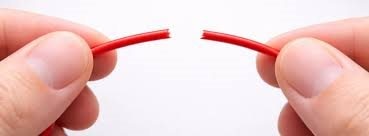
In 3D printing operations at print-farm scale, maintaining filament material quality is crucial for production continuity. High ambient humidity triggers filament degradation, making it brittle and significantly increasing the risk of stringing, poor layer adhesion, printhead fragility, and nozzle clogging on high-speed printers such as the Bambu Lab P1S, A1, and A1 Mini.
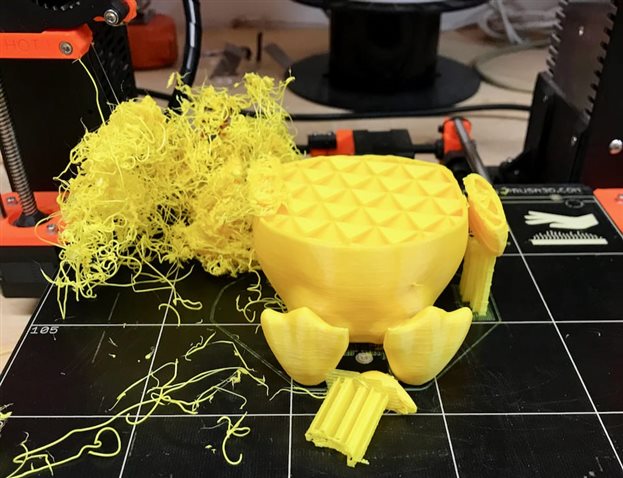
These physical issues lead to high print failure rates and costly downtime. The absence of an integrated monitoring system makes it difficult for operators to detect print failures early, often resulting in entire production batches being wasted before the problem is noticed.
1.2 Proposed Solution

The implemented solution integrates an AIoT (Artificial Intelligence of Things) architecture that combines edge computing with responsive actuators directly in the print farm area. The system serves two primary functions:
- Active Dry Box: An automated filament drying chamber controlled by a heater with a temperature setpoint of 50-60 degrees C, ensuring filament remains in optimal condition before and during the printing process.
- Print Farm Supervisor: A real-time monitoring system using YOLOv8n computer vision running directly on the board (edge inference) to autonomously detect 6 types of print failures.
1.3 System Title and Ecosystem Concept
The device is titled "AIoT : Smart Active Dry Box & Print Farm Supervisor", representing a closed-loop ecosystem that centralizes production metrics in a single integrated device. All processing is performed locally (on-device) without reliance on external servers, ensuring the system continues to operate even without an internet connection.
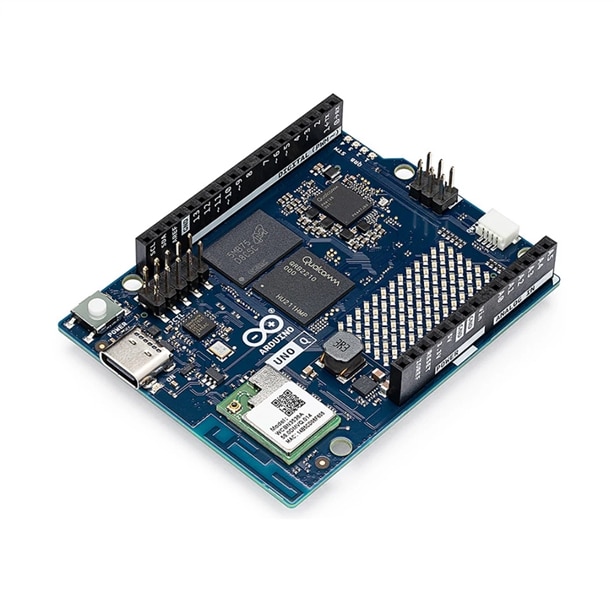
2.1 Main Platform: Arduino Uno Q
The Arduino Uno Q was selected as the main platform because it integrates two processors on a single board, enabling the system to operate simultaneously as a single-board computer and an Arduino microcontroller:
2.2 Sensor Subsystem
The system employs three sensor types, each with a specific role:
|
Sensor |
Model |
Interface |
Parameter |
|
Thermocouple #1 |
OMEGA 5SRTC-TT-K-24-72 |
MAX31855, CS=D10 |
Temperature at point 1 inside dry box, range -200 to +1372 degrees C |
|
Thermocouple #2 |
OMEGA 5SRTC-TT-K-24-72 |
MAX31855, CS=D9 |
Temperature at point 2 for cross-checking heat distribution inside dry box |
|
Temp & Humidity |
DHT22 |
GPIO D2, 10k pull-up |
Ambient temperature and humidity inside dry box chamber as control reference |
|
USB Camera |
USB Camera (V4L2) |
/dev/video2 |
Live 640x480 feed for YOLOv8n inference to detect 3D print failures in real time |
2.3 Humidity Sensor Selection: From HX94C to DHT22
2.3.1 Background — Initial Attempt with HX94C

The original design specified the OMEGA HX94C industrial humidity and temperature sensor, which uses a standard 4-20 mA current loop output commonly found in manufacturing environments. This sensor was chosen for its high accuracy and immunity to electromagnetic interference. However, during actual implementation the sensor could not be read by the Arduino Uno Q due to several technical constraints described below.
2.3.2 Technical Constraints of Using HX94C with Arduino Uno Q
The HX94C outputs a 4-20 mA current signal (current loop standard). To be read by a microcontroller ADC, this current must first be converted to a voltage using a shunt resistor. The experiment used a 250-ohm resistor as specified in the sensor datasheet ("For 1 to 5 Volt Output, R Load = 250 Ohm"), but encountered the following problems:
|
Problem |
Explanation |
|
Output voltage exceeds ADC limit |
With R = 250 ohm, the maximum current of 20 mA produces a voltage of 5V (V = I x R = 0.02 x 250 = 5V). The analog pins of the STM32U585 on the Arduino Uno Q are only tolerant up to 3.3V + 0.3V = 3.6V. Applying 5V risks permanently damaging the ADC pin. |
|
Current source cannot be divided with a standard voltage divider |
The HX94C behaves as a current source, not a voltage source. Attempting to reduce the voltage by adding a series resistor does not work like a resistive voltage divider. A constant current will flow through the total resistance, so the voltage at any tap point remains proportional only to the resistance below that tap, not split between two resistors. |
|
Parallel 250-ohm solution still produced zero ADC reading |
To safely limit the voltage to 3.3V at 20 mA, a shunt resistor of no more than 165 ohm is required (R = V/I = 3.3/0.02 = 165 ohm). Two 250-ohm resistors wired in parallel (equivalent to 125 ohm) were used as a substitute, resulting in a maximum voltage of 2.5V which is within the safe range. However, the ADC reading remained stuck at 0 and showed no response to environmental changes. |
|
Requires separate 24V external power supply |
The HX94C requires a separate 6-30 VDC supply according to its datasheet. This necessitates an external power supply, additional wiring, and careful ground sharing between the 24V supply and the Arduino ground plane. This complexity increases the risk of wiring errors and is impractical for a prototype stage. |
|
ADC reading persistently zero |
Even with the circuit assembled, the ADC value read from the Uno Q analog pin was consistently 0 with no variation. Likely causes include noise on the analog line from long unshielded cables, an unstable supply voltage, or a ground reference mismatch between the sensor loop and the MCU. Further debugging would require an oscilloscope and a dedicated signal conditioner, neither of which were available. |
2.3.3 Decision to Switch to DHT22

Based on the technical constraints above, the decision was made to replace the HX94C with the DHT22, which uses a digital single-wire interface and therefore requires no analog signal conversion whatsoever. The following table compares both sensors across all relevant parameters:
|
Parameter |
OMEGA HX94C |
DHT22 |
|
Output Interface |
4-20 mA current loop |
Digital single-wire GPIO |
|
Supply Voltage |
6-30 VDC external supply |
3.3V directly from Arduino |
|
Additional Circuitry |
Shunt resistor + signal conditioner + 24V power supply |
10 kOhm pull-up resistor only |
|
ADC Compatibility |
Not direct — output 1-5V exceeds 3.3V limit |
Direct via digital GPIO, no ADC needed |
|
Integration Effort |
High — requires signal conditioning |
Very low — 1 data pin + mature library |
|
Temperature Accuracy |
+/- 0.5 degrees C |
+/- 0.5 degrees C |
|
Humidity Accuracy |
+/- 2% RH |
+/- 2 to 5% RH |
|
Temperature Range |
-40 to +60 degrees C |
-40 to +80 degrees C |
|
Humidity Range |
0-100% RH |
0-100% RH |
|
Arduino Library |
None — custom ADC reading required |
Adafruit DHT library (stable, well-tested) |
|
Suitability for Dry Box |
Adequate but failed to implement |
Adequate and successfully implemented |
The DHT22 satisfies all measurement requirements for the filament dry box context with dramatically lower integration complexity. For the target operating range of 50-60 degrees C and a minimum humidity threshold of 40% RH, the DHT22 accuracy is fully sufficient. Should higher industrial-grade accuracy be needed in a future revision, the recommended approach is to use a dedicated 4-20 mA to 0-3.3V signal conditioner module (such as a precision op-amp based module) rather than a bare shunt resistor, which cannot safely interface a current source to a 3.3V ADC without additional protective circuitry.
Actuator Subsystem

The system uses a single relay module as the sole actuator for controlling the heating element inside the dry box:
- 1-channel relay module, active LOW logic, connected to GPIO D6 of the Arduino Uno Q
- Controlled by the STM32 based on commands received from the Python control thread via Bridge.call("set_relay")
- AUTO mode: heater turns ON automatically when the average thermocouple temperature falls below 50 degrees C, and turns OFF when it exceeds 60 degrees C
- MANUAL mode: operator directly controls the relay state from the web dashboard toggle
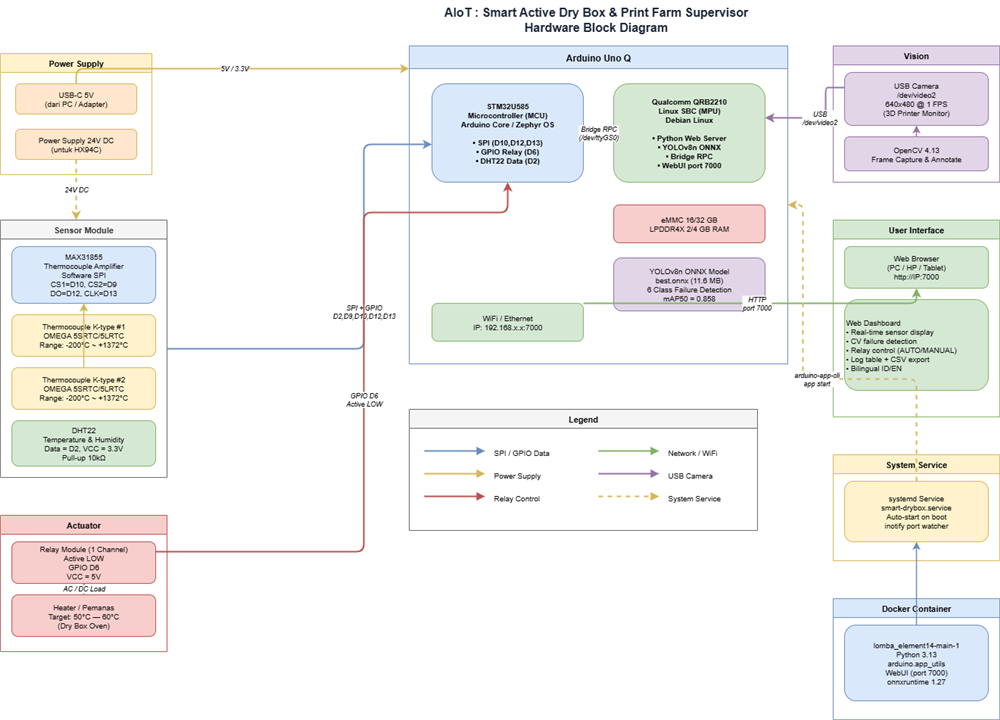
Hardware Block Diagram
The hardware block diagram illustrates the physical connections between all system components.
3.1 Component Block Descriptions

|
Block |
Description |
|
Power Supply |
Two power sources: USB-C 5V for the Arduino Uno Q (distributed internally as 3.3V and 5V for sensors and relay), and an optional 24V DC external supply originally planned for the HX94C industrial sensor. |
|
Arduino Uno Q |
System core. The STM32U585 handles all hardware I/O via SPI (thermocouples) and GPIO (relay, DHT22). The Qualcomm QRB2210 runs Python, the WebUI, and AI inference. Both chips communicate through Bridge RPC over /dev/ttyGS0. |
|
Sensor Module |
Two MAX31855 modules share the SPI bus (CLK=D13, DO=D12) with separate chip selects (CS1=D10 and CS2=D9) for two K-type thermocouples. DHT22 is connected to D2 with a 10 kOhm pull-up resistor to 3.3V. |
|
Actuator |
A single 1-channel relay that switches the dry box heater. Control signal comes from D6 on the STM32, using active LOW logic so the heater defaults to OFF at power-on for safety. |
|
Vision |
A USB camera connected to the Qualcomm QRB2210 USB port. OpenCV 4.13 captures 640x480 frames, which are then processed by the YOLOv8n ONNX model for print failure detection. |
|
User Interface |
A Python WebUI dashboard accessible from any browser on the local network at port 7000. Displays real-time sensor data, live annotated video, failure logs, and a relay control panel. |
|
System Service |
A systemd service (smart-drybox.service) ensures the entire system starts automatically on board power-on. An inotify watcher script monitors app-compose.yaml to persistently maintain port 7000 mapping across container restarts. |
3.2 Inter-Block Connections
|
From |
To |
Protocol |
Notes |
|
Thermocouple x2 |
MAX31855 x2 |
Analog (mV) |
Thermoelectric signal converted to digital by MAX31855 amplifier |
|
MAX31855 x2 |
STM32U585 |
Software SPI |
Shared CLK+DO bus, separate CS pins D10 and D9 |
|
DHT22 |
STM32U585 |
1-Wire GPIO D2 |
Temperature and humidity readings every 2 seconds |
|
STM32U585 |
Qualcomm QRB2210 |
Bridge RPC |
update_data() sensor payload and set_relay() commands via /dev/ttyGS0 |
|
Qualcomm QRB2210 |
STM32U585 |
Bridge RPC |
Relay control command: Bridge.call("set_relay", state) |
|
USB Camera |
Qualcomm QRB2210 |
USB / V4L2 |
640x480 video frames for AI inference pipeline |
|
Qualcomm QRB2210 |
Web Browser |
HTTP REST port 7000 |
JSON sensor data, JPEG frame in base64, log events |
|
STM32U585 |
Relay Heater |
GPIO D6 Active LOW |
On/off control of the dry box heating element |
4. Software Flowchart
The software architecture runs across 4 parallel threads that communicate through shared state objects protected by threading.Lock(). An interactive flowchart is available as a draw.io file: smart_drybox_software_flowchart.drawio.
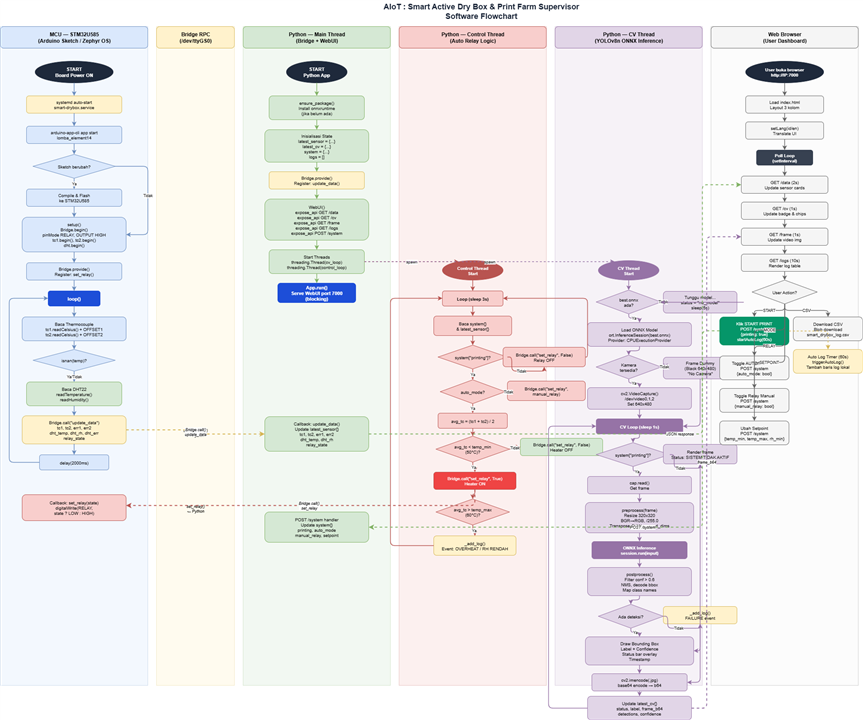
4.1 Thread Architecture Overview
|
Thread / Lane |
Interval |
Responsibility |
|
MCU (STM32) |
2 seconds |
Read sensors (TC1, TC2, DHT22), send data via Bridge.call(), receive relay commands |
|
Python Main |
Event-driven |
System initialization, Bridge.provide() registration, REST API exposure, WebUI blocking serve |
|
Control Thread |
3 seconds |
Automatic relay control logic based on sensor data and setpoints, warning log recording |
|
CV Thread |
1 second |
Load ONNX model, open camera, run YOLOv8n inference, annotate frame, update latest_cv state |
|
Web Browser |
Poll 1-2s |
Fetch JSON from REST API, render dashboard, send POST /system commands from user interaction |
4.2 MCU Flow (STM32U585 — Arduino Sketch)
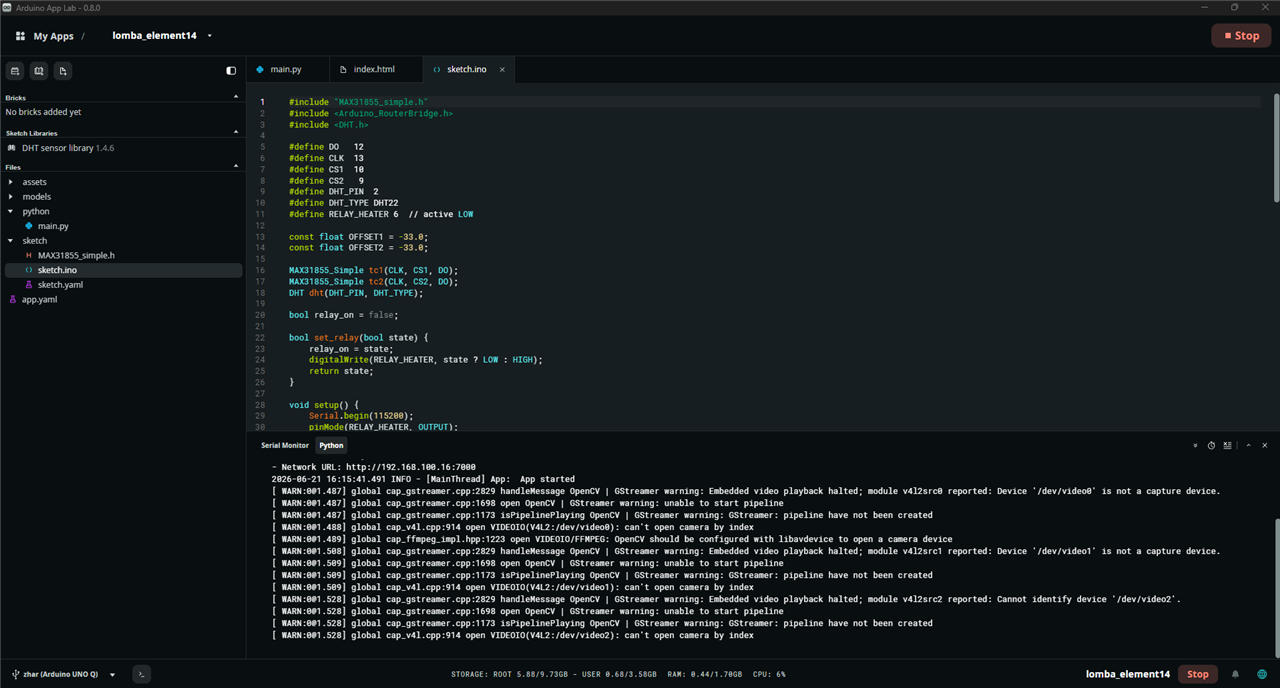
After the board powers on, the systemd service runs arduino-app-cli which compiles and flashes the sketch to the STM32 if changes are detected. After setup() completes initializing all peripherals, loop() executes every 2 seconds:
- Read both thermocouples through the MAX31855 modules via Software SPI, applying calibration offsets
- Check for error conditions (isnan) from thermocouple readings
- Read DHT22 for ambient temperature and humidity
- Send all data to Python via Bridge.call("update_data", ...)
- Receive relay control commands from Python via the registered callback Bridge.provide("set_relay", ...)
4.3 Python Main Thread Flow
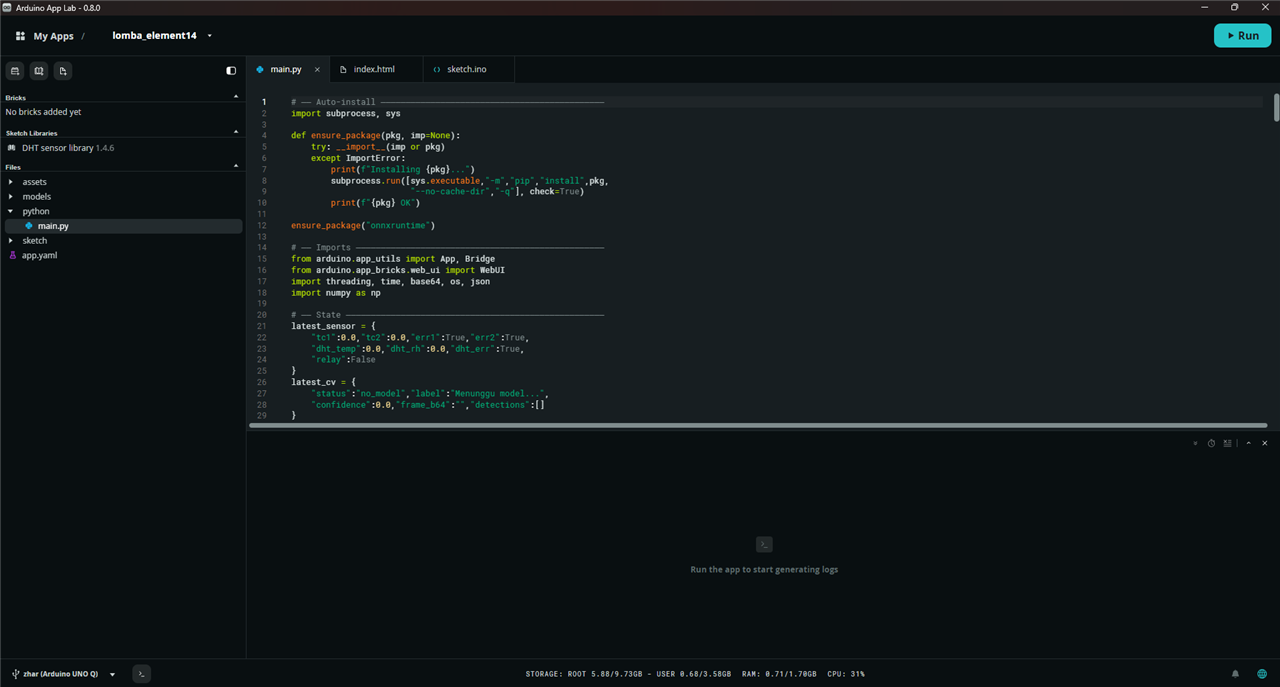
The Python app runs inside a Docker container managed by arduino-app-cli. Initialization sequence:
- ensure_package(): auto-install onnxruntime into the venv if not already present
- Initialize shared state objects: latest_sensor{}, latest_cv{}, system{}, logs[]
- provide("update_data"): register callback to receive sensor data from the MCU
- WebUI().expose_api(): register GET /data, /cv, /frame, /logs endpoints and POST /system handler
- Thread(): spawn the Control Thread and CV Thread as daemon threads
- run(): blocking call that serves HTTP requests on port 7000
4.4 Control Thread Flow
This thread is responsible for automatic relay control logic and runs every 3 seconds:
- If system["printing"] is False: force relay OFF unconditionally
- If system["auto_mode"] is False (Manual mode): send Bridge.call("set_relay", manual_relay) per user input
- If Auto mode is active: compute average temperature from both thermocouples, turn heater ON if below temp_min (default 50 degrees C), turn OFF if above temp_max (default 60 degrees C)
- Detect abnormal conditions: temperature exceeding temp_max or humidity below rh_min, and record to log via _add_log()
4.5 CV Thread Flow (YOLOv8n Inference)
The computer vision thread runs every 1 second and executes the following pipeline:
- Wait for best.onnx model file at /app/models/, update status to "no_model" while waiting
- Load ONNX model using onnxruntime with CPUExecutionProvider
- Open USB camera (scan /dev/video0, 1, 2), fall back to a dummy black frame if no camera found
- If system["printing"] is False: render frame with "SYSTEM INACTIVE" overlay, skip inference
- Preprocessing: resize to 320x320, convert BGR to RGB, normalize by dividing by 255, transpose to CHW format, add batch dimension
- Inference: session.run() produces output tensor of shape [1, 10, 2100]
- Postprocessing: filter detections by confidence > 0.6, decode bounding boxes, map class indices to 6 class names
- Annotation: draw color-coded bounding boxes per class, add confidence labels, status bar overlay, and timestamp
- Encode annotated frame to JPEG base64, update latest_cv{} for browser delivery
- If any detections found: append failure log entry via _add_log()
4.6 Web Browser Flow (User Dashboard)

The web dashboard uses a 3-column layout and performs asynchronous polling:
- GET /data every 2 seconds: update thermocouple cards, temperature, humidity, and relay status
- GET /cv every 1 second: update detection status badge and detected class chips
- GET /frame every 1 second: update camera image with bounding box annotations
- GET /logs every 10 seconds: render failure and warning log table
- POST /system: send user commands (START/STOP PRINT, AUTO/MANUAL mode, setpoint changes, manual relay toggle)
- Auto-log timer: after START PRINT, automatically append a log entry every 60 seconds with countdown timer
- CSV download: export the full log history to smart_drybox_log.csv in the browser
5. AI Model — YOLOv8n 3D Print Failure Detection
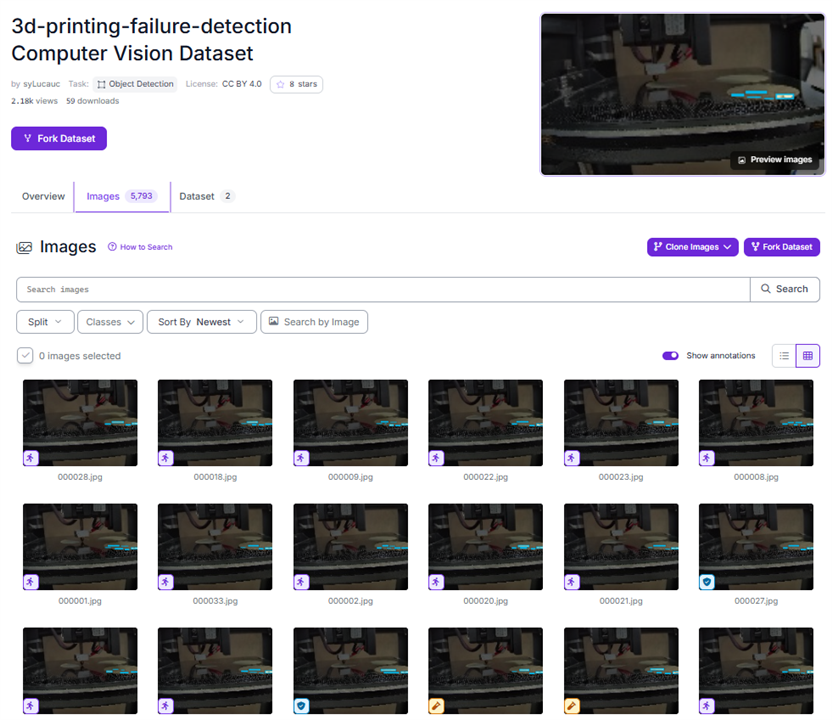
5.1 Dataset
|
Parameter |
Value |
|
Dataset Source |
Roboflow Universe: 3d-printing-failure-detection v3 (CC BY 4.0) |
|
Total Images |
1,161 images (train + val + test split) |
|
Total Instances |
6,732 bounding box annotations |
|
Number of Classes |
6 print failure classes |
|
Label Format |
YOLOv8 (.txt per image) |
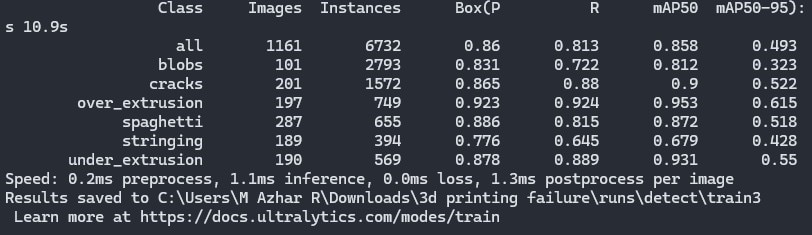
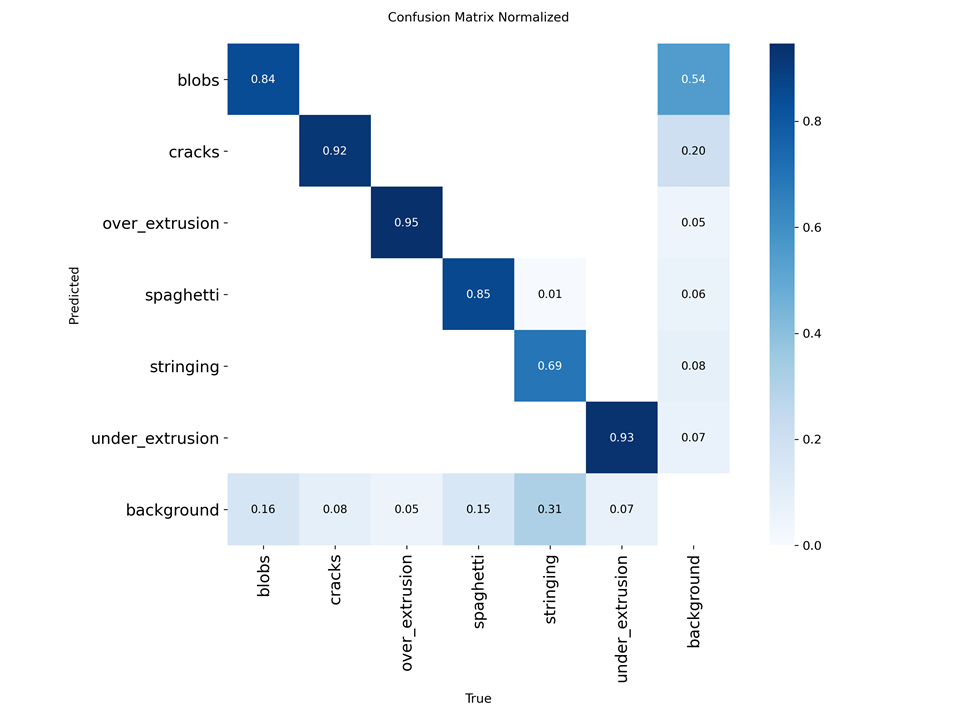
5.2 Detection Classes and Per-Class Performance
|
Class |
Images |
Instances |
Precision |
mAP50 |
mAP50-95 |
|
blobs |
101 |
2793 |
0.831 |
0.812 |
0.323 |
|
cracks |
201 |
1572 |
0.865 |
0.900 |
0.522 |
|
over_extrusion |
197 |
749 |
0.923 |
0.953 |
0.615 |
|
spaghetti |
287 |
655 |
0.886 |
0.872 |
0.518 |
|
stringing |
189 |
394 |
0.776 |
0.679 |
0.428 |
|
under_extrusion |
190 |
569 |
0.878 |
0.931 |
0.550 |
|
ALL (overall) |
1161 |
6732 |
0.860 |
0.858 |
0.493 |
5.3 Model Specifications
|
Parameter |
Value |
|
Architecture |
YOLOv8n (nano) — 3,006,818 parameters, 8.1 GFLOPs |
|
Export Format |
ONNX opset 19, simplified with onnxslim 0.1.82 |
|
Input Shape |
[1, 3, 320, 320] BCHW |
|
Output Shape |
[1, 10, 2100] — 10 = 4 bbox coordinates + 6 class scores |
|
File Size |
11.6 MB — very lightweight for edge deployment |
|
Inference Engine |
onnxruntime 1.27.0, CPUExecutionProvider |
|
Confidence Threshold |
0.6 (to minimize false positives on non-printer scenes) |
|
Reported Speed |
0.2 ms preprocess, 1.1 ms inference, 1.3 ms postprocess per image (training machine CPU) |
6. Web Dashboard
6.1 Dashboard Features
The dashboard is accessible from any browser on the local network without installing any additional application, at http://[Board-IP]:7000. Available features:
|
Feature |
Description |
|
3-Column Layout |
Sensor panel (left), Camera + Log (center), Control panel (right) |
|
Bilingual ID / EN |
Language toggle button in the top-right corner; all UI text switches dynamically between Indonesian and English |
|
Real-time Sensor Cards |
Updated every 2 seconds: TC1, TC2, DHT22 temperature, DHT22 humidity, relay status indicator |
|
Live CV Feed |
Camera frame with bounding box annotations updated every 1 second, with detection status badge |
|
START / STOP PRINT |
Activates or deactivates the full automated system: relay auto-control and CV inference pipeline |
|
AUTO / MANUAL Mode |
AUTO: relay controlled by the system based on sensor readings; MANUAL: operator controls relay directly via toggle |
|
Adjustable Setpoints |
Target temperature range (min/max in degrees C) and minimum humidity threshold can be changed live from the dashboard |
|
Log Table |
Tabular log of failure detections, system warnings, and auto-log entries with color-coded event types (red/amber/purple) |
|
Auto-Log Timer |
After START PRINT, a log entry is automatically appended every 60 seconds with a visible countdown timer |
|
Download CSV |
Export the full log history to a timestamped CSV file directly from the browser |
|
Visual Alerts |
Sensor cards turn amber when readings are outside setpoints; CV badge blinks red when a failure is detected |
6.2 REST API Endpoints
|
Method |
Endpoint |
Response |
|
GET |
/data |
JSON: tc1, tc2, err1, err2, dht_temp, dht_rh, dht_err, relay |
|
GET |
/cv |
JSON: status, label, confidence, detections[] (frame_b64 excluded) |
|
GET |
/frame |
JSON: frame_b64 — annotated JPEG frame encoded as base64 string |
|
GET |
/logs |
JSON array: up to 100 most recent log entries (time, tc1, tc2, dht_temp, dht_rh, relay, event) |
|
GET |
/system |
JSON: current system state (printing, auto_mode, setpoints, etc.) |
|
POST |
/system |
Request body JSON: printing, auto_mode, manual_relay, temp_min, temp_max, rh_min |
7. Original Concept vs. Actual Implementation
|
Aspect |
Original Concept |
Actual Implementation |
|
Platform |
Arduino Uno Q + CAN Bus MAX33041 |
Arduino Uno Q, Bridge RPC via /dev/ttyGS0 |
|
Humidity Sensor |
OMEGA HX94C (4-20 mA, 24V DC) |
DHT22 (digital 1-Wire, 3.3V) — replaced due to ADC voltage incompatibility and zero readings |
|
AI Model |
TensorFlow Lite / YOLO Nano |
YOLOv8n ONNX, onnxruntime 1.27, mAP50 = 0.858 |
|
Visualization |
NI LabVIEW HMI |
Python WebUI, HTML/JS, REST API — accessible from any browser without software installation |
|
ML Backend |
Decision Tree on external server |
Edge inference directly on board — no server dependency |
|
Communication |
CAN Bus to server infrastructure |
Bridge RPC (MCU to Linux) + WiFi (board to browser) |
|
Deployment |
Not specified |
systemd + Docker, fully automatic on board boot |
|
Heater Control |
Relay via CAN Bus |
GPIO D6 STM32, active LOW, PID-like logic via Python control thread at 3-second intervals |
