


Whose going to carry the boats??
Who is going to carry the logs?
I work with IDEC PLCs. They have some software which was probably really nice in 1982.
yesterday, I was so infuriated when a log download process kept failing, I went off and made my own utility to get logs.
The general gist is that when the OEM supported software looses connection, you loose the entire set of data you had been downloading.
many of our systems are thousands of miles away, on questionably reliable networks. While you might see 20Kpbs down, locally, remote connections even for small files can take hours at 2-4KBps. then to loose it. .. OMG. or the syntax is convoluted AF, or theres no direct way to automate the process via the OEM supported software.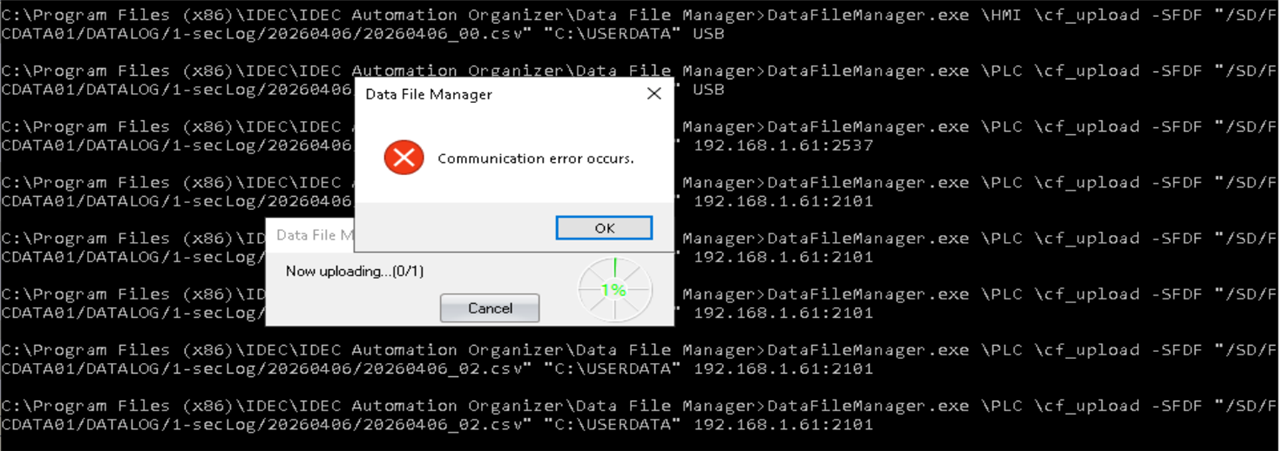
Well last night, I had enough, and delved into the internal operation of remote SD Card reading, via Maintenance Protocol.
How OpenDFM Works
OpenDFM is a multithreaded graphical client for accessing the SD-card filesystem exposed by IDEC PLCs through the maintenance protocol over TCP.
Each PLC is represented by an independent tab and session object. A session stores the controller’s IP address, TCP port, PLC device identifier, current remote working directory, local destination path, cached directory-entry metadata, active transfer state, and synchronization primitives used to prevent overlapping protocol transactions.
Ethernet maintenance communication normally uses TCP port 2101.
At the transport layer, OpenDFM creates a TCP socket to the PLC and exchanges IDEC maintenance-protocol frames. A conventional request contains:
ENQcontrol byte0x05- two-byte device identifier, commonly
FF - continuation flag
- command and subcommand
- command-specific payload
- XOR-based block-check character
- carriage-return terminator
0x0D
The PLC normally responds with an ACK frame beginning with 0x06, followed by the responding device number, completion status, returned data, BCC, and terminator. Negative protocol responses are decoded separately from TCP errors, socket timeouts, truncated frames, and malformed payloads.
SD-card access uses the PLC’s extended FR filesystem command family. Directory enumeration is stateful. OpenDFM first submits a remote path, such as:
/FCDATA01/DATALOG/1-secLog
The path-open request includes the path length and a NUL-terminated path name. The PLC returns the number of directory entries available in the opened directory context. OpenDFM then issues successive entry-read requests, using the observed FR20 sequence, until every directory record has been retrieved. The final request uses the terminating form of the command so the PLC can release the active enumeration context.
Each returned directory record is parsed into structured metadata. Depending on the record format, this includes:
- file-versus-directory type
- filename length
- filename bytes
- file size
- FAT-style modification date
- FAT-style modification time
- additional flags or reserved fields
The date and time fields are decoded from their packed filesystem representation. File sizes are converted from the protocol’s hexadecimal ASCII representation into native integers. Filenames are decoded without treating path separators as local filesystem separators until the remote entry has been validated.
The GUI does not directly display raw protocol responses. Parsed entries are converted into application-level directory-entry objects and inserted into a tree or list model. Directory entries can therefore be sorted, selected, recursively traversed, and associated with transfer actions without repeatedly reparsing the original response bytes.
File retrieval is also stateful and block-oriented. OpenDFM opens the selected remote file, determines or receives its expected length, and repeatedly requests the next block. Returned blocks contain protocol framing plus a binary or encoded data payload. The application removes framing, validates the response, extracts the payload, and appends it to a local output stream.
The local file is normally written incrementally rather than buffering the complete remote file in memory. This allows large logs to be downloaded with a bounded memory footprint. The transfer loop tracks:
- expected remote file length
- bytes requested
- bytes received
- bytes committed to disk
- current remote offset
- retry state
- elapsed transfer time
- effective transfer rate
A transfer is considered complete only when the protocol reports end-of-file or the accumulated byte count matches the size reported during directory enumeration. A short response, zero-length block before the expected end, invalid BCC, unexpected command status, or socket disconnect is treated as a transfer failure rather than silently producing a truncated file.
Folder downloads are implemented as client-side recursive traversal. The PLC provides only the contents of one opened directory at a time. OpenDFM therefore performs a depth-first or breadth-first walk:
- Enumerate the selected remote directory.
- Create the matching local directory.
- Download each regular file.
- Queue or recursively enter each sub-directory.
- Repeat until no unvisited directories remain.
The remote path is normalized independently from the local path. This prevents a PLC filename containing parent-directory components, absolute-path syntax, or unexpected separators from escaping the selected local download directory.
Because the PLC’s filesystem commands maintain implicit remote state, command ordering is significant. A directory-open operation establishes the context used by subsequent directory-entry reads. Likewise, a file-open command establishes the context used by following block-read commands. If two operations against the same PLC were interleaved, one command sequence could replace the context required by the other.
OpenDFM therefore serializes filesystem transactions per PLC session. A tab may have only one active directory enumeration, file transfer, or recursive operation at a time. This restriction is not primarily due to Ethernet bandwidth; it is required to preserve the PLC’s stateful command sequence.
Concurrency is applied between PLC sessions rather than within one PLC session. Each tab has its own socket activity, protocol state, command lock, transfer worker, and progress reporting path. As a result, PLC A may download a log while PLC B enumerates a directory, provided the two operations use separate sessions.
Blocking socket and disk operations are executed in worker threads so they do not run inside the GUI event loop. The workers publish status updates through a thread-safe queue or framework signal mechanism. The main interface thread consumes those updates and modifies widgets, progress bars, transfer labels, and tab state. GUI objects are not directly manipulated from network workers.
A typical operation therefore crosses several layers:
GUI action
->PLC session controller
-> filesystem operation
-> maintenance-protocol command builder
-> TCP transport
-> PLC response parser
-> directory-entry or file-block decoder
-> local filesystem writer
-> thread-safe progress update
-> GUI model refresh
Error handling is divided by layer. Connection failures identify an unreachable PLC. Protocol failures identify a syntactically valid exchange rejected by the controller. Filesystem failures identify invalid paths, unavailable SD cards, changed directory contents, or interrupted remote file state. Local I/O failures identify permission errors, full disks, invalid filenames, or failed writes.
OpenDFM can also verify that the SD card is mounted before performing filesystem operations by reading the PLC’s SD-card status devices. On FC6A controllers, special relay M8070 indicates SD-card mount status, while special registers such as D8250 and D8251 expose total and free SD-card capacity. These checks are separate from directory enumeration but provide an early indication that a browsing or download request is likely to succeed.
In effect, OpenDFM translates a stateful, request-response filesystem interface into a conventional graphical file browser while preserving the strict transaction ordering, response validation, and per-controller isolation required by the PLCs.

https://github.com/FOSSBOSS/OpenDFM
Are there bugs? HELL YEAH!
Am I going to fix it? hell ye?
Did I really write this whole thing in one night? LOL NO.
Vid:
Next up:
Decoding the SV1 security protocol into practical utilities.
