


In Lab 5, I learnt how to use the SDK JTAG connection and a TCL script to initialize the ARM processor registers and debug applications. However, in this lab initialization of the ARM processor was done in an embedded fashion using code called the First Stage Boot Loader or FSBL. One of the great things about Vivado is the amount of automation it does for the developer. The FSBL is one of those functions that the Xlininx SDK automatically creates using a template. The SDK interprets the hardware platform, and generates a fully functional FSBL for you.
Lab 6 taught me how to:
• How to generate the FSBL
• What the FSBL application includes
• How to recognize some of the initialization sequences
One of the experiments in the lab shows us how to Generate the FSBL using the New Project Wizard
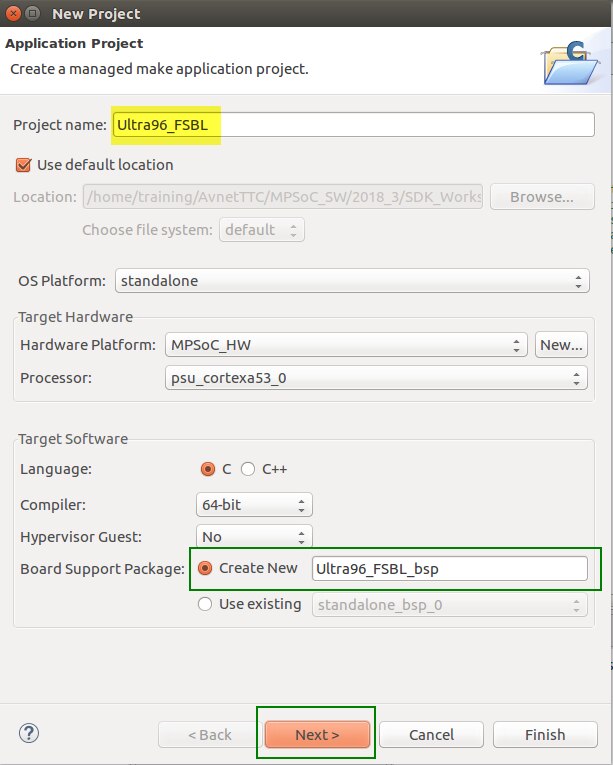
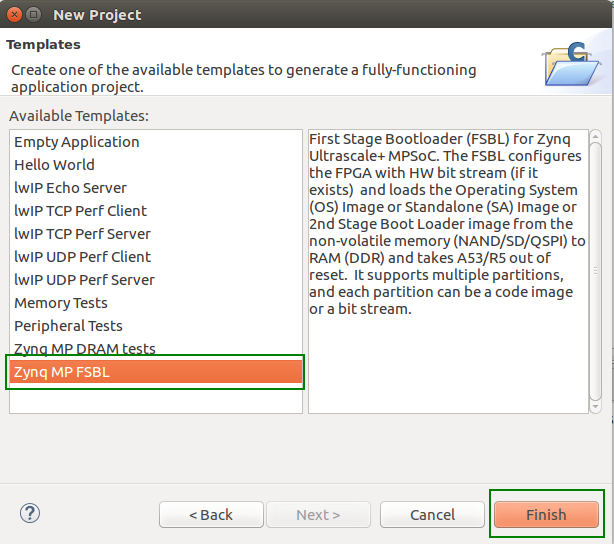
I explored the platform management unit (PMU) processor for power, error management, and execution of an optional software test library (STL) for functional safety applications.
The PMU performs the following set of tasks:
• Initialization of the system prior to boot.
• Power management.
• Software test library execution (optional).
• System error handling.
Just like the FSBL to initialize the Processing System Unit (PSU), firmware is also needed to initialize the Platform Management Unit (PMU). I used the New Project Wizard as well to create the PMU firmware. Great tool this Vivado.

