element14 Community
element14 Community
    Register Log In
  • Site
  • Search
  • Log In Register
  • Community Hub
    Community Hub
    • What's New on element14
    • Feedback and Support
    • Benefits of Membership
    • Personal Blogs
    • Members Area
    • Achievement Levels
  • Learn
    Learn
    • Ask an Expert
    • eBooks
    • element14 presents
    • Learning Center
    • Tech Spotlight
    • STEM Academy
    • Webinars, Training and Events
    • Learning Groups
  • Technologies
    Technologies
    • 3D Printing
    • FPGA
    • Industrial Automation
    • Internet of Things
    • Power & Energy
    • Sensors
    • Technology Groups
  • Challenges & Projects
    Challenges & Projects
    • Design Challenges
    • element14 presents Projects
    • Project14
    • Arduino Projects
    • Raspberry Pi Projects
    • Project Groups
  • Products
    Products
    • Arduino
    • Avnet & Tria Boards Community
    • Dev Tools
    • Manufacturers
    • Multicomp Pro
    • Product Groups
    • Raspberry Pi
    • RoadTests & Reviews
  • About Us
  • Store
    Store
    • Visit Your Store
    • Choose another store...
      • Europe
      •  Austria (German)
      •  Belgium (Dutch, French)
      •  Bulgaria (Bulgarian)
      •  Czech Republic (Czech)
      •  Denmark (Danish)
      •  Estonia (Estonian)
      •  Finland (Finnish)
      •  France (French)
      •  Germany (German)
      •  Hungary (Hungarian)
      •  Ireland
      •  Israel
      •  Italy (Italian)
      •  Latvia (Latvian)
      •  
      •  Lithuania (Lithuanian)
      •  Netherlands (Dutch)
      •  Norway (Norwegian)
      •  Poland (Polish)
      •  Portugal (Portuguese)
      •  Romania (Romanian)
      •  Russia (Russian)
      •  Slovakia (Slovak)
      •  Slovenia (Slovenian)
      •  Spain (Spanish)
      •  Sweden (Swedish)
      •  Switzerland(German, French)
      •  Turkey (Turkish)
      •  United Kingdom
      • Asia Pacific
      •  Australia
      •  China
      •  Hong Kong
      •  India
      • Japan
      •  Korea (Korean)
      •  Malaysia
      •  New Zealand
      •  Philippines
      •  Singapore
      •  Taiwan
      •  Thailand (Thai)
      • Vietnam
      • Americas
      •  Brazil (Portuguese)
      •  Canada
      •  Mexico (Spanish)
      •  United States
      Can't find the country/region you're looking for? Visit our export site or find a local distributor.
  • Translate
  • Profile
  • Settings
Path II Programmable
  • Challenges & Projects
  • Design Challenges
  • Path II Programmable
  • More
  • Cancel
Path II Programmable
Blog P2P Week 1: Environment Setup and SW Labs
  • Blog
  • Forum
  • Documents
  • Polls
  • Files
  • Events
  • Mentions
  • Sub-Groups
  • Tags
  • More
  • Cancel
  • New
  • Share
  • More
  • Cancel
Group Actions
  • Group RSS
  • More
  • Cancel
Engagement
  • Author Author: vladrumyan
  • Date Created: 20 Oct 2019 1:20 PM Date Created
  • Views 667 views
  • Likes 3 likes
  • Comments 2 comments
  • ultra96-v2
  • path ii programmable
Related
Recommended

P2P Week 1: Environment Setup and SW Labs

vladrumyan
vladrumyan
20 Oct 2019

Intro

This is the first time I publish something on element14 – so I am bit nervous but very excited about the journey, as we follow the three courses on developing for Zynq MPSoC. It took a while to ship the ULTRA96-V2 kit from Chicago to the UK, so I only spent around 5 days with the board by now.

The training program consists of three core modules – Software, Hardware and Petalinux. I decided to focus on the software course to begin with and have now completed 3 out of 11 labs, which we will go in more detail a bit later in this post.


Setting Up

The first step was of course to set up the development environment and install the required Xilinx tools. The Avnet guide on setting up an Ubuntu VM for these purposes is probably the most extensive guide of this kind you will ever find – almost 60 pages of detailed step-by-step instructions with relevant references to external resources. All the tweaks you have to do in Ubuntu are explained properly, so you never get a feeling of blindly following a set of “black box” actions. I also decided not to deviate from the guide and proceeded with installing Ubuntu 16.04 LTS and Xilinx tools v2018.3 instead of the latest ones available (18.04 LTS and v2019.1 respectively). I wanted to make sure that my setup matches exactly the one used in the course materials to avoid any unnecessary compatibility issues.

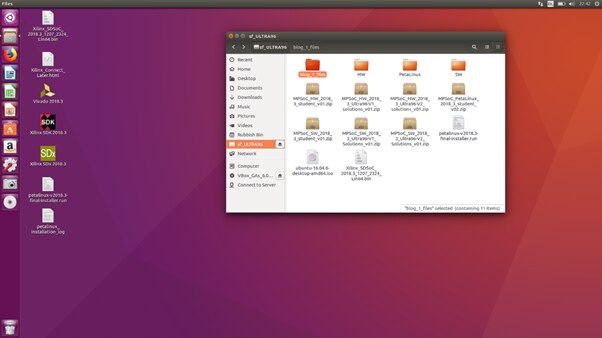
The screenshot below shows my VM with a shared folder setup and Oracle VirtualBox Guest Additions mounted correctly.
 

image


Software Labs 1-3

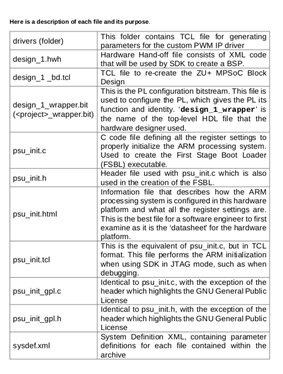
The first 3 Software module labs give a good overview of the Xilinx SDK and how it links to the Hardware platform. I have through the process of exporting hardware platform generated in Vivado to the SDK before in my university courses. However, I have never really paid attention to what the internals of the exported archive file are (this is the file with .hdf extension). Therefore, I found it very useful that the purpose of each component is explained clearly (see screenshot below).
image

It feels quite unusual that up until lab 4 u don’t get to run any actual code on the hardware but, to be fair, this is what I really liked in this course: by the time you run the “Hello World” application you know exactly what is happening behind the scenes.

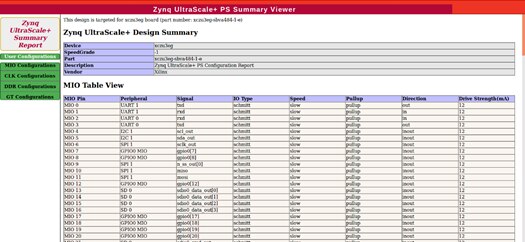
Tutorials give you a lot of pointers to the information on the drivers and IP blocks that are included in the hardware platform. It also forces you to use the documentation efficiently and allows you to explore multiple options to do so. For example, I found the hardware report generated from psu_init.html file handy.
image

To sum up, the first week with Ultra96-V2 for me was rather theoretical. Nevertheless, I believe I am now on track to some exciting hands-on experiments which I will share with you in the next several days.


P.S. My anti-static mat arrived while I was writing this post, so I am now ready to go!

  • Sign in to reply

Top Comments

  • jw0752
    jw0752 over 6 years ago +1
    Nice write up. I look forward to your experiments. John
  • cmelement14
    cmelement14 over 6 years ago +1
    I think starting from hardware module may be a better choice since it gradually builds up the hardware required for the software module training.
  • cmelement14
    cmelement14 over 6 years ago

    I think starting from hardware module may be a better choice since it gradually builds up the hardware required for the software module training.

    • Cancel
    • Vote Up +1 Vote Down
    • Sign in to reply
    • More
    • Cancel
  • jw0752
    jw0752 over 6 years ago

    Nice write up. I look forward to your experiments.


    John

    • Cancel
    • Vote Up +1 Vote Down
    • Sign in to reply
    • More
    • Cancel
element14 Community

element14 is the first online community specifically for engineers. Connect with your peers and get expert answers to your questions.

  • Members
  • Learn
  • Technologies
  • Challenges & Projects
  • Products
  • Store
  • About Us
  • Feedback & Support
  • FAQs
  • Terms of Use
  • Privacy Policy
  • Legal and Copyright Notices
  • Sitemap
  • Cookies

An Avnet Company © 2026 Premier Farnell Limited. All Rights Reserved.

Premier Farnell Ltd, registered in England and Wales (no 00876412), registered office: Farnell House, Forge Lane, Leeds LS12 2NE.

ICP 备案号 10220084.

Follow element14

  • X
  • Facebook
  • linkedin
  • YouTube