element14 Community
element14 Community
    Register Log In
  • Site
  • Search
  • Log In Register
  • Community Hub
    Community Hub
    • What's New on element14
    • Feedback and Support
    • Benefits of Membership
    • Personal Blogs
    • Members Area
    • Achievement Levels
  • Learn
    Learn
    • Ask an Expert
    • eBooks
    • element14 presents
    • Learning Center
    • Tech Spotlight
    • STEM Academy
    • Webinars, Training and Events
    • Learning Groups
  • Technologies
    Technologies
    • 3D Printing
    • FPGA
    • Industrial Automation
    • Internet of Things
    • Power & Energy
    • Sensors
    • Technology Groups
  • Challenges & Projects
    Challenges & Projects
    • Design Challenges
    • element14 presents Projects
    • Project14
    • Arduino Projects
    • Raspberry Pi Projects
    • Project Groups
  • Products
    Products
    • Arduino
    • Avnet & Tria Boards Community
    • Dev Tools
    • Manufacturers
    • Multicomp Pro
    • Product Groups
    • Raspberry Pi
    • RoadTests & Reviews
  • About Us
  • Store
    Store
    • Visit Your Store
    • Choose another store...
      • Europe
      •  Austria (German)
      •  Belgium (Dutch, French)
      •  Bulgaria (Bulgarian)
      •  Czech Republic (Czech)
      •  Denmark (Danish)
      •  Estonia (Estonian)
      •  Finland (Finnish)
      •  France (French)
      •  Germany (German)
      •  Hungary (Hungarian)
      •  Ireland
      •  Israel
      •  Italy (Italian)
      •  Latvia (Latvian)
      •  
      •  Lithuania (Lithuanian)
      •  Netherlands (Dutch)
      •  Norway (Norwegian)
      •  Poland (Polish)
      •  Portugal (Portuguese)
      •  Romania (Romanian)
      •  Russia (Russian)
      •  Slovakia (Slovak)
      •  Slovenia (Slovenian)
      •  Spain (Spanish)
      •  Sweden (Swedish)
      •  Switzerland(German, French)
      •  Turkey (Turkish)
      •  United Kingdom
      • Asia Pacific
      •  Australia
      •  China
      •  Hong Kong
      •  India
      • Japan
      •  Korea (Korean)
      •  Malaysia
      •  New Zealand
      •  Philippines
      •  Singapore
      •  Taiwan
      •  Thailand (Thai)
      • Vietnam
      • Americas
      •  Brazil (Portuguese)
      •  Canada
      •  Mexico (Spanish)
      •  United States
      Can't find the country/region you're looking for? Visit our export site or find a local distributor.
  • Translate
  • Profile
  • Settings
Path II Programmable
  • Challenges & Projects
  • Design Challenges
  • Path II Programmable
  • More
  • Cancel
Path II Programmable
Blog PIIP - PL and Software lessons 0-5 - And a new bit of kit!
  • Blog
  • Forum
  • Documents
  • Polls
  • Files
  • Events
  • Mentions
  • Sub-Groups
  • Tags
  • More
  • Cancel
  • New
  • Share
  • More
  • Cancel
Group Actions
  • Group RSS
  • More
  • Cancel
Engagement
  • Author Author: aspork42
  • Date Created: 5 Nov 2019 4:53 AM Date Created
  • Views 628 views
  • Likes 4 likes
  • Comments 1 comment
  • path ii programmable
  • piip
  • xilinx
  • fpga
Related
Recommended

PIIP - PL and Software lessons 0-5 - And a new bit of kit!

aspork42
aspork42
5 Nov 2019

Today, I was able to get a lot of progress with the SW lessons 0-5

In this series, we are provided an Ultra96 board and a series of training modules focused around three areas - Hardware (the FPGA side), Software (the microprocessor side), and Petalinux (the OS side).

I got some new kit!

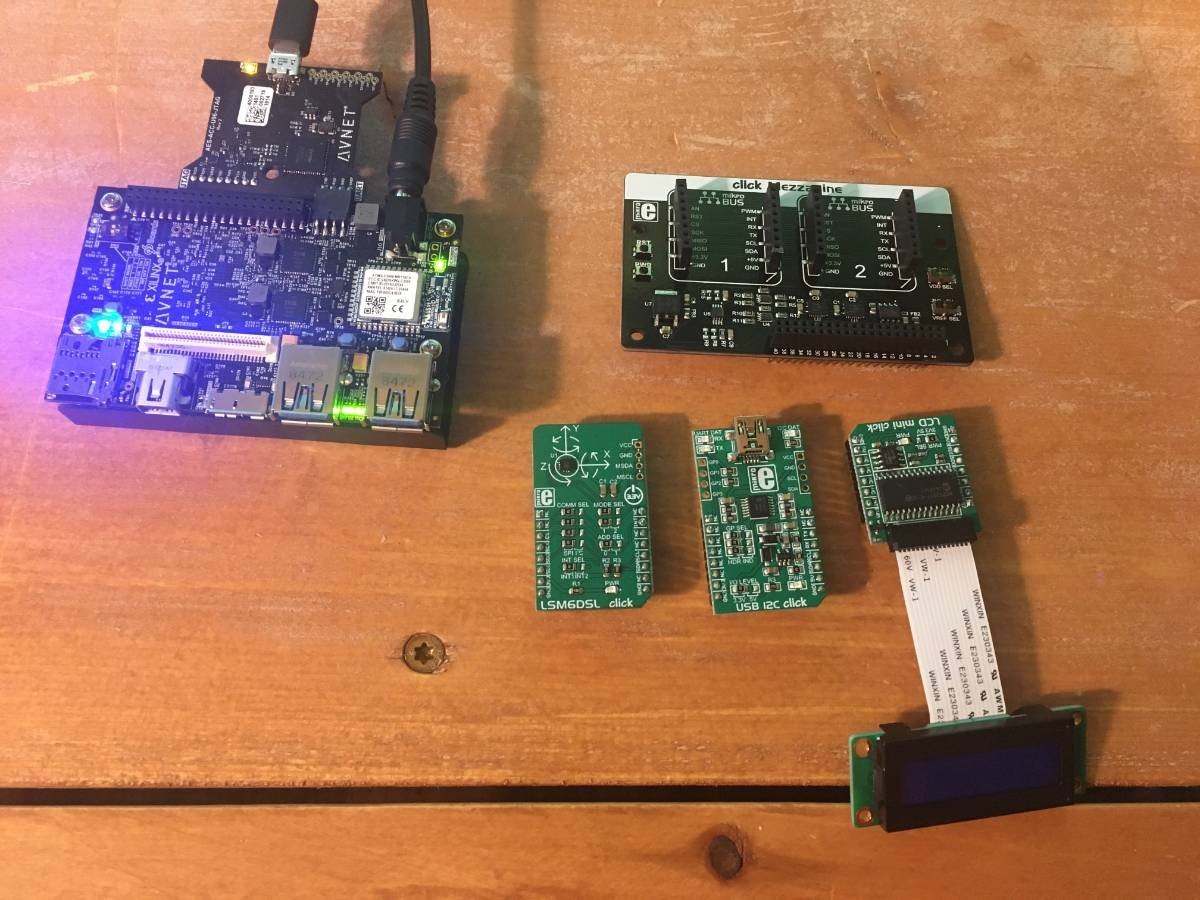
Thanks a bunch to the E14 guys and everyone from Avnet/Xilinx supporting this training. Today, I got the 96Boards Click Mezzanine Click Starter kit. This comes with the Mezzanine with spots for two Click Boards, It also includes a Click Board for a USB peripheral (USB I2C), an LSM6DSL accelerometer, , and the LCD MiniClick (complete with LCD).

These are used in various lessons - including one that I had to complete without, but hope to go back and try out for reals.
image


SW Lesson 0-3

I will summarize these lessons pretty quickly Lesson 0 was all about setting up the development environment - the Ubuntu VM, and installing Vivado. Since I had done this during the previous group of lessons, there was nothing to do here. In Lab 01, we examine the .hdf file which is what SDK needs to create the hardware and board support package. This is essentially a .zip file with TCL scripts, libraries, and other description files for the hardware. In my case, the file was about 1.5 mb in size. This contains a .tcl file which could be used to regenerate the hardware in Vivado; so is really a bi-directional descriptor. This is also a file that one could use for source control since its compact and complete. Lesson 03 centers around the first launch of SDK. We learn about workspaces and how we can create different top-level workbenches for different projects. I have one workbench left over from the hardware lessons, then I made a new one in this lesson for the SW section. We finish by taking the hardware imported in lesson 02 and create a new board support package. We are shown where to find sample code and documentation for all the libraries that come with the BSP.


SW Lessons 4-5

Lesson 04 is where we are finally able to create an application and [almost] run it on physical hardware (physical comes in Lesson 05). I remember doing the original Path to Programmable and wondering how long this would take. It is an important milestone for a beginner since this ties everything together and we can finally see it all working at one time. We created a few different applications using a few different methods.


  • Method 1: Black application project. We created a Hello_Zynq blank application to show how it can be done entirely from scratch. We were shown where the source code for Hello_Zynq lives and we copy-pasted it into our .c program; then regenerated some support documents with Project --> Clean.
  • Method 2: Example application. We added the Memory_Test application and the peripheral_test application from the default application projects provided by Xilinx. This is a very convenient feature since they have canned applications for a lot of things and is a good way to do a sanity check of your system.
  • Method 3: Copy/pasting an existing application. We took the original memory_test application and copy/pasted it in the file browser. This duplicated everything for us and we could go in an change just the items that we want; leaving the rest the same. In this case, we altered the amount of memory that was tested by the application.


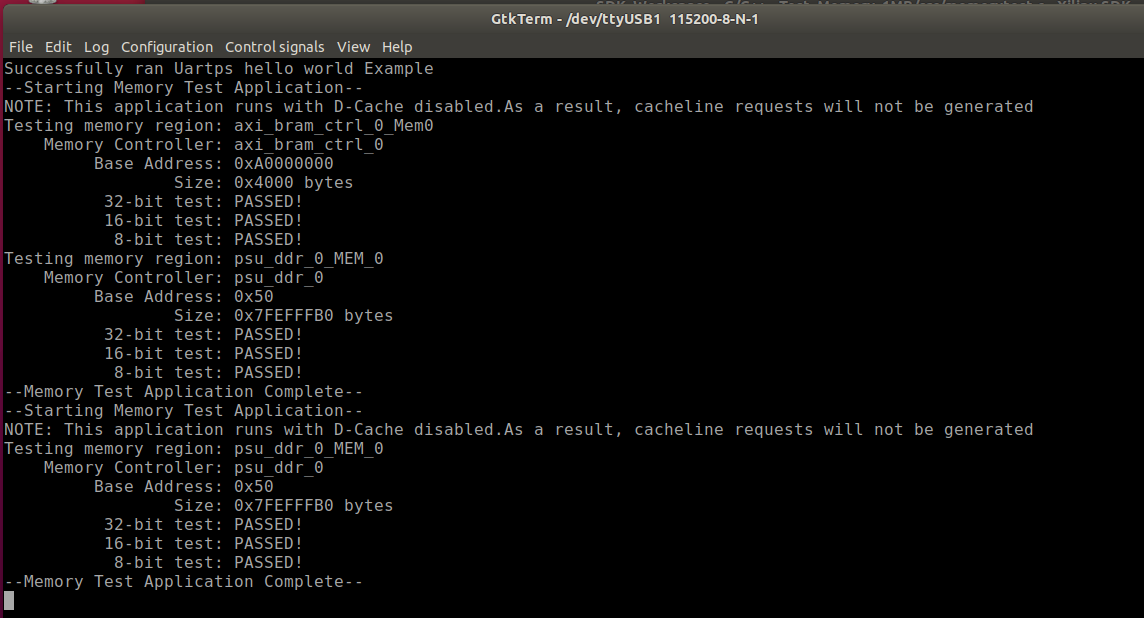
Lesson 05, we learn more about the Run Configurations in the SDK. These provide ways to run, debug, and program the FPGA and launch the appropriate software. We create different configurations for each of the software applications that we have available. I start by running the Hello_Zynq app and am happily greeted in GKTerm by the Ultra96 board.Then I ran the Memory Test and Memory_test_1MB and those both went well. The final thing that we learn about is the "debug perspective". This is a special view from within SDK that provides interactive debugging for both the PL and PS, setting breakpoints, viewing memory, and quickly editing code and testing. This looks like a very useful and powerful tool that I'll probably use a lot in the second half of this program.


Here is a snip of the terminal output:
image

Video Walkthrough

Here is a quick video walkthrough of the first lessons of this section.

You don't have permission to edit metadata of this video.
Edit media
x
image
Upload Preview
image


  • Sign in to reply

Top Comments

  • cmelement14
    cmelement14 over 6 years ago +1
    Nice Click Mezzanine Click Starter kit. Waiting for mine to arrive.
  • cmelement14
    cmelement14 over 6 years ago

    Nice Click Mezzanine Click Starter kit. Waiting for mine to arrive.

    • Cancel
    • Vote Up +1 Vote Down
    • Sign in to reply
    • More
    • Cancel
element14 Community

element14 is the first online community specifically for engineers. Connect with your peers and get expert answers to your questions.

  • Members
  • Learn
  • Technologies
  • Challenges & Projects
  • Products
  • Store
  • About Us
  • Feedback & Support
  • FAQs
  • Terms of Use
  • Privacy Policy
  • Legal and Copyright Notices
  • Sitemap
  • Cookies

An Avnet Company © 2025 Premier Farnell Limited. All Rights Reserved.

Premier Farnell Ltd, registered in England and Wales (no 00876412), registered office: Farnell House, Forge Lane, Leeds LS12 2NE.

ICP 备案号 10220084.

Follow element14

  • X
  • Facebook
  • linkedin
  • YouTube