element14 Community
element14 Community
    Register Log In
  • Site
  • Search
  • Log In Register
  • Community Hub
    Community Hub
    • What's New on element14
    • Feedback and Support
    • Benefits of Membership
    • Personal Blogs
    • Members Area
    • Achievement Levels
  • Learn
    Learn
    • Ask an Expert
    • eBooks
    • element14 presents
    • Learning Center
    • Tech Spotlight
    • STEM Academy
    • Webinars, Training and Events
    • Learning Groups
  • Technologies
    Technologies
    • 3D Printing
    • FPGA
    • Industrial Automation
    • Internet of Things
    • Power & Energy
    • Sensors
    • Technology Groups
  • Challenges & Projects
    Challenges & Projects
    • Design Challenges
    • element14 presents Projects
    • Project14
    • Arduino Projects
    • Raspberry Pi Projects
    • Project Groups
  • Products
    Products
    • Arduino
    • Avnet & Tria Boards Community
    • Dev Tools
    • Manufacturers
    • Multicomp Pro
    • Product Groups
    • Raspberry Pi
    • RoadTests & Reviews
  • About Us
  • Store
    Store
    • Visit Your Store
    • Choose another store...
      • Europe
      •  Austria (German)
      •  Belgium (Dutch, French)
      •  Bulgaria (Bulgarian)
      •  Czech Republic (Czech)
      •  Denmark (Danish)
      •  Estonia (Estonian)
      •  Finland (Finnish)
      •  France (French)
      •  Germany (German)
      •  Hungary (Hungarian)
      •  Ireland
      •  Israel
      •  Italy (Italian)
      •  Latvia (Latvian)
      •  
      •  Lithuania (Lithuanian)
      •  Netherlands (Dutch)
      •  Norway (Norwegian)
      •  Poland (Polish)
      •  Portugal (Portuguese)
      •  Romania (Romanian)
      •  Russia (Russian)
      •  Slovakia (Slovak)
      •  Slovenia (Slovenian)
      •  Spain (Spanish)
      •  Sweden (Swedish)
      •  Switzerland(German, French)
      •  Turkey (Turkish)
      •  United Kingdom
      • Asia Pacific
      •  Australia
      •  China
      •  Hong Kong
      •  India
      • Japan
      •  Korea (Korean)
      •  Malaysia
      •  New Zealand
      •  Philippines
      •  Singapore
      •  Taiwan
      •  Thailand (Thai)
      • Vietnam
      • Americas
      •  Brazil (Portuguese)
      •  Canada
      •  Mexico (Spanish)
      •  United States
      Can't find the country/region you're looking for? Visit our export site or find a local distributor.
  • Translate
  • Profile
  • Settings
Path to Programmable 3
  • Challenges & Projects
  • Design Challenges
  • Path to Programmable 3
  • More
  • Cancel
Path to Programmable 3
Blog Lost start Blog #1
  • Blog
  • Forum
  • Documents
  • Leaderboard
  • Files
  • Members
  • Mentions
  • Sub-Groups
  • Tags
  • More
  • Cancel
  • New
Join Path to Programmable 3 to participate - click to join for free!
  • Share
  • More
  • Cancel
Group Actions
  • Group RSS
  • More
  • Cancel
Engagement
  • Author Author: cghaba
  • Date Created: 17 Jul 2023 9:05 PM Date Created
  • Views 564 views
  • Likes 7 likes
  • Comments 2 comments
Related
Recommended

Lost start Blog #1

cghaba
cghaba
17 Jul 2023

I received the kit for the Path to Programmable 3 rather quickly compared with other kits I received for RoadTesting. Usually, it took several days until I could get the kit in my hand, and several emails needed to be exchanged with the customs office in order to explain why they should not tax the kit.

The kit I enrolled for was the Ultra96 and it came in a big box, bigger than I was expecting (I have some ideas of how big the boards and extensions could be). Therefore, I was wondering what was inside such a box and hurried to unbox it. The box contained the four parts of the kit, i.e

  1. the Ultra96-V2 Zynq UltraScale+ ZU3EG Single Board Computer
  2. the AES-ACC U96-JTAG USB to JTAG/UARTPOD
  3. the AES-ACC-U96-ME-SK development kit, 96Boards Click Mezzanine Starter Kit
  4. the AES-ACC-U96-4APWR Power supply for 96Boards

Ultra96_kit

Assembled together parts 1, 2 and 3 look like in the following figure:
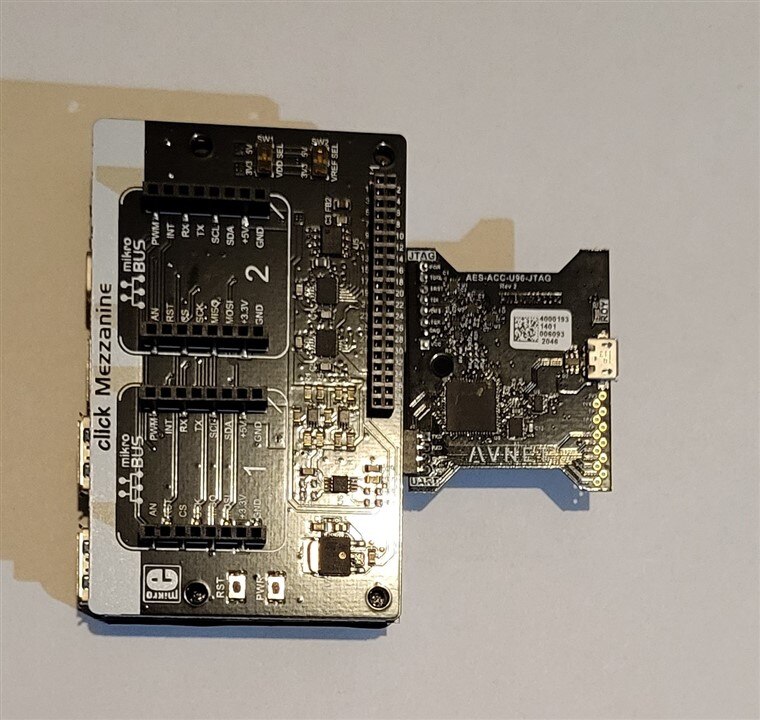
Ultra96kit_assambled

After unboxing the kit, I went to element14 Path to Programmable 3 webpage and I accessed the Ultra96-V2 Training Courses 2021.2 (Path to Programmable III Training) in order to start the training.

According to the initial steps in the course, I had to install the software for the training, which would imply installing Xilinx development tools, i.e. Vivado and Vitis. Because I am working on a PC running Windows 10, I followed the recommendation of the training course which was to install the tools on an Oracle Virtual Box virtual machine running Ubuntu 18.04.

I had already a VM with Ubuntu 18.04 that was used for a TUL PYNQ-Z2 board (for which I have succeeded, because of lack of time, only to go through the initial step). Because it takes a lot of time to create the VM, install Ubuntu, and install Vivado and Vitis, I tried to make a clone of the already existing machine with the intention to modify it according to the requirements for the Ultra96 board.

I opened the VM to see which Vivado tools were installed and if they have to be upgraded. I soon realized that there were some problems with this solution:

  • first, the Xilinx tools installed on the VM were 2019.1 while the training course for Ultra96 requires 2021.2 version for the tools
  • second, the allocated space for the existing VM disk was only 160 GB while for the Ultra96 training course, a minimum of 300 GB is required.
  • the user name, password and installation paths were different than the ones in the Ultra96 training course, which makes it more difficult to follow the training labs step by step.

Unfortunately, my VM disk could not be enlarged because the HDD hosting the VM had less free space than the one required for the creation of the new VM. The other disks on the PC also had available less free space than required.

The conclusion was that I needed to buy another disk, big enough to host the required VM.

Because I know that the speed of running Xilinx tools is lower if the tools are run in a VM machine (compared to the case when they are running directly on the host PC), I thought it would be a good idea to use an SDD for the VM.

I ordered a 1TB SSD and after a couple of days, I received the SDD. I connected to one of the SATA ports and started to make it work. It didn’t work, having a problem with the SSD being recognized by the PC. I have lost a couple of days until I realized that I confused the SATA ports and that instead of connecting it to a SATA III port, I connected it to a SATA II port.

I thought now it will go easily but, other problems have appeared.

First, I had problems creating a fixed-size disk for the VM. Finally, I created a non-fix size disk, installed Ubuntu 18.4, downloaded the Xilinx tools (which took a long time), then started the installation.

Tools started to install the files but this went well only until it reached 75% (if I remember well), case in which it stalled (the installation program was showing it was installing the files but the installation percent indicator was not changing anymore).

The only solution was to force the shutdown of the VM, which I did but, after trying to restart, something got messed up so the Virtual Box Manager reported that the VM cannot be started.

I tried again, reformatting the SDD, recreating the VM, allocating space for the VM disk, reinstalling Ubuntu, and reinstalling the Xilinx tools. The downloading step finished without problems, but the installation step got blocked in the same way as in the first attempt.

Seeing that I have lost more than a week with this attempt, I decided to buy an HDD and proceed further.

After another couple of days, I received the new HDD and I restarted the process of preparing the VM and installing the Xilinx tools.

This time all went without problems, the installation proceeded till the end, so, finally I had the software tools installed in order to proceed with the first labs of the training course.
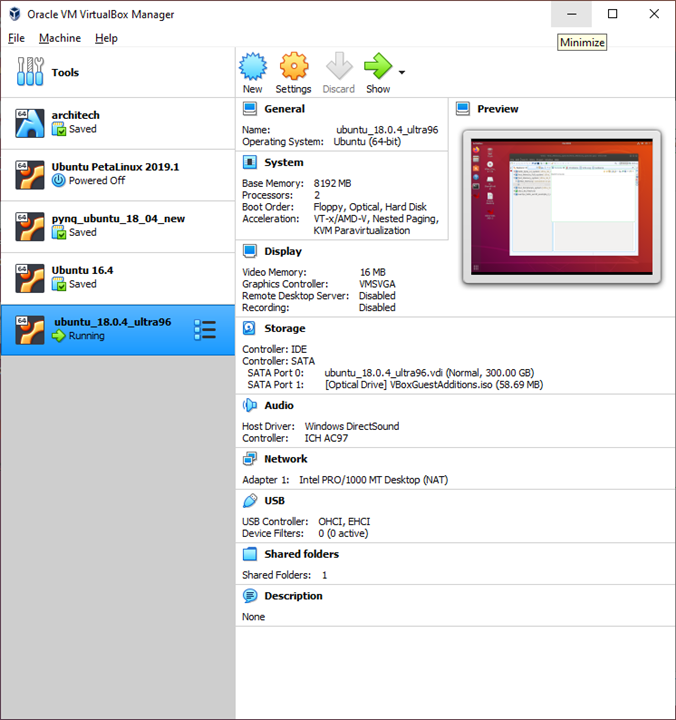
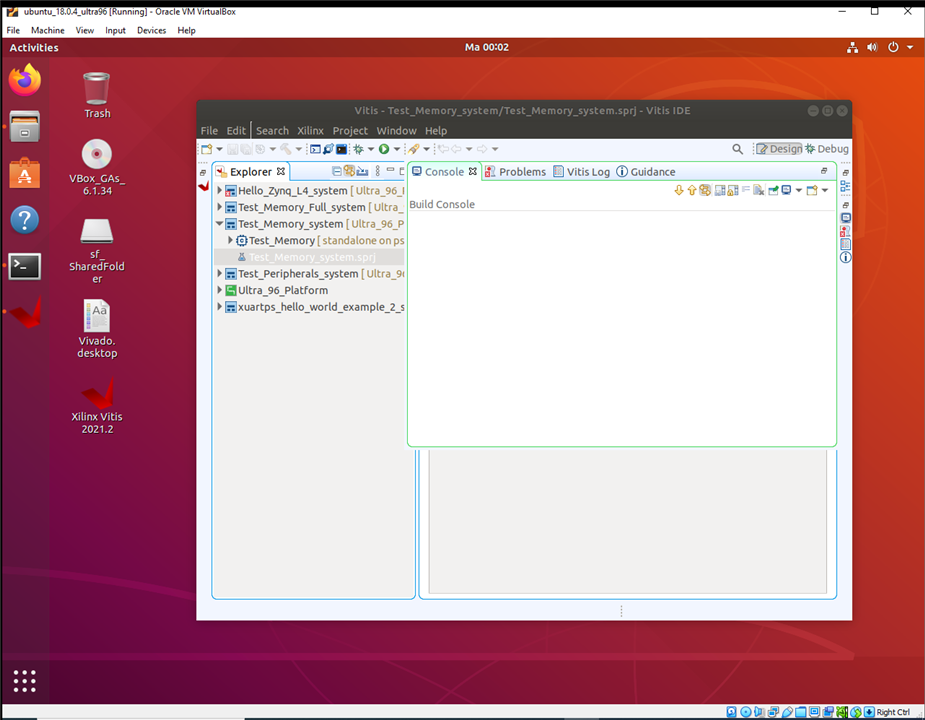
Installed VMs Running Vitis

  • Sign in to reply
Parents
  • shabaz
    shabaz over 2 years ago

    Hi,

    Glad you're making progress. It sounds like it could be a faulty SSD, since it works with the new HDD. It might be worth returning the SSD, just in case. I have only ever installed Vitis on an SSD(I've not bought a HDD in a decade) so can't see why it would have failed on one but not the other. Maybe it's some other incompatibility at the PC/drive level.

    VirtualBox occasionally has issues, especially regarding compatibility with VMware.Also VMWare Workstation is a pain because although technically that works well, it invariably needs an upgrade every few years otherwise the latest OS's (e.g. the latest Ubuntu release etc) won't install properly, and the cost is therefore too much.

    For perhaps the past 5 years, I've used a simple setup: A separate PC or server (it can be a very small PC; I use an Intel NUC, they are cheap used from ebay), running ESXi (and local vCenter), which is a type-1 hypervisor so there is no host OS cost or complication. It is all a free install on a single server, so there's no additional cost, and it's been reliable. The performance impact is tiny (maybe a few percent). I liked that it doesn't require a lot of expense, because just a single VM can be run if that VM needs a lot of resources (RAM, CPU etc). From my perspective I've had good results for at least the past 5 years or so, I am happy with this solution.

    • Cancel
    • Vote Up 0 Vote Down
    • Sign in to reply
    • More
    • Cancel
Comment
  • shabaz
    shabaz over 2 years ago

    Hi,

    Glad you're making progress. It sounds like it could be a faulty SSD, since it works with the new HDD. It might be worth returning the SSD, just in case. I have only ever installed Vitis on an SSD(I've not bought a HDD in a decade) so can't see why it would have failed on one but not the other. Maybe it's some other incompatibility at the PC/drive level.

    VirtualBox occasionally has issues, especially regarding compatibility with VMware.Also VMWare Workstation is a pain because although technically that works well, it invariably needs an upgrade every few years otherwise the latest OS's (e.g. the latest Ubuntu release etc) won't install properly, and the cost is therefore too much.

    For perhaps the past 5 years, I've used a simple setup: A separate PC or server (it can be a very small PC; I use an Intel NUC, they are cheap used from ebay), running ESXi (and local vCenter), which is a type-1 hypervisor so there is no host OS cost or complication. It is all a free install on a single server, so there's no additional cost, and it's been reliable. The performance impact is tiny (maybe a few percent). I liked that it doesn't require a lot of expense, because just a single VM can be run if that VM needs a lot of resources (RAM, CPU etc). From my perspective I've had good results for at least the past 5 years or so, I am happy with this solution.

    • Cancel
    • Vote Up 0 Vote Down
    • Sign in to reply
    • More
    • Cancel
Children
No Data
element14 Community

element14 is the first online community specifically for engineers. Connect with your peers and get expert answers to your questions.

  • Members
  • Learn
  • Technologies
  • Challenges & Projects
  • Products
  • Store
  • About Us
  • Feedback & Support
  • FAQs
  • Terms of Use
  • Privacy Policy
  • Legal and Copyright Notices
  • Sitemap
  • Cookies

An Avnet Company © 2025 Premier Farnell Limited. All Rights Reserved.

Premier Farnell Ltd, registered in England and Wales (no 00876412), registered office: Farnell House, Forge Lane, Leeds LS12 2NE.

ICP 备案号 10220084.

Follow element14

  • X
  • Facebook
  • linkedin
  • YouTube