


Hello everyone, I am very excited to start my blog series with Minized Board unboxing and general overview.
Unboxing:
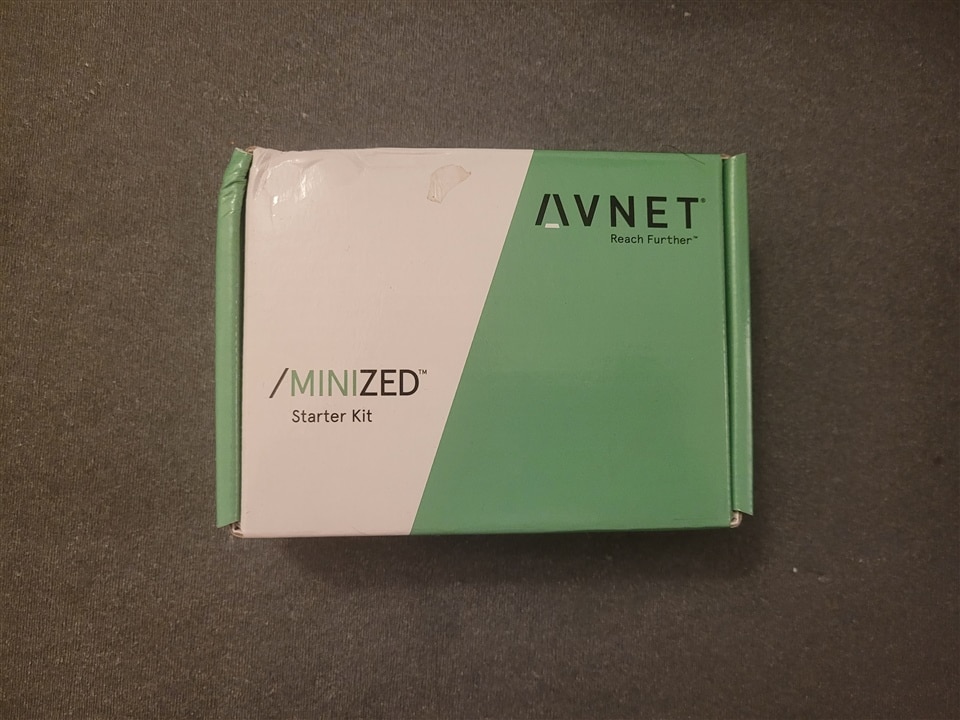
Alright, here's the Minized board and it arrived in a neatly packaged box. The box features a sleek design. Inside the box, we can see the board securely packed with foam to ensure its safety during transit.
Package Contents:
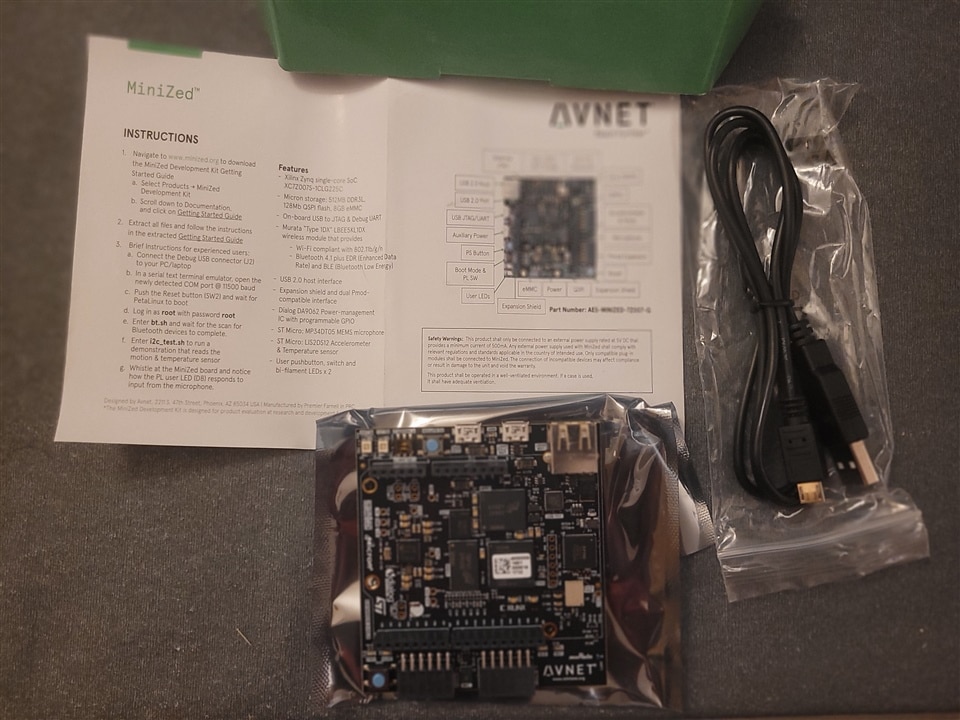
After opening the box, we had a quick start guide. It's always good to have clear instructions to get started with the board. I am just going to follow it in the following sections. Next, we have the Minized board itself, nicely wrapped in an antistatic bag. I carefully took it out and then we had a USB to JTAG/UART cable which is also quite useful.
Board Overview:
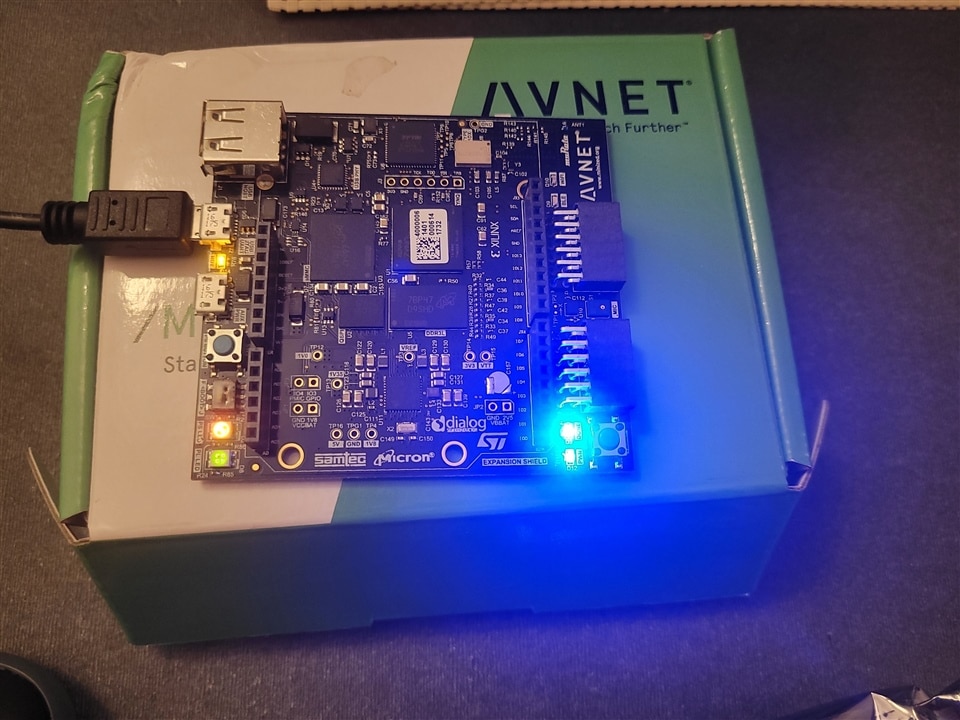
Now that we have the Minized board out of the antistatic bag let's get a closer look at it. The board is incredibly compact, which is perfect for prototyping and embedded projects. On the top side, we can see various connectors and components. Here, we have the Xilinx Zynq 7Z007S SoC, which combines an FPGA and a dual-core Arm Cortex-A9 processor.
Moving on, we have a USB host port with a USB phy chip, a USB JTAG/UART port for power and com port functionality, and another Micro USB port for auxillary power. There are also user LEDs, a reset button, and a power indicator LED. Additionally, we have DDR3L, emmc, QSPI flash based memory. We also have WIFI and bluetooth connectivity options. This is my first board that has such wireless connectivity options. There are also a Accelerometer and temperature sensors. There is also an on-board microphone.
Connecting UART cable and starting the board
I have connected the UART cable and the board just powered immediately. So that was simple.
Below I have captured the boot log on the UART terminal observed in my terminal. As expected, the device is booting from the on-board QSPI flash. I followed the instruction provided in the instruction manual. I logged in with the username and password provided in the manual.
U-Boot 2016.07 (Jul 13 2017 - 19:58:56 -0700)

DRAM:  ECC disabled 512 MiB
MMC:   sdhci@e0100000: 0, sdhci@e0101000: 1
SF: Detected N25Q128 with page size 256 Bytes, erase size 64 KiB, total 16 MiB
*** Warning - bad CRC, using default environment

In:    serial
Out:   serial
Err:   serial
U-BOOT for

Hit any key to stop autoboot:  0
switch to partitions #0, OK
mmc1(part 0) is current device
reading image.ub
16786800 bytes read in 1550 ms (10.3 MiB/s)
## Loading kernel from FIT Image at 10000000 ...
   Using 'conf@1' configuration
   Verifying Hash Integrity ... OK
   Trying 'kernel@0' kernel subimage
     Description:  Linux Kernel
     Type:         Kernel Image
     Compression:  uncompressed
     Data Start:   0x100000d4
     Data Size:    4075112 Bytes = 3.9 MiB
     Architecture: ARM
     OS:           Linux
     Load Address: 0x00008000
     Entry Point:  0x00008000
     Hash algo:    sha1
     Hash value:   2feb6a2f50fc863208748d4a4a5502fce93487d9
   Verifying Hash Integrity ... sha1+ OK
## Loading ramdisk from FIT Image at 10000000 ...
   Using 'conf@1' configuration
   Trying 'ramdisk@0' ramdisk subimage
     Description:  ramdisk
     Type:         RAMDisk Image
     Compression:  uncompressed
     Data Start:   0x103e72e0
     Data Size:    12693150 Bytes = 12.1 MiB
     Architecture: ARM
     OS:           Linux
     Load Address: unavailable
     Entry Point:  unavailable
     Hash algo:    sha1
     Hash value:   acf68a35f1d97f744aa8672737a4616de57bb555
   Verifying Hash Integrity ... sha1+ OK
## Loading fdt from FIT Image at 10000000 ...
   Using 'conf@1' configuration
   Trying 'fdt@0' fdt subimage
     Description:  Flattened Device Tree blob
     Type:         Flat Device Tree
     Compression:  uncompressed
     Data Start:   0x103e3030
     Data Size:    16894 Bytes = 16.5 KiB
     Architecture: ARM
     Hash algo:    sha1
     Hash value:   d989058f04e066702a50da837782f2c5ed94e7b8
   Verifying Hash Integrity ... sha1+ OK
   Booting using the fdt blob at 0x103e3030
   Loading Kernel Image ... OK
   Loading Ramdisk to 073e5000, end 07fffe9e ... OK
   Loading Device Tree to 073dd000, end 073e41fd ... OK

Starting kernel ...

Uncompressing Linux... done, booting the kernel.
Booting Linux on physical CPU 0x0
Linux version 4.6.0-xilinx (training@localhost.localdomain) (gcc version 5.2.1 20151005 (Linaro GCC 5.2-2015.11-2) ) #1 SMP PREEMPT Tue Jun 6 20:15:27 PDT 2017
CPU: ARMv7 Processor [413fc090] revision 0 (ARMv7), cr=18c5387d
CPU: PIPT / VIPT nonaliasing data cache, VIPT aliasing instruction cache
Machine model: minized
bootconsole [earlycon0] enabled
cma: Reserved 16 MiB at 0x1f000000
Memory policy: Data cache writealloc
percpu: Embedded 12 pages/cpu @debca000 s19776 r8192 d21184 u49152
Built 1 zonelists in Zone order, mobility grouping on.  Total pages: 130048
Kernel command line: console=ttyPS0,115200 earlyprintk
PID hash table entries: 2048 (order: 1, 8192 bytes)
Dentry cache hash table entries: 65536 (order: 6, 262144 bytes)
Inode-cache hash table entries: 32768 (order: 5, 131072 bytes)
Memory: 480056K/524288K available (6319K kernel code, 249K rwdata, 1916K rodata, 1024K init, 212K bss, 27848K reserved, 16384K cma-reserved, 0K highmem)
Virtual kernel memory layout:
    vector  : 0xffff0000 - 0xffff1000   (   4 kB)
    fixmap  : 0xffc00000 - 0xfff00000   (3072 kB)
    vmalloc : 0xe0800000 - 0xff800000   ( 496 MB)
    lowmem  : 0xc0000000 - 0xe0000000   ( 512 MB)
    pkmap   : 0xbfe00000 - 0xc0000000   (   2 MB)
    modules : 0xbf000000 - 0xbfe00000   (  14 MB)
      .text : 0xc0008000 - 0xc090ae84   (9228 kB)
      .init : 0xc0a00000 - 0xc0b00000   (1024 kB)
      .data : 0xc0b00000 - 0xc0b3e7a0   ( 250 kB)
       .bss : 0xc0b3e7a0 - 0xc0b73a38   ( 213 kB)
Preemptible hierarchical RCU implementation.
        Build-time adjustment of leaf fanout to 32.
        RCU restricting CPUs from NR_CPUS=4 to nr_cpu_ids=2.
RCU: Adjusting geometry for rcu_fanout_leaf=32, nr_cpu_ids=2
NR_IRQS:16 nr_irqs:16 16
efuse mapped to e0800000
slcr mapped to e0802000
L2C: platform modifies aux control register: 0x72360000 -> 0x72760000
L2C: DT/platform modifies aux control register: 0x72360000 -> 0x72760000
L2C-310 erratum 769419 enabled
L2C-310 enabling early BRESP for Cortex-A9
L2C-310 full line of zeros enabled for Cortex-A9
L2C-310 ID prefetch enabled, offset 1 lines
L2C-310 dynamic clock gating enabled, standby mode enabled
L2C-310 cache controller enabled, 8 ways, 512 kB
L2C-310: CACHE_ID 0x410000c8, AUX_CTRL 0x76760001
zynq_clock_init: clkc starts at e0802100
Zynq clock init
sched_clock: 64 bits at 333MHz, resolution 3ns, wraps every 4398046511103ns
clocksource: arm_global_timer: mask: 0xffffffffffffffff max_cycles: 0x4ce07af025, max_idle_ns: 440795209040 ns
Switching to timer-based delay loop, resolution 3ns
clocksource: ttc_clocksource: mask: 0xffff max_cycles: 0xffff, max_idle_ns: 537538477 ns
timer #0 at e080a000, irq=17
Console: colour dummy device 80x30
Calibrating delay loop (skipped), value calculated using timer frequency.. 666.66 BogoMIPS (lpj=3333333)
pid_max: default: 32768 minimum: 301
Mount-cache hash table entries: 1024 (order: 0, 4096 bytes)
Mountpoint-cache hash table entries: 1024 (order: 0, 4096 bytes)
CPU: Testing write buffer coherency: ok
CPU0: thread -1, cpu 0, socket 0, mpidr 80000000
Setting up static identity map for 0x100000 - 0x100058
CPU1: failed to boot: -1
Brought up 1 CPUs
SMP: Total of 1 processors activated (666.66 BogoMIPS).
CPU: All CPU(s) started in SVC mode.
devtmpfs: initialized
VFP support v0.3: implementor 41 architecture 3 part 30 variant 9 rev 4
clocksource: jiffies: mask: 0xffffffff max_cycles: 0xffffffff, max_idle_ns: 19112604462750000 ns
pinctrl core: initialized pinctrl subsystem
NET: Registered protocol family 16
DMA: preallocated 256 KiB pool for atomic coherent allocations
cpuidle: using governor menu
hw-breakpoint: found 5 (+1 reserved) breakpoint and 1 watchpoint registers.
hw-breakpoint: maximum watchpoint size is 4 bytes.
zynq-ocm f800c000.ocmc: ZYNQ OCM pool: 256 KiB @ 0xe0880000
zynq-pinctrl 700.pinctrl: zynq pinctrl initialized
GPIO IRQ not connected
XGpio: /amba_pl/gpio@41200000: registered, base is 905
GPIO IRQ not connected
XGpio: /amba_pl/gpio@41200000: dual channel registered, base is 904
GPIO IRQ not connected
XGpio: /amba_pl/gpio@41210000: registered, base is 903
GPIO IRQ not connected
XGpio: /amba_pl/gpio@41220000: registered, base is 895
vgaarb: loaded
SCSI subsystem initialized
usbcore: registered new interface driver usbfs
usbcore: registered new interface driver hub
usbcore: registered new device driver usb
media: Linux media interface: v0.10
Linux video capture interface: v2.00
pps_core: LinuxPPS API ver. 1 registered
pps_core: Software ver. 5.3.6 - Copyright 2005-2007 Rodolfo Giometti <giometti@linux.it>
PTP clock support registered
EDAC MC: Ver: 3.0.0
Advanced Linux Sound Architecture Driver Initialized.
Bluetooth: Core ver 2.21
NET: Registered protocol family 31
Bluetooth: HCI device and connection manager initialized
Bluetooth: HCI socket layer initialized
Bluetooth: L2CAP socket layer initialized
Bluetooth: SCO socket layer initialized
clocksource: Switched to clocksource arm_global_timer
NET: Registered protocol family 2
TCP established hash table entries: 4096 (order: 2, 16384 bytes)
TCP bind hash table entries: 4096 (order: 3, 32768 bytes)
TCP: Hash tables configured (established 4096 bind 4096)
UDP hash table entries: 256 (order: 1, 8192 bytes)
UDP-Lite hash table entries: 256 (order: 1, 8192 bytes)
NET: Registered protocol family 1
RPC: Registered named UNIX socket transport module.
RPC: Registered udp transport module.
RPC: Registered tcp transport module.
RPC: Registered tcp NFSv4.1 backchannel transport module.
Trying to unpack rootfs image as initramfs...
Freeing initrd memory: 12396K (c73e5000 - c8000000)
hw perfevents: enabled with armv7_cortex_a9 PMU driver, 7 counters available
futex hash table entries: 512 (order: 3, 32768 bytes)
workingset: timestamp_bits=28 max_order=17 bucket_order=0
jffs2: version 2.2. (NAND) (SUMMARY)  © 2001-2006 Red Hat, Inc.
io scheduler noop registered
io scheduler deadline registered
io scheduler cfq registered (default)
dma-pl330 f8003000.dmac: Loaded driver for PL330 DMAC-241330
dma-pl330 f8003000.dmac:        DBUFF-128x8bytes Num_Chans-8 Num_Peri-4 Num_Events-16
Serial: 8250/16550 driver, 4 ports, IRQ sharing disabled
43c00000.serial: ttyS0 at MMIO 0x43c01000 (irq = 166, base_baud = 3000000) is a 16550A
e0000000.serial: ttyPS1 at MMIO 0xe0000000 (irq = 143, base_baud = 6249999) is a xuartps
e0001000.serial: ttyPS0 at MMIO 0xe0001000 (irq = 144, base_baud = 6249999) is a xuartps
console [ttyPS0] enabled
console [ttyPS0] enabled
bootconsole [earlycon0] disabled
bootconsole [earlycon0] disabled
xdevcfg f8007000.devcfg: ioremap 0xf8007000 to e081e000
[drm] Initialized drm 1.1.0 20060810
brd: module loaded
loop: module loaded
m25p80 spi0.0: found n25q128a13, expected m25p80
m25p80 spi0.0: n25q128a13 (16384 Kbytes)
4 ofpart partitions found on MTD device spi0.0
Creating 4 MTD partitions on "spi0.0":
0x000000000000-0x000000ff0000 : "boot"
0x000000270000-0x000000ff0000 : "kernel"
0x000000ff0000-0x000001000000 : "bootenv"
0x000001000000-0x000001000000 : "spare"
mtd: partition "spare" is out of reach -- disabled
e1000e: Intel(R) PRO/1000 Network Driver - 3.2.6-k
e1000e: Copyright(c) 1999 - 2015 Intel Corporation.
ehci_hcd: USB 2.0 'Enhanced' Host Controller (EHCI) Driver
ehci-pci: EHCI PCI platform driver
usbcore: registered new interface driver usb-storage
e0002000.usb supply vbus not found, using dummy regulator
ULPI transceiver vendor/product ID 0x0424/0x0007
Found SMSC USB3320 ULPI transceiver.
ULPI integrity check: passed.
ci_hdrc ci_hdrc.0: EHCI Host Controller
ci_hdrc ci_hdrc.0: new USB bus registered, assigned bus number 1
ci_hdrc ci_hdrc.0: USB 2.0 started, EHCI 1.00
hub 1-0:1.0: USB hub found
hub 1-0:1.0: 1 port detected
mousedev: PS/2 mouse device common for all mice
i2c /dev entries driver
i2c i2c-0: of_i2c: modalias failure on /amba_pl/i2c@41600000/i2c4@6b
Bluetooth: HCI UART driver ver 2.3
Bluetooth: HCI UART protocol H4 registered
Bluetooth: HCI UART protocol BCSP registered
Bluetooth: HCI UART protocol LL registered
Bluetooth: HCI UART protocol ATH3K registered
Bluetooth: HCI UART protocol Three-wire (H5) registered
EDAC MC: ECC not enabled
Xilinx Zynq CpuIdle Driver started
sdhci: Secure Digital Host Controller Interface driver
sdhci: Copyright(c) Pierre Ossman
sdhci-pltfm: SDHCI platform and OF driver helper
sdhci-arasan e0100000.sdhci: assigned as wifi host
mmc0: SDHCI controller on e0100000.sdhci [e0100000.sdhci] using DMA
mmc1: SDHCI controller on e0101000.sdhci [e0101000.sdhci] using DMA
ledtrig-cpu: registered to indicate activity on CPUs
usbcore: registered new interface driver usbhid
usbhid: USB HID core driver
NET: Registered protocol family 10
sit: IPv6 over IPv4 tunneling driver
NET: Registered protocol family 17
Bluetooth: RFCOMM TTY layer initialized
Bluetooth: RFCOMM socket layer initialized
Bluetooth: RFCOMM ver 1.11
Bluetooth: BNEP (Ethernet Emulation) ver 1.3
Bluetooth: BNEP socket layer initialized
Bluetooth: HIDP (Human Interface Emulation) ver 1.2
Bluetooth: HIDP socket layer initialized
Registering SWP/SWPB emulation handler
mmc1: new high speed MMC card at address 0001
hctosys: unable to open rtc device (rtc0)
wlreg_on: disabling
ALSA device list:
  No soundcards found.
Freeing unused kernel memory: 1024K (c0a00000 - c0b00000)
INIT: mmcblk1boot0: mmc1:0001 Q2J55L partition 1 16.0 MiB
version 2.88 bootingmmcblk1boot1: mmc1:0001 Q2J55L partition 2 16.0 MiB

mmcblk1rpmb: mmc1:0001 Q2J55L partition 3 4.00 MiB
 mmcblk1: p1
FAT-fs (mmcblk1p1): Volume was not properly unmounted. Some data may be corrupt. Please run fsck.
EXT4-fs (mmcblk1rpmb): unable to read superblock
EXT4-fs (mmcblk1rpmb): unable to read superblock
EXT2-fs (mmcblk1rpmb): error: unable to read superblock
FAT-fs (mmcblk1rpmb): unable to read boot sector
EXT4-fs (mmcblk1rpmb): unable to read superblock
EXT4-fs (mmcblk1rpmb): unable to read superblock
EXT2-fs (mmcblk1rpmb): error: unable to read superblock
FAT-fs (mmcblk1rpmb): unable to read boot sector
FAT-fs (mmcblk1rpmb): unable to read boot sector
mount: mounting /dev/mmcblk1rpmb on /run/media/mmcblk1rpmb failed: Input/output error
mount: mounting /dev/mmcblk1boot0 on /run/media/mmcblk1boot0 failed: Invalid argument
mount: mounting /dev/mmcblk1boot1 on /run/media/mmcblk1boot1 failed: Invalid argument
/etc/mdev/mdev-mount.sh: line 28: [: /sys/block/mmcblk1/mmcblk1boot1: binary operator expected
mount: mounting /dev/mmcblk1 on /run/media/mmcblk1 failed: Device or resource busy
random: dd urandom read with 3 bits of entropy available
Fri Jul 14 03:13:01 UTC 2017
Starting internet superserver: inetd.
INIT: Entering runlevel: 5
Configuring network interfaces... ifconfig: SIOCGIFFLAGS: No such device
Starting system message bus: dbus.
Starting Dropbear SSH server: Generating key, this may take a while...
Public key portion is:
ssh-rsa AAAAB3NzaC1yc2EAAAADAQABAAABAQCyEqzS3OAUmhAqIvi0p5e7SJIMrjogtSEnypeByrrkMTb6kIbFn0Wzqy2/uYQgSYL0mrUeTHEYa6+EfTMyiVXRtKvk8YlKCMDRHcv4uasFV2sWn9X8MUE5m8EkCoYqlvjf8jEjL1Y0nYdj1y94QH3WAxp947/28zeaY5pwhlCuSahi62NnAU36u4CUqUqbVk9aBdgBh3BOGJWCII+lV8cDRtIVT2ulHMpLxbuDb8jeG1yZxdGhIjLU5uop1DXe+qjVdMItLYYf5OCsHxzvYRdKKfnLgU+x02ynSd+mNSofOIZ0qm3Uq9EQN2MzYdbGeeb4UKhjYChatvawY+g4vuD9 root@plnx_arm
Fingerprint: md5 9d:f0:0a:ef:fd:87:55:0b:aa:bb:9c:1d:4f:27:36:f1
dropbear.
Starting bluetooth
bluetoothd
Starting syslogd/klogd: done
Starting tcf-agent: OK

PetaLinux 2016.4 plnx_arm /dev/ttyPS0

plnx_arm login: root
Password:
root@plnx_arm:~#
Enabling Bluetooth
root@plnx_arm:~# bt.sh
#To turn on BT_REG_ON, which is on EMIO GPIO #0
echo 960 > /sys/class/gpio/export
echo out > /sys/class/gpio/gpio960/direction
echo 1 > /sys/class/gpio/gpio960/value
#Set uart0 = serial1 = ttyPS1 baudrate:
#(this was for UART0 from PS) stty -F /dev/ttyPS1 115200
stty -F /dev/ttyS0 115200
sleep 1s
#For the flow control.
#It seems you have to send a character before RTS from the 1DX modulke will be set in the correct state.
#(this was for UART0 from PS) echo "W" > /dev/ttyPS1
echo "W" > /dev/ttyS0
sleep 1s
#Initialize the device:
#(this was for UART0 from PS) hciattach /dev/ttyPS1 bcm43xx 921600 flow -t 10
hciattach /dev/ttyS0 bcm43xx 3000000 flow -t 10
bcm43xx_init
Set Controller UART speed to 3000000 bit/s
Flash firmware /etc/firmware/BCM43430A1.1DX.hcd
Set Controller UART speed to 3000000 bit/s
Device setup complete
sleep 2s

#Configure the right BT device:
hciconfig hci0 up

#begin new
sleep 1s
hciconfig hci0 reset
hciconfig hci0 class 0x200404
#for no password:
hciconfig hci0 sspmode 1
hciconfig hci0 piscan
hciconfig hci0 leadv
hciconfig -a
hci0:   Type: Primary  Bus: UART
        BD Address: 43:43:A1:12:1F:AC  ACL MTU: 1021:8  SCO MTU: 64:1
        UP RUNNING PSCAN ISCAN
        RX bytes:1329 acl:0 sco:0 events:75 errors:0
        TX bytes:1243 acl:0 sco:0 commands:75 errors:0
        Features: 0xbf 0xfe 0xcf 0xfe 0xdb 0xff 0x7b 0x87
        Packet type: DM1 DM3 DM5 DH1 DH3 DH5 HV1 HV2 HV3
        Link policy: RSWITCH SNIFF
        Link mode: SLAVE ACCEPT
        Name: 'MiniZed Murata Type-1DX'
        Class: 0x200404
        Service Classes: Audio
        Device Class: Audio/Video, Device conforms to the Headset profile
        HCI Version: 4.0 (0x6)  Revision: 0x16
        LMP Version: 4.0 (0x6)  Subversion: 0x2209
        Manufacturer: Broadcom Corporation (15)

#end new

sleep 1s
#Scan for BT devices:
hcitool scan
Scanning ...
        20:22:10:24:24:16       WP18
        AC:C4:BD:70:42:7E       OPPO A77 5G
        AC:73:52:0B:E4:A2       OPPO Reno7
set +v
root@plnx_arm:~#
i was able to pair the bluetooth with my phone


This definitely confirms that the bluetooth is working and I can pair with it.
Testing Temperature and Motion sensor:
I also verified that I can read the temperature values from the on-board temperature sensor and the motion sensor also responded to movement and tilting of the board.
root@plnx_arm:~# i2c_test.sh
/usr/bin/i2csensor
################################################################################
Testing the MiniZed GPIO and ST Micro LIS2DS12 I2C motion and temperature sensor
--------------------------------------------------------------------------------
The PS Button will reset the LED counter
The PL switch selects the LED count or microphone output on the PL LED
################################################################################
With I2C device address 0x1d received WhoAmI = 0x43
CTL1 = 0x60 written
CTL4 = 0x01 written
gpio903 set as in
gpio906 set as in
gpio958 set as in
gpio959 set as in
gpio904 set as in
gpio905 set as in
gpio895 set as in
gpio896 set as in
 OUT_T register = 0x0a -> Temperature = 35 degrees C.    Acceleration = X:   -53, Y:   -80, Z: +4046
Testing the Microphone and its impact on PL User LED (D8):
This is a nice demostration. I was able to whistle near the Microphone and observe the colour of the PL User LED (D8) change from non to Green to Red based on the intensity of the sound.
Conclusion:
In conclusion, the Minized board looks like a powerful and versatile development platform, perfect for a wide range of applications because of the availability of the various wireless interfaces. The compact size, combined with the FPGA capabilities, makes it a fantastic choice for anyone interested in FPGA and embedded development.
I am excited to start experimenting with this board and sharing my projects with all of you. Keep exploring.