


In this article we will discuss about an important topic - boot modes, their need in modern FPGA/SoC devices, different type of boot modes and we will finally finish with the difffernt boot modes supported in Minized board.
What is boot mode in FPGA/SoC?
In the context of FPGA (Field-Programmable Gate Arrays) and SoC (System-on-Chip) devices, boot mode refers to the specific method or process by which the device is configured or initialized upon power-up or reset. Configuring an FPGA typically involves loading a bitstream (a file containing configuration data) into its programmable logic to define its functionality. For SoCs, boot mode can encompass configuring the FPGA portion as well as booting the embedded processor and initializing other on-chip components.
The boot mode is crucial as it determines how the device behaves when it first starts up, and it can have a significant impact on the system's operation and functionality. Different boot modes offer various configuration options and sources for the FPGA and processor cores.
Generally FPGAs and SoCs have specific pins (Boot configuration pins) or straps that are used to determine the boot mode during power-up or reset.
Why do we have multiple boot modes in FPGA/SoC devices?
Having multiple boot modes in FPGAs/SoC serves several purposes and provides flexibility in how they can be configured. Here are some reasons why multiple boot modes are desirable:
1. Versatility: Different applications and use cases may require different configuration methods. Some applications might need a quick and easy configuration process during development, while others may require a more secure and dedicated configuration process in the deployed system. By offering multiple boot modes, FPGA manufacturers cater to a wide range of application requirements.
2. Debugging and Testing: JTAG boot mode allows for easy debugging and testing during FPGA development. Engineers can interact with the FPGA, perform boundary scan testing, and observe internal signals to diagnose and fix issues.
3. Ease of Prototyping: Serial configuration modes are often used during early prototyping stages as they can be easily implemented with low-cost configuration devices, like serial EEPROMs or flash memories.
4. Configuration from Various Sources: Different boot modes enable configuration data to be sourced from various external devices, such as flash memory, SD cards, or over Ethernet connections. This flexibility allows for convenient and efficient programming of FPGAs in different application scenarios.
5. Security: Some boot modes offer added security features, such as bitstream encryption or authentication, to protect the intellectual property (IP) contained within the FPGA configuration. These security mechanisms help prevent unauthorized access and cloning of the design.
6. Volume Production: In volume production scenarios, certain boot modes may be more suitable due to faster programming times or cost-effective programming solutions.
7. Redundancy and Reliability: In critical systems, multiple boot modes can provide redundancy for configuration, ensuring that the FPGA can recover from a configuration failure using an alternative boot mode.
8. Migration and Upgrades: Having multiple boot modes allows for easier FPGA upgrades or migration to newer devices. The same design can be configured using different boot modes, depending on the target FPGA.
9. Legacy Support: As FPGA technology evolves, manufacturers often continue to support older boot modes to maintain backward compatibility with existing designs and infrastructure.
Overall, offering multiple boot modes in FPGAs/SoC provides designers with the flexibility to choose the most appropriate configuration method for their specific application, development stage, and production requirements. This versatility is a significant advantage of FPGAs compared to fixed-function ASICs (Application-Specific Integrated Circuits) and other programmable devices.
What are the different type of boot modes in FPGA/SoC devices?
FPGAs and SoCs (System-on-Chips) can have various boot modes that enable the configuration and initialization of the programmable logic and processor subsystems. These boot modes can vary depending on the FPGA or SoC vendor and the specific device family. Below are some common boot modes found in FPGA and SoC devices:
1. JTAG (Joint Test Action Group) Boot Mode:
As mentioned earlier, JTAG is a standard interface used for testing and debugging integrated circuits. It can also be used to program the FPGA configuration memory or boot the processor core in SoCs.
2. Configuration from Flash Memory Boot Mode:
Many FPGAs and SoCs support configuring the device directly from an external flash memory device. The FPGA/SoC reads the configuration data from the flash memory and loads it into its configuration memory or boots the processor core from it.
3. Configuration from SD Card or other Storage Media Boot Mode:
Some FPGAs and SoCs can be configured using data stored on an SD card or other storage media. The configuration data is read from the storage device and used to configure the FPGA or boot the processor.
4. Ethernet Boot Mode:
Advanced FPGAs and SoCs may support configuring the device over an Ethernet connection. The configuration data or bootloader can be received via the network and used to program the FPGA or boot the processor core.
5. Processor Boot Modes:
SoCs with embedded processors (e.g., ARM, RISC-V) have their boot modes specific to the processor architecture. These modes define how the processor's firmware or operating system is loaded and executed during the system's power-up sequence.
6. Secure Boot Modes:
Some modern FPGAs and SoCs support secure boot modes, where cryptographic methods are used to ensure that only authenticated and authorized configurations or software are loaded during the boot process.
7. Fallback or Redundant Boot Modes:
In critical systems, FPGAs and SoCs may support fallback or redundant boot modes, allowing the device to recover from configuration or boot failures by using alternative boot sources.
There are also several other boot modes that are not widely used (atleast on hobby boards) like Serial Configuration (Slave Serial or Passive Serial) Boot Mode, Parallel Configuration (Active Parallel) Boot Mode and (SelectMAP) Boot Modes. They all have their specific advantages and disadvantages. It's important to note that the availability of these boot modes can vary between different FPGA and SoC families, and we should refer to the hardware developer guide and datasheet for each device to understand the supported boot modes and their implementation details.
What are the boot modes in Minized?
The minzed supports JTAG, QSPI boot modes as shown in the schematics. We have the boot mode configuration pins that are connected to the boot mode switch that can inturn control if we want to boot using JTAG or QSPI using MIO pins.

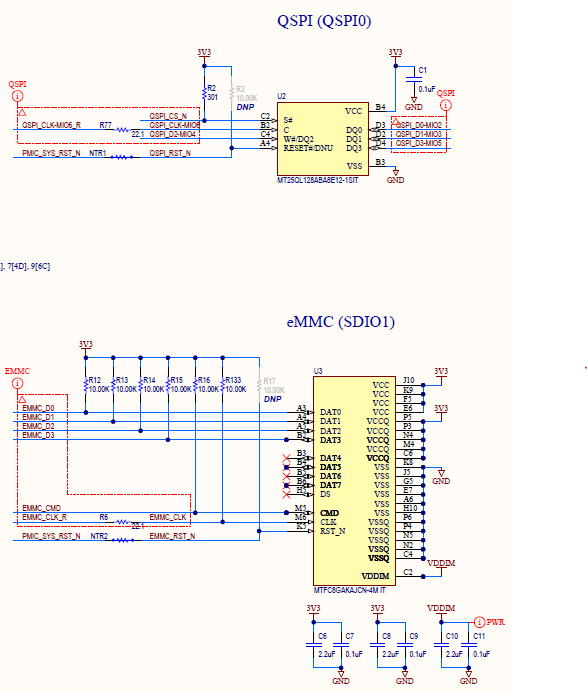
More details can be obtained from the Boot Modes section (section 5) in the MiniZed Hardware User Guide. The document goes in greater detail on how that specific boot mode is configured through lower level electronic components.
But as a user, we are interfaced with the Boot mode switch.
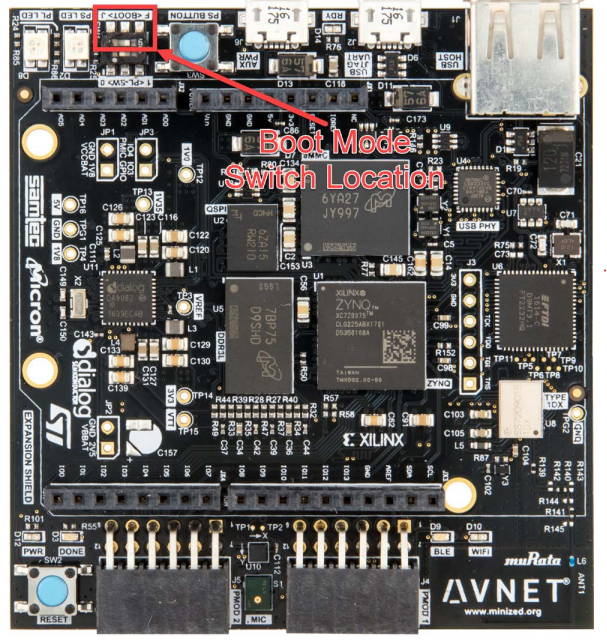
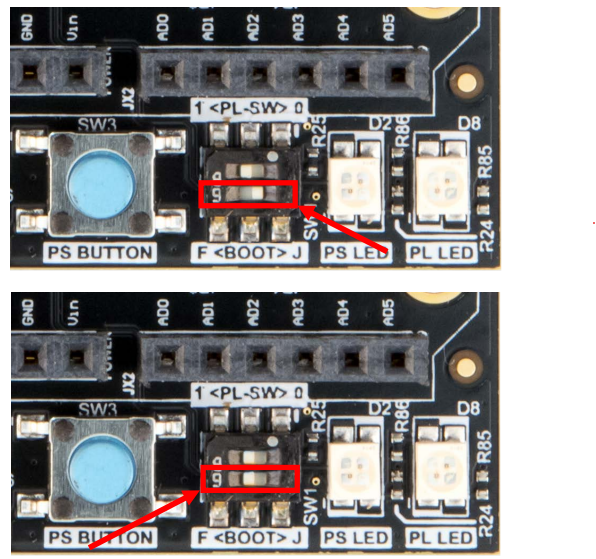
Based on how the switch is configured (towards F or J) where "F" stands for Flash and "J" stands for JTAG, the specific mode is achieved.
In this article we discussed about boot modes, their need, different type and the boot modes supported in Minized board.
In a future article I will discuss the QSPI boot mode in more detail from the point of configuration, flashing the QSPI from JTAG and petalinux etc.