element14 Community
element14 Community
    Register Log In
  • Site
  • Search
  • Log In Register
  • Community Hub
    Community Hub
    • What's New on element14
    • Feedback and Support
    • Benefits of Membership
    • Personal Blogs
    • Members Area
    • Achievement Levels
  • Learn
    Learn
    • Ask an Expert
    • eBooks
    • element14 presents
    • Learning Center
    • Tech Spotlight
    • STEM Academy
    • Webinars, Training and Events
    • Learning Groups
  • Technologies
    Technologies
    • 3D Printing
    • FPGA
    • Industrial Automation
    • Internet of Things
    • Power & Energy
    • Sensors
    • Technology Groups
  • Challenges & Projects
    Challenges & Projects
    • Design Challenges
    • element14 presents Projects
    • Project14
    • Arduino Projects
    • Raspberry Pi Projects
    • Project Groups
  • Products
    Products
    • Arduino
    • Avnet & Tria Boards Community
    • Dev Tools
    • Manufacturers
    • Multicomp Pro
    • Product Groups
    • Raspberry Pi
    • RoadTests & Reviews
  • About Us
  • Store
    Store
    • Visit Your Store
    • Choose another store...
      • Europe
      •  Austria (German)
      •  Belgium (Dutch, French)
      •  Bulgaria (Bulgarian)
      •  Czech Republic (Czech)
      •  Denmark (Danish)
      •  Estonia (Estonian)
      •  Finland (Finnish)
      •  France (French)
      •  Germany (German)
      •  Hungary (Hungarian)
      •  Ireland
      •  Israel
      •  Italy (Italian)
      •  Latvia (Latvian)
      •  
      •  Lithuania (Lithuanian)
      •  Netherlands (Dutch)
      •  Norway (Norwegian)
      •  Poland (Polish)
      •  Portugal (Portuguese)
      •  Romania (Romanian)
      •  Russia (Russian)
      •  Slovakia (Slovak)
      •  Slovenia (Slovenian)
      •  Spain (Spanish)
      •  Sweden (Swedish)
      •  Switzerland(German, French)
      •  Turkey (Turkish)
      •  United Kingdom
      • Asia Pacific
      •  Australia
      •  China
      •  Hong Kong
      •  India
      • Japan
      •  Korea (Korean)
      •  Malaysia
      •  New Zealand
      •  Philippines
      •  Singapore
      •  Taiwan
      •  Thailand (Thai)
      • Vietnam
      • Americas
      •  Brazil (Portuguese)
      •  Canada
      •  Mexico (Spanish)
      •  United States
      Can't find the country/region you're looking for? Visit our export site or find a local distributor.
  • Translate
  • Profile
  • Settings
Pi-Fest
  • Challenges & Projects
  • Design Challenges
  • Pi-Fest
  • More
  • Cancel
Pi-Fest
Blog Blog #3 Pi-Fest. First Steps.
  • Blog
  • Forum
  • Documents
  • Polls
  • Files
  • Leaderboard
  • Mentions
  • Sub-Groups
  • Tags
  • More
  • Cancel
  • New
  • Share
  • More
  • Cancel
Group Actions
  • Group RSS
  • More
  • Cancel
Engagement
  • Author Author: vadergsg9
  • Date Created: 13 Jun 2022 12:14 AM Date Created
  • Views 547 views
  • Likes 6 likes
  • Comments 0 comments
  • element14
  • thonny
  • micropython
  • pi-fest
  • MakeSomeNoise
Related
Recommended

Blog #3 Pi-Fest. First Steps.

vadergsg9
vadergsg9
13 Jun 2022

After a few days of hard work I was able to resume the project. I did not remember that I had not tested "El Pico".

Not because I have any doubts about its good quality, it's because of my poor pin soldering skills. I have "Elektro" hands so I decided well to protect the "El Pico" with the acrylic cap. The Pin-Out sticker helps guide me, because the pin numbers are below the board.

image

The first step to test "El Pico" was to select the programming language that I am going to use. I decided on Micropython because I don't know much about that language, okay, Arduino is wonderful, but everything has already been done, the important thing is to learn a little more, maybe I myself have decided to go the hard way, but the important thing is to learn and have fun.

image

The second step was to select the IDE to use, I decided on "Thonny" because THE OFFICIAL RASPBERRY PI PICO GUIDE recommends it.

image

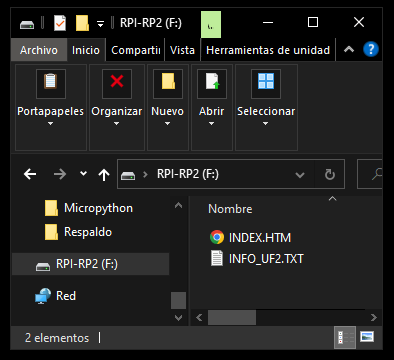
The third step was to load the Micropython firmware on "El Pico". It was easier than I thought, although there are two ways to do it.
The obvious one is when you connect the card via the USB cable, the PC recognizes it as a storage drive, so if you already downloaded the firmware version you just have to drag and drop.
image

The other option is to open "Thonny" and let it help you, this is a very friendly IDE and it recognizes that you don't have a Micropython firmware installed on "El Pico".

image

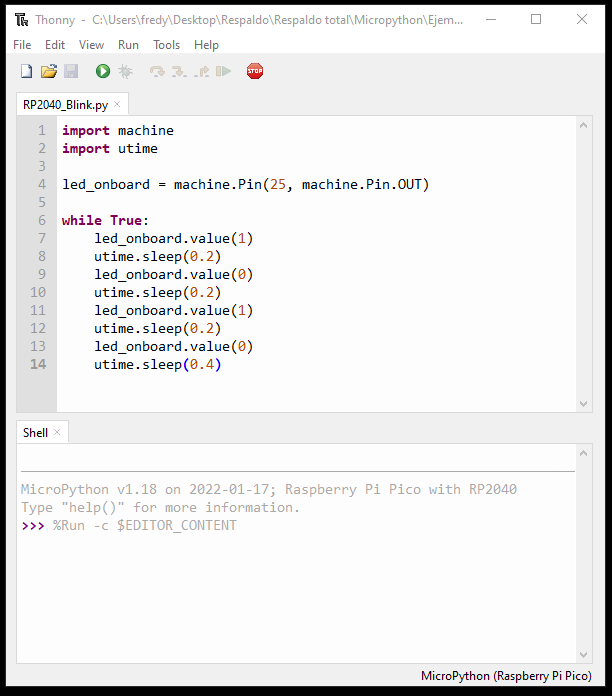
The third step is to create a first test program, as I said at the beginning of this blog, just to make sure that my welding job does not fail. But since I haven't decided which hardware I'm going to use entirely, I just tested that my electrostatic hands didn't cause damage to the card. So for now the classic Blink works for me.
image

As you can see in the code, it wasn't the classic Blink, because I like to give flow to my codes, but the result is the same.
image

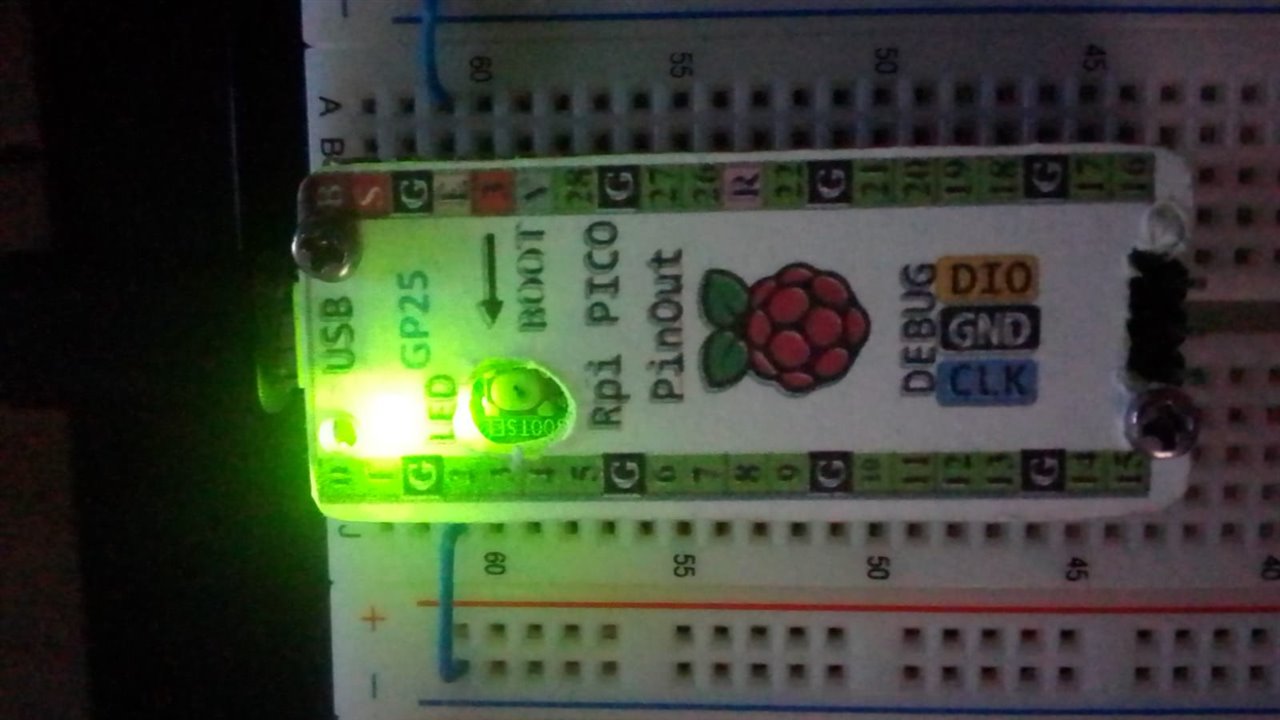
Its alive. The pick has survived the high temperatures of my soldering iron and my electrostatic hands. That means that the road will be entertaining. I already have some pieces of hardware in test, but they will be for the next Blog.

  • Sign in to reply
element14 Community

element14 is the first online community specifically for engineers. Connect with your peers and get expert answers to your questions.

  • Members
  • Learn
  • Technologies
  • Challenges & Projects
  • Products
  • Store
  • About Us
  • Feedback & Support
  • FAQs
  • Terms of Use
  • Privacy Policy
  • Legal and Copyright Notices
  • Sitemap
  • Cookies

An Avnet Company © 2026 Premier Farnell Limited. All Rights Reserved.

Premier Farnell Ltd, registered in England and Wales (no 00876412), registered office: Farnell House, Forge Lane, Leeds LS12 2NE.

ICP 备案号 10220084.

Follow element14

  • X
  • Facebook
  • linkedin
  • YouTube