element14 Community
element14 Community
    Register Log In
  • Site
  • Search
  • Log In Register
  • Community Hub
    Community Hub
    • What's New on element14
    • Feedback and Support
    • Benefits of Membership
    • Personal Blogs
    • Members Area
    • Achievement Levels
  • Learn
    Learn
    • Ask an Expert
    • eBooks
    • element14 presents
    • Learning Center
    • Tech Spotlight
    • STEM Academy
    • Webinars, Training and Events
    • Learning Groups
  • Technologies
    Technologies
    • 3D Printing
    • FPGA
    • Industrial Automation
    • Internet of Things
    • Power & Energy
    • Sensors
    • Technology Groups
  • Challenges & Projects
    Challenges & Projects
    • Design Challenges
    • element14 presents Projects
    • Project14
    • Arduino Projects
    • Raspberry Pi Projects
    • Project Groups
  • Products
    Products
    • Arduino
    • Avnet & Tria Boards Community
    • Dev Tools
    • Manufacturers
    • Multicomp Pro
    • Product Groups
    • Raspberry Pi
    • RoadTests & Reviews
  • About Us
  • Store
    Store
    • Visit Your Store
    • Choose another store...
      • Europe
      •  Austria (German)
      •  Belgium (Dutch, French)
      •  Bulgaria (Bulgarian)
      •  Czech Republic (Czech)
      •  Denmark (Danish)
      •  Estonia (Estonian)
      •  Finland (Finnish)
      •  France (French)
      •  Germany (German)
      •  Hungary (Hungarian)
      •  Ireland
      •  Israel
      •  Italy (Italian)
      •  Latvia (Latvian)
      •  
      •  Lithuania (Lithuanian)
      •  Netherlands (Dutch)
      •  Norway (Norwegian)
      •  Poland (Polish)
      •  Portugal (Portuguese)
      •  Romania (Romanian)
      •  Russia (Russian)
      •  Slovakia (Slovak)
      •  Slovenia (Slovenian)
      •  Spain (Spanish)
      •  Sweden (Swedish)
      •  Switzerland(German, French)
      •  Turkey (Turkish)
      •  United Kingdom
      • Asia Pacific
      •  Australia
      •  China
      •  Hong Kong
      •  India
      • Japan
      •  Korea (Korean)
      •  Malaysia
      •  New Zealand
      •  Philippines
      •  Singapore
      •  Taiwan
      •  Thailand (Thai)
      • Vietnam
      • Americas
      •  Brazil (Portuguese)
      •  Canada
      •  Mexico (Spanish)
      •  United States
      Can't find the country/region you're looking for? Visit our export site or find a local distributor.
  • Translate
  • Profile
  • Settings
PiCasso Design Challenge
  • Challenges & Projects
  • Design Challenges
  • PiCasso Design Challenge
  • More
  • Cancel
PiCasso Design Challenge
Blog Smart Home Orchestra And Mood Mediator (SHOAMM) - Adding Tracker
  • Blog
  • Forum
  • Documents
  • Polls
  • Files
  • Events
  • Mentions
  • Sub-Groups
  • Tags
  • More
  • Cancel
  • New
  • Share
  • More
  • Cancel
Group Actions
  • Group RSS
  • More
  • Cancel
Engagement
  • Author Author: vlasov01
  • Date Created: 19 May 2019 12:47 AM Date Created
  • Views 649 views
  • Likes 6 likes
  • Comments 1 comment
  • ble
  • picasso
  • hassio
  • hassio.
Related
Recommended

Smart Home Orchestra And Mood Mediator (SHOAMM) - Adding Tracker

vlasov01
vlasov01
19 May 2019

Adding Bluetooth LE Tracker Sensor to hassio

I've decided to add a tracker sensor so my controller generates and plays music if I'm nearby.

This tracker discovers new devices on boot and in regular intervals and tracks Bluetooth low-energy devices periodically based on scan_interval value. It is not required to pair the devices with each other. So I've changed the configuration of my hassio.


sudo vi /usr/share/hassio/homeassistant/configuration.yaml


device_tracker:
  - platform: bluetooth_le_tracker
    device_id: hci0
    scan_interval: 60
    track_new_devices: False
    # track_new_devices: True


Than I've restarted the assistant, but nothing happens. And my BLE devices where not detected. I've read some bug reports and added a file, which is used by the tracker to populate new BLE devices, when track_new_devices is set to True.


sudo touch /usr/share/hassio/homeassistant/known_devices.yaml
sudo chmod 666 /usr/share/hassio/homeassistant/known_devices.yaml


sudo vi  /usr/share/hassio/homeassistant/known_devices.yaml


I've restarted the assistant again and start getting new devices into known_devices.yaml. Than I modified names my devices. As well I've discovered that some BLE devices constantly changing their MAC address. So I've disabled tracking of new devices by setting track_new_devices to False. So This is current content of known_devices.yaml.

sudo vi /usr/share/hassio/homeassistant/known_devices.yaml


bose:
  hide_if_away: false
  icon:
  mac: BLE_04:52:C7:FE:AF:98
  name: BOSE QC35
  picture:
  track: true

nxp:
  hide_if_away: false
  icon:
  mac: BLE_00:60:37:12:87:A0
  name: NXP Rapid IoT D87A0
  picture:
  track: true

sport_6610:
  hide_if_away: false
  icon:
  mac: BLE_D4:78:09:01:66:10
  name: SPORT 6610
  picture:
  track: true


I've used the following command to troubleshot configuration by filtering specific keywords from the assistant log file:

pi@raspberrypi:~ $ tail -f /usr/share/hassio/homeassistant/home-assistant.log|grep 'BLE\|Error\|ERROR\|fail\|Discovered'


2019-05-19 00:19:42 INFO (SyncWorker_9) [pygatt.backends.gatttool.gatttool] Discovered 22:DB:51:7A:A7:B2 (None)
2019-05-19 00:19:42 INFO (SyncWorker_9) [pygatt.backends.gatttool.gatttool] Discovered D4:78:09:01:66:10 (SPORT 6610)
2019-05-19 00:19:42 INFO (SyncWorker_9) [pygatt.backends.gatttool.gatttool] Discovered 00:60:37:12:87:A0 (D87A0)
2019-05-19 00:19:42 INFO (SyncWorker_9) [pygatt.backends.gatttool.gatttool] Found 3 BLE devices
2019-05-19 00:19:55 INFO (SyncWorker_19) [pygatt.backends.gatttool.gatttool] Starting BLE scan
2019-05-19 00:20:05 INFO (SyncWorker_19) [pygatt.backends.gatttool.gatttool] Discovered 22:DB:51:7A:A7:B2 (None)
2019-05-19 00:20:05 INFO (SyncWorker_19) [pygatt.backends.gatttool.gatttool] Discovered D4:78:09:01:66:10 (SPORT 6610)
2019-05-19 00:20:05 INFO (SyncWorker_19) [pygatt.backends.gatttool.gatttool] Discovered 00:60:37:12:87:A0 (D87A0)
2019-05-19 00:20:05 INFO (SyncWorker_19) [pygatt.backends.gatttool.gatttool] Discovered 04:52:C7:FE:AF:98 (None)
2019-05-19 00:20:05 INFO (SyncWorker_19) [pygatt.backends.gatttool.gatttool] Found 4 BLE devices


Now I' can see the state of all tracked BLE devices at the assistant Devices page:
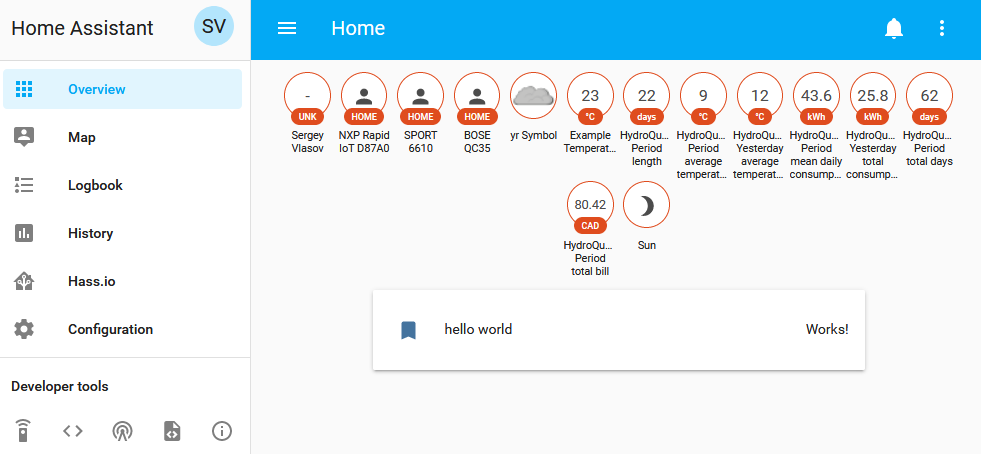
image

And I can as well see the history of devices and change of their states (Home<->Away)

image

The next step is to automate the process of sending sensor data to the music generator when controller knows that I'm at home.

  • Sign in to reply

Top Comments

  • DAB
    DAB over 6 years ago +2
    Nice update. DAB
  • DAB
    DAB over 6 years ago

    Nice update.


    DAB

    • Cancel
    • Vote Up +2 Vote Down
    • Sign in to reply
    • More
    • Cancel
element14 Community

element14 is the first online community specifically for engineers. Connect with your peers and get expert answers to your questions.

  • Members
  • Learn
  • Technologies
  • Challenges & Projects
  • Products
  • Store
  • About Us
  • Feedback & Support
  • FAQs
  • Terms of Use
  • Privacy Policy
  • Legal and Copyright Notices
  • Sitemap
  • Cookies

An Avnet Company © 2025 Premier Farnell Limited. All Rights Reserved.

Premier Farnell Ltd, registered in England and Wales (no 00876412), registered office: Farnell House, Forge Lane, Leeds LS12 2NE.

ICP 备案号 10220084.

Follow element14

  • X
  • Facebook
  • linkedin
  • YouTube