element14 Community
element14 Community
    Register Log In
  • Site
  • Search
  • Log In Register
  • Community Hub
    Community Hub
    • What's New on element14
    • Feedback and Support
    • Benefits of Membership
    • Personal Blogs
    • Members Area
    • Achievement Levels
  • Learn
    Learn
    • Ask an Expert
    • eBooks
    • element14 presents
    • Learning Center
    • Tech Spotlight
    • STEM Academy
    • Webinars, Training and Events
    • Learning Groups
  • Technologies
    Technologies
    • 3D Printing
    • FPGA
    • Industrial Automation
    • Internet of Things
    • Power & Energy
    • Sensors
    • Technology Groups
  • Challenges & Projects
    Challenges & Projects
    • Design Challenges
    • element14 presents Projects
    • Project14
    • Arduino Projects
    • Raspberry Pi Projects
    • Project Groups
  • Products & Partners
    Products & Partners
    • Arduino
    • Avnet & Tria Boards Community
    • Dev Tools
    • Manufacturers
    • Multicomp Pro
    • Product Groups
    • Raspberry Pi
    • RoadTests & Reviews
  • About Us
    About the element14 Community
  • Store
    Store
    • Visit Your Store
    • Choose another store...
      • Europe
      •  Austria (German)
      •  Belgium (Dutch, French)
      •  Bulgaria (Bulgarian)
      •  Czech Republic (Czech)
      •  Denmark (Danish)
      •  Estonia (Estonian)
      •  Finland (Finnish)
      •  France (French)
      •  Germany (German)
      •  Hungary (Hungarian)
      •  Ireland
      •  Israel
      •  Italy (Italian)
      •  Latvia (Latvian)
      •  
      •  Lithuania (Lithuanian)
      •  Netherlands (Dutch)
      •  Norway (Norwegian)
      •  Poland (Polish)
      •  Portugal (Portuguese)
      •  Romania (Romanian)
      •  Russia (Russian)
      •  Slovakia (Slovak)
      •  Slovenia (Slovenian)
      •  Spain (Spanish)
      •  Sweden (Swedish)
      •  Switzerland(German, French)
      •  Turkey (Turkish)
      •  United Kingdom
      • Asia Pacific
      •  Australia
      •  China
      •  Hong Kong
      •  India
      •  Japan
      •  Korea (Korean)
      •  Malaysia
      •  New Zealand
      •  Philippines
      •  Singapore
      •  Taiwan
      •  Thailand (Thai)
      •  Vietnam
      • Americas
      •  Brazil (Portuguese)
      •  Canada
      •  Mexico (Spanish)
      •  United States
      Can't find the country/region you're looking for? Visit our export site or find a local distributor.
  • Translate
  • Profile
  • Settings
Sci Fi Your Pi
  • Challenges & Projects
  • Design Challenges
  • Sci Fi Your Pi
  • More
  • Cancel
Sci Fi Your Pi
Blog Cybernetic Computer Interface - Audio interface settings
  • Blog
  • Forum
  • Documents
  • Files
  • Mentions
  • Sub-Groups
  • Tags
  • More
  • Cancel
  • New
  • Share
  • More
  • Cancel
Group Actions
  • Group RSS
  • More
  • Cancel
Engagement
  • Author Author: sebathorus
  • Date Created: 22 May 2015 9:50 AM Date Created
  • Views 550 views
  • Likes 1 like
  • Comments 0 comments
  • cybernetic_interface
Related
Recommended

Cybernetic Computer Interface - Audio interface settings

sebathorus
sebathorus
22 May 2015

Hi everybody


Is time for a new step in Cybernetic Interface development - audio interface configuration.

Because RaspberryPi lacks a microphone input, which I need for my project, I had to add and configure an external USB sound card.

Due to space constraints I picked the smallest I could find,  Konig 3D Sound, based on C-Media CM108 Audio Controller.
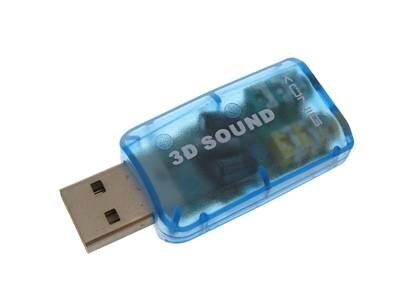
image

It worked from the first try, plugged directly in RPi USB port or in USB Hub.

Configuration and testing steps are listed bellow:


Check sound card configuration:


cat /proc/asound/card ->


0 [ALSA          ]: bcm2835 - bcm2835 ALSA

                      bcm2835 ALSA

1 [Device        ]: USB-Audio - USB PnP Sound Device

                      C-Media Electronics Inc. USB PnP Sound Device at usb-bcm2708_usb-1.2, full speed


lsusb ->


Bus 001 Device 002: ID 0424:9514 Standard Microsystems Corp.

Bus 001 Device 001: ID 1d6b:0002 Linux Foundation 2.0 root hub

Bus 001 Device 003: ID 0424:ec00 Standard Microsystems Corp.

Bus 001 Device 004: ID 0d8c:013c C-Media Electronics, Inc. CM108 Audio Controller


show that the USB sound card is visible. Next, edit alsa-base.conf to load snd-usb-audio as first option:


sudo nano /etc/modprobe.d/alsa-base.conf


Change configuration to make USB sound card the default one:


options snd-usb-audio index=-2

to

options snd-usb-audio index=0


and after a sudo reboot, cat /proc/asound/cards -> should looks like this:


0 [Device        ]: USB-Audio - USB PnP Sound Device

                      C-Media Electronics Inc. USB PnP Sound Device at usb-bcm2708_usb-1.2, full speed

1 [ALSA          ]: bcm2835 - bcm2835 ALSA

                      bcm2835 ALSA


If not already installed, install alsa-base, alsa-utils and mpg321 (or mpg123, mplayer, etc.) :


sudo apt-get update

sudo apt-get upgrade

sudo apt-get install alsa-base alsa-utils mpg321

sudo reboot


Next, edit /etc/asound.conf and change playback and capture devices from "internal" to "usb". Mine look like this:


sudo nano /etc/asound.conf


pcm.usb

{

    type hw

    card Device

}


pcm.internal

{

    type hw

    card ALSA

}


pcm.!default

{

    type asym

    playback.pcm

    {

        type plug

        slave.pcm "usb"

    }

    capture.pcm

    {

        type plug

        slave.pcm "usb"

    }

}


ctl.!default

{

    type asym

    playback.pcm

    {

        type plug

        slave.pcm "usb"

    }

    capture.pcm

    {

        type plug

        slave.pcm "usb"

    }

}


To be sure, do an other reboot and proceed to test the configuration.


To check configuration I used:


amixer -c 0 - to display current settings. Mine looks like this:


pi@cyberpi ~$ amixer -c 0

Simple mixer control 'Speaker',0

  Capabilities: pvolume pswitch pswitch-joined penum

  Playback channels: Front Left - Front Right

  Limits: Playback 0 - 151

  Mono:

  Front Left: Playback 119 [79%] [-6.06dB] [on]

  Front Right: Playback 119 [79%] [-6.06dB] [on]

Simple mixer control 'Mic',0

  Capabilities: pvolume pvolume-joined cvolume cvolume-joined pswitch pswitch-joined cswitch cswitch-joined penum

  Playback channels: Mono

  Capture channels: Mono

  Limits: Playback 0 - 127 Capture 0 - 16

  Mono: Playback 96 [76%] [17.99dB] [off] Capture 0 [0%] [0.00dB] [on]

Simple mixer control 'Auto Gain Control',0

  Capabilities: pswitch pswitch-joined penum

  Playback channels: Mono

  Mono: Playback [on]


and


alsamixer -c 0 - to modify speakers and microphone levels.


Using mpg321 (mpg123/mplayer/aplay/other) and favourite test sound file, plug headphones or speakers into external soundcard output and check if the sound is correctly played. It did image


pi@cyberpi ~$ mpg321 /home/pi/test.mp3


Ok, with playback working, let's check the recording side.


Plug microphone into USB soundcard input and launch:


pi@cyberpi ~$ arecord -D plughw:0,0 -f cd ./test.wav


Use Ctrl+C to stop recording.


Check the result -> pi@cyberpi ~$ mpg321 test.wav -> success image.


If needed, use "alsamixer -c 0" to adjust sound levels to meet your requirements.


That's it. Now I have both audio playback and recording on Raspberry PI.

Next step is to do some speech recognition and implement the audio aided menus.


All the best

-=Seba=-

  • Sign in to reply
element14 Community

element14 is the first online community specifically for engineers. Connect with your peers and get expert answers to your questions.

  • Members
  • Learn
  • Technologies
  • Challenges & Projects
  • Products
  • Store
  • About Us
  • Feedback & Support
  • FAQs
  • Terms of Use
  • Privacy Policy
  • Legal and Copyright Notices
  • Sitemap
  • Cookies

An Avnet Company © 2026 Premier Farnell Limited. All Rights Reserved.

Premier Farnell Ltd, registered in England and Wales (no 00876412), registered office: Farnell House, Forge Lane, Leeds LS12 2NE.

Follow element14

  • X
  • Facebook
  • linkedin
  • YouTube