


Introduction
As Python is an interpreted language the first temptation for develop applications is directly editing the sources on the Raspberry PI, eventually with the help of the Python idle simple IDE installed by default in raspbian; this development environment is almost primitive, while the availability of a good development environment for the Python language maybe very helpful especially if the code can be managed on the PC while tested real-time on the destination device.
This Meditech project annex explains just how an efficient environment has been set to reach this scope.
The role of Python in the software architecture
Pointing the attention to the language Python it has two advantages: it runs fast in the Raspberry PI environment and can be executed (launched) by the command line. The multi-language approach of the entire Meditech project is draft in the following table:
| Language / Environment | Usage |
|---|---|
| C++ | Building programs and command line commands to to the hard work: communication, calculation, data processing |
| SQL | Direct access via queries from bash commands for internal data organization and database management |
| Php | External access via Apache2 web server supporting database integration |
| Bash | Pre-built commands to manage complex tasks and simplify the inter-process communication |
| Python | Local User Interface and on-screen real-time monitoring |
Simplifying the Python development
As explained in the Annex I also in this case the best way to simplify the development lifecycle is adopting an external development IDE. After several tries, I have decided to use the PyCharm Community Edition IDE (free open source version).
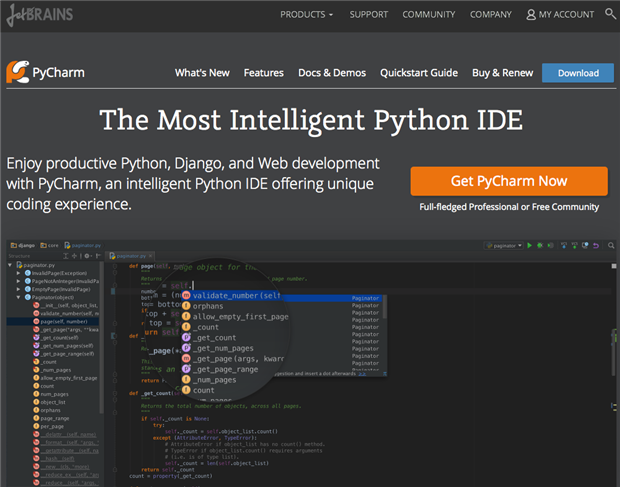
I should recognize that this product from JetBrains demonstrated a very efficient instrument for the language development.
In the case of Python we have not the need of the remote compilation as it is based on the Python interpreter. A potentially risk factor working with an external IDE is due by the raspbian libraries not available on other platforms; anyway this aspect can be ignored because the advantages are worthy. Like the case of NetBeans IDE for C++, also PyCharm is simple to download and install. An appreciable aspect is the good available documentation accessible from the PyCharm IDE and the good contextual help support provided, as well as the editor features supporting depth syntax checking and indentation control.
The Python development environment
The way followed creating a Python development environment is a bit different than the remote compilation settings requiring to add some changes and integrations.
Minimal requirements
The minimal requirements on the Raspberry PI side requires as usual the SSH connectivity; it is essential while developing on a remote linux embedded device to reach the system from a terminal. The minimal requirements settings on the PI are the following:
- NFS server for folder sharing
- SSH remote access (supporting the graphical environment on the PC with the -Y option as an alternative to a headless Raspberry PI)
- A couple of simple Bash commands to fasten the synchronization
- The possibility to mount on the PC the Raspberry PI remote folder. Also in this case on the Mac OSX a Bash command has been built
- A simple command to keep synchronize the PC development folder with the Raspberry PI test folder
- Python installed on the system (it is by default on raspbian)
Raspberry PI configuration
The Raspberry PI configuration is really simple. The only change you need is to export the development folder to the NFS server so it is shared remotely by the PC connected on the same LAN.
Note: it is best practice to export the folder limited to the development PC IP address.
Supposing the following initial conditions,
- The PC address on the network is 192.168.1.5
- The Raspberry PI IP address is 192.168.1.99
- The Raspberry PI folder to share is /home/pi/GitHub
execute the following command to edit the exported (shared) folders:
sudo nano /etc/exports
Then add the following line, accordingly with your real PC and Raspberry IP address and foldert to share
/home/pi/GitHub 192.168.1.5/0(rw,async,insecure,no_subtree_check,no_root_squash)
After saving the file, reload the NFS server with the following command to restart the NFS sharing service
sudo /etc/init.d/nfs-kernel-server restart
At this point your folder can be mounted on the remote PC. This example will work with a development PC based on Linux (Ubuntu, Debian etc.) or Mac OSX. For Windows see the how to share a folder from Raspberry PI with the Samba protocol to reach the same result (the same document is attached to this post).
PC remote folder mounting
Now that the Raspberry PI folder is shared on the LAN for the specific IP address of our development PC we should mount the remote folder so it is available locally on the PC. To do this avoiding to repeat the mount command it is sufficient to write a short bash comand that we will launch everytime we need to develop with the PI. In the following example the command refers to my local development folder on the Mac, so you should adapt it accordingly with your computer folder structure.
#!/bin/bash

# Mount RPI master Meditech Python repository and launch the ide.
sudo mount -o resvport,rw -t nfs 192.168.1.99:/home/pi/GitHub/meditech_python_interface meditech_python_interface/
At this point all can be considered done. We should simply start the PyCharm IDE on the PC and open projects and build them directly in this folder. To make the things more reliable a small improvement has been done.
While the remote Python development folder is mounted as meditech_python_interface/ an identical folder named local.meditech_python_interface/ has been created on the PC. So the PyCharm IDE sources are written in the local... folder and wen the python code should be run on the raspberry PI platform it is synchronized with the remote folder overwriting still existing files; in this way there is a local and remote replica of the sources, just like an anticipated backup 
Also in this case the synchronization task is simplified by a bash command wrote once and executed in seconds everytime it is needed.
#!/bin/bash

# Update the remote mount files from the local development folder
sudo cp local.meditech_python_interface/* meditech_python_interface/
The Python development scenario
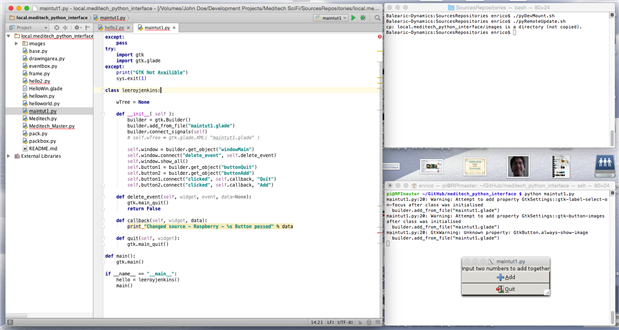
We can comfortable develop our Python applications on the Raspberry PI with only three windows:
- The PyCharm IDE window
- A local terminal session
- A Raspberry PI remote SSH terminal session
The following image shows the PC with the Python develompent settings
| How-To Share a folder with a Windows computer from a Raspberry Pi.pdf |

Top Comments