


Introduction
In the previous post it was explained how the control panel communication between the ChipKit PI and RPI master (Raspberry PI 2) works, based on a rigid syntax sequential command language. The hardware layer of the communication between the two boards implement the TTL direct serial communication at the speed of 38.400 bps. This is an average speed sufficiently high to grant a good data exchange between the two boards without penalising the interrupt-based tasks that are managed by the ChipKit board during the remaining free time processing of the PIC microcontroller (running at 80 MHz)
The tests described to see the protocol in action and have an idea of the response time while the commands are processed are done with the RPI master machine overclocked at 900 MHz (the higher speed without an extra voltage setting to the Raspberry PI processor).
Test commands
A series of test commands has been prepared and sent to the ChipKit control panel controller from the raspberry PI via a remote SSH connection over LAN WiFi. On the RPI master (the sender machine) commands has been sent through the MPIDE serial communication connected to the ChipKit PI.
The commands used for test are the following:
@L;00;"Stethoscope";"Gain";"00027"
@L;01;"B. Pressure";"Wait...";"Min";"90";"Max";"120"
@L;02;"Heart Beat";"Spot";"110";"Avg.";"107"
@L;03;"Temperature";"Spot";"36.5";"Avg.";"37"
@L;04;"E.C.G.";"Status";"running"
@L;05;"Control Panel";"Test running"
@D;00001;00010;"Hello"
The template showing sequences includes the field texts to be displayed so are the longer command strings that should be used. The adopted testing parameters was the following:
- On the RPI master Raspberry PI the minicom terminal has been used to send manually the commands [38.400 bps, 8N1] through the ChipKit serial connection /dev/ttyS0
- For every command has been set a macro that can be enabled with [F1]...[F7] keys + [RETURN]
- Echo has been enabled only for pasting manually the commands while when launching the macros echo is disabled
- Two test cycles: manual pasting of every command and fast command sending via the minicom macros
The following image shows the macros settings for the test
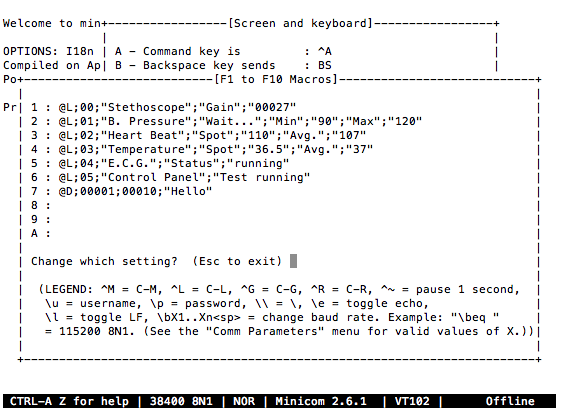
Test cycle
The following video sows the minicom full test cycle of the commands sending and acknowledgment.
The send-response sequence
Every command sent to the board from the RPI master generates a returning acknowledgment string. The RPI master should parse the string to get information on the command execution status.
- Ack return string is sent back after a variable delay depending on the time the requested command need for the execution so when the RPI master receives the ack response it is sure that the command has been managed by the board.
- The Ack string contains the same number of parameters of the sent command is all the fields was ok else it contains an error code informing the RPI master of what was wrong.
For example sending the command
@L;01;"B. Pressure";"Wait...";"Min";"90";"Max";"120"
We are asking to the board to show the LCD display template, ID=01 with the 6 field strings B. Pressure, Wait..., Min, 90, Max, 120 If the command is completed without errors (fields and syntax are correct and there is not out-of-range data) the RPI master should expect the following Ack string:
:L:0:0:0:0:0:0
Where the command code 'L' is followed by a '0' (=parameter OK) for every parameter field sent.
If we send for example the same command with the last ';' field separator missing we get the following response:
@L;01;"B. Pressure";"Wait...";"Min";"90";"Max""120"
:L:0:0:0:0:0:3
In some cases there is not an error returned while managing the string fields. The reason is that this is a machine-to-machine language protocol so the parser excludes typical human errors, e.g. some expected parameter missing because after the commands are correctly implemented in both the sender and receiver it is impossible that these kind of errors (mostly depending on typing mistakes) occur.
The following image shows the various conditions of recognized and unrecognized errors by the parser.
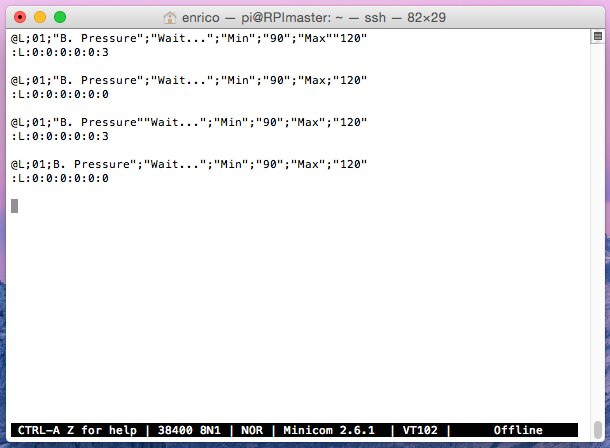
Error codes
The error conditions recognized by the parser are the following:
Command completion code
COMMAND_OK 0
Command unknown to the parser
COMMAND_UNKNOWN 1
Wrong or malformed command.
This message occours when the parameters following a command are wrong, incomplete or missing.
COMMAND_WRONG 2
The requested parameter separator was missing
COMMAND_MISSINGSEPARATOR 3
The requested parameter separator was missing
COMMAND_OUT_OF_RANGE 10
The received subcommand is unknown
PARSER_SUBCOMMAND_UNKNOWN 4
Probe error conditions
COMMAND_STETHOSCOPE_PARAMERROR 5
COMMAND_ECG_PARAMERROR 6
COMMAND_PRESSURE_PARAMERROR 7
COMMAND_BODYTEMP_PARAMERROR 8
COMMAND_HEARTBEAT_PARAMERROR 9
COMMAND_WRONG_TEMPLATE 10
-

fvan
-
Cancel
-
Vote Up
0
Vote Down
-
-
Sign in to reply
-
More
-
Cancel
-

balearicdynamics
in reply to fvan
-
Cancel
-
Vote Up
0
Vote Down
-
-
Sign in to reply
-
More
-
Cancel
Comment-

balearicdynamics
in reply to fvan
-
Cancel
-
Vote Up
0
Vote Down
-
-
Sign in to reply
-
More
-
Cancel
Children