


Introduction
The Meditech architecture is based on a certain number of Raspberry PI (initially three in the actual prototype) every one dedicated to manage specific tasks. These tasks are strictly related and needs to be also synchronised in time: For example the database records on the RPImaster device should have the right timestamp accordingly with the other network node from where the event is collected. Not only but some continuous data collections comes from different devices and should report the same timing with at least 1/10 of second precision.
To these functional aspects we should add the fact that there are conditions that does not permit to the devices to stay synchronised with the Internet time because of poor signal, Internet connection unavailability and so on. This is the reason that I have adopted an internal time synchronisation using the NTP time protocol.
Reference docuemtation
A good yes not too complex explanation on how the NTP protocol works and the difference between the NTP client and server can be found on this article (also attached in PDF to this post) The concept is clearly explained but as our needs are slightly different it is not to be considered as a cut-and-paste document and should be interpreted.
Meditech NTP client-server architecture
NTP Server
First of all, the RPIslave1 device, that is the network NTP server, hosts the PiFace real-time clock board. The network is not accessible by the because of the bridge RPImaster, but when needed every internal device is enabled to access the Internet, with limitation to some protocols only. RPIslave1 is the only device that access to the Internet NTP servers, when there is an available connection, to update its RTC. When there is not any available connection the RTC can provide anyway the right time to synchronise all the other devices because it is configured as NTP server.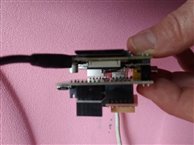
NTP Bridge client-server
Meditech hosts internally two different networks:
- A wired network through the devices eth0 for all the devices hosted intside the Meditech box (net 192.168.5.0/255)
- A WiFi network through the device wlan0 for all the other devices that should be removable and battery-operated (net 192.168.1.0/255)
The configuration of the NTP protocol in the RPImaster device is a bit uncommon because it is the client of the RPIslave1 device but is also a secondary server, bridging the NTP protocol between the two networks.
NTP Wireless client
The RPIslave2 device, connected via WiFi, can't access directly the ethernet wired network so it has its NTP protocol configured to access to the RPImaster secondary NTP server.
Common to all devices
Excluded the NTP server in all the other devices the access to the NTP Internet servers has been disabled resulting a time synchronised network based on a primary NTP server.
NTP configurations in practice
The NTP configuration parameters are stored in the /etc/ntp.conf configuration file. That should be edited accordingly to the network configuration. The three configuration files are attached in the ntp_conf.zip file to this post.
The nest paragraphs only show the ntp.conf file parts that are meaningful for this kind of configuration
NTP main server (RPIslave1)
As this is the main NTP server the default configuration of the public servers remain untouched: if the Internet connection is available the internal date and time is updated with one of the accessible public servers.
# You do need to talk to an NTP server or two (or three).
#server ntp.your-provider.example

# pool.ntp.org maps to about 1000 low-stratum NTP servers.  Your server will
# pick a different set every time it starts up.  Please consider joining the
# pool: <http://www.pool.ntp.org/join.html>
server 0.debian.pool.ntp.org iburst
server 1.debian.pool.ntp.org iburst
server 2.debian.pool.ntp.org iburst
server 3.debian.pool.ntp.org iburst
The NTP server is configured to grant the access to the Meditech internal networks so that any client can ask for NTP updates.
# Internal network for both ethernet and WiFi lans have full access
# to this server (nocriptography needed).
# If you want to grant the access to only encrypted clients access, add "notrust" at the end of every network definition
restrict 192.168.1.0 mask 255.255.255.0
restrict 192.168.5.0 mask 255.255.255.0

# Authorised clients subnets
broadcast 192.168.1.255
broadcast 192.168.5.255
NTP bridge client-server
RPImaster is configured as both an NTP client and a (secondary) NTP server. For testing purposes only (this devices has a 1Tb hard disk for data storage) an extensive NTP logging has been enabled.
# Enable this if you want statistics to be logged.
# For NTP internal server testing and data logging
statsdir /var/log/ntpstats/

statistics loopstats peerstats clockstats
filegen loopstats file loopstats type day enable
filegen peerstats file peerstats type day enable
filegen clockstats file clockstats type day enable
Only the RPIslave1 NTP server is enabled while the NTP Internet pool is disabled (left commented)
# You do need to talk to an NTP server or two (or three).
# Internal server
server 192.168.5.1

# Internet NTP servers are disabled to manage a unique synchronized
# time between the entire network
# pool.ntp.org maps to about 1000 low-stratum NTP servers.  Your server will
# pick a different set every time it starts up.  Please consider joining the
# pool: <http://www.pool.ntp.org/join.html>
#server 0.debian.pool.ntp.org iburst
#server 1.debian.pool.ntp.org iburst
#server 2.debian.pool.ntp.org iburst
#server 3.debian.pool.ntp.org iburst
RPImaster is also configured as a (secondary) NTP server to grant the access to the WiFi second network through the bridging features.
# Clients from this (example!) subnet have unlimited access
# This device is the network bridge so relaunch the NTP server
# to the wlan0 connected devices.
restrict 192.168.1.0 mask 255.255.255.0

# If you want to provide time to your local subnet, change the next line.
# (Again, the address is an example only.)
broadcast 192.168.1.255
NTP client
The shown client is accessing the Meditech network through the WiFi so its NTP server is RPImaster. It is obvious that then same configuration settings (with the correct IP address) are valid also for the RPIslave1 NTP server.
# Access the secondary NTP server RPImaster via the WiFi connection
server 192.168.1.99

# pool.ntp.org maps to about 1000 low-stratum NTP servers.  Your server will
# pick a different set every time it starts up.  Please consider joining the
# pool: <http://www.pool.ntp.org/join.html>
#server 0.debian.pool.ntp.org iburst
#server 1.debian.pool.ntp.org iburst
#server 2.debian.pool.ntp.org iburst
#server 3.debian.pool.ntp.org iburst
Remember to restart the NTP service
After the configuration of the file /etc/ntp.conf restart the NTP service on every device
$> sudo /etc/init.d/ntp restart
| NTP client and server - Raspberry Pi blog.pdf | |

Top Comments