


So the parts list for the kit online included the base board for the Microstack GPS module and accelerometer. However, the kit that arrived at our doors does not include the base board and it seems unlikely to be arriving anytime soon. My GPS module arrived today and I really wanted to get it to work so I had to get creative.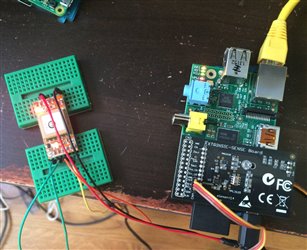
I took a good look at the user guide for the Xtrinsic Sense Board (and the board itself) and noticed that there are some pins sticking out on the top and bottom sides of the board. There are three pins on the top that are for serial sending and receiving of data and on the bottom side there are three pins that allow for ground and power to come in. The power/ground pins are actually for connecting to the Freescale FRDM-KL25z board.
I also looked at Microstack's documentation for the GPS module's pins and found that all I needed were connections for serial communication and power. There are a couple of other pins on the GPS module that can connect to GPIO pins but they are not really necessary for functionality.
I was a little nervous about the possibility of destroying one of the new RPi's I got in the kit, so I pulled out a spare 2011/12 RPi Model B and tested it on there. Well, you can see from the picture on the left that power is definitely flowing through the wires and into the GPS module, the LED light on the board means that it is communicating with the satellites. Super exciting.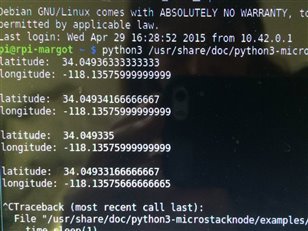
It was time to test whether it was communicating through the pins on the Xtrinsic board. I followed the directions in the Microstack documentation and installed the relevant software. After rebooting I ran their test code and low and behold, coordinates!
I also tested the sensors on the Xtrinsic board and they are still working correctly. I'll be running this off the B+ model in my smart pizza box. I'm going to have to make a base board of my own at some point because the breadboards are very clunky and will take up too much room in the pizza box.
Looks like I'm one step closer to getting this crazy box working!
Top Comments