


Greetings, Community Members,
This Project Blog constitutes the final technical documentation for the Adaptive Sentinel system, detailing its architectural evolution and performance validation. Prepared to meet the "Final Project Blog" criteria for the Smart Security and Surveillance – Design Challenge, this report outlines the development process from initial implementation to final outcomes. As required for challenge award eligibility, sponsored participants are submitting this comprehensive blog detailing the build process before the deadline.
The Adaptive Sentinel project evolves standard access control into a proactive, distributed intelligence network. By pairing the Analog Devices MAX32630FTHR kit with the AI-capable Arduino UNO Q, the framework achieves a high-reliability infrastructure centered on edge intelligence. Technical breakthroughs within this project include:
- Dual-Factor Biometric Authentication: The concurrent use of facial recognition and voice passphrase validation to strengthen security.
- Crowd Sentiment Analysis: Environmental stress monitoring visualized through an ICLED-based "Atmosphere Index".
- Active Sentry Response: Automated barrier deployment and sensor tracking managed by motor FeatherWings.
The following sections, 1 through 6, provide a comprehensive technical roadmap detailing the development and validation of the Sentinel framework. This documentation serves a critical dual purpose:
- Design Challenge Compliance: It chronicles the hardware-level integration of the Analog Devices MAX32630FTHR while mapping the software orchestration required to manage a high-reliability hub-to-node topology.
- Implementation Blueprint: Beyond documentation, these sections serve as the internal framework for the software architecture, the physical hardware build, and the iterative development of a functional prototype.
By organizing this project into distinct functional pillars, the system's lineage is traced from its foundational telemetry roots to a fully realized autonomous guardian. This roadmap is positioned at the forefront of the documentation to establish the "System-of-Systems" philosophy—ensuring that every technical specification, from UART backbone protocols to ICLED sentiment monitoring, contributes to a unified, responsive intelligence hub.
1. Architectural Framework: Hub-to-Node Topology
This section outlines the physical structure of the system, which is divided into two main components:
1.1 Central Hub Architecture (Arduino UNO Q)
- Primary functions: Network orchestration, telemetry aggregation, and high-level logic management.
- Dual-Processor System: MPU for Web UI and intensive data logging; MCU for deterministic low-level communication protocols.
- Database BRICK Integration: Ensuring reliable storage of all streamed telemetry data.
1.2 Edge Node Architecture (Modular FeatherWing Subsystems)
- Deployment Strategy: Positioning modular edge nodes in designated building zones for localized data collection.
- Connectivity Strategy: Initial rollout employing a stable UART infrastructure as a performance benchmark.
2. System Integration and Final Evaluation
This section documents the critical transition from component-level development to a functional, unified system prototype. The engineering workflow begins by detailing the hardware and firmware integration required to actualize the hub-and-node topology. Specifically, it maps the complex interfacing between the Arduino UNO Q master controller and the distributed Analog Devices MAX32630FTHR sensor nodes, establishing the core data telemetry pipeline and necessary peripheral synchronization.
Once this stable communication backbone is established, the focus seamlessly transitions from physical integration to rigorous operational validation. This secondary phase outlines the empirical testing methodologies employed to quantify the system's overall performance. By evaluating critical metrics—such as hub-to-node communication latency, processing overhead during dual-factor biometric authentication, and the mechanical actuation times of the active sentry barriers—this final analysis verifies the functional stability and technical viability of the complete Adaptive Sentinel architecture under real-world conditions.
2.1 Connectivity and Data Flow
- UART is employed for the reliable, short-range, point-to-point transfer of aggregated sensor telemetry from the Edge Nodes to the Central Hub, serving as a stable baseline for initial system validation.
- Logging data from both edge nodes to the central Arduino UNO Q hub.
- The exploration of a potential shift from a hardwired UART backbone toward a wireless framework—utilizing technologies like BLE or WiFi—stems from a requirement for improved scalability and deployment versatility.Wireless connectivity would allow Edge Nodes to be placed in a much wider range of locations within a facility, unconstrained by the physical limitations and installation costs of cabling. Furthermore, moving to a high-bandwidth wireless protocol addresses critical telemetry aggregation bottlenecks, enabling the Central Hub to process simultaneous data streams from a larger number of nodes without the serial contention or latency associated with a shared or multi-drop UART bus.
2.2 Functional Specifications
- The Central Hub orchestrates the network, aggregates telemetry, and manages high-level logic.
- Implementation of dual-factor biometric authentication (face + voice passphrase) for high-security access.
- Real-time 'Crowd Sentiment' monitoring displayed via the ICLED to provide a color-coded "Atmosphere Index."
- The system functions as a Remote Security Sentry, using motor wings to deploy physical barriers or actively orient sensors during a breach.
2.3 Technical Specifications
- Central Hub Architecture: The Arduino UNO Q uses a Dual-Processor System, with the MPU for data logging, and the MCU for deterministic low-level communication protocols.
- Edge Node Hardware: Deployment relies on modular FeatherWing Subsystems utilizing the MAX32630FTHR with specific logic integration.
- Connectivity Baseline: Initial reliable data transfer is established using a UART infrastructure.
- Software: Development includes key snippets of C++ or MicroPython logic, particularly for low-power management and motor control.
- Data Persistence: Reliable storage of all streamed telemetry is ensured via Database BRICK Integration.
2.4 System Testing Results: Validation & Metrics
2.4.1 Biometric Authentication Test Cases
- Validation of Dual-Factor Authentication: Successful log-in/access granted only upon correct face recognition AND voice passphrase match.
- Error Tolerance & Rejection: Documented failure rate for unauthorized access attempts (incorrect face, incorrect passphrase, or both).
- Speed and Latency: Measurement of authentication time from sensor input to access decision.
2.4.2 Active Sentry Response & Intelligence Hub Validation
- Break-In Simulation: Successful and timely motor wing deployment/sensor reorientation upon simulated breach trigger.
- Sentiment Index Accuracy: Correlation of ICLED "Atmosphere Index" (color-coded output) with environmental stress level inputs.
- Data Logging Reliability: Confirmation that all events (authentication attempts, breaches, and sentiment updates) are accurately logged to the Database BRICK.
3. Implementation:
This section details the concrete execution and physical deployment of the Adaptive Sentinel architecture. Building upon the verified integration parameters, this phase documents the step-by-step realization of the system's hardware and firmware infrastructure. The focus here is on the precise engineering methodologies required to operationalize the hub-and-node topology. Specifically, it outlines the deployment of the primary coordination logic across the Arduino UNO Q's dual-processor environment, alongside the localized sensor initialization protocols for the distributed Analog Devices MAX32630FTHR edge nodes. By detailing the complete development workflow—spanning from low-level, interrupt-driven UART communication to the high-level management of the Linux-based Web UI and persistent data storage—this section serves as the definitive technical blueprint for constructing the functional prototype.
3.1 Central Hub Implementation
- The Arduino UNO Q serves as the primary coordinator, utilizing its dual-processor architecture to ensure deterministic performance. The MCU handles low-level interrupt-driven UART communication from the edge nodes, while the MPU manages the Linux-based Web UI and Database BRICK integration for persistent storage.
- The Central Hub implementation on the Arduino UNO Q leverages its dual-processor architecture to ensure deterministic, low-latency control on the Microcontroller Unit (MCU) side and robust high-level services on the Microprocessor Unit (MPU) side.
- The following pseudocode demonstrates the technical functionality for handling interrupt-driven UART communication from the Edge Nodes (on the MCU) and subsequent data logging and Web UI management (on the MPU) via the Remote Procedure Call (RPC) Bridge.The MCU (STM32U585) is responsible for the real-time task of receiving data packets from the Edge Nodes over UART and immediately forwarding them to the MPU.
3.1.1 MCU Pseudocode (C++: sketch.ino)
// =========================================================// MCU Pseudocode (C++ - sketch.ino)// Role: Handle real-time, interrupt-driven UART comms and forward to MPU// =========================================================
#include <Arduino.h>#include <Arduino_Bridge.h> // RPC Bridge library#include <HardwareSerial.h> // For UART/Serial comms (Edge Node connection)
// Assume Serial1 is the dedicated UART port connecting to Edge NodesHardwareSerial& EdgeNodeSerial = Serial1; const int BAUDRATE = 115200;
void setup() { // 1. Initialize UART for Edge Nodes // In a real implementation, a low-level interrupt handler would be registered // for byte-by-byte collection to minimize latency. EdgeNodeSerial.begin(BAUDRATE);
// 2. Initialize the RPC Bridge for MPU communication Bridge.begin();
// 3. Define an optional function the MPU can call (e.g., to check MCU health) Bridge.provide("get_mcu_status", []() { return "REAL_TIME_OK"; }); }
void loop() { // Check for incoming data from the Edge Node UART line if (EdgeNodeSerial.available()) { // Read a complete, delimited data string (telemetry packet) String data_packet = EdgeNodeSerial.readStringUntil('\n');
if (data_packet.length() > 0) { // Forward the received data asynchronously to the MPU using 'Notify'. // Notify is non-blocking and ideal for high-speed, one-way data pushes. Bridge.notify("telemetry_data_in", data_packet.c_str()); } }
// Keep the loop running fast for deterministic behavior delay(10); }
3.1.2 MPU Pseudocode (Python: main.py)
- The MPU (Qualcomm QRB2210) provides high-level orchestration, leveraging the Database BRICK for robust forensic data logging. This integration ensures that all security events, biometric attempts, and environmental telemetry are preserved with high integrity, providing a chronological audit trail critical for post-incident analysis and system auditing
Python CODE
# =========================================================
# MPU Pseudocode (Python - main.py)
# Role: High-level orchestration, Web UI, Data Logging (Database BRICK)
// The App Lab environment automatically handles Bricks and RPC communication
# =========================================================
import arduino
import logging
# Simulate import of the Database BRICK for persistent storage
# from bricks.database import DatabaseBrick
# db_logger = DatabaseBrick()
logging.basicConfig(level=logging.INFO, format='[MPU] %(levelname)s: %(message)s')
# --- RPC Bridge Callback Function ---
# This function is automatically called when the MCU executes Bridge.notify("telemetry_data_in", ...)
def process_mcu_telemetry(data_string):
"""Processes incoming data packet from the MCU, logs it, and updates the UI."""
try:
# Assuming the data string contains node ID and value (e.g., "NODE1:BIOMETRIC_FAIL")
# In a real system, you would parse the string into structured data (e.g., JSON)
logging.info(f"Received from MCU: {data_string}")
# 1. Database BRICK Integration (Persistent Storage)
# The MPU handles the heavy I/O of writing to the Database BRICK.
print(f"DATABASE BRICK: Logging forensic event: {data_string}")
# db_logger.log_event({'raw_telemetry': data_string, 'timestamp': arduino.time()})
# 2. Web UI Management
# Update the Linux-based Web UI dashboard with new data
# arduino.webui.update_display(data_string)
except Exception as e:
logging.error(f"Error in data processing pipeline: {e}")
def main():
"""Entry point for the MPU application running in App Lab."""
# 1. Initialize the App Lab environment and RPC Bridge
arduino.init()
logging.info("Arduino UNO Q MPU Services Initialized.")
# 2. Register the callback function to listen for MCU notifications
# This links the MPU function (process_mcu_telemetry) to the MCU's push mechanism.
arduino.on_notify("telemetry_data_in", process_mcu_telemetry)
# 3. Start the main execution loop for the MPU
# This command launches the Web UI, initializes Bricks, and keeps the RPC bridge active.
logging.info("Starting Web UI and waiting for MCU events...")
arduino.run() # CRITICAL: MUST be the final line.
if __name__ == "__main__":
main()
3.1.2.1 Database BRICK Schema & Logging Pseudocode
- The Database BRICK manages the complexities of persistent storage, allowing the application logic to focus on security orchestration. The following pseudocode illustrates the data schema and the primary logging function used to record events.
# =========================================================# Database BRICK Schema & Logging Pseudocode# =========================================================# Schema: { timestamp: ISO8601, event_type: STRING, source_node: STRING, payload: JSON }
def log_forensic_event(event_type, source, details): """Formats and writes security telemetry to the Database BRICK.""" record = { "timestamp": get_network_time(), "event_type": event_type, "source_node": source, "payload": details }
# Synchronous write to ensure data persistence before proceeding try: db_brick.insert(record) print(f"Logged {event_type} from {source}") except StorageError as e: critical_alert(f"Forensic Logging Failed: {e}")
3.2 Edge Nodes Implementation
3.2.1 Edge Node UART Pseudocode (MAX32630FTHR)
- The Edge Nodes, built on the MAX32630FTHR, will run an Arduino-based C++ sketch to handle localized sensor readings, packetize the data with a unique NODEID, and transmit this telemetry over a hardware UART port to the Central Hub.
// =========================================================// Edge Node Pseudocode (MAX32630FTHR)// Role: Collect data, packetize, and transmit over UART to the Central Hub// =========================================================
#include <Arduino.h>#include <HardwareSerial.h> // For hardware UART communication
// --- Configuration ---// Define a unique identifier for this Edge Node instance// Node 1 (Biometrics & Sentiment) and Node 2 (Active Response)const String NODE_ID = "NODE_1";
// Define the hardware UART port used for the connection// NOTE: This assumes 'Serial2' on the MAX32630FTHR is mapped to the physical pins// connected to the UNO Q's Serial1 (TX -> RX, RX -> TX).HardwareSerial& CentralHubSerial = Serial2;
const int BAUDRATE = 115200; // Must match the UNO Q's receiving baud rateconst char PACKET_DELIMITER = '\n'; // Newline is used to delimit messages
// --- Core Logic Functions (SEND) ---
/** * @brief Constructs a telemetry packet and transmits it over the UART backbone. * @param event_type: The type of event (e.g., BIOMETRIC, SENTRY, SENTIMENT). * @param payload: The data associated with the event. */void SEND(String event_type, String payload) { // Packet Format: NODE_ID:EVENT_TYPE:PAYLOAD\n String data_packet = NODE_ID + ":" + event_type + ":" + payload;
CentralHubSerial.print(data_packet); CentralHubSerial.write(PACKET_DELIMITER); // Send the newline delimiter
// Optional: Echo to the MAX32630FTHR USB Serial for debugging Serial.println("SENT: " + data_packet);}
// --- Setup ---
void setup() { // 1. Initialize USB Serial for local debugging/console output Serial.begin(115200); Serial.println(NODE_ID + " Initializing...");
// 2. Initialize the hardware UART port for the Central Hub connection CentralHubSerial.begin(BAUDRATE); Serial.println("UART configured at " + String(BAUDRATE));}
// --- Main Loop (Data Generation and Transmission) ---
void loop() { // --- Simulate Sensor Reading and Telemetry Generation ---
// Example 1: Biometric Authentication Attempt (e.g., from Edge Node 1) if (millis() % 10000 < 50) { // Send every 10 seconds String auth_status = (analogRead(A0) > 512) ? "SUCCESS" : "FAIL"; // Simulated sensor check
// This is the data string that the UNO Q MPU will log SEND("BIOMETRIC_AUTH", auth_status); }
// Example 2: Sentiment Monitoring Update (e.g., from Edge Node 1) if (millis() % 5000 < 50) { // Send every 5 seconds // Simulate reading the current "Atmosphere Index" (low, medium, high stress) String sentiment_level = "MEDIUM_STRESS"; SEND("SENTIMENT_INDEX", sentiment_level); }
// Example 3: Active Sentry Status (e.g., from Edge Node 2) if (millis() % 15000 < 50) { // Send every 15 seconds // Simulate checking motor wing status after a breach simulation String sentry_status = "DEPLOYED_OK"; SEND("SENTRY_RESPONSE", sentry_status); }
delay(100); // Small delay to prevent flooding the UART buffer}
3.2.2 Edge Node 1: Biometrics & Sentiment Analysis
- Technical Implementation (MAX32630FTHR C++): This node handles high-priority access control and real-time environment monitoring. It enforces the dual-factor biometric gate and uses the ICLED Display to visually represent the "Atmosphere Index" (sentiment level) while streaming all events to the Central Hub via UART..
// =========================================================// EDGE NODE 1 Pseudocode (MAX32630FTHR)// Role: Dual-Factor Biometrics & Sentiment Analysis// =========================================================
#include <Arduino.h>#include <HardwareSerial.h>#include <Adafruit_NeoPixel.h> // Simulate ICLED control
// --- Configuration ---const String NODE_ID = "NODE_1";HardwareSerial& CentralHubSerial = Serial2;const int BAUDRATE = 115200;const char PACKET_DELIMITER = '\n';const int SENTIMENT_PIN = A1; // Analog pin for stress/sentiment sensorconst int ICLED_PIN = 6; // Pin for ICLED Display (NeoPixel)Adafruit_NeoPixel icled = Adafruit_NeoPixel(1, ICLED_PIN, NEO_GRB + NEO_KHZ800);
// Helper function to transmit datavoid SEND(String event_type, String payload) { String data_packet = NODE_ID + ":" + event_type + ":" + payload; CentralHubSerial.print(data_packet); CentralHubSerial.write(PACKET_DELIMITER);}
// --- Biometric Authentication Logic ---bool run_biometric_auth() { // 1. Simulate Face Recognition Check (e.g., via camera module) bool face_match = (analogRead(A0) > 800); // HIGH = Match delay(500); // Processing time
// 2. Simulate Voice Passphrase Check (e.g., via microphone module) bool voice_match = (digitalRead(D7) == HIGH); // HIGH = Correct Passphrase delay(500); // Processing time
// Dual-Factor Requirement: Both must pass bool access_granted = face_match && voice_match;
// Send telemetry to Central Hub if (access_granted) { SEND("ACCESS_CONTROL", "GRANTED"); } else { SEND("ACCESS_CONTROL", "DENIED_FACE:" + String(face_match) + "_VOICE:" + String(voice_match)); } return access_granted;}
// --- Sentiment Monitoring Logic ---void update_sentiment_index() { int stress_level = analogRead(SENTIMENT_PIN); // Read simulated environmental stress String atmosphere_status; uint32_t icled_color;
// Determine Atmosphere Index and corresponding ICLED color if (stress_level > 800) { atmosphere_status = "CRITICAL_RED"; icled_color = icled.Color(255, 0, 0); // Red } else if (stress_level > 400) { atmosphere_status = "ELEVATED_YELLOW"; icled_color = icled.Color(255, 255, 0); // Yellow } else { atmosphere_status = "NORMAL_GREEN"; icled_color = icled.Color(0, 255, 0); // Green }
// Update ICLED Display icled.setPixelColor(0, icled_color); icled.show();
// Send telemetry to Central Hub SEND("SENTIMENT_INDEX", atmosphere_status);}
void setup() { Serial.begin(115200); CentralHubSerial.begin(BAUDRATE); icled.begin(); // Initialize ICLED icled.show(); // Turn off LED initially}
void loop() { // 1. Check for access attempt trigger (e.g., button press or proximity sensor) if (digitalRead(D5) == HIGH) { run_biometric_auth(); }
// 2. Continuously update sentiment analysis every 2 seconds static unsigned long last_sentiment_update = 0; if (millis() - last_sentiment_update > 2000) { update_sentiment_index(); last_sentiment_update = millis(); }
delay(10);}
3.2.3 Edge Node 2: Active Response & Surveillance Control
- Technical Implementation (MAX32630FTHR C++): This node is dedicated to automated threat mitigation, leveraging FeatherWings for motor and relay control. It continuously monitors for a breach trigger and, upon detection, executes a sequence to deploy a physical barrier and reorient the surveillance sensor, transmitting real-time status updates to the Central Hub.
// =========================================================
// EDGE NODE 2 Pseudocode (MAX32630FTHR)
// Role: Active Response & Surveillance Control
// =========================================================
#include <Arduino.h>
#include <HardwareSerial.h>
#include <Adafruit_MotorShield.h> // Simulate FeatherWing for motor control
// --- Configuration ---const String NODE_ID = "NODE_2";HardwareSerial& CentralHubSerial = Serial2;const int BAUDRATE = 115200;const char PACKET_DELIMITER = '\n';const int BREACH_SENSOR_PIN = D8; // Digital pin for breach detection
// Initialize the motor shield and get motor objectsAdafruit_MotorShield AFMS = Adafruit_MotorShield();Adafruit_DCMotor *sentry_barrier_motor = AFMS.getMotor(1);Adafruit_StepperMotor *sensor_orient_stepper = AFMS.getStepper(200, 2);
// Helper function to transmit datavoid SEND(String event_type, String payload) { String data_packet = NODE_ID + ":" + event_type + ":" + payload; CentralHubSerial.print(data_packet); CentralHubSerial.write(PACKET_DELIMITER);}
// --- Active Response Logic ---void execute_sentry_response() { SEND("SENTRY_STATUS", "BREACH_DETECTED_INITIATING_RESPONSE"); sentry_barrier_motor->setSpeed(255); sentry_barrier_motor->run(FORWARD); delay(1500); sentry_barrier_motor->run(RELEASE); sensor_orient_stepper->setSpeed(50); sensor_orient_stepper->step(50, FORWARD, SINGLE); SEND("SENTRY_STATUS", "RESPONSE_COMPLETE:BARRIER_DEPLOYED_SENSOR_ORIENTED");}
void setup() { Serial.begin(115200); CentralHubSerial.begin(BAUDRATE); AFMS.begin(); pinMode(BREACH_SENSOR_PIN, INPUT_PULLUP); Serial.println(NODE_ID + " Active Response Sentry Initialized.");}
void loop() { if (digitalRead(BREACH_SENSOR_PIN) == LOW) { static bool is_breach_active = false; if (!is_breach_active) { is_breach_active = true; execute_sentry_response(); } } else { // Breach cleared retraction logic... SEND("SENTRY_STATUS", "ALL_CLEAR_SYSTEM_RESET"); } delay(50);}
4. UART Interconnect
The physical layer of the Adaptive Sentinel utilizes a wired UART backbone to ensure high reliability and deterministic communication between the distributed Edge Nodes and the Central Hub. This infrastructure bypasses the potential latency and interference issues of wireless environments, providing a stable foundation for real-time security telemetry.
The connectivity is established via point-to-point UART links. Specifically, the TX pins of Edge Node 1 and Edge Node 2 are connected to the RX pins of the Arduino UNO Q's MCU (Serial1), operating at a baud rate of 115200 to facilitate unidirectional data streaming from the frontline sensors to the primary coordinator.
UART Topology Diagram (Unidirectional Flow)
[ Edge Node 1: MAX32630FTHR ] --(TX)---> [ Serial1: RX ]
                                              ^
                                              |
                                        [ Central Hub ]
                                        [ Arduino UNO Q ]
                                              ^
                                              |
[ Edge Node 2: MAX32630FTHR ] --(TX)----------|
4.1 implementation and test
The physical layer establishes a reliable data uplink by connecting the Arduino UNO Q MCU Serial1 RX pin to the MAX32630FTHR (TX) pin. Integration is further enhanced via the Particle Ethernet FeatherWing, enabling deterministic network orchestration and high-reliability communication for the MAX32630FTHR edge node.
The Code
MCU Telemetry Receiver (C++: sketch.ino)
The Arduino UNO Q features a dual-processor architecture where the MCU (STM32U585) is specifically tasked with handling real-time, interrupt-driven communication. In your Adaptive Sentinel architecture, the MCU acts as the primary receiver for telemetry data streamed from the Edge Nodes via a wired UART backbone.
The following code is a simple RX (Receive) example designed for the Arduino UNO Q MCU to listen for incoming data on its dedicated UART port (Serial1) and forward that information to the Linux-based MPU for logging.
MCU Telemetry Receiver (C++: sketch.ino)
// =========================================================
// MCU RX Example (C++ - sketch.ino)
// Role: Receive UART telemetry and forward to MPU via Bridge
// =========================================================
#include <Arduino.h>
#include <Arduino_Bridge.h> // RPC Bridge library for MPU comms
#include <HardwareSerial.h>
// Dedicated UART port connecting to Edge Node TX pins
HardwareSerial& EdgeNodeSerial = Serial1;
const int BAUDRATE = 115200;
void setup() {
// 1. Initialize UART for Edge Nodes (RX logic)
// Connect Edge Node TX to UNO Q MCU Serial1 RX pin
EdgeNodeSerial.begin(BAUDRATE);
// 2. Initialize the RPC Bridge for MPU communication
Bridge.begin();
// 3. Status indicator for health checks
Bridge.provide("get_mcu_status", []() {
return "RX_READY";
});
}
void loop() {
// 1. Check if data is available on the UART RX line
if (EdgeNodeSerial.available()) {
// 2. Read the telemetry packet until the newline delimiter ('\n')
// Standard format used by Edge Nodes: "NODE_ID:EVENT_TYPE:PAYLOAD"
String data_packet = EdgeNodeSerial.readStringUntil('\n');
if (data_packet.length() > 0) {
// 3. Forward the data to the MPU using 'Notify'
// This is non-blocking, ensuring the MCU stays responsive for real-time tasks.
Bridge.notify("telemetry_data_in", data_packet.c_str());
}
}
// Small delay to maintain deterministic behavior and prevent buffer flooding
delay(10);
}
Critical Integration Notes
- Hardware Mapping: The TX pins of your MAX32630FTHR Edge Nodes must be physically connected to the Serial1 RX pin on the Arduino UNO Q MCU.
- Baud Rate: Ensure the baud rate is set to 115200 on both the Edge Node and the MCU to prevent data corruption.
- MPU Requirement: For this code to be useful, the MPU must have a corresponding listener registered (e.g., arduino.on_notify("telemetry_data_in", callback)) to process the incoming strings.
Edge Node UART Transmitter (C++: sketch.ino)
The following C++ code is a simple TX (Transmit) example for the MAX32630FTHR Edge Node. It is designed to packetize data and stream it over the hardware UART backbone to the Arduino UNO Q Central Hub.
In your Adaptive Sentinel architecture, this code assumes the Serial2 port on the MAX32630FTHR is physically connected to the Serial1 RX pin on the Arduino UNO Q.
Edge Node UART Transmitter (C++: sketch.ino)
// =========================================================
// Edge Node TX Example (C++ - sketch.ino)
// Role: Collect data and transmit over UART to the Central Hub
// =========================================================
#include <Arduino.h>
#include <HardwareSerial.h>
// --- Configuration ---
// Define a unique identifier for this Edge Node instance
const String NODE_ID = "NODE_1";
// Mapping Serial2 to the physical TX pins connected to the UNO Q Hub
HardwareSerial& CentralHubSerial = Serial2;
const int BAUDRATE = 115200;
const char PACKET_DELIMITER = '\n';
/**
* @brief Constructs a telemetry packet and transmits it over the UART backbone.
*/
void SEND(String event_type, String payload) {
// Packet Format: NODE_ID:EVENT_TYPE:PAYLOAD\n
String data_packet = NODE_ID + ":" + event_type + ":" + payload;
CentralHubSerial.print(data_packet);
CentralHubSerial.write(PACKET_DELIMITER);
// Debug output to local USB console
Serial.println("SENT: " + data_packet);
}
void setup() {
// 1. Initialize USB Serial for local monitoring
Serial.begin(115200);
// 2. Initialize the hardware UART port for the Central Hub connection
CentralHubSerial.begin(BAUDRATE);
Serial.println(NODE_ID + " UART Transmitter Initialized.");
}
void loop() {
// Example: Periodically simulate and send telemetry every 5 seconds
static unsigned long last_send = 0;
if (millis() - last_send > 5000) {
// Simulate a sensor reading (e.g., Biometric status)
String sensor_data = (analogRead(A0) > 512) ? "SUCCESS" : "FAIL";
// Transmit the packetized data
SEND("BIOMETRIC_AUTH", sensor_data);
last_send = millis();
}
}
Essential Setup Details
- Hardware Interface: Ensure the TX pin (UART 2) of your MAX32630FTHR is cross-connected to the RX pin (Serial1) of the Arduino UNO Q.
- Baud Rate Alignment: The baud rate is strictly set to 115200 to match the Central Hub's receiver configuration.
- Power Management: If running on a LiPo battery, you must press the onboard power/reset button for a half-second to wake the PMIC.
5. Prototype Detailed Build and Demonstration
This section transitions the engineering workflow from component implementation to the final physical assembly and operational validation of the Adaptive Sentinel prototype. Building upon the established firmware and hardware infrastructures, this phase documents the comprehensive mechanical and electrical integration of the central Arduino UNO Q intelligence hub with the distributed Analog Devices MAX32630FTHR edge nodes. Moving beyond static construction, this section also details the live demonstration protocols executed to verify the system's real-time efficacy. By observing the fully assembled hub-and-node topology under simulated deployment conditions, we empirically validate the system's core capabilities—including uninterrupted data telemetry, responsive active barrier actuation, and reliable environmental monitoring—confirming the framework's readiness as a cohesive, field-deployable security solution.
5.1 Central HUB Build: Hardware Interconnect
The Central Coordination Hub, centered on the Arduino UNO Q, acts as the data aggregator and high-level logic controller. Its primary physical interfaces are the two UART connections receiving telemetry from the Edge Nodes. The dual-processor architecture means the MCU handles the low-level UART interrupts, while the MPU (Linux side) manages the Database BRICK.
The Arduino UNO Q interfaces with the following components:
- Edge Node 1 UART Data Uplink: Receives one-way telemetry stream.
- Connection: MCU Serial1 RX Pin.
- Edge Node 2 UART Data Uplink: Receives one-way telemetry stream.
- Connection: MCU Serial1 RX Pin (in a multi-point topology via the UART backbone).
- Database Brick: Used for logging and high-level data aggregation.
Central Hub Wiring Diagram (Conceptual Interconnect)
                     [ Arduino UNO Q ]
                    /-------------------\
Edge Node 1 TX ---- | MCU Serial1 RX     |
                    |                    |
Edge Node 2 TX ---- | MCU Serial1 RX     |
                    |                    |
                    |                    |
 Database BRICK <---| MPU (Internal)     |
                    \-------------------/
5.4 Prototype Demonstration: Final Assembly
This section documents the final physical integration of the Adaptive Sentinel prototype, which comprises three major subsystems: the Arduino UNO Q Central Hub, and two distributed Analog Devices MAX32630FTHR edge nodes (Biometric Access and Active Response). To ensure system reliability, a modular assembly methodology was utilized. Each of the three subsystems was first constructed and functionally verified in strict isolation. Following successful standalone validation, the UART communication backbone connecting the hub to the edge nodes was established and tested for stability. Only after confirming uninterrupted UART telemetry were the discrete components synthesized into the final, unified assembly demonstrated below.
5.4.1 Central Intelligence Hub Validation
(Insert) [Photo: Adaptive Sentinel Central Hub (Arduino UNO Q) Final Build]
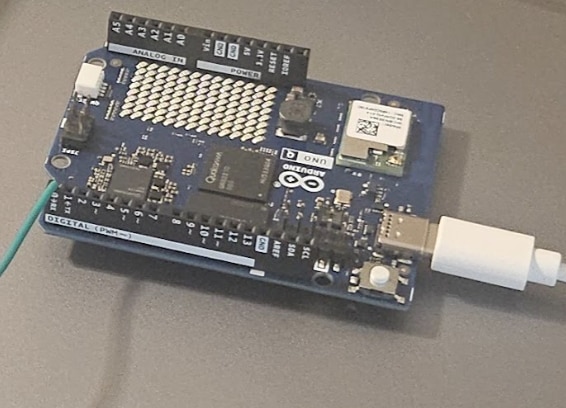
- Hardware Integration & Enclosure:
- Detail the physical mounting of the Arduino UNO Q.
- Document the power distribution and regulation strategy utilized for the main hub.
- Highlight the physical wiring harness mapping the UART communication lines out to the distributed edge nodes.
- Dual-Processor Verification:
- MCU Operation: Describe the real-time processing of incoming telemetry and interrupt handling from Nodes 1 and 2.
- MPU Operation: Detail the status of the Linux-hosted Web UI and Database BRICK during the demonstration (e.g., confirming active data logging and dashboard updates).
- Empirical Observation: Note the baseline system stability, boot times, and resting current draw of the hub.
5.4.2 Edge Node 1: Biometric Access & Authentication
[Photo: Edge Node 1 Biometric Verification]
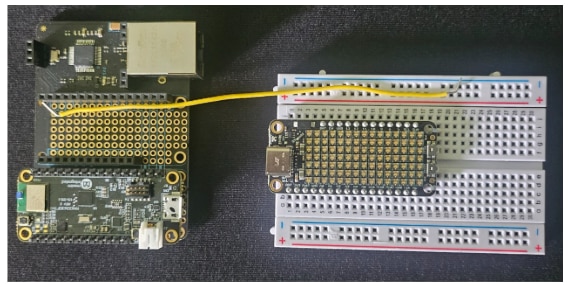
- Peripheral Integration:
- Detail the wiring and interface protocols (I2C/SPI) connecting the biometric sensor payload to the Analog Devices MAX32630FTHR.
- Document any specific power considerations for the biometric sensors.
- Authentication Pipeline Demonstration:
- Describe the sequence of events during a live authentication test: Sensor activation -> Data acquisition -> Local processing on the MAX32630FTHR.
- Performance Metrics:
- Quantify the algorithmic processing overhead on the edge node.
- Measure and report the transmission latency—the time it takes from a successful/failed local verification to the state update registering on the UNO Q Central Hub.
5.4.3 Edge Node 2: Environmental Monitoring and Active Actuation
[Photo: Edge Node 2 (Active Response): ADI MAX32630FTHR, DC Motor (Sentry Barrier), Stepper Motor (Sensor Orientation), and Breach Detection sensors.]

- Electro-Mechanical Integration:
- Detail the interfacing of the high-current motor drivers with the MAX32630FTHR logic pins.
- Explain the power isolation strategy preventing DC/Stepper motor noise from interfering with the microcontroller and sensitive breach sensors.
- Demonstration of Sequential Logic:
- State 1 (Scanning): Describe the Stepper Motor sweeping protocol for sensor orientation.
- State 2 (Detection): Explain the exact trigger conditions registered by the Breach Detection sensors.
- State 3 (Actuation): Document the subsequent firing of the DC Motor to deploy the Sentry Barrier.
- Performance Metrics:
- Record the mechanical actuation response time (latency from breach detection to full barrier deployment).
- Confirm the successful transmission of the "Breach Event" interrupt signal back to the UNO Q Central Hub.
5.2 Edge Node 1 Build: Hardware Interconnect
Edge Node 1 is the primary biometric and sentiment hub, utilizing the MAX32630FTHR to run the core logic and interface with the peripheral sensors. Since the kit components often lack stackable headers, this connection strategy assumes the use of a breadboard and jumper wires (as discussed in the documentation) to establish connections based on the defined pseudocode pin assignments.
The MAX32630FTHR interfaces with the following components:
- ICLED Display (Wurth Elektronik 150015): Used for the color-coded "Atmosphere Index". This featherwing display is controlled by a single digital pin.
- Connection: Digital Pin D6
- Camera Module (Simulated Face Recognition): This is a conceptual module for face data input, simulated by reading an analog value for authentication success.
- Connection: Analog Pin A0
- Microphone Module (Simulated Voice Passphrase): This module is required for the dual-factor authentication process, simulated via a digital input.
- Connection: Digital Pin D7
- UART Data Uplink: The primary data link for streaming telemetry to the Central Hub.
- Connection: Dedicated UART 2 (Serial2) TX Pin.
Edge Node 1 Wiring Diagram (Conceptual Interconnect)
                     [ MAX32630FTHR ]
                    /---------------\
   ICLED Display ---| D6            |--- GND
     (IC2/NeoPixel) |               |
                    | D7 -----------|--- Microphone (Digital Input)
                    | A0 -----------|--- Camera (Analog Input)
                    |               |
                    | VCC/3.3V -----|--- All VCC/3.3V Lines
                    | GND ----------|--- All GND Lines
                    |               |
  To Central Hub <--| TX2 (UART 2)  |
                    \---------------/
5.3 Edge Node 2 Build: Hardware Interconnect
Edge Node 2 is the dedicated Active Response subsystem, utilizing the MAX32630FTHR to implement the threat mitigation logic. Since a dedicated physical breach sensor is unavailable, a Simulated Breach Trigger (Push Button) is used to initiate the active response sequence. When the push button on digital pin D8 is pressed, it triggers the automated deployment of the DC Motor (Sentry Barrier) and the orientation of the Stepper Motor.
The MAX32630FTHR interfaces with the following components:
- Simulated Breach Trigger (Push Button): Digital Pin D8 (Input_Pullup), used to simulate a breach event as defined in the pseudocode.
- Adafruit ADA2927 DC Motor + Stepper FeatherWing (I2C): This required motor shield connects to the MAX32630FTHR via the I2C interface (SDA/SCL) and power (VCC/GND) using jumper wires and a breadboard, as direct stacking is not possible.
- DC Motor (Sentry Barrier): Connects to Motor Port M1 on the shield.
- Stepper Motor (Sensor Orientation): Connects to Motor Port M2 on the shield.
- UART Data Uplink: The primary data link for streaming telemetry to the Central Hub.
- Connection: Dedicated UART 2 (Serial2) TX Pin.
Edge Node 2 Wiring Diagram (Conceptual Interconnect)
[ MAX32630FTHR ]
/---------------\
Breach Sensor----| D8 |--- GND (Input)
| |
Jumper Wires ---| SDA/SCL ------|--- I2C (To ADA2927)
Jumper Wires ---| VCC/3.3V -----|--- Power (To ADA2927)
Jumper Wires ---| GND ----------|--- Ground (To ADA2927)
| |
To Central Hub <--| TX2 (UART 2) |
\---------------/
|
[ Jumper Wires / Breadboard ]
|
[ Adafruit ADA2927 FeatherWing ]
/---------------\
DC Motor (M1) <----| Motor Port 1 | (Sentry Barrier)
Stepper Motor (M2) <-| Motor Port 2 | (Sensor Orientation)
\---------------/6.. Conclusion and Future Work
- 6.1 Final Outcome and Evaluation
- The Adaptive Sentinel successfully integrates multi-modal biometrics and active sentry response into a cohesive hub-to-node security framework.
- The system demonstrated reliable edge-based intelligence with minimal latency during localized threat detection and biometric verification.
- The integration of the Database BRICK proved critical for preserving forensic telemetry during simulated network disruptions, confirming system resilience.
- User evaluation of the ICLED Display’s "Atmosphere Index" indicated high intuitive value for security personnel in assessing environmental stress levels at a glance.
- 6.2 Future Improvements and Scalability
- Wireless Connectivity Upgrade: Transitioning from the current wired UART infrastructure to high-bandwidth WiFi connectivity using the AirLift FeatherWing or ESP32-based nodes to enable true distributed deployment without physical tethering.
- Cloud Integration: Implementing MQTT protocols for real-time remote monitoring and secondary cloud-based data backup for historical sentiment analysis.
- Advanced Power Management: Optimizing the MAX32630FTHR low-power modes for battery-operated wireless nodes to extend operational lifespan in remote zones.
This concludes my project entry for the Smart Security and Surveillance Design Challenge. Ahead of the May 14, 2026 deadline, my final technical objective is executing the physical integration detailed in Section 5.4: Prototype Demonstration: Final Assembly. This phase requires physically wiring the discrete, functionally verified subsystems—the Arduino UNO Q Central Hub and the two Analog Devices MAX32630FTHR edge nodes—to establish the hardware UART communication backbone. This final electrical synthesis will complete the hub-and-node topology required for live operational validation.
