element14 Community
element14 Community
    Register Log In
  • Site
  • Search
  • Log In Register
  • Community Hub
    Community Hub
    • What's New on element14
    • Feedback and Support
    • Benefits of Membership
    • Personal Blogs
    • Members Area
    • Achievement Levels
  • Learn
    Learn
    • Ask an Expert
    • eBooks
    • element14 presents
    • Learning Center
    • Tech Spotlight
    • STEM Academy
    • Webinars, Training and Events
    • Learning Groups
  • Technologies
    Technologies
    • 3D Printing
    • FPGA
    • Industrial Automation
    • Internet of Things
    • Power & Energy
    • Sensors
    • Technology Groups
  • Challenges & Projects
    Challenges & Projects
    • Design Challenges
    • element14 presents Projects
    • Project14
    • Arduino Projects
    • Raspberry Pi Projects
    • Project Groups
  • Products
    Products
    • Arduino
    • Avnet & Tria Boards Community
    • Dev Tools
    • Manufacturers
    • Multicomp Pro
    • Product Groups
    • Raspberry Pi
    • RoadTests & Reviews
  • About Us
    About the element14 Community
  • Store
    Store
    • Visit Your Store
    • Choose another store...
      • Europe
      •  Austria (German)
      •  Belgium (Dutch, French)
      •  Bulgaria (Bulgarian)
      •  Czech Republic (Czech)
      •  Denmark (Danish)
      •  Estonia (Estonian)
      •  Finland (Finnish)
      •  France (French)
      •  Germany (German)
      •  Hungary (Hungarian)
      •  Ireland
      •  Israel
      •  Italy (Italian)
      •  Latvia (Latvian)
      •  
      •  Lithuania (Lithuanian)
      •  Netherlands (Dutch)
      •  Norway (Norwegian)
      •  Poland (Polish)
      •  Portugal (Portuguese)
      •  Romania (Romanian)
      •  Russia (Russian)
      •  Slovakia (Slovak)
      •  Slovenia (Slovenian)
      •  Spain (Spanish)
      •  Sweden (Swedish)
      •  Switzerland(German, French)
      •  Turkey (Turkish)
      •  United Kingdom
      • Asia Pacific
      •  Australia
      •  China
      •  Hong Kong
      •  India
      •  Japan
      •  Korea (Korean)
      •  Malaysia
      •  New Zealand
      •  Philippines
      •  Singapore
      •  Taiwan
      •  Thailand (Thai)
      •  Vietnam
      • Americas
      •  Brazil (Portuguese)
      •  Canada
      •  Mexico (Spanish)
      •  United States
      Can't find the country/region you're looking for? Visit our export site or find a local distributor.
  • Translate
  • Profile
  • Settings
Smart Security and Surveillance
  • Challenges & Projects
  • Design Challenges
  • Smart Security and Surveillance
  • More
  • Cancel
Smart Security and Surveillance
Forum Accessing the PAN1326B Bluetooth module on the MAX32630fTHR
  • News
  • Projects
  • Forum
  • DC
  • Leaderboard
  • Files
  • Members
  • More
  • Cancel
  • New
Join Smart Security and Surveillance to participate - click to join for free!
Actions
  • Share
  • More
  • Cancel
Forum Thread Details
  • Replies 18 replies
  • Subscribers 46 subscribers
  • Views 408 views
  • Users 0 members are here
Related

Accessing the PAN1326B Bluetooth module on the MAX32630fTHR

Alistair
Alistair 1 month ago

I have dome some experimentation over the long weekend and had some success in getting the MAX32630fTHR working with the Arduino IDE. In fact it is pleasingly fast to compile and upload. I will try and finish documenting this process just in case it is of help to others, or me in the future when I have forgotten everything. ;-)

There is one thing I am struggling with however, and I was wondering it anyone has the solution.

I am trying to communicate with the PAN1326B to scan for Bluetooth devices. It should be on UART0, and having dug deep in to the Arduino core for the module it looks like that is mapped correctly. However when I send data (a HCI reset of 01,03,0c,00 for example) to it nothing happens and nothing ever comes back.

I have pulsed down P1.6 (BT_RST) for a few hundred milliseconds to try and reset things and nothing changes. I have held CTS low, but also checked it high just in case.

One complication is the PAN1326B required a 32KHz signal, but this is a feature built in to the MAX32630 in P1.7. If I do not activate this then RTS remains high as expected.

When I set the PWR_PSEQ_32K_EN flag in PWRSEQ_REG4 to activate the 32KHz output RTS from the module is briefly high, but then goes low in a fraction of a second. I believe this is as expected.

Now one odd thing is if I leave the module running it will eventually do high. This is not quick though and may be some kind of power saving feature perhaps?

I am blindly assuming that the clock is being generated and being passed thought correctly, but there is a test pad TP4 so I can confirm this tomorrow. Everything else is not exposed on the board unfortunately.

So, has anyone got any thoughts on why I am not able to communicate with the module, or advice of what to try next?

  • Sign in to reply
  • Cancel

Top Replies

  • Alistair
    Alistair 1 month ago in reply to skruglewicz +2
    I have just rushed a post with the details in. I will do a deeper dive in to the lower level stuff when I post about the Bluetooth work. community.element14.com/.../programming-the-max32630fthr-with-the…
  • Alistair
    Alistair 1 month ago in reply to skruglewicz +1
    I have decided to go with the Arduino IDE and core for this project. It is a fun project that I want to be accessible to and modifiable by everyone, so it was an obvious call really. The only negative…
  • Alistair
    Alistair 1 month ago +1
    I think I have it working. There were a number of things that I will document later (honest ;-) ). The summary version is that UART0 was not enabled so neds turning on, P1.7 need a 32KHx signal mapping…
  • arvindsa
    arvindsa 1 month ago

    I have not received the board, so i am not a stage where i can give you a tested solution, but when i was reading the user guide during the application stage i had seen that the TI's CC2564 Chip inside this module requires an init script to be sent after reset. https://pideu.panasonic.de/development-hub/pan1326/evaluation_board/user_guide/ . Do let me know, I am starting to think using this module will be quite hard.  Also I am planning to use Maxim's LPSDK which seem to have the necessary BLE Stack and it takes care of the init script by itself. Again I have only setup the SDK and configured make file to compile a blinky code. But never put it on the board.

    • Cancel
    • Vote Up 0 Vote Down
    • Sign in to reply
    • Cancel
  • Alistair
    Alistair 1 month ago in reply to arvindsa

    I believe you are correct that the chip needs resetting / initialising, but I don’t believe that command is making it to the module, and if it is I am not getting any response from it. I am going to be able to check that I have the controller flags set correctly to feed the 32KHz required, and I think that is working, but if it is then it is the UART related flags I need to turn my attention towards. The Arduino core does do some of the initialisation, but there is perhaps some more that needs doing first. If no one else knows then I will have to keep working the problem.

    Truth is mbed will do everything I need, but that is being deprecated. I can at least learn from that when porting to Arduino. My intention to use Arduino is because I want to keep things easy in the future and accessible, even if I need to do more work now to achieve that. It appears much of the SDK is available through the Arduino core so everything should be possible. For what I and doing I do not need a full Bluetooth stack and I have encapsulated other modules in the same way in the past, some hope that will be enough. I will say that for everything other than Bluetooth I have found the Arduino core more than adequate. If you get stuck then perhaps give it a look.

    • Cancel
    • Vote Up 0 Vote Down
    • Sign in to reply
    • Cancel
  • Alistair
    Alistair 1 month ago

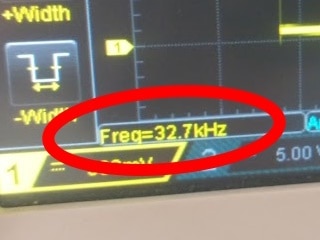
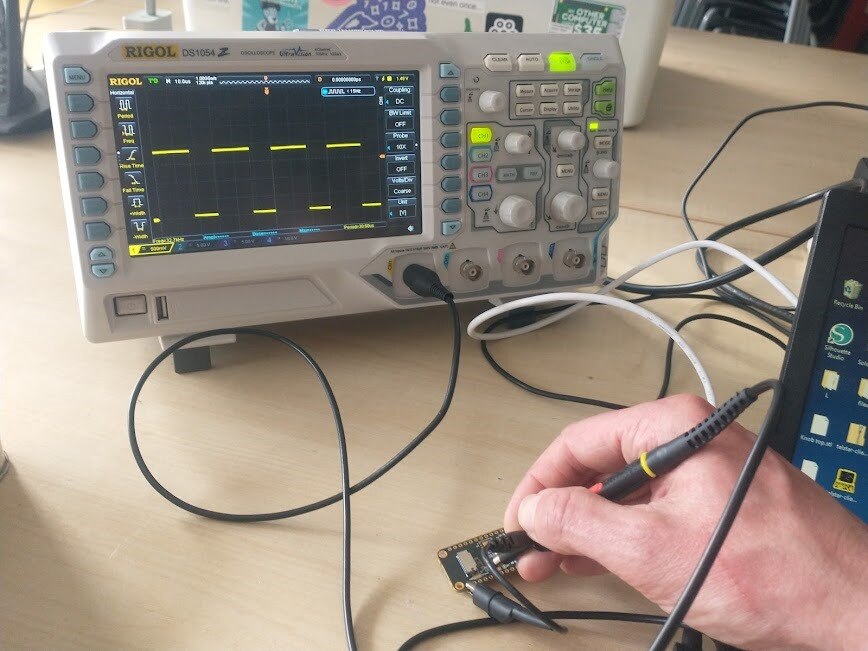
    Good news. It looks like the 32KHz signal is getting through.

    image

    image

    It starts off slightly slow for a few moments and then jumps to the correct frequency. This seems a little odd, and my best guess is that it starts off using an internal oscillator before activating the external crystal. Either way it should not break anything and all is good.

    The bad news is there are so many more things to check. My next call will be checking documentation relating to UART0 and comparing the registers to the functional UART1. I guess after that I will dig in to the Mbed libraries and look for things I may have missed. I am convinced it is something simple that I am missing.  

    • Cancel
    • Vote Up 0 Vote Down
    • Sign in to reply
    • Cancel
  • skruglewicz
    skruglewicz 1 month ago

    Hi Alistair 

    I’m sorry to hear that your having problems. I’ve never used maximum boards, so I have no idea how to help.

    im a bit discouraged that arm mbed is being end of lived. 
    Can I ask you to describe the dev env you have chosen if any?

    ide and version, language. Debugger etc.

    fedex just delivered the kit today

    • Cancel
    • Vote Up 0 Vote Down
    • Sign in to reply
    • Cancel
  • Alistair
    Alistair 1 month ago in reply to skruglewicz

    I have decided to go with the Arduino IDE and core for this project. It is a fun project that I want to be accessible to and modifiable by everyone, so it was an obvious call really. The only negative point is that I would need to reimplement some base functionality that is currently mbed only, but if we are loosing mbed then that needs to happen whatever. It could be that the legacy of this project is the porting of the Bluetooth functionality for the MAX32630FTHR to Arduino, and I ma happy with that. They are good little modules and it would be a shame for them to die when mbed goes.

    As for the setup details, I was going to do a post on that including the Bluetooth, and after I had got round to properly documenting my project, but I might knock up a quick set of instruction if it helps others now. The trouble always is the development is fun, and the documentation is not. 

    • Cancel
    • Vote Up +1 Vote Down
    • Sign in to reply
    • Cancel
  • Alistair
    Alistair 1 month ago

    I think I have it working. There were a number of things that I will document later (honest ;-) ). The summary version is that UART0 was not enabled so neds turning on, P1.7 need a 32KHx signal mapping to it, the Arduino core UART initialisation turns off the RTS and CTS functionality so it needs turning back on after setup, and the RX and TX pins are inverted. The latter is one that was a guess but an easy check and paid off. So, show stopper over. Phew.

    • Cancel
    • Vote Up +1 Vote Down
    • Sign in to reply
    • Cancel
  • BigG
    BigG 1 month ago in reply to Alistair

    Well done figuring all that out. You've made a solid choice going with Arduino as with Mbed I think you have to use an older version (like 5.10) to use the Bluetooth on this board rather than mbed 6.x.

    • Cancel
    • Vote Up +1 Vote Down
    • Sign in to reply
    • Cancel
  • Alistair
    Alistair 1 month ago in reply to skruglewicz

    I have just rushed a post with the details in. I will do a deeper dive in to the lower level stuff when I post about the Bluetooth work. community.element14.com/.../programming-the-max32630fthr-with-the-arduino-ide

    • Cancel
    • Vote Up +2 Vote Down
    • Sign in to reply
    • Cancel
  • skruglewicz
    skruglewicz 1 month ago in reply to Alistair

    thanks Alistair 

    The mbed compatibility is a bit over my head at the moment. But I will keep this in mind when and if I decide to use BLE in my project..
    Thanks for your feedback on my question

    Steve K

    • Cancel
    • Vote Up 0 Vote Down
    • Sign in to reply
    • Cancel
  • skruglewicz
    skruglewicz 1 month ago in reply to Alistair

    Thanks...I'll keep this info handy when I experient with BLE.

    • Cancel
    • Vote Up 0 Vote Down
    • Sign in to reply
    • Cancel
>
element14 Community

element14 is the first online community specifically for engineers. Connect with your peers and get expert answers to your questions.

  • Members
  • Learn
  • Technologies
  • Challenges & Projects
  • Products
  • Store
  • About Us
  • Feedback & Support
  • FAQs
  • Terms of Use
  • Privacy Policy
  • Legal and Copyright Notices
  • Sitemap
  • Cookies

An Avnet Company © 2026 Premier Farnell Limited. All Rights Reserved.

Premier Farnell Ltd, registered in England and Wales (no 00876412), registered office: Farnell House, Forge Lane, Leeds LS12 2NE.

ICP 备案号 10220084.

Follow element14

  • X
  • Facebook
  • linkedin
  • YouTube