


Guardian Sentinel — Ethernet & BLE
<Part 3>
In the previous post we have seen about how to program the MAX32630FTHR and the OLED. In this post we shall see how to configure the ethernet and the BLE.
Ethernet
Since we are using the ethernet FeatherWing, there is onboard RJ45 connector with controller. The image below shows the details of the device.
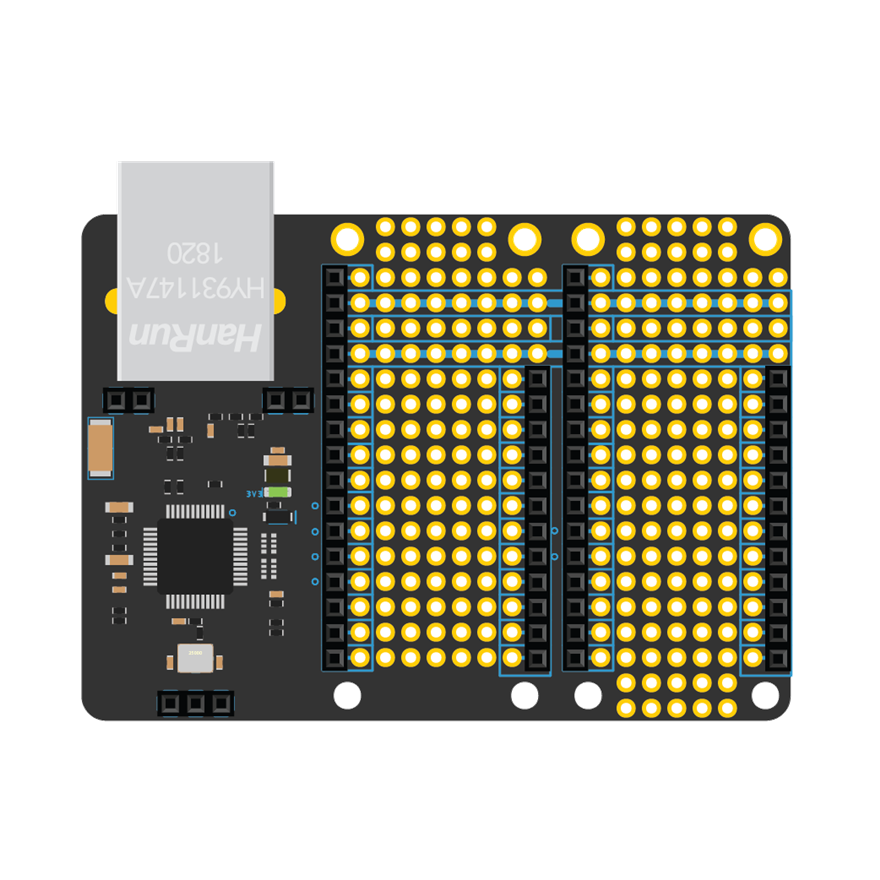 The board is based one the WIZnet5500 and take the form factor of the Adafruit FeatherWing Tripler. It can support
- 10BaseT/100BaseTX Ethernet
- Support Auto Negotiation (Full and half duplex, for both 10BaseT and 100BaseTX)
In order to test the ethernet connectivity i have use the following code. And the serial output shows the output. I have also configure the OLED to show the output as well.
#include <SPI.h>
#include <Ethernet.h>

#define STATUS_LED LED_BUILTIN

#define ETH_CS    44
#define ETH_RESET 46

byte mac[] = { 0xDE, 0xAD, 0xBE, 0xEF, 0x32, 0x30 };

void resetEthernet() {
  pinMode(ETH_RESET, OUTPUT);

  digitalWrite(ETH_RESET, HIGH);
  delay(100);

  digitalWrite(ETH_RESET, LOW);
  delay(300);

  digitalWrite(ETH_RESET, HIGH);
  delay(1000);
}

void setup() {
  pinMode(STATUS_LED, OUTPUT);

  Serial.begin(9600);
  delay(3000);

  Serial.println();
  Serial.println("==============================");
  Serial.println("MAX32630FTHR + Particle Ethernet");
  Serial.println("==============================");

  SPI.begin();

  resetEthernet();

  Ethernet.init(ETH_CS);

  Serial.println("Starting DHCP...");

  if (Ethernet.begin(mac) == 0) {
    Serial.println("DHCP failed.");
    while (true) {
      digitalWrite(STATUS_LED, HIGH);
      delay(300);
      digitalWrite(STATUS_LED, LOW);
      delay(300);
    }
  }

  Serial.println("DHCP successful!");
  Serial.print("Local IP: ");
  Serial.println(Ethernet.localIP());

  Serial.print("Subnet: ");
  Serial.println(Ethernet.subnetMask());

  Serial.print("Gateway: ");
  Serial.println(Ethernet.gatewayIP());

  Serial.print("DNS: ");
  Serial.println(Ethernet.dnsServerIP());
}

void loop() {
  Ethernet.maintain();

  Serial.print("Running. IP: ");
  Serial.println(Ethernet.localIP());

  digitalWrite(STATUS_LED, !digitalRead(STATUS_LED));
  delay(3000);
}
The library used is the Ethernet.h. And below is the serial output.
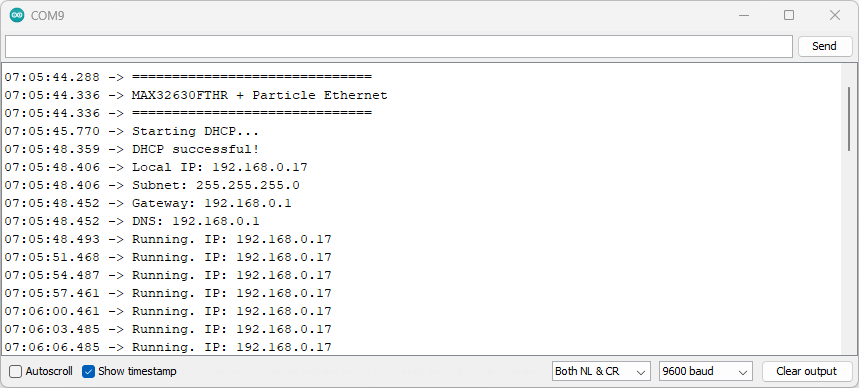
And i have tried to show the status update of the ethernet on the OLED as well

Next lets configure the BLE
BLE
Initially i found that, most of the resources are using the Mbed OS to setup the BLE. After researching and also the sharing from other participant, below is the code that i am using to check the BLE.
#include <pwrseq_regs.h>
#include <pwrman_regs.h>
#include <Wire.h>
#include <Adafruit_GFX.h>
#include <Adafruit_SSD1306.h>

// -------------------- Bluetooth Settings --------------------
#define BT_SERIAL Serial0
#define BT_RST    P1_6

// -------------------- OLED Settings --------------------
#define SCREEN_WIDTH 128
#define SCREEN_HEIGHT 32
#define OLED_RESET -1
#define OLED_ADDR 0x3C

Adafruit_SSD1306 display(SCREEN_WIDTH, SCREEN_HEIGHT, &Wire, OLED_RESET);
bool oledOK = false;

// -------------------- HCI Commands --------------------
const byte HCI_RESET_CMD[] = {
  0x01, 0x03, 0x0C, 0x00
};

const byte HCI_READ_BD_ADDR[] = {
  0x01, 0x09, 0x10, 0x00
};

const byte HCI_LE_READ_LOCAL_SUPPORTED_FEATURES[] = {
  0x01, 0x03, 0x20, 0x00
};

// -------------------- Helper Functions --------------------
void showOLED(String line1, String line2, String line3 = "", String line4 = "") {
  if (!oledOK) return;

  display.clearDisplay();
  display.setTextSize(1);
  display.setTextColor(SSD1306_WHITE);

  display.setCursor(0, 0);
  display.println(line1);

  display.setCursor(0, 8);
  display.println(line2);

  display.setCursor(0, 16);
  display.println(line3);

  display.setCursor(0, 24);
  display.println(line4);

  display.display();
}

void setupOLED() {
  Wire.begin();

  if (!display.begin(SSD1306_SWITCHCAPVCC, OLED_ADDR)) {
    Serial.println("OLED not detected.");
    oledOK = false;
    return;
  }

  oledOK = true;
  showOLED("MAX32630FTHR", "OLED Started", "BLE Detect Test");
  delay(1500);
}

void printHexByte(byte b) {
  if (b < 0x10) Serial.print("0");
  Serial.print(b, HEX);
  Serial.print(" ");
}

void clearBTBuffer() {
  while (BT_SERIAL.available()) {
    BT_SERIAL.read();
  }
}

void configureBluetoothUART() {
  // Enable 32.768 kHz oscillator output on P1.7
  MXC_PWRSEQ->reg4 |= MXC_F_PWRSEQ_REG4_PWR_PSEQ_32K_EN;

  // Start HCI UART
  BT_SERIAL.begin(115200);

  // Swap RX/TX lines and enable CTS/RTS
  MXC_IOMAN->uart0_req |= MXC_F_IOMAN_UART0_REQ_CTS_IO_REQ |
                          MXC_F_IOMAN_UART0_REQ_RTS_IO_REQ |
                          MXC_F_IOMAN_UART0_REQ_IO_MAP;
}

void hardwareResetBT() {
  pinMode(BT_RST, OUTPUT);

  digitalWrite(BT_RST, LOW);
  delay(1000);

  digitalWrite(BT_RST, HIGH);
  delay(3000);

  clearBTBuffer();
}

bool readHCIResponse(byte *buffer, int &length, unsigned long timeoutMs) {
  length = 0;
  unsigned long startTime = millis();

  while (millis() - startTime < timeoutMs) {
    while (BT_SERIAL.available()) {
      byte data = BT_SERIAL.read();

      if (length < 64) {
        buffer[length++] = data;
      }
    }
  }

  return length > 0;
}

bool sendHCICommand(const byte *cmd, int cmdLen, const char *label, byte *response, int &responseLen) {
  Serial.println();
  Serial.print("Sending: ");
  Serial.println(label);

  clearBTBuffer();

  BT_SERIAL.write(cmd, cmdLen);

  bool gotResponse = readHCIResponse(response, responseLen, 2500);

  Serial.print("Response: ");

  if (!gotResponse) {
    Serial.println("No response");
    return false;
  }

  for (int i = 0; i < responseLen; i++) {
    printHexByte(response[i]);
  }

  Serial.println();

  return true;
}

bool checkStatusOK(byte *response, int responseLen) {
  // HCI Command Complete format:
  // 04 0E XX 01 OP_LSB OP_MSB STATUS ...
  if (responseLen >= 7 && response[0] == 0x04 && response[1] == 0x0E) {
    return response[6] == 0x00;
  }

  return false;
}

String extractBDADDR(byte *response, int responseLen) {
  // Read BD_ADDR response:
  // 04 0E 0A 01 09 10 00 XX XX XX XX XX XX
  // Address is returned LSB first
  if (responseLen >= 13 && response[6] == 0x00) {
    String addr = "";

    for (int i = 12; i >= 7; i--) {
      if (response[i] < 0x10) addr += "0";
      addr += String(response[i], HEX);

      if (i > 7) addr += ":";
    }

    addr.toUpperCase();
    return addr;
  }

  return "Unknown";
}

void setup() {
  Serial.begin(115200);
  delay(3000);

  Serial.println();
  Serial.println("MAX32630FTHR BLE Module Detection Test");
  Serial.println("--------------------------------------");

  setupOLED();
  showOLED("BLE Test", "Starting...");

  configureBluetoothUART();

  bool detected = false;
  String btAddress = "Unknown";

  for (int attempt = 1; attempt <= 5; attempt++) {
    Serial.println();
    Serial.print("BLE detection attempt ");
    Serial.println(attempt);

    showOLED("BLE Detect", "Attempt " + String(attempt), "Resetting module");

    hardwareResetBT();

    byte response[64];
    int responseLen = 0;

    bool resetOK = sendHCICommand(
      HCI_RESET_CMD,
      sizeof(HCI_RESET_CMD),
      "HCI Reset",
      response,
      responseLen
    );

    if (resetOK && checkStatusOK(response, responseLen)) {
      Serial.println("HCI Reset: OK");
      showOLED("BLE Module", "HCI Reset OK", "Reading address");

      bool addrOK = sendHCICommand(
        HCI_READ_BD_ADDR,
        sizeof(HCI_READ_BD_ADDR),
        "Read BD_ADDR",
        response,
        responseLen
      );

      if (addrOK && checkStatusOK(response, responseLen)) {
        btAddress = extractBDADDR(response, responseLen);
        Serial.print("Bluetooth Address: ");
        Serial.println(btAddress);

        bool leOK = sendHCICommand(
          HCI_LE_READ_LOCAL_SUPPORTED_FEATURES,
          sizeof(HCI_LE_READ_LOCAL_SUPPORTED_FEATURES),
          "LE Read Local Supported Features",
          response,
          responseLen
        );

        if (leOK && checkStatusOK(response, responseLen)) {
          Serial.println("LE Feature Check: OK");
          detected = true;
          break;
        }
      }
    }

    Serial.println("BLE module not ready. Retrying...");
    delay(1000);
  }

  Serial.println();

  if (detected) {
    Serial.println("BLE MODULE DETECTED SUCCESSFULLY");
    Serial.print("BD_ADDR: ");
    Serial.println(btAddress);

    showOLED(
      "BLE: Detected",
      "HCI: OK",
      btAddress,
      "LE Feature: OK"
    );
  } else {
    Serial.println("BLE MODULE NOT DETECTED");

    showOLED(
      "BLE: Not Found",
      "Check reset/UART",
      "Try board reset"
    );
  }
}

void loop() {
  // Nothing needed. The result remains on OLED.
}
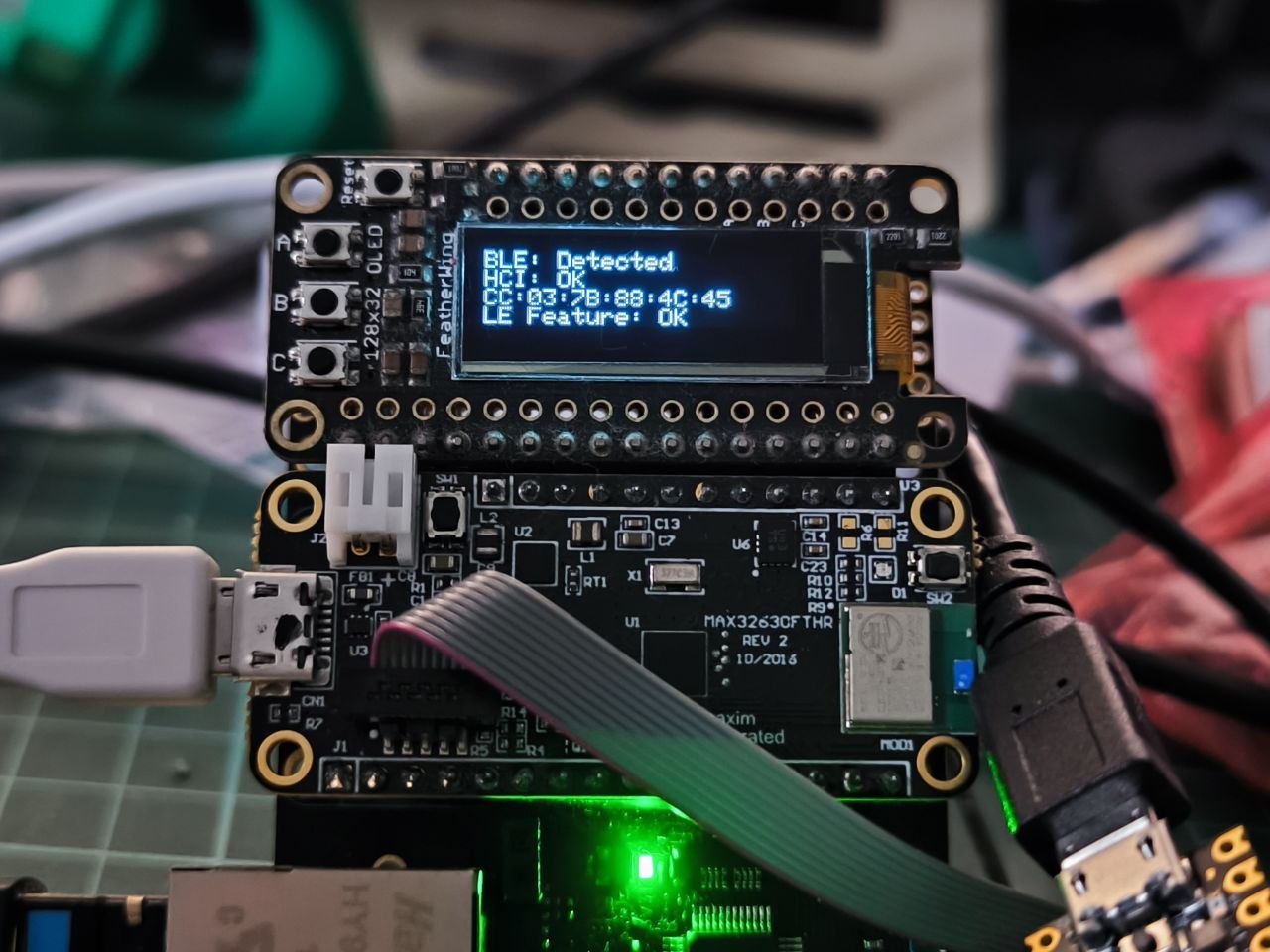
And we can monitor the status on oled. The image below shows the status of the BLE on the OLED.
Now the MASTER is ready. We can now prepare the SLAVE.


