


Just when you thought I was finished, here I am again. I was not planning to create a “how to” for this and only include it in the setup notes, but it has ballooned a little and is useful beyond the project so I thought I would post it here instead.
As part of my build I need to activate a 3rd party alarm system. For me personally I could use an unofficial API, but that can break overnight and is only of use to someone with the same system as me. Not to mention that when I upgrade to a better system I will need to rewrite that part of the project. With that in mind I decided to take the unusual step of using Amazon’s Alexa. At first it may seem odd, but let me explain.
There are many connected alarm systems, some with official APIs that allow integration with other systems (like what I am producing here), many more with unofficial APIs that are for internal use but someone has backwards engineered them, and some with no API at all. All the APIs are different and a separate integration would need to be created for each. However many systems have a form of Alexa integration that allows them to be armed using voice. This also allows Alexa routines (a routine being basic “if this happens then do that” feature within the Alexa ecosystem) to do the same when a button is pressed. All we need to do is to simulate a button being pressed and then we can arm the alarm automatically using their official integration from our code.
While we could hack a hardware smart button such as an Echo button or Alexa compatible door bell, it is neater to create a virtual button and trigger it across the network. A few services already exist to do this and my preferred option is the URL Routine Trigger skill from Virtual Mart Home.
You will need an Amazon account and the Alexa app installed to set up and configure things, but you do not need any Alexa hardware and you don’t need to pay any subscription.
So once we have an Amazon account with the Alexa app installed, and you have linked your alarm system to it (normally through an option in your alarm’s app), we can create that virtual button and modify an Alexa routine to activate the alarm.
To start go to www.virtualsmarthome.xyz/.../, click the “Login with Amazon” button, and follow the instructions. You will then see a screen like this…
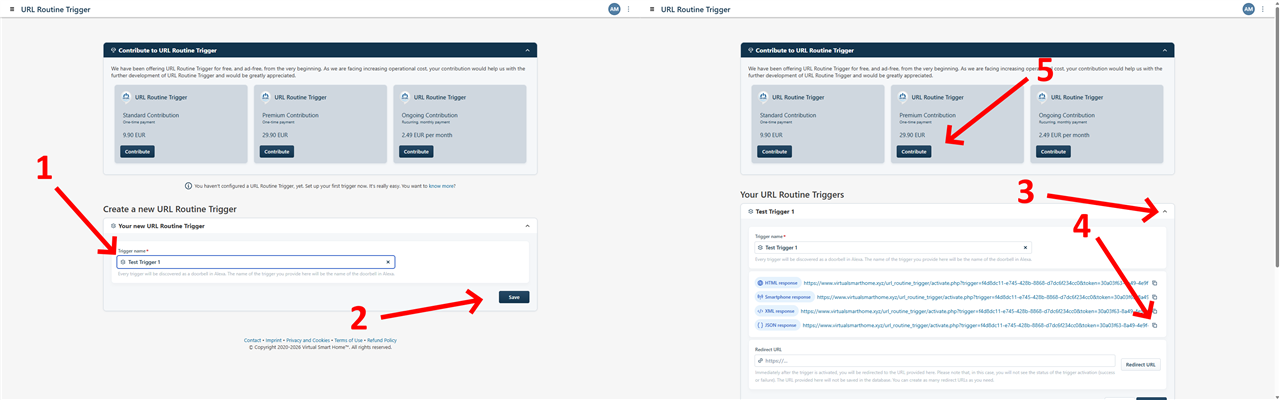
Now (1) enter a name for the virtual button (this can be anything) and (2) click Save. Once created click the down arrow (3) to show the URL information we need, and (4) copy the URL we need to trigger the button and keep it safe. It does not matter which of the URLs you copy as we will not be reading the returned data. Finally consider donating to this service (5) as it exists because of the generosity of the author. If you find yourself using it then do consider making a donation to support it.
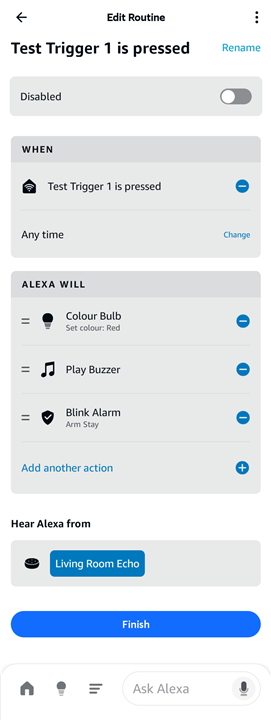
After all that, open the Alexa App, click the “hamburger” button at the bottom, click Routines, and you should find a sample routine that has been created mirroring the name of the virtual button name you entered before. You can then add actions to do by clicking the “+” next to the very descriptive “Add another action” text. Arming an alarm is normally under Smart Home and Security Panels, but that depends on your exact alarm setup.
Finally the URL that was noted down needs adding to the configuration at the top of the source code.
That is it. I hope to have the final writeup posed later today.