element14 Community
element14 Community
    Register Log In
  • Site
  • Search
  • Log In Register
  • Community Hub
    Community Hub
    • What's New on element14
    • Feedback and Support
    • Benefits of Membership
    • Personal Blogs
    • Members Area
    • Achievement Levels
  • Learn
    Learn
    • Ask an Expert
    • eBooks
    • element14 presents
    • Learning Center
    • Tech Spotlight
    • STEM Academy
    • Webinars, Training and Events
    • Learning Groups
  • Technologies
    Technologies
    • 3D Printing
    • FPGA
    • Industrial Automation
    • Internet of Things
    • Power & Energy
    • Sensors
    • Technology Groups
  • Challenges & Projects
    Challenges & Projects
    • Design Challenges
    • element14 presents Projects
    • Project14
    • Arduino Projects
    • Raspberry Pi Projects
    • Project Groups
  • Products
    Products
    • Arduino
    • Avnet & Tria Boards Community
    • Dev Tools
    • Manufacturers
    • Multicomp Pro
    • Product Groups
    • Raspberry Pi
    • RoadTests & Reviews
  • About Us
  • Store
    Store
    • Visit Your Store
    • Choose another store...
      • Europe
      •  Austria (German)
      •  Belgium (Dutch, French)
      •  Bulgaria (Bulgarian)
      •  Czech Republic (Czech)
      •  Denmark (Danish)
      •  Estonia (Estonian)
      •  Finland (Finnish)
      •  France (French)
      •  Germany (German)
      •  Hungary (Hungarian)
      •  Ireland
      •  Israel
      •  Italy (Italian)
      •  Latvia (Latvian)
      •  
      •  Lithuania (Lithuanian)
      •  Netherlands (Dutch)
      •  Norway (Norwegian)
      •  Poland (Polish)
      •  Portugal (Portuguese)
      •  Romania (Romanian)
      •  Russia (Russian)
      •  Slovakia (Slovak)
      •  Slovenia (Slovenian)
      •  Spain (Spanish)
      •  Sweden (Swedish)
      •  Switzerland(German, French)
      •  Turkey (Turkish)
      •  United Kingdom
      • Asia Pacific
      •  Australia
      •  China
      •  Hong Kong
      •  India
      • Japan
      •  Korea (Korean)
      •  Malaysia
      •  New Zealand
      •  Philippines
      •  Singapore
      •  Taiwan
      •  Thailand (Thai)
      • Vietnam
      • Americas
      •  Brazil (Portuguese)
      •  Canada
      •  Mexico (Spanish)
      •  United States
      Can't find the country/region you're looking for? Visit our export site or find a local distributor.
  • Translate
  • Profile
  • Settings
Smart Spaces Design Challenge
  • Challenges & Projects
  • Design Challenges
  • Smart Spaces Design Challenge
  • More
  • Cancel
Smart Spaces Design Challenge
Forum DDS Elevator - Enabling LPUART in N236 board for Serial communication
  • Forum
  • Projects
  • DC
  • Leaderboard
  • Files
  • Members
  • More
  • Cancel
  • New
Join Smart Spaces Design Challenge to participate - click to join for free!
Actions
  • Share
  • More
  • Cancel
Forum Thread Details
  • Replies 3 replies
  • Subscribers 40 subscribers
  • Views 144 views
  • Users 0 members are here
  • NXP FRDM MCX N
  • FRDM-MCXN236
  • MCXN236
Related

DDS Elevator - Enabling LPUART in N236 board for Serial communication

balajivan1995
balajivan1995 19 days ago

Table of Contents

  • Introduction
  • Pin Configuration
  • Clock
  • Peripheral
  • Transfer Method
  • Callback
  • Modifying Driver code
  • Configuring Read Non-blocking function
  • Output
  • Conclusion

Introduction

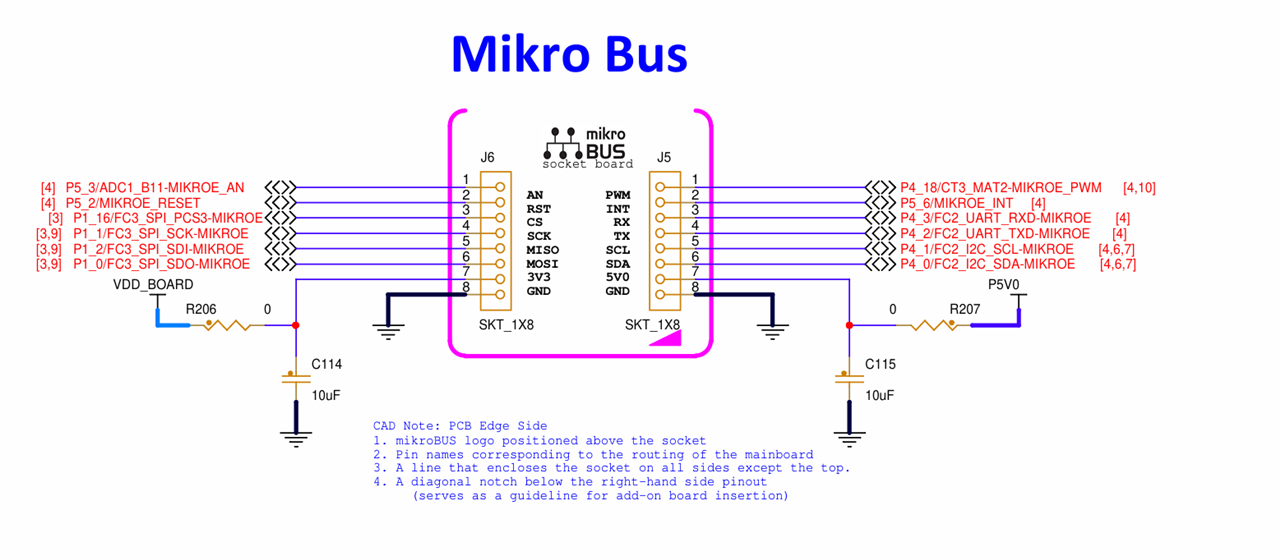
Since configuring UART is slightly complex and there is no proper tutorial on how to configure multiple UART to use and receive in a non-blocking manner, I have decided to write this blog to help others who might be in need of this. For this example, we will enable the default UART and the UART pins connected in the Micro Bus extension.
image

Pin Configuration

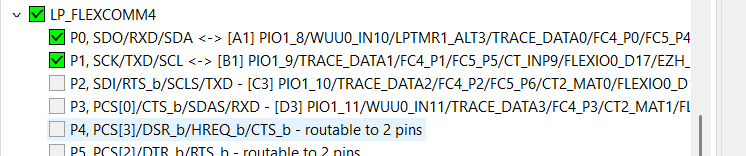
Peripheral Rx Pins Tx Pins
Default P1_8 P1_9
MicroBus P4_2 P4_3

image

image 

Clock

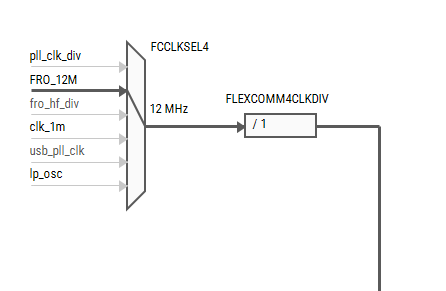
We will use 12Mhz clock for both FC2 and FC4. From the clock page, activate clocks for both FlexComm peripherals.

 image

image

image

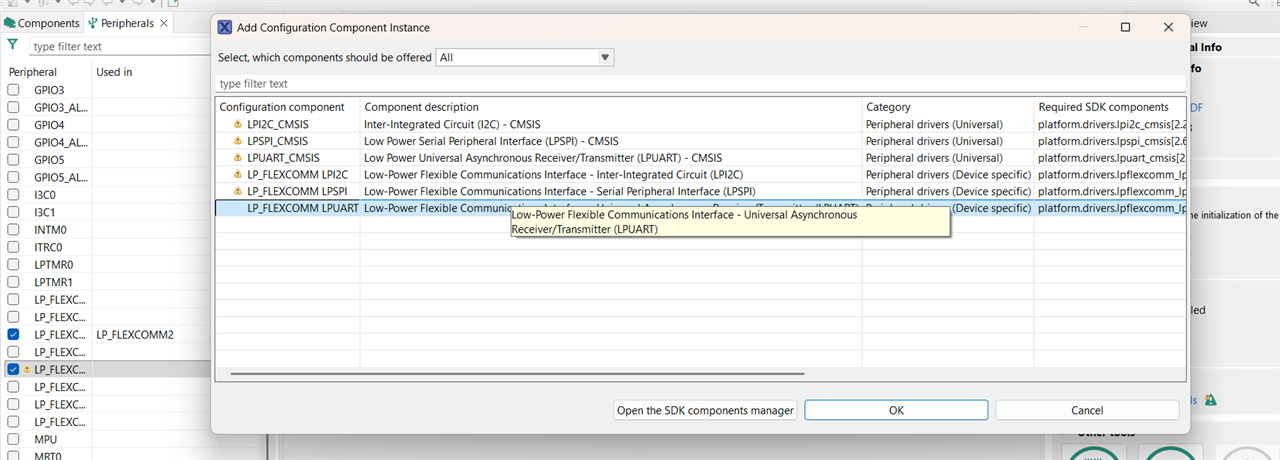
Peripheral

We are not going to use DMA or RTOS, we will use the basic Device specific driver for this.
 image

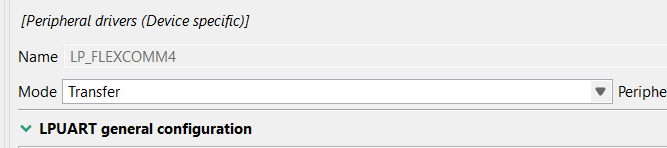
Transfer Method

Instead of polling method, we will use transfer method which is versatile and can be used either in blocking mode or as non-blocking mode.
image

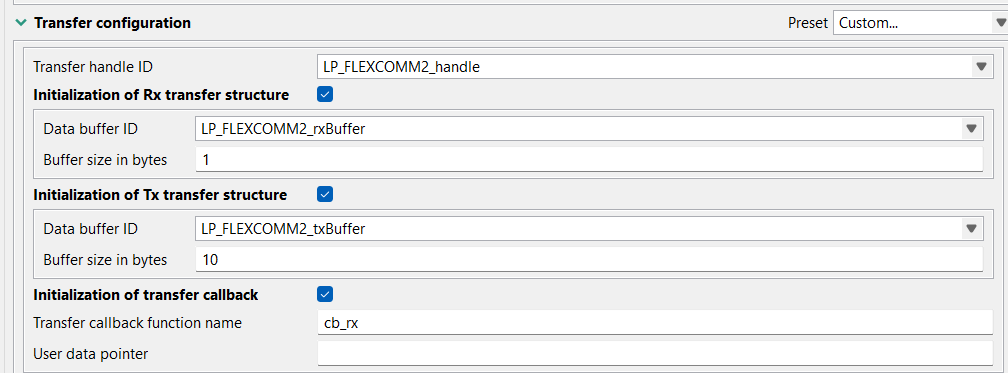
We can capture more bytes at a same time, but it’s hard to know the amount of received data. Let’s say for example, we want to receive 10 bytes as default, and we receive only 5 bytes, the rx buffer will receive the minimum of both size which is 5 bytes, but we won’t know this detail when call back is triggered. So, for this example, we will receive one byte at a time.
image

Callback

Unless we configure the callback, we will have to rely on the return statement of 

LPUART_TransferReceiveNonBlocking
 function which is not reliable in knowing how many bytes we have in our buffer. Lets enable the callback and give the name as "cb_rx".

image

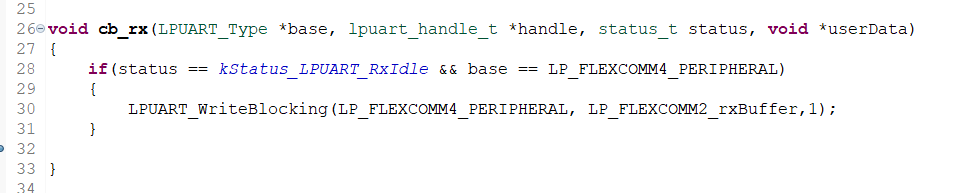
These are the configurations we need to get UART receive in non-blocking mode. Now select "Generate Code". Once the code is generated, try to build the application. It will throw error as we have not defined what our callback function does.
image

void cb_rx(LPUART_Type *base, lpuart_handle_t *handle, status_t status, void *userData)
{
	if(status == kStatus_LPUART_RxIdle && base == LP_FLEXCOMM4_PERIPHERAL)
	{
		LPUART_WriteBlocking(LP_FLEXCOMM4_PERIPHERAL, LP_FLEXCOMM2_rxBuffer,1);
	}
}

Add this code in main c file. Now the build will succeed. What we are trying to do is, on receiving the callback, we will print the first character stored in our receive buffer using default UART.

Modifying Driver code

Since we are using I2C pins which can be configured as Rx/Tx pins of FC2, we need to ensure the UART is properly initialized. Unfortunately, the driver code automatically doesn't take care of this, and we need to make some manual changes in the fsl_lpuart.c in the LPUART_Init function.

    	if(base==(LPUART_Type *) LP_FLEXCOMM2_BASE)
    	{
    		status = LP_FLEXCOMM_Init(LPUART_GetInstance(base), LP_FLEXCOMM_PERIPH_LPI2CAndLPUART);
    	}
    	else
    	{
    		status = LP_FLEXCOMM_Init(LPUART_GetInstance(base), LP_FLEXCOMM_PERIPH_LPUART);
    	}

Configuring Read Non-blocking function

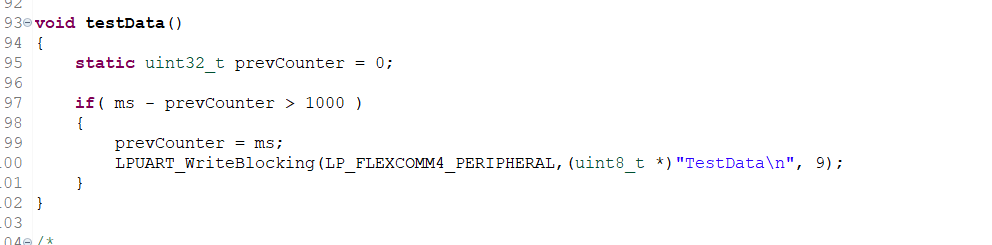
For this example, we will connect the Tx of FC2 to Rx of FC2 so we will verify the working by using this loopback setup. We will transmit test data every 1s and check whether we are receiving the same.

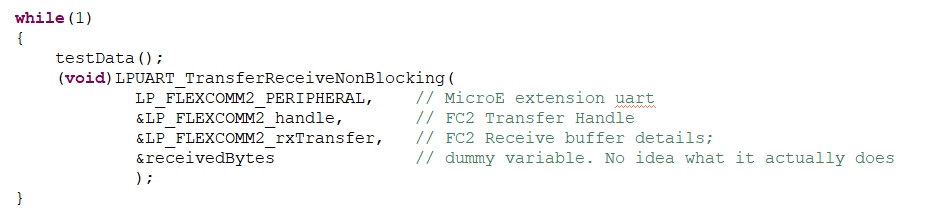
To get the callback the read non-blocking repeatedly.
image

void testData()
{
	static uint32_t prevCounter = 0;

	if( ms - prevCounter > 1000 )
	{
		prevCounter = ms;
		LPUART_WriteBlocking(LP_FLEXCOMM4_PERIPHERAL,(uint8_t *)"TestData\n", 9);
	}
}
image

    while(1)
    {
    	testData();
    	(void)LPUART_TransferReceiveNonBlocking(
    			LP_FLEXCOMM2_PERIPHERAL, 	// MicroE extension uart
				&LP_FLEXCOMM2_handle,		// FC2 Transfer Handle
				&LP_FLEXCOMM2_rxTransfer,	// FC2 Receive buffer details;
				&receivedBytes				// dummy variable. No idea what it actually does
				);
    }

Output

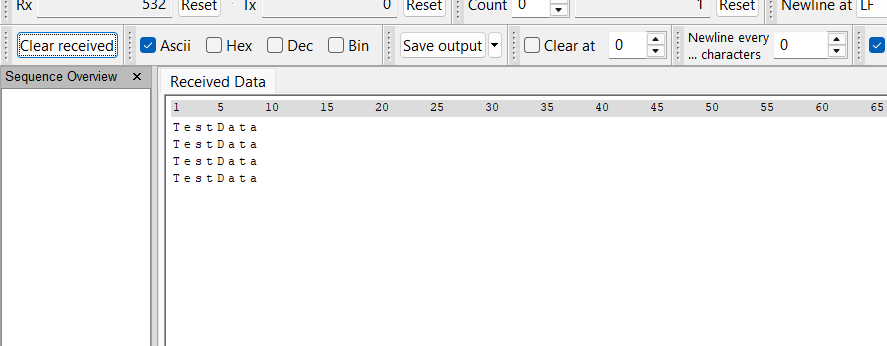
Now, build and flash the firmware in the N236 board. Open the serial terminal and we will see "TestData" printed every one second.
image

Conclusion

Although this is not in my intended list of forum post, I want to keep this process documented so that it will be useful for anyone who is facing the same issue.

  • Sign in to reply
  • Cancel

Top Replies

  • balajivan1995
    balajivan1995 19 days ago +1
    yamanoorsai skruglewicz This might be a little too late, but I hope this blog is useful for both of you.
  • balajivan1995
    balajivan1995 19 days ago

    yamanoorsai  skruglewicz 
    This might be a little too late, but I hope this blog is useful for both of you.

    • Cancel
    • Vote Up +1 Vote Down
    • Sign in to reply
    • Cancel
  • skruglewicz
    skruglewicz 19 days ago in reply to balajivan1995

    Thanks looks good but I still cannot get my board n237 to debug port

    • Cancel
    • Vote Up 0 Vote Down
    • Sign in to reply
    • Cancel
  • balajivan1995
    balajivan1995 18 days ago in reply to skruglewicz

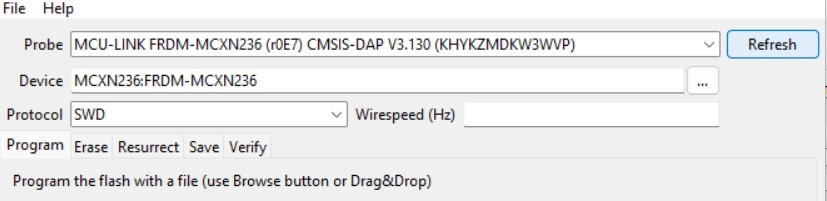
    Maybe try to reset the configuration on LinkFlash 
    image

    then connect your device and press refresh

    image

    Then flash your firmware?

    • Cancel
    • Vote Up 0 Vote Down
    • Sign in to reply
    • Cancel
element14 Community

element14 is the first online community specifically for engineers. Connect with your peers and get expert answers to your questions.

  • Members
  • Learn
  • Technologies
  • Challenges & Projects
  • Products
  • Store
  • About Us
  • Feedback & Support
  • FAQs
  • Terms of Use
  • Privacy Policy
  • Legal and Copyright Notices
  • Sitemap
  • Cookies

An Avnet Company © 2025 Premier Farnell Limited. All Rights Reserved.

Premier Farnell Ltd, registered in England and Wales (no 00876412), registered office: Farnell House, Forge Lane, Leeds LS12 2NE.

ICP 备案号 10220084.

Follow element14

  • X
  • Facebook
  • linkedin
  • YouTube