element14 Community
element14 Community
    Register Log In
  • Site
  • Search
  • Log In Register
  • Community Hub
    Community Hub
    • What's New on element14
    • Feedback and Support
    • Benefits of Membership
    • Personal Blogs
    • Members Area
    • Achievement Levels
  • Learn
    Learn
    • Ask an Expert
    • eBooks
    • element14 presents
    • Learning Center
    • Tech Spotlight
    • STEM Academy
    • Webinars, Training and Events
    • Learning Groups
  • Technologies
    Technologies
    • 3D Printing
    • FPGA
    • Industrial Automation
    • Internet of Things
    • Power & Energy
    • Sensors
    • Technology Groups
  • Challenges & Projects
    Challenges & Projects
    • Design Challenges
    • element14 presents Projects
    • Project14
    • Arduino Projects
    • Raspberry Pi Projects
    • Project Groups
  • Products
    Products
    • Arduino
    • Avnet & Tria Boards Community
    • Dev Tools
    • Manufacturers
    • Multicomp Pro
    • Product Groups
    • Raspberry Pi
    • RoadTests & Reviews
  • About Us
  • Store
    Store
    • Visit Your Store
    • Choose another store...
      • Europe
      •  Austria (German)
      •  Belgium (Dutch, French)
      •  Bulgaria (Bulgarian)
      •  Czech Republic (Czech)
      •  Denmark (Danish)
      •  Estonia (Estonian)
      •  Finland (Finnish)
      •  France (French)
      •  Germany (German)
      •  Hungary (Hungarian)
      •  Ireland
      •  Israel
      •  Italy (Italian)
      •  Latvia (Latvian)
      •  
      •  Lithuania (Lithuanian)
      •  Netherlands (Dutch)
      •  Norway (Norwegian)
      •  Poland (Polish)
      •  Portugal (Portuguese)
      •  Romania (Romanian)
      •  Russia (Russian)
      •  Slovakia (Slovak)
      •  Slovenia (Slovenian)
      •  Spain (Spanish)
      •  Sweden (Swedish)
      •  Switzerland(German, French)
      •  Turkey (Turkish)
      •  United Kingdom
      • Asia Pacific
      •  Australia
      •  China
      •  Hong Kong
      •  India
      •  Korea (Korean)
      •  Malaysia
      •  New Zealand
      •  Philippines
      •  Singapore
      •  Taiwan
      •  Thailand (Thai)
      • Americas
      •  Brazil (Portuguese)
      •  Canada
      •  Mexico (Spanish)
      •  United States
      Can't find the country/region you're looking for? Visit our export site or find a local distributor.
  • Translate
  • Profile
  • Settings
Sudden Impact Wearables Design Challenge
  • Challenges & Projects
  • Design Challenges
  • Sudden Impact Wearables Design Challenge
  • More
  • Cancel
Sudden Impact Wearables Design Challenge
Blog SFH: Week 2 - The Build
  • Blog
  • Forum
  • Documents
  • Polls
  • Files
  • Events
  • Mentions
  • Sub-Groups
  • Tags
  • More
  • Cancel
  • New
  • Share
  • More
  • Cancel
Group Actions
  • Group RSS
  • More
  • Cancel
Engagement
  • Author Author: hawkeyethehacker
  • Date Created: 7 Dec 2014 1:38 PM Date Created
  • Views 510 views
  • Likes 0 likes
  • Comments 4 comments
  • safe_field_hockey
  • sudden_impact
Related
Recommended

SFH: Week 2 - The Build

hawkeyethehacker
hawkeyethehacker
7 Dec 2014

The Safe Field Hockey project is a compact and modular design that can be modified to fit all sizes of human (or other animal, if that's the kind of thing you do image), by simply removing and adding pieces. An example of this is the chest strap that holds the pack, which is located on the left of the body, above the hip.


I'll split the explanations of the system into two parts, the base and the uniform.


Base

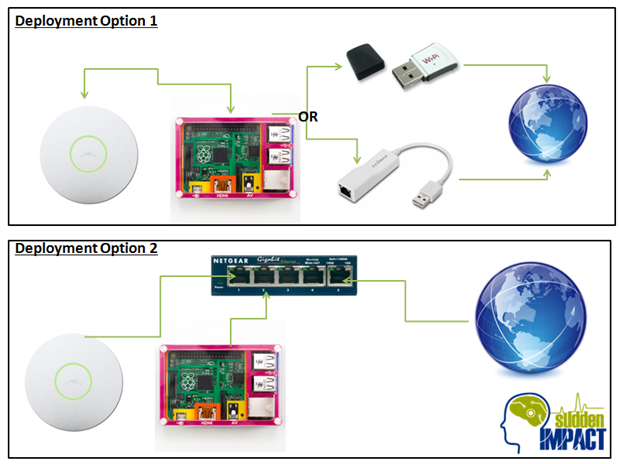
The overall composition of the Base unit depends on the school's or sport club's networking setup. In general, this is the basic outline:

  • Raspberry Pi Model B+
  • WiFi Access Point (Of appropriate range)
  • WiFi Adapter over USB (or USB Ethernet module) *
  • Ethernet Switch *


* These are optional. In a larger deployment the Pi and Access Point may be connected to either a dedicated switch for the system, or into the site's network backbone. If the school/club is limited to a single WiFi access point or Ethernet endpoint, however, the Pi may take an internet connection through a USB WiFi/Ethernet module, with the access point connected to the onboard Ethernet port.

image


While there is not much difference in the setup, it all boils down to a matter of preference. They both work exactly the same way. What should be noted is that in terms of expandability, going with Deployment Option 2 would be easier. The Raspberry Pi acts as an endpoint for the uniform and mobile app, so everything is unified onto one piece of hardware.

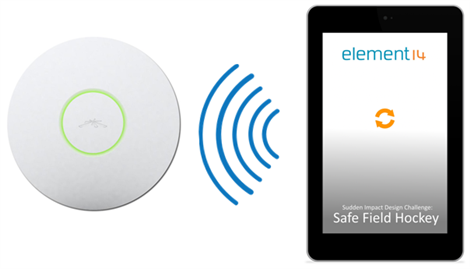
Where this system really shines through though, is the ease of use involved when initially setting up the system. The coach can connect his Android powered Phone/Tablet to the system's WiFi Access Point (which has a password to maintain security, mind you), and launch the SFH app. The app can detect what network it is connected to, and if it is indeed connected to the SFH AP, it will automatically pull the data from the system. No need to configure IP addresses or further usernames and passwords. Even if it is not on the AP, but rather another AP on the network (for example, a school's Bring Your Own Device platform), it can autosearch for the Pi on the network, and authenticate against it for external access. If all else fails - an IP address can be entered. Due to WebSockets being utilised on the app, however, Cellular connections are NOT supported, and if the app detects it is connected via a cellular service, it will not allow the user to connect. Addendum: The issue regarding WebSockets was a lack of research on my part. In general, however, most UK mobile providers will not support such a protocol, and is why I am not implementing cellular connections.
 

image

The app is designed in the simplistic Ionic Framework which is powered by AngularJS. Behind the Ionic platform is Apache Cordova, which should allow for future deployment to an iOS device. It is critical the app is simplistic, so the coach can reach the information he requires quickly and easily. Cordova helps open up the possibility for multiple platform support, with minimal adjustments.


Uniform


The Uniform is where things get exciting.
 

image

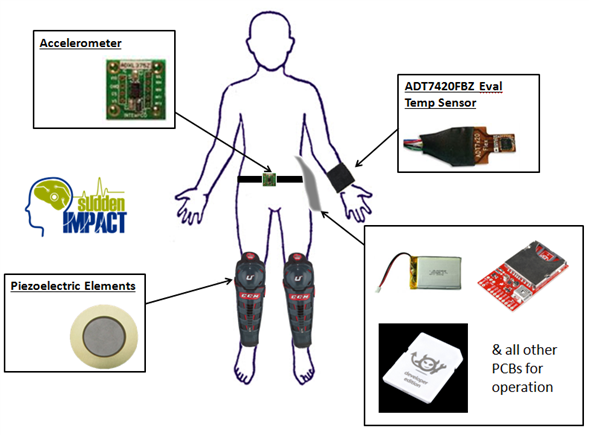
As shown above, various sensors and boards are placed in different areas of the body. The temperature sensor (ADT7420FBZ) is part of a sweatband that fits onto your wrist, Piezoelectric elements to measure impact are on the shinpads, and an accelerometer is attached to a strap which in turn holds a 3D Printed pack onto your side. This pack holds all measurement PCBs and..... Drumroll Please...


The mystery Breakout board and Chip is the Electric Imp!


The Electric Imp is an all in one package that is in the package of an SD card. It has WiFi built in and plenty of I/O, including Analogue, Digital, Serial and I2C.


All of the sensor output goes to the input of the Electric Imp, which in turn reads them, compiles the readings and sends them to a Node.JS web server on the Pi. The Pi in turn processes the data into a readable form for the app.


---


This was just a quick overview of what the project entails, and I will be going into more detail as time goes on. Thanks for reading!


EDIT: It has come to my attention that I missed the ECG system in the diagram above. Heart rate monitoring works over standard 3 probe electrodes on the chest.

  • Sign in to reply

Top Comments

  • tomaja
    tomaja over 10 years ago in reply to DAB +1
    I was looking for some info on that part too so I found the following: Electric imp developer site. Electric Imp April: Basic prototyping ID: 1130 - $12.50 : Adafruit Industries, Unique & fun DIY electronics…
  • DAB
    DAB over 10 years ago in reply to tomaja +1
    Thanks DAB
  • hawkeyethehacker
    hawkeyethehacker over 10 years ago in reply to tomaja +1
    These links are good, and SparkFun has some as well https://www.sparkfun.com/products/11395 https://www.sparkfun.com/products/12886 https://learn.sparkfun.com/tutorials/electric-imp-breakout-hookup-guide…
  • hawkeyethehacker
    hawkeyethehacker over 10 years ago in reply to tomaja

    These links are good, and SparkFun has some as well image


    https://www.sparkfun.com/products/11395

    https://www.sparkfun.com/products/12886

    https://learn.sparkfun.com/tutorials/electric-imp-breakout-hookup-guide/improduction?_ga=1.178914084.1661512687.14153967…

    • Cancel
    • Vote Up +1 Vote Down
    • Sign in to reply
    • More
    • Cancel
  • DAB
    DAB over 10 years ago in reply to tomaja

    Thanks

    DAB

    • Cancel
    • Vote Up +1 Vote Down
    • Sign in to reply
    • More
    • Cancel
  • tomaja
    tomaja over 10 years ago in reply to DAB

    I was looking for some info on that part too so I found the following:

    Electric imp developer site.

    Electric Imp April: Basic prototyping ID: 1130 - $12.50 : Adafruit Industries, Unique & fun DIY electronics and kits


    Dragan

    • Cancel
    • Vote Up +1 Vote Down
    • Sign in to reply
    • More
    • Cancel
  • DAB
    DAB over 10 years ago

    Interesting,


    Do you have a link to the Electric Imp site?


    DAB

    • Cancel
    • Vote Up 0 Vote Down
    • Sign in to reply
    • More
    • Cancel
element14 Community

element14 is the first online community specifically for engineers. Connect with your peers and get expert answers to your questions.

  • Members
  • Learn
  • Technologies
  • Challenges & Projects
  • Products
  • Store
  • About Us
  • Feedback & Support
  • FAQs
  • Terms of Use
  • Privacy Policy
  • Legal and Copyright Notices
  • Sitemap
  • Cookies

An Avnet Company © 2025 Premier Farnell Limited. All Rights Reserved.

Premier Farnell Ltd, registered in England and Wales (no 00876412), registered office: Farnell House, Forge Lane, Leeds LS12 2NE.

ICP 备案号 10220084.

Follow element14

  • X
  • Facebook
  • linkedin
  • YouTube