element14 Community
element14 Community
    Register Log In
  • Site
  • Search
  • Log In Register
  • Community Hub
    Community Hub
    • What's New on element14
    • Feedback and Support
    • Benefits of Membership
    • Personal Blogs
    • Members Area
    • Achievement Levels
  • Learn
    Learn
    • Ask an Expert
    • eBooks
    • element14 presents
    • Learning Center
    • Tech Spotlight
    • STEM Academy
    • Webinars, Training and Events
    • Learning Groups
  • Technologies
    Technologies
    • 3D Printing
    • FPGA
    • Industrial Automation
    • Internet of Things
    • Power & Energy
    • Sensors
    • Technology Groups
  • Challenges & Projects
    Challenges & Projects
    • Design Challenges
    • element14 presents Projects
    • Project14
    • Arduino Projects
    • Raspberry Pi Projects
    • Project Groups
  • Products
    Products
    • Arduino
    • Avnet & Tria Boards Community
    • Dev Tools
    • Manufacturers
    • Multicomp Pro
    • Product Groups
    • Raspberry Pi
    • RoadTests & Reviews
  • About Us
  • Store
    Store
    • Visit Your Store
    • Choose another store...
      • Europe
      •  Austria (German)
      •  Belgium (Dutch, French)
      •  Bulgaria (Bulgarian)
      •  Czech Republic (Czech)
      •  Denmark (Danish)
      •  Estonia (Estonian)
      •  Finland (Finnish)
      •  France (French)
      •  Germany (German)
      •  Hungary (Hungarian)
      •  Ireland
      •  Israel
      •  Italy (Italian)
      •  Latvia (Latvian)
      •  
      •  Lithuania (Lithuanian)
      •  Netherlands (Dutch)
      •  Norway (Norwegian)
      •  Poland (Polish)
      •  Portugal (Portuguese)
      •  Romania (Romanian)
      •  Russia (Russian)
      •  Slovakia (Slovak)
      •  Slovenia (Slovenian)
      •  Spain (Spanish)
      •  Sweden (Swedish)
      •  Switzerland(German, French)
      •  Turkey (Turkish)
      •  United Kingdom
      • Asia Pacific
      •  Australia
      •  China
      •  Hong Kong
      •  India
      • Japan
      •  Korea (Korean)
      •  Malaysia
      •  New Zealand
      •  Philippines
      •  Singapore
      •  Taiwan
      •  Thailand (Thai)
      • Vietnam
      • Americas
      •  Brazil (Portuguese)
      •  Canada
      •  Mexico (Spanish)
      •  United States
      Can't find the country/region you're looking for? Visit our export site or find a local distributor.
  • Translate
  • Profile
  • Settings
Sudden Impact Wearables Design Challenge
  • Challenges & Projects
  • Design Challenges
  • Sudden Impact Wearables Design Challenge
  • More
  • Cancel
Sudden Impact Wearables Design Challenge
Blog Skier impact monitor 03 - Slow progress
  • Blog
  • Forum
  • Documents
  • Polls
  • Files
  • Events
  • Mentions
  • Sub-Groups
  • Tags
  • More
  • Cancel
  • New
  • Share
  • More
  • Cancel
Group Actions
  • Group RSS
  • More
  • Cancel
Engagement
  • Author Author: hlipka
  • Date Created: 16 Dec 2014 8:56 PM Date Created
  • Views 388 views
  • Likes 1 like
  • Comments 2 comments
  • impact_skiers
  • sudden_impact
Related
Recommended

Skier impact monitor 03 - Slow progress

hlipka
hlipka
16 Dec 2014

(Complete list of all blog entries in this series)

As already mentioned in my last blog, I was away for a weekend (familiy birthday) and the week after for a business trip. So there was not so much time working on the project.

Also, the kits have not arrived yet so I was not able to have a look at all the provided stuff. But fortunately some of the other gear arrived, so could have a look at it.

PSoC4 BLE

First item I got was the PSoC4 BLE Pioneer kit. My thanks goes to Cypress for providing me with this, I very much appreciate this.
image

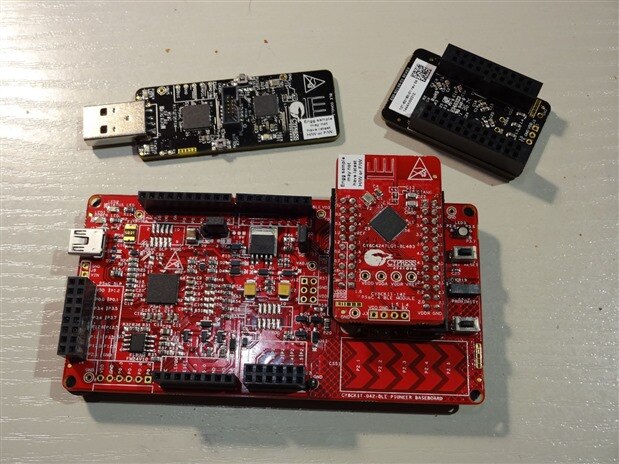
On the bottom is the Pioneer base board, with the PSoC BLE module mounted on it. The base board provides the power, some peripherals (LEDs, buttons, FRAM chip, CapSense) and the PSoC5-based programmer. Its headers are Arduino-compatible in case you want to use shields.

On the top right is the PRoC4 module. The PRoC BLE chips are like the PSoC4, but with a reduced set of peripherals and customization capabilities (but they are much cheaper). On the top left is the CySmart dongle, that can be used to act as BLE companion device to get started with a design.

The silk screen on all modules shows really all the connections and pins, and on the base board even the connections between the PSoC4 and the PSoC5. So there is no need to consult the manual for any pin assignments.

For test so far I only looked at the provided demo. It connects the PSoC4 BLE board with the dongle, and allows to control the dongle RGB LED with the  CapSense slider on the Pioneer board (wireless of course...). That works quite well, but when the PSoC4 module gets reset in the middle its difficult to re-establish the connection. The dongle seems to be stuck in some timeout before it re-scans for a new connection.

I also looked at the CySmart Android app.  It provides some demo apps depending on the BLE device connected to it. For example, one can control the Pioneer boardRGB LED color from the phone, or transmit the value of the CapSense slider to the phone.


Wireless charging

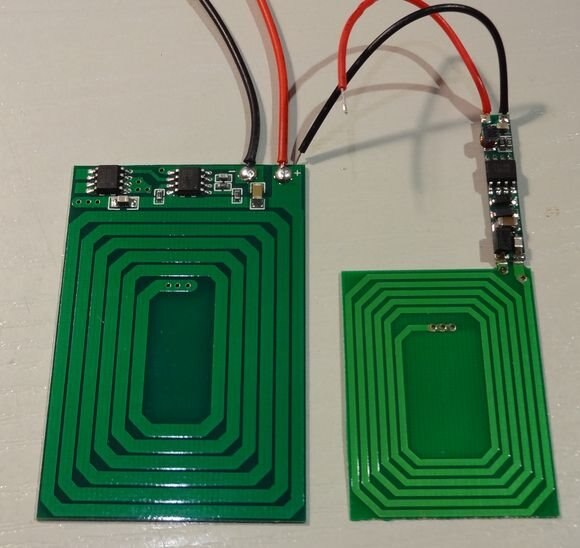
I also ordered the SeedStudio wireless charger module, and it arrived last week while I was away (receiver to the right):
image

Its not based on the Qi/WPC standard but probably on some proprietary solution. Judging from the chips, on it it seems similar to the wireless charger I looked at before, but with a different coil design. The receiver chips are the same (its called T3168), and this module uses a transmitter IC called XKT-412 (though there seem to be different versions of this module, some with the XKT-510, some with the -608).

I made some basic measurements to get the performance characteristics (all with the transmitter powered at 5V) . With no receiver attached the transmitter needs about 60mA. When I just put the receiver on it (with no load) it takes about 75-125mA, depending on the distance of the receiver. With varying load the transmitter current changes, but also the distance that can be achieved. The sweet spot for me seems to be at about 20mA load. The distance can go up to about 7mm, and the transmitter needs about 150mA (yes, the efficiency is bad).

The receiver circuit PCB is just soldered to the coil PCB, so it can be detached easily. Both are rather thin, so they won't take up so much space.

What I also found out is that the orientation of the PCBs matters. When placed as above, they can be stacked top-to-bottom or bottom-to-top. When placing the bottom-to-bottom together, the output voltage is some mere 3V.

Next steps

I also got some ADXL375 as samples from Analog Devices, the gyroscope (an ADXRS290) will ship second week of January. That means I have a spare accelerometer (just in case) and a gyro to play with later on (the ADXRS290 was the only one in LGA14 package I could find).

I will start looking at programming the PSoC4 BLE module. Fortunately the Linux BlueZ stack supports BLE, so I can use the hcitool and gatttool commands for basic interaction. Also, the Python bluepy package supports BLE, so it looks as if I will start learning some Python soon. I think its easier (and more safe) to have at least one "known to work" part when starting with new technologies. So I should have a rudimentary client in Python, knowing that this part is based on proved software) instead of starting to work on an Android client directly.

Now I'm just hoping that the kits arrive before the holiday season starts, so I can make some plans with the hardware too.

  • Sign in to reply
  • hlipka
    hlipka over 10 years ago in reply to clem57

    I found out that the bluepy package did not provide programmatic access to the attributes, it just had discovery functionality for now. So I needed to skip that. I used the CySmart tool for getting access to the attribute data and to enable the notifications. Cypress provided me with the source code the Android CySmart app, so I used that as basis for developing my Android client app.

    • Cancel
    • Vote Up 0 Vote Down
    • Sign in to reply
    • More
    • Cancel
  • clem57
    clem57 over 10 years ago

    Python is pretty nice Language. Did you use it for your design?

    • Cancel
    • Vote Up 0 Vote Down
    • Sign in to reply
    • More
    • Cancel
element14 Community

element14 is the first online community specifically for engineers. Connect with your peers and get expert answers to your questions.

  • Members
  • Learn
  • Technologies
  • Challenges & Projects
  • Products
  • Store
  • About Us
  • Feedback & Support
  • FAQs
  • Terms of Use
  • Privacy Policy
  • Legal and Copyright Notices
  • Sitemap
  • Cookies

An Avnet Company © 2025 Premier Farnell Limited. All Rights Reserved.

Premier Farnell Ltd, registered in England and Wales (no 00876412), registered office: Farnell House, Forge Lane, Leeds LS12 2NE.

ICP 备案号 10220084.

Follow element14

  • X
  • Facebook
  • linkedin
  • YouTube