


During the project's development stage, times will arise where it's necessary to control the XMC development board with a PC. For instance the PC host will be used for such tasks as setting time and date, initiating barometric air pressure measurements or retrieving previously logged measurements. I decided that communication between the host PC and the development board will be carried out by means of Virtual COM port. Although, physically this is a USB interface, as far as the PC programming model is concerned, this interface is treated as a traditional COM port. For someone like me that lacks experience developing PC applications and accessing their drivers, the relative simplicity offered by the Virtual COM port approach is a God-send.
In DAVE you can add Virtual COM port support to your project by adding the USBD_VCOM APP. See screen shot below:

Figure 1 - Adding USBD_VCOM
To receive and transmit characters to and from the Virtual COM port I relied on a handful of ready-made functions.
The first of these used was the USB_VCOM_SendString function, and as its name implies it's used to transmit a string out to the Virtual COM port.
In the code below, I use the USB_VCOM_SendString function to transmit the Main Menu string to the host PC.

Figure 2 - Sending Main Menu String
You'll notice that the USB_VCOM_SendString function call is preceded by a call to the CDC_Device_USBTask function in line 57.
The 'help file' for USBD_VCOM states that is a general management task for a given CDC class interface and is required for the correct operation of the interface.
They also state that it should be called frequently. In fact the code above doesn't work when the line calling CDC_Device_USBTask is removed.
The other ready-made functions that were used are:
USBD_VCOM_BytesReceived() which returns the number of bytes received from the host.
USBD_VCOM_ReceiveByte which is used to receive a byte from USB.
USBD_VCOM_SendByte which is used to send a byte to the host.
The screen shot below illustrates how these functions were used.
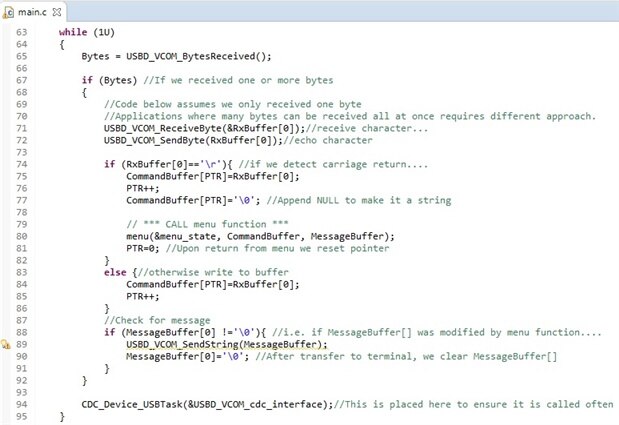
Figure 3 - Receiving and Sending Characters from/to Host
You will see that at the bottom of the while loop, on line 94, I have another call to CDC_Device_USBTask.
Its position here ensures that it is 'called frequently'.
My existing hardware setup is shown in the photo below. As a special homage to John Woo my development board is 'rocking' two USB connections.
One is used for uploading code. The other is used for communicating with the host PC.

Figure 4 - Rocking 2 USB Connections
My host PC is running Hyper Terminal. (Yes I was visited by the Ghost of Operating Systems Past).
Anyway, as a parting gift I leave you with an image of Hyper Terminal displaying the main menu.

Figure 5 - Flashback from the 1990s
Regarding the attachment - I am not a C guru, so be kind.
Thanks,
Dan