element14 Community
element14 Community
    Register Log In
  • Site
  • Search
  • Log In Register
  • Community Hub
    Community Hub
    • What's New on element14
    • Feedback and Support
    • Benefits of Membership
    • Personal Blogs
    • Members Area
    • Achievement Levels
  • Learn
    Learn
    • Ask an Expert
    • eBooks
    • element14 presents
    • Learning Center
    • Tech Spotlight
    • STEM Academy
    • Webinars, Training and Events
    • Learning Groups
  • Technologies
    Technologies
    • 3D Printing
    • FPGA
    • Industrial Automation
    • Internet of Things
    • Power & Energy
    • Sensors
    • Technology Groups
  • Challenges & Projects
    Challenges & Projects
    • Design Challenges
    • element14 presents Projects
    • Project14
    • Arduino Projects
    • Raspberry Pi Projects
    • Project Groups
  • Products
    Products
    • Arduino
    • Avnet & Tria Boards Community
    • Dev Tools
    • Manufacturers
    • Multicomp Pro
    • Product Groups
    • Raspberry Pi
    • RoadTests & Reviews
  • About Us
  • Store
    Store
    • Visit Your Store
    • Choose another store...
      • Europe
      •  Austria (German)
      •  Belgium (Dutch, French)
      •  Bulgaria (Bulgarian)
      •  Czech Republic (Czech)
      •  Denmark (Danish)
      •  Estonia (Estonian)
      •  Finland (Finnish)
      •  France (French)
      •  Germany (German)
      •  Hungary (Hungarian)
      •  Ireland
      •  Israel
      •  Italy (Italian)
      •  Latvia (Latvian)
      •  
      •  Lithuania (Lithuanian)
      •  Netherlands (Dutch)
      •  Norway (Norwegian)
      •  Poland (Polish)
      •  Portugal (Portuguese)
      •  Romania (Romanian)
      •  Russia (Russian)
      •  Slovakia (Slovak)
      •  Slovenia (Slovenian)
      •  Spain (Spanish)
      •  Sweden (Swedish)
      •  Switzerland(German, French)
      •  Turkey (Turkish)
      •  United Kingdom
      • Asia Pacific
      •  Australia
      •  China
      •  Hong Kong
      •  India
      • Japan
      •  Korea (Korean)
      •  Malaysia
      •  New Zealand
      •  Philippines
      •  Singapore
      •  Taiwan
      •  Thailand (Thai)
      • Vietnam
      • Americas
      •  Brazil (Portuguese)
      •  Canada
      •  Mexico (Spanish)
      •  United States
      Can't find the country/region you're looking for? Visit our export site or find a local distributor.
  • Translate
  • Profile
  • Settings
Sustain The World - Design Challenge
  • Challenges & Projects
  • Design Challenges
  • Sustain The World - Design Challenge
  • More
  • Cancel
Sustain The World - Design Challenge
Blog Setting hardware, software & programming tools. Blog #2
  • Blog
  • Forum
  • Documents
  • Polls
  • Files
  • Events
  • Mentions
  • Sub-Groups
  • Tags
  • More
  • Cancel
  • New
  • Share
  • More
  • Cancel
Group Actions
  • Group RSS
  • More
  • Cancel
Engagement
  • Author Author: lesmalave
  • Date Created: 7 Oct 2020 7:00 AM Date Created
  • Views 649 views
  • Likes 3 likes
  • Comments 0 comments
  • vsc
  • xmc4700
  • hardware
  • programming
  • segger
  • visual studio code
  • j-link
  • sustain the world
  • arduino
Related
Recommended

Setting hardware, software & programming tools. Blog #2

lesmalave
lesmalave
7 Oct 2020

Considering the ease and great support that Arduino has. I preferred to use (for the time being) the XMC4700 Relax Kit which features a powerful ARM Cortex M4 microcontroller.

We add the pin headers to the XMC4700 board and we also solder the terminal blocks to the Prophet + 12V board.

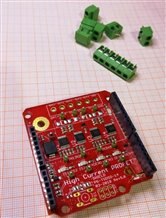
imageimage

In order to program our XMC4700 Relax Kit in Arduino we must do the following:

Follow the instructions in the following link:


https://github.com/Infineon/XMC-for-Arduino


Where we will install the support of the Infineon XMC boards for Arduino as well as install the SEGGER J-Link programmer to upload the sketches

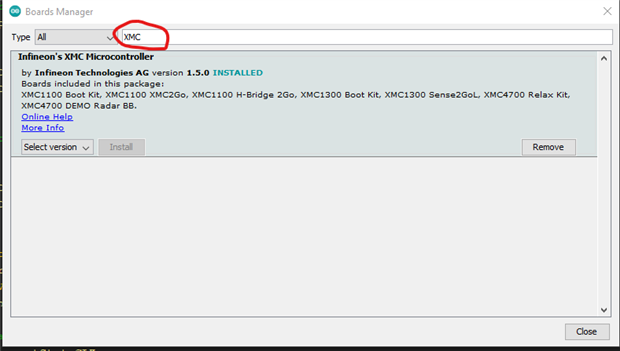
image

image

image

Once this procedure is finished we can do a test with the classic Blink Led in the Arduino IDE. If all goes well, let's move on.


In my case I feel more comfortable using the Visual Studio Code editor with the Arduino extension, this allows me to have more control in the process. Since it has IntelliSense and other benefits such as being able to study the libraries that we will be adding to the project. For this you have to add some things manually such as includePath, forceInclude and as for the C / C ++ compiler, use the one of your preference in my case as I am a Windows user I use Mingw-64.

image

image

image

In the next installments I will explain part of the code of the environmental sensors

  • Sign in to reply
element14 Community

element14 is the first online community specifically for engineers. Connect with your peers and get expert answers to your questions.

  • Members
  • Learn
  • Technologies
  • Challenges & Projects
  • Products
  • Store
  • About Us
  • Feedback & Support
  • FAQs
  • Terms of Use
  • Privacy Policy
  • Legal and Copyright Notices
  • Sitemap
  • Cookies

An Avnet Company © 2025 Premier Farnell Limited. All Rights Reserved.

Premier Farnell Ltd, registered in England and Wales (no 00876412), registered office: Farnell House, Forge Lane, Leeds LS12 2NE.

ICP 备案号 10220084.

Follow element14

  • X
  • Facebook
  • linkedin
  • YouTube