1. The XMC series by Infineon
XMC is one of core MCU line by Infineon, this is for general purpose and others for automobile and TLE series for IGBT control. ARM-M0 and Arm-M4 core are covered. As follows,
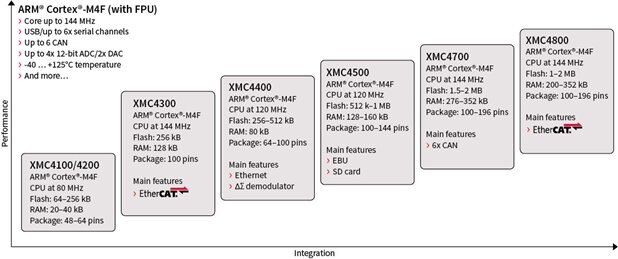
All XMC4000 devices are powered by ARM Cortex-M4 with a built-in DSP instruction set. The Single Precision Floating Point Unit, Direct Memory Access (DMA) feature and Memory Protection Unit (MPU) ,with comprehensive set of common, fast and precise analog/mixed signal, Timer/PWM and communication peripherals. XMC4000 family is available in seven series: XMC4100, XMC4200, XMC4300, XMC4400, XMC4500, XMC4700 and XMC4800 with more than 75 devices in VQFN, LQFP and LFBGA packages scaling from 48 to 196 pins.
ARM Cortex-M4 with floating point unit (FPU), single-cycle DSP MAC, 80-144MHz CPU frequency, with Up to 2MB embedded Flash with 22ns access time and error correction unit and Up to 352kB embedded RAM.
There are two choice for MCU , one for XMC4700 and the other XMC4200 and shall be compared accordingly..
2. XMC for Arduino
XMC for arduino is prefered development platform in this design. Dave can provide more basic control over peripherals and more sample project for reference. But quick start is the best part of arduino. And with more close look into arduino lib for XMC , the performance can be assured as well.
First , add https://github.com/Infineon/XMC-for-Arduino/releases/latest/download/package_infineon_index.json into the preference menu, the xmc boards can be accessed in arduino IDE.
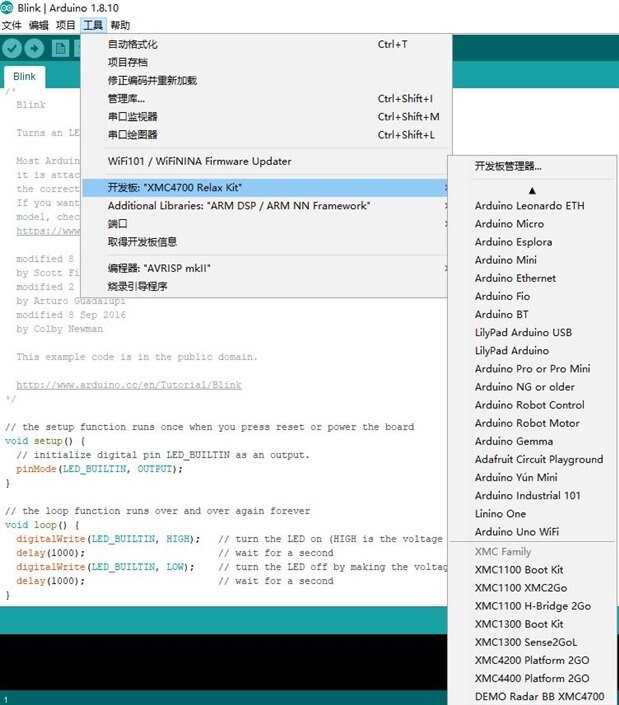
While only XMC Platform 2Go is provided. I have just added XMC4200 platform 2Go for migration. It is not successful now.
The rest part is like any other arduino board like MKR.
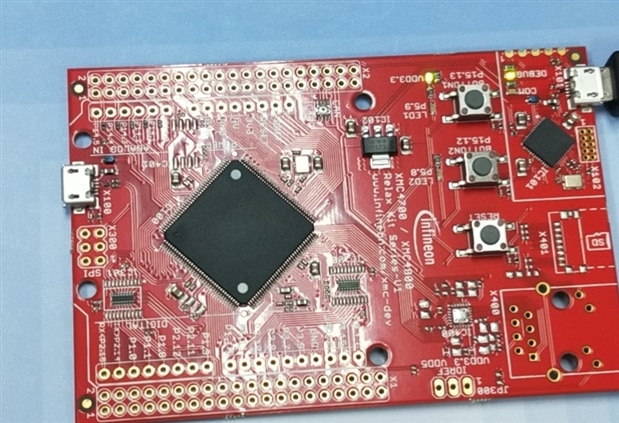
3. KIT_XMC47_RELAX_LITE
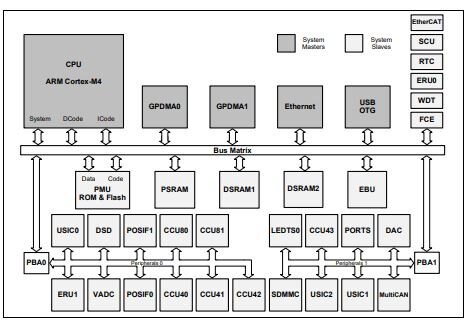
The XMC4[78]00 devices are members of the XMC4000 Family of microcontrollers based on the ARM Cortex-M4 processor core. The XMC4000 is a family of high performance and energy efficient microcontrollers. With basic features like,
• CPU Core
– High Performance 32-bit ARM Cortex-M4 CPU
– 16-bit and 32-bit Thumb2 instruction set
– DSP/MAC instructions
– System timer (SysTick) for Operating System support
• Floating Point Unit
• Memory Protection Unit
• Nested Vectored Interrupt Controller
• General Purpose DMA with up-to 12 channels
• Event Request Unit (ERU) for programmable processing of external and internal service requests
• Flexible CRC Engine (FCE) for multiple bit error detection
On-Chip Memories
• 16 KB on-chip boot ROM
• 96 KB on-chip high-speed program memory
• 128 KB on-chip high speed data memory
• 128 KB on-chip high-speed communication memory
• 2,048 KB on-chip Flash Memory with 8 KB instruction cache
The arduino library saves the labour of reading chip reference manual, but it would be good if know what is going on.
4. Platform2GO XMC4200 MCU
The platform 2Go is rich is peripherals and as many as pins can be exposed for designs. While the arduino can not support XMC4200 , only for XMC4400, which is more powerful.
I have just revised the file boards.txt in C:\Users\$your Username\AppData\Local\Arduino15\packages\Infineon\hardware\arm\1.5.0
Part of code in boards.txt is
####################################################
XMC4200_Platform2GO.name=XMC4200 Platform 2GO
XMC4200_Platform2GO.upload.tool=xmcprog
XMC4200_Platform2GO.upload.speed=115200
XMC4200_Platform2GO.upload.resetmethod=ck
XMC4200_Platform2GO.upload.maximum_size=512000
XMC4200_Platform2GO.upload.wait_for_upload_port=true

XMC4200_Platform2GO.communication=usb
XMC4200_Platform2GO.protocol=dragon_isp
XMC4200_Platform2GO.program.protocol=dragon_isp
XMC4200_Platform2GO.program.tool=xmcprog
XMC4200_Platform2GO.program.extra_params=-Pusb

XMC4200_Platform2GO.serial.disableDTR=true
XMC4200_Platform2GO.serial.disableRTS=true

XMC4200_Platform2GO.build.mcu=cortex-m4
XMC4200_Platform2GO.build.f_cpu=80000000L
XMC4200_Platform2GO.build.board=ARM_XMC
XMC4200_Platform2GO.build.board.version=4200
XMC4200_Platform2GO.build.board.type=F64x256
XMC4200_Platform2GO.build.board.v=256
XMC4200_Platform2GO.build.core=./
XMC4200_Platform2GO.build.variant=XMC4200
XMC4200_Platform2GO.build.board_variant=XMC4200_Platform2GO
XMC4200_Platform2GO.build.flash_size=250K
XMC4200_Platform2GO.build.flash_ld=linker_script.ld
XMC4200_Platform2GO.build.extra_flags=-DARM_MATH_CM4 -DARM_MATH_DSP
#-DUSB0


XMC4200_Platform2GO.menu.UART.debug=PC
XMC4200_Platform2GO.menu.UART.debug.uart.selected=-DSERIAL_HOSTPC
XMC4200_Platform2GO.menu.UART.onBoard=On Board
XMC4200_Platform2GO.menu.UART.onBoard.uart.selected=-DSERIAL_ONBOARD


XMC4200_Platform2GO.menu.LIB.NONE=None
XMC4200_Platform2GO.menu.LIB.NONE.library.selected=
XMC4200_Platform2GO.menu.LIB.DSPNN=ARM DSP / ARM NN Framework
XMC4200_Platform2GO.menu.LIB.DSPNN.library.selected=-DARM_LIB_CMSIS_DSP -DARM_LIB_CMSIS_NN
XMC4200_Platform2GO.menu.LIB.NN=ARM NN Framework
XMC4200_Platform2GO.menu.LIB.NN.library.selected=-DARM_LIB_CMSIS_NN
XMC4200_Platform2GO.menu.LIB.DSP=ARM DSP
XMC4200_Platform2GO.menu.LIB.DSP.library.selected=-DARM_LIB_CMSIS_DSP


####################################################
XMC4400_Platform2GO.name=XMC4400 Platform 2GO
XMC4400_Platform2GO.upload.tool=xmcprog
XMC4400_Platform2GO.upload.speed=115200
XMC4400_Platform2GO.upload.resetmethod=ck
XMC4400_Platform2GO.upload.maximum_size=512000
XMC4400_Platform2GO.upload.wait_for_upload_port=true

XMC4400_Platform2GO.communication=usb
XMC4400_Platform2GO.protocol=dragon_isp
XMC4400_Platform2GO.program.protocol=dragon_isp
XMC4400_Platform2GO.program.tool=xmcprog
XMC4400_Platform2GO.program.extra_params=-Pusb

XMC4400_Platform2GO.serial.disableDTR=true
XMC4400_Platform2GO.serial.disableRTS=true

XMC4400_Platform2GO.build.mcu=cortex-m4
XMC4400_Platform2GO.build.f_cpu=144000000L
XMC4400_Platform2GO.build.board=ARM_XMC
XMC4400_Platform2GO.build.board.version=4400
XMC4400_Platform2GO.build.board.type=F100x512
XMC4400_Platform2GO.build.board.v=512
XMC4400_Platform2GO.build.core=./
XMC4400_Platform2GO.build.variant=XMC4400
XMC4400_Platform2GO.build.board_variant=XMC4400_Platform2GO
XMC4400_Platform2GO.build.flash_size=500K
XMC4400_Platform2GO.build.flash_ld=linker_script.ld
XMC4400_Platform2GO.build.extra_flags=-DARM_MATH_CM4 -DARM_MATH_DSP
#-DUSB0


XMC4400_Platform2GO.menu.UART.debug=PC
XMC4400_Platform2GO.menu.UART.debug.uart.selected=-DSERIAL_HOSTPC
XMC4400_Platform2GO.menu.UART.onBoard=On Board
XMC4400_Platform2GO.menu.UART.onBoard.uart.selected=-DSERIAL_ONBOARD


XMC4400_Platform2GO.menu.LIB.NONE=None
XMC4400_Platform2GO.menu.LIB.NONE.library.selected=
XMC4400_Platform2GO.menu.LIB.DSPNN=ARM DSP / ARM NN Framework
XMC4400_Platform2GO.menu.LIB.DSPNN.library.selected=-DARM_LIB_CMSIS_DSP -DARM_LIB_CMSIS_NN
XMC4400_Platform2GO.menu.LIB.NN=ARM NN Framework
XMC4400_Platform2GO.menu.LIB.NN.library.selected=-DARM_LIB_CMSIS_NN
XMC4400_Platform2GO.menu.LIB.DSP=ARM DSP
XMC4400_Platform2GO.menu.LIB.DSP.library.selected=-DARM_LIB_CMSIS_DSP


####################################################
XMC4700_Radar_Baseboard.name=DEMO Radar BB XMC4700
XMC4700_Radar_Baseboard.upload.tool=xmcprog
XMC4700_Radar_Baseboard.upload.speed=115200
XMC4700_Radar_Baseboard.upload.resetmethod=ck
XMC4700_Radar_Baseboard.upload.maximum_size=2048000
XMC4700_Radar_Baseboard.upload.wait_for_upload_port=true

XMC4700_Radar_Baseboard.communication=usb
XMC4700_Radar_Baseboard.protocol=dragon_isp
XMC4700_Radar_Baseboard.program.protocol=dragon_isp
XMC4700_Radar_Baseboard.program.tool=xmcprog
XMC4700_Radar_Baseboard.program.extra_params=-Pusb

XMC4700_Radar_Baseboard.serial.disableDTR=true
XMC4700_Radar_Baseboard.serial.disableRTS=true

XMC4700_Radar_Baseboard.build.mcu=cortex-m4
XMC4700_Radar_Baseboard.build.f_cpu=144000000L
XMC4700_Radar_Baseboard.build.board=ARM_XMC
XMC4700_Radar_Baseboard.build.board.version=4700
XMC4700_Radar_Baseboard.build.board.type=E196x2048
XMC4700_Radar_Baseboard.build.board.v=2048
XMC4700_Radar_Baseboard.build.core=./
XMC4700_Radar_Baseboard.build.variant=XMC4700
XMC4700_Radar_Baseboard.build.board_variant=XMC4700_Radar_Baseboard
XMC4700_Radar_Baseboard.build.flash_size=2000K
XMC4700_Radar_Baseboard.build.flash_ld=linker_script.ld
XMC4700_Radar_Baseboard.build.extra_flags=-DARM_MATH_CM4 -DINTERRUPT_USE_ERU -DSERIAL_USE_U1C1 -DXMC4_SERIES


XMC4700_Radar_Baseboard.menu.LIB.DSPNN=ARM DSP / ARM NN Framework
XMC4700_Radar_Baseboard.menu.LIB.DSPNN.library.selected=-DARM_LIB_CMSIS_DSP -DARM_LIB_CMSIS_NN
XMC4700_Radar_Baseboard.menu.LIB.NONE=None
XMC4700_Radar_Baseboard.menu.LIB.NONE.library.selected=
XMC4700_Radar_Baseboard.menu.LIB.NN=ARM NN Framework
XMC4700_Radar_Baseboard.menu.LIB.NN.library.selected=-DARM_LIB_CMSIS_NN
XMC4700_Radar_Baseboard.menu.LIB.DSP=ARM DSP
XMC4700_Radar_Baseboard.menu.LIB.DSP.library.selected=-DARM_LIB_CMSIS_DSP


####################################################
XMC4700_Relax_Kit.name=XMC4700 Relax Kit
XMC4700_Relax_Kit.upload.tool=xmcprog
XMC4700_Relax_Kit.upload.speed=115200
XMC4700_Relax_Kit.upload.resetmethod=ck
XMC4700_Relax_Kit.upload.maximum_size=2048000
XMC4700_Relax_Kit.upload.wait_for_upload_port=true

XMC4700_Relax_Kit.communication=usb
XMC4700_Relax_Kit.protocol=dragon_isp
XMC4700_Relax_Kit.program.protocol=dragon_isp
XMC4700_Relax_Kit.program.tool=xmcprog
XMC4700_Relax_Kit.program.extra_params=-Pusb

XMC4700_Relax_Kit.serial.disableDTR=true
XMC4700_Relax_Kit.serial.disableRTS=true

XMC4700_Relax_Kit.build.mcu=cortex-m4
XMC4700_Relax_Kit.build.f_cpu=144000000L
XMC4700_Relax_Kit.build.board=ARM_XMC
XMC4700_Relax_Kit.build.board.version=4700
XMC4700_Relax_Kit.build.board.type=F144x2048
XMC4700_Relax_Kit.build.board.v=2048
XMC4700_Relax_Kit.build.core=./
XMC4700_Relax_Kit.build.variant=XMC4700
XMC4700_Relax_Kit.build.board_variant=XMC4700_Relax_Kit
XMC4700_Relax_Kit.build.flash_size=2000K
XMC4700_Relax_Kit.build.flash_ld=linker_script.ld
XMC4700_Relax_Kit.build.extra_flags=-DARM_MATH_CM4 -DXMC4_SERIES


XMC4700_Relax_Kit.menu.LIB.DSPNN=ARM DSP / ARM NN Framework
XMC4700_Relax_Kit.menu.LIB.DSPNN.library.selected=-DARM_LIB_CMSIS_DSP -DARM_LIB_CMSIS_NN
XMC4700_Relax_Kit.menu.LIB.NONE=None
XMC4700_Relax_Kit.menu.LIB.NONE.library.selected=
XMC4700_Relax_Kit.menu.LIB.NN=ARM NN Framework
XMC4700_Relax_Kit.menu.LIB.NN.library.selected=-DARM_LIB_CMSIS_NN
XMC4700_Relax_Kit.menu.LIB.DSP=ARM DSP
XMC4700_Relax_Kit.menu.LIB.DSP.library.selected=-DARM_LIB_CMSIS_DSP


####################################################
# Not up to date
#XMC4800_Relax_Kit.name=XMC4800 Relax Kit
#XMC4800_Relax_Kit.upload.tool=xmcprog
#XMC4800_Relax_Kit.upload.speed=115200
#XMC4800_Relax_Kit.upload.resetmethod=ck
#XMC4800_Relax_Kit.upload.maximum_size=2000000
#XMC4800_Relax_Kit.upload.maximum_data_size=352000
#XMC4800_Relax_Kit.upload.wait_for_upload_port=true
#
#XMC4800_Relax_Kit.communication=usb
#XMC4800_Relax_Kit.protocol=dragon_isp
#XMC4800_Relax_Kit.program.protocol=dragon_isp
#XMC4800_Relax_Kit.program.tool=xmcprog
#XMC4800_Relax_Kit.program.extra_params=-Pusb
#
#XMC4800_Relax_Kit.serial.disableDTR=true
#XMC4800_Relax_Kit.serial.disableRTS=true
#
#XMC4800_Relax_Kit.build.mcu=cortex-m4
#XMC4800_Relax_Kit.build.f_cpu=144000000L
#XMC4800_Relax_Kit.build.board=ARM_XMC
#XMC4800_Relax_Kit.build.board.version=4800
#XMC4800_Relax_Kit.build.board.type=F144x2048
#XMC4800_Relax_Kit.build.board.v=2048
#XMC4800_Relax_Kit.build.core=./
#XMC4800_Relax_Kit.build.variant=XMC4800
#XMC4800_Relax_Kit.build.board_variant=XMC4800_Relax_Kit
#XMC4800_Relax_Kit.build.flash_size=2000K
#XMC4800_Relax_Kit.build.flash_ld=linker_script.ld
#XMC4800_Relax_Kit.build.extra_flags=-DARM_MATH_CM4 -DXMC4_SERIES


#XMC4800_Relax_Kit.menu.LIB.DSPNN=ARM DSP / ARM NN Framework
#XMC4800_Relax_Kit.menu.LIB.DSPNN.library.selected=-DARM_LIB_CMSIS_DSP -DARM_LIB_CMSIS_NN
#XMC4800_Relax_Kit.menu.LIB.NONE=None
#XMC4800_Relax_Kit.menu.LIB.NONE.library.selected=
#XMC4800_Relax_Kit.menu.LIB.NN=ARM NN Framework
#XMC4800_Relax_Kit.menu.LIB.NN.library.selected=-DARM_LIB_CMSIS_NN
#XMC4800_Relax_Kit.menu.LIB.DSP=ARM DSP
#XMC4800_Relax_Kit.menu.LIB.DSP.library.selected=-DARM_LIB_CMSIS_DSP
Copy the XMC4400 directory with new name XMC4200, then the XMC Platform 2Go can be accessced from IDE boards.
5. Design with Arduino
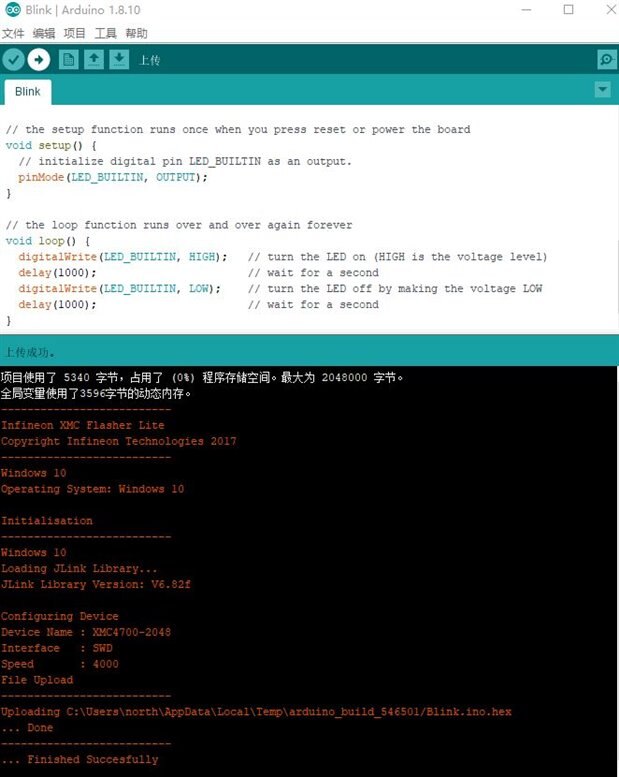
As kind of routine, start the blink.ino as first step using XMC4700 relax lite, build the code and download , the led blink every 1 second . It passes the first test.
/*
  Blink


  Turns an LED on for one second, then off for one second, repeatedly.


  Most Arduinos have an on-board LED you can control. On the UNO, MEGA and ZERO
  it is attached to digital pin 13, on MKR1000 on pin 6. LED_BUILTIN is set to
  the correct LED pin independent of which board is used.
  If you want to know what pin the on-board LED is connected to on your Arduino
  model, check the Technical Specs of your board at:
  https://www.arduino.cc/en/Main/Products


  modified 8 May 2014
  by Scott Fitzgerald
  modified 2 Sep 2016
  by Arturo Guadalupi
  modified 8 Sep 2016
  by Colby Newman


  This example code is in the public domain.


  http://www.arduino.cc/en/Tutorial/Blink
*/


// the setup function runs once when you press reset or power the board
void setup() {
  // initialize digital pin LED_BUILTIN as an output.
  pinMode(LED_BUILTIN, OUTPUT);
}


// the loop function runs over and over again forever
void loop() {
  digitalWrite(LED_BUILTIN, HIGH);   // turn the LED on (HIGH is the voltage level)
  delay(1000);                       // wait for a second
  digitalWrite(LED_BUILTIN, LOW);    // turn the LED off by making the voltage LOW
  delay(1000);                       // wait for a second
}