


In the previous blog post I've described how to establish a WiFi link with the CC3100 booster pack and Energia. Unfortunately, I couldn't find any Enregia libraries that implement capacitive sensing and support the MSP432. The libraries which are out there, are only for the MSP430. I've spent a considerable effort trying to get them working but finally decided to switch to CCS.
So, In this blog post I'll describe how to test the capacitve sense functionality using TI's libraries in Code Composer.
Capacitive touch sensing in the MSP432
I've already touched (get it? touched?) on this topic on my second blog post, but here is a short recap:
The capacitive sensing method being used by the MSP432 is the relaxation oscillator (RO) method. The internal oscillator has a variable frequency as a function of capacitance. As the capacitance increases, the oscillator's frequency decreases. A second, fast timer, is used to count the number of the RO pulses that fit within a certain time interval. When a person touches the sensor he causes the capacitance to increase, hence causes the frequency and number of pulses to decrease. The software can than detect this change in number of pulses and trigger a certain action.
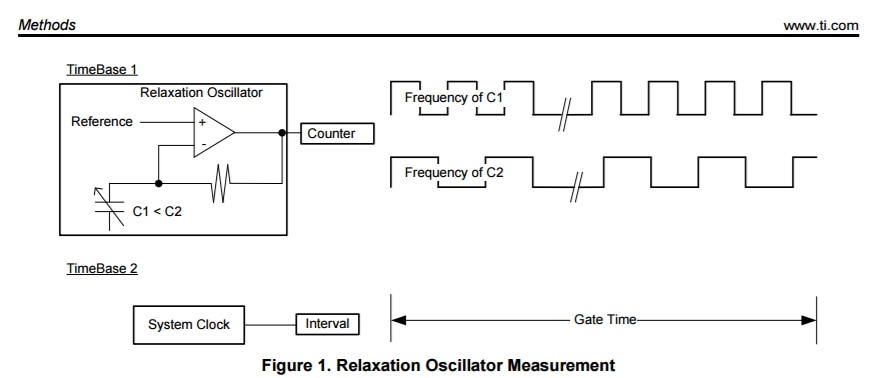
The MSP432 is already equiped with all the necessary hardware to implement RO based capacitive sensing, so only the an external sensing element is needed and the software are required.
The code implementation is based on the TI's Capacitive touch software library. I found it rather difficult to figure out the various timer configuration required, but fortunately, my application is very basic in terms of the many features the library provides and it turned out to be rather simple to make use of the basic API's.
According to TI, the library provides three different layers of abstraction. I'm using the lowest level which is the TI_CAPT_RAW function. This function provides the raw capacitance measurement (number of pulses) to the application layer. The other layers implement various baseline tracking algorithms (i.e., determine a reference value for the capacitance. A change in capacitance will be sensed relative to this reference value). For now, however, I find it more straightforward to monitor the raw values and set an appropriate threshold manually.
So, in the rest of the post we will:
- See how to load the example project from the Capacitive touch library to CCS and modify the code to simply read the number of pulses.
- Test the code with the Capacitive Touch Booster Pack.
- Test the code with the "parallel plate" sensing element described in blog post #2.
Loading the example project to CCS:
1. Download the 432CAPSENSELIBRARY from the above link and unzip the file.
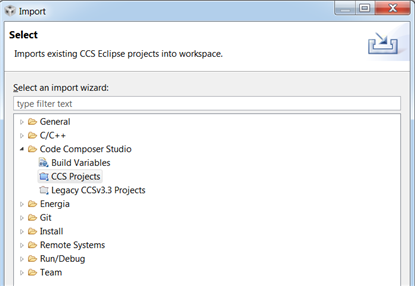
2. In CCS, import the project intro the workspace: File --> Import --> Code composer Studio --> CCS Projects
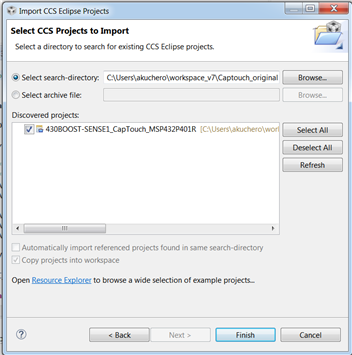
3. Click Browse and navigate to "Download Folder"l\Firmware\Source\430BOOST-SENSE1_CapTouch_MSP432P401R\CCS. Finally, click the "Finish" button and the project should be imported into the workspace:
4. Now, the original code implements a variety of features such as proximity detection, scroll wheel, led flashing, etc. Since all I really need is the raw number of counts, I've modified the main() function to simply read the raw number of counts and report it via UART.
The TI_CAPT_RAW is being called periodically and writes the number of counts to the "raw_data" variable. This number is converted to a string and transmitted via UART. We are expecting this number to decrease as we touch the sensor (capacitance increases). The sensor under test is the middle button of the Touch Booster pack as can be seen by the first argument that is being pass to the TI_CAPT_RAW function. "middle_button" is a class defined in "structure.c". The class includes various parameter definitions such as port configuration, thresholds, etc. Maybe these parameters will be used later for fine tuning but for now lets see how it works with the default values.
int main(void)
{
    WDTCTL = WDTPW | WDTHOLD;           // Stop watchdog timer
    System_setupDIOPorts();
    /* Setup Clocks: DCO to 1MHz and SMCLK to DCO/8 = 125kHz, MCLK = DCO, ACLK = REFO */
    /* MAP_function will use ROM version of function if available                     */
    MAP_FPU_enableModule(); // Enable FPU for DCO frequency calculation
    MAP_CS_setDCOFrequency(CS_1MHZ); // Set DCO Frequency to 1MHz
    MAP_CS_initClockSignal(CS_SMCLK, CS_DCOCLK_SELECT, CS_CLOCK_DIVIDER_8); //Source DCO/8 for SMCLK
    MAP_CS_initClockSignal(CS_MCLK, CS_DCOCLK_SELECT, CS_CLOCK_DIVIDER_1); //Source DCO for MCLK, no divider
    MAP_CS_initClockSignal(CS_ACLK, CS_REFOCLK_SELECT, CS_CLOCK_DIVIDER_1); //Source REFO for ACLK
    NVIC_EnableIRQ(TA0_0_IRQn); //Enable TA0 interrupt in NVIC

    UART_init();
    UART_print("Hello\n\r");
    char tmp[10] = "";
    short int raw_data[4];
    while(1)
    {
        TI_CAPT_Raw(&middle_button,raw_data);
        char tmp1[10] = "";
        itoa(raw_data[0],&tmp1[0],10); // convert int to string
        UART_print(tmp1);
        UART_print("\n\r");
        __delay_cycles(100000);
        __no_operation(); // set breakpoint here
    }

}
Testing it out:
1. Connect the Capacitive touch booster pack to the MSP432 Launchpad.
2. Build the project and program the MSP.
3. Open a serial monitor and observe the changes in the number of counts when touching the middle sensor. So, as expected, we see that touching the sensor reduces the number of counts that fit inside the measurement interval.
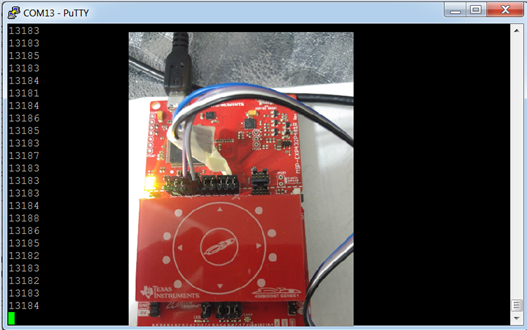

4. Ok, it seems to be working. Now, let's test it with our parallel-plate-capacitor sensor.
- First, we have to figure out to what port is the middle button connected to. This is defined in the structure.c file, as we see below. So, the middle sensor is connected to P5.0. This is the port to which we will connect the top plate of the sensor. The bottom plate will be connected to GND.
const struct Element middle_element = {

        // Select P5.0
  .inputBits = CAPTIOPOSEL_5 + CAPTIOPISEL_0,
- Connect sensor to the lanuchpad:
Top Plate ----> P5.0
Bottom Plate -----> GND

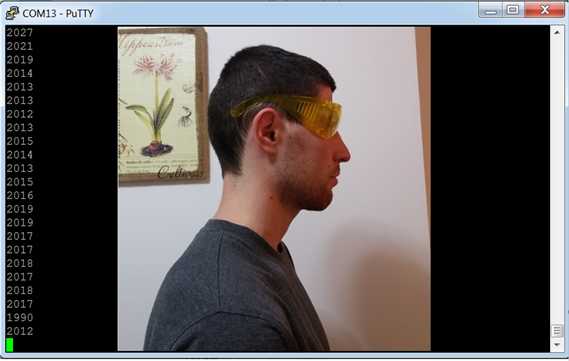
- Test it out with the glasses: The left photo shows the capacitance measurement with the glasses off and the right one shows it with the glasses on.
Great! we see that wearing the glasses increases the capacitance that is connected to P5.0 at thus reduces the number of counts.

Summary
- In this post we've seen how to implement a very basic touch sensor based on the example project in the Capacitive Touch Library.
- The code was tested with the CapTouch booster pack and the "parallel-plate-conductive-tape" sensing element.
- We've seen that wearing the glasses reduces the number of counts (=increases capacitance) and a certain threshold can be established.
- In the next post we'll return to establishing a WiFi link, this time using CCS and integrating it with the capacitive sensing.
Top Comments